Key takeaways
- Skio's migration guide puts the whole move at 4 to 5 weeks, and the data move starts only after your store has sold on Skio for 24 to 36 hours.
- Skio copies subscriptions rather than moving them, cannot migrate cancelled subscriptions, and turns billing on only once the old app's billing is off.
- On Skio, one CBD supplement brand's cancel flow save rate went from 14.8% to 24.8% across 3,543 sessions, and month 3 retention from 61% to 73%.
Search "migrate to Skio" and you get Skio's own sales page, Skio's help docs, and rival apps selling the move the other way. None of them is written for the brand deciding whether to go.
Since April 2026 there is a second question as well. Recharge bought Skio. So the brand asking "how do I move to Skio" is also asking "should I move to Skio now, or wait".
This guide answers both. It lays out the 4 to 5 weeks from Skio's own docs, what Skio moves for you and what it leaves, the order of migration day, and what to rebuild so the move pays for itself. RetainUP builds on Skio every month, and our Skio retention setup covers the settings in detail. Everything here was checked against Skio's pages on 8 November 2026.
Should you move to Skio now that Recharge owns it?
Recharge announced it had bought Skio in April 2026. Skio's changelog says both platforms keep shipping features, the best of both will be combined over about the next 12 months, and nothing changes operationally until there is something better to show. Your Merchant Success Manager stays your contact.
Price is no longer a reason to pick Skio over Recharge. On 8 November, Skio Scale lists $499 a month billed annually or $599 billed monthly, plus 1.25% and 20 cents on each order with a subscription. Recharge Scale lists the same 1.25% and 20 cents on a $499 plan. Our Recharge vs Skio comparison covers that change.
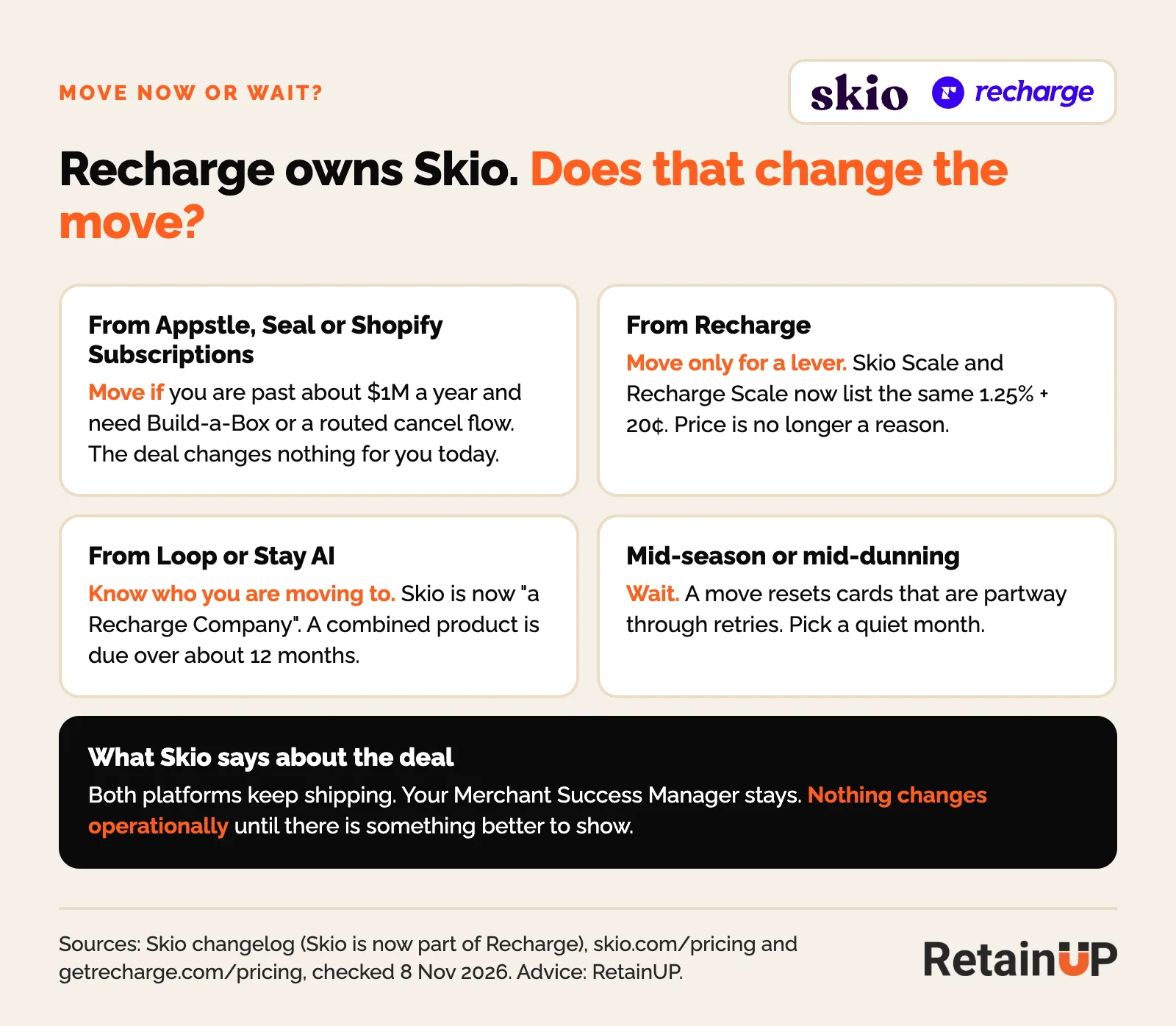
- From Appstle, Seal or Shopify Subscriptions: move if you are past about $1M a year and need Build-a-Box or a cancel flow routed by reason. The deal changes nothing for you today.
- From Recharge: move only for a lever you cannot set on Recharge, such as Build-a-Box on one self-serve plan or a save event in Klaviyo. Never for the fee.
- From Loop or Stay AI: know who you are moving to. Skio's App Store listing now reads "Skio, a Recharge Company". If an independent owner matters to you, read Stay AI vs Recharge vs Skio first.
- Mid-season, or with many cards in retry: wait for a quiet month. A move resets cards that are partway through retries.
What Skio costs at your size
Here is the yearly Skio bill at list price, at a $50 average order. Shopify's own payment fees sit on top. Enterprise pricing is by quote, so above about $5M a year, ask.
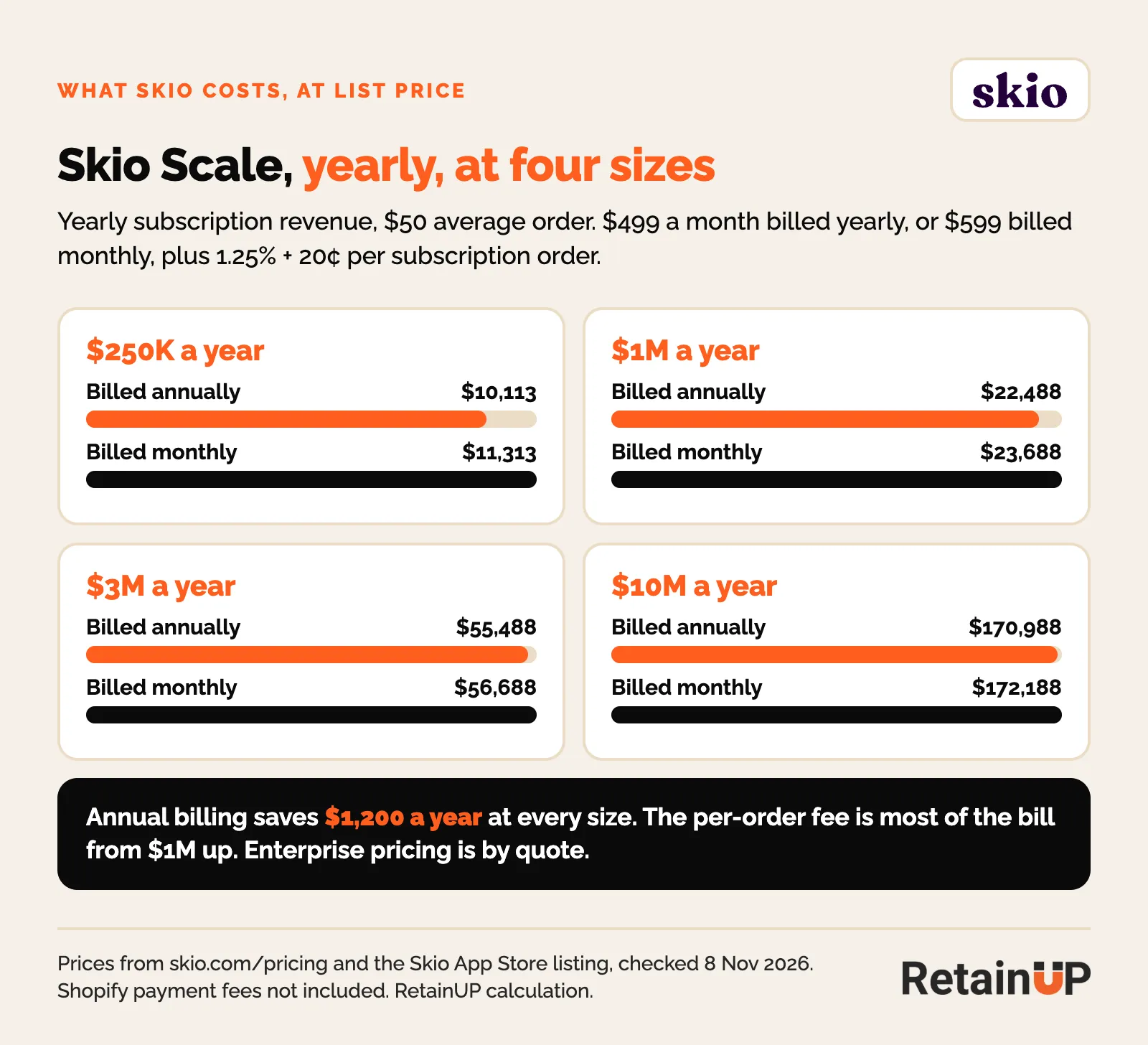
| Skio Scale, yearly | $250K a year | $1M a year | $3M a year | $10M a year |
|---|---|---|---|---|
| Billed annually | $10,113 | $22,488 | $55,488 | $170,988 |
| Billed monthly | $11,313 | $23,688 | $56,688 | $172,188 |
From $1M up, the per-order fee is most of the bill, so the plan matters less than whether each subscriber stays for another order. The free subscription LTV calculator shows what one more order per subscriber is worth to you.
The 4 to 5 week plan, step by step
Skio's migrations guide gives the total: 4 to 5 weeks, with buffers for your team to check the front end and the data preview. It also says the faster you answer the Migrations team, the faster it goes. Here is how those weeks usually fall.
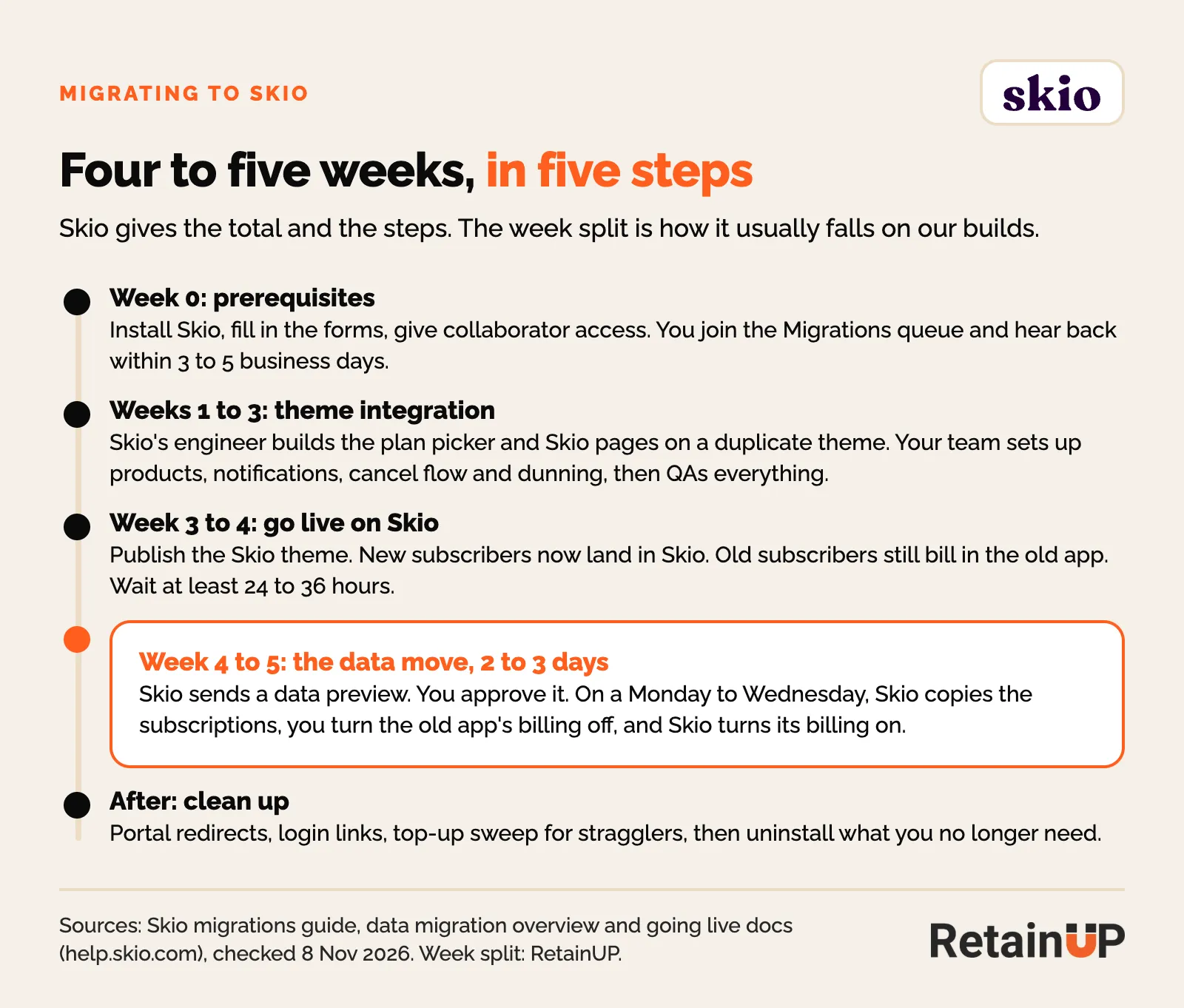
Week 0: prerequisites
Install Skio, fill in the forms and give Skio collaborator access to your Shopify store. That puts you in the Migrations queue. Skio says to expect a reply within 3 to 5 business days, often sooner.
Weeks 1 to 3: theme integration
Skio's engineer adds the Skio plan picker and Skio pages to a duplicate of your live theme, so nothing changes on the live store. In the same weeks your team sets up products for sale as subscriptions, notifications, the cancel flow, dunning and the portal. Decide the offer here, before any subscriber sees it.
Week 3 to 4: go live on Skio
Publish the Skio theme. From that moment new subscribers land in Skio, while existing subscribers keep renewing in the old app. Watch the old app for a few days: renewals there are fine, but a new subscription there means an old widget, script or link is still live.
Week 4 to 5: the data move
Once the store has been live on Skio for at least 24 to 36 hours, Skio checks that new subscriptions are flowing in, then sends a data preview. You approve it, and Skio sets a migration date early in the week. Skio puts this step at 2 to 3 days.
Skio's launch engineer moves the data. The offer, cancel paths and flows are yours to rebuild. The Subscription LTV Maximizer™ does that new setup or migration in 30 days, for $5,000.
What Skio moves, what you check, what you rebuild
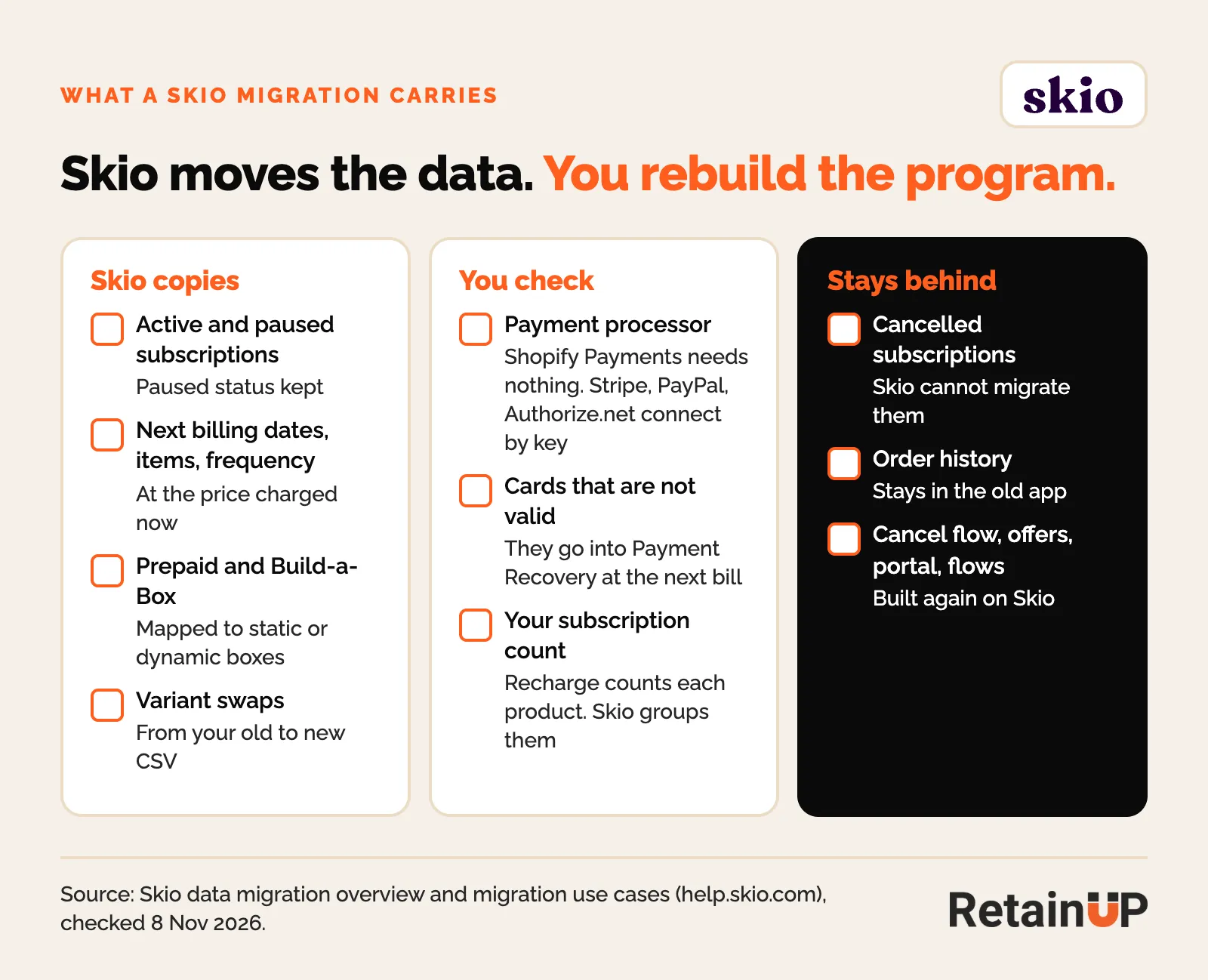
Skio's data migration overview is the most useful page in its help center. The short version is below.
Skio copies
- Active and paused subscriptions. Paused status is kept.
- Next billing dates, line items, frequency and the price each subscriber pays today, not the pre-discount price.
- Prepaid subscriptions, with their delivery intervals. Skio asks you to flag prepaid early, since some sources need manual checks.
- Build-a-Box subscribers, mapped to a static or dynamic box in Skio.
- Variant swaps, if you send a CSV of old and new variant IDs.
You check
- Payment data. Shopify Payments needs nothing. Stripe, PayPal and Authorize.net connect through Skio's migration wizard. Authorize.net also needs your old app to release the tokens and a CIM export.
- Cards across processors. Skio cannot move tokens from one processor to another. If you moved processors yourself, tell Skio which tokens to use.
- Subscriptions with no valid card. They still migrate, then go into Skio's Payment Recovery the next time they bill. Clean them up first.
- Your subscription count. Recharge counts each product as a subscription. Skio groups products with the same date, frequency and address. Expect the number to change.
What stays behind
- Cancelled subscriptions. Skio cannot migrate them. Export cancel reasons and dates before you switch the old app off.
- Order history. It stays in the old app. Coming from Recharge, Skio cancels recurring billing without deleting the app, so you can still look things up.
- The retention setup. Cancel flow, offers, portal layout, dunning and every Klaviyo flow get built again on Skio.
Migration day: one app bills at a time
The data move is a copy, not a transfer. Shopify subscription contracts made by one app cannot be taken over by another, so for a short time both apps hold the same subscribers. The order matters.
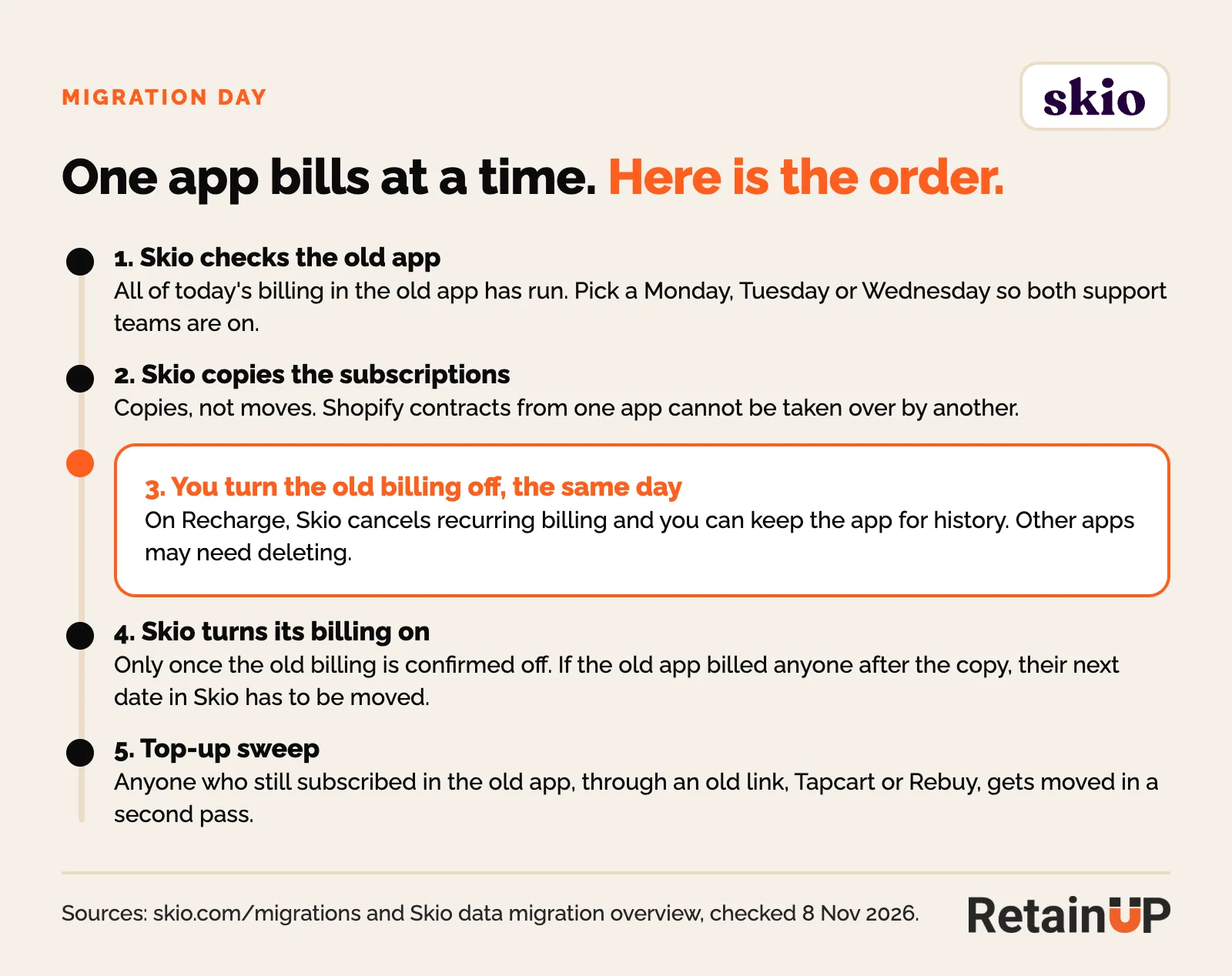
- Skio checks that all of the day's billing in the old app has run, then copies the subscriptions.
- You cancel or turn off billing in the old app the same day. On Recharge, Skio cancels recurring billing for you. Some other apps have to be deleted.
- Skio says it does not enable billing until your old platform is confirmed off. If the old app bills someone after the copy, that subscriber's next date in Skio has to be moved.
- Stragglers who still subscribe in the old app, through an old link or an app like Tapcart or Rebuy, get moved in a top-up migration.
The same rules apply to any app switch. Our subscription app migration checklist runs them day by day with an owner on each task.
Redirect the old portal and every old link
The Skio customer portal lives at your store URL plus /a/account/login. Every old portal link in your theme, emails and texts points somewhere else.
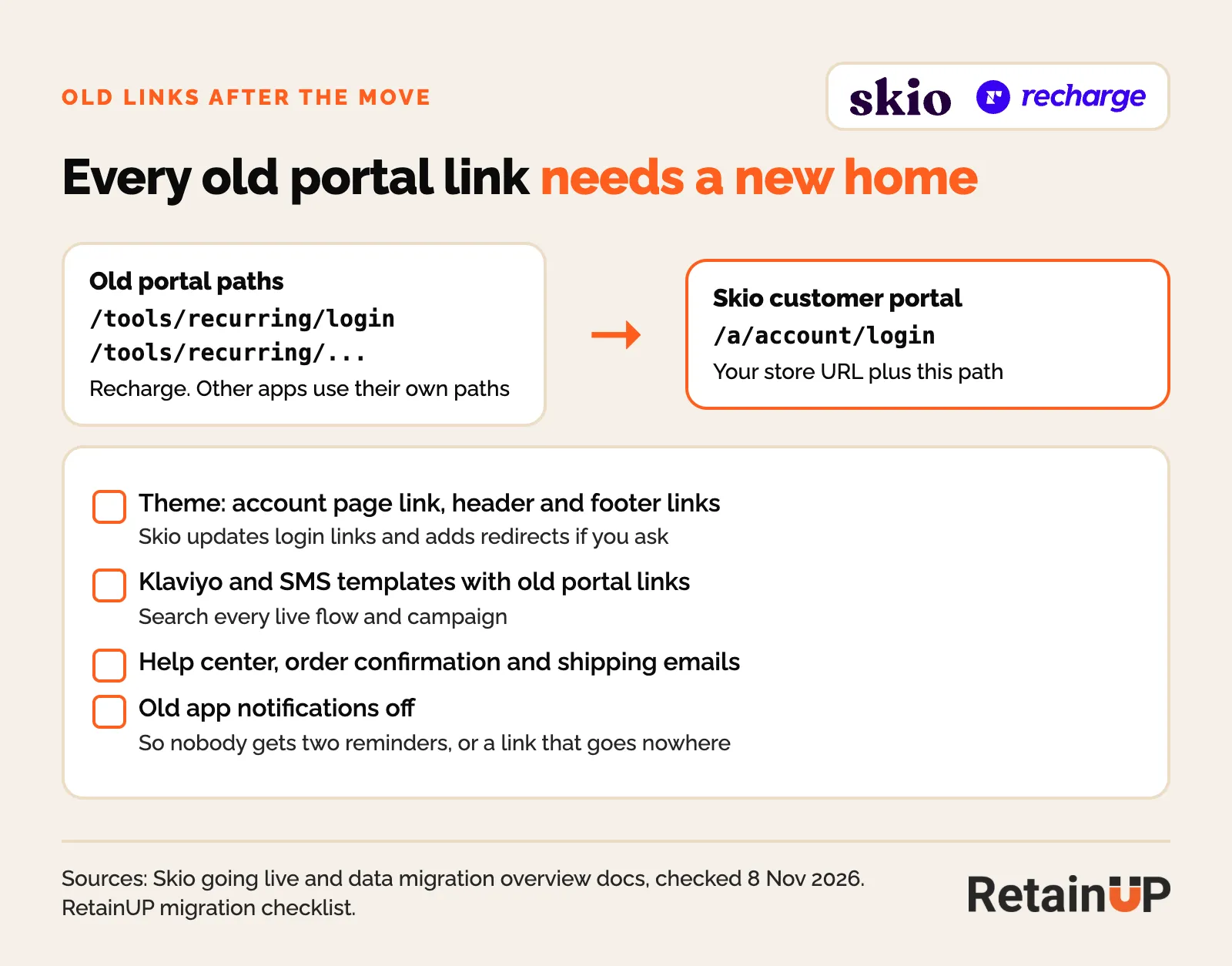
- Skio's team updates login links and adds redirects from the old portal if you ask. Ask on the kickoff call.
- Search every live Klaviyo flow, campaign template and SMS for the old portal path. On Recharge that is /tools/recurring.
- Check the help center, order confirmation and shipping emails, and the account page link in the header and footer.
- Turn the old app's notifications off once billing moves, so nobody gets two reminders or a dead link.
Rebuild your Klaviyo flows on Skio's event names
Every trigger changes name. "Order upcoming on ReCharge" becomes "Skio: Billing Reminder Notification". Skio also sends events Recharge does not list, such as "Skio: Billing Attempt Failed" and "Skio: Subscription Went Through Cancel Flow", which fires on a save. The full map for all four apps is in our Klaviyo event map.
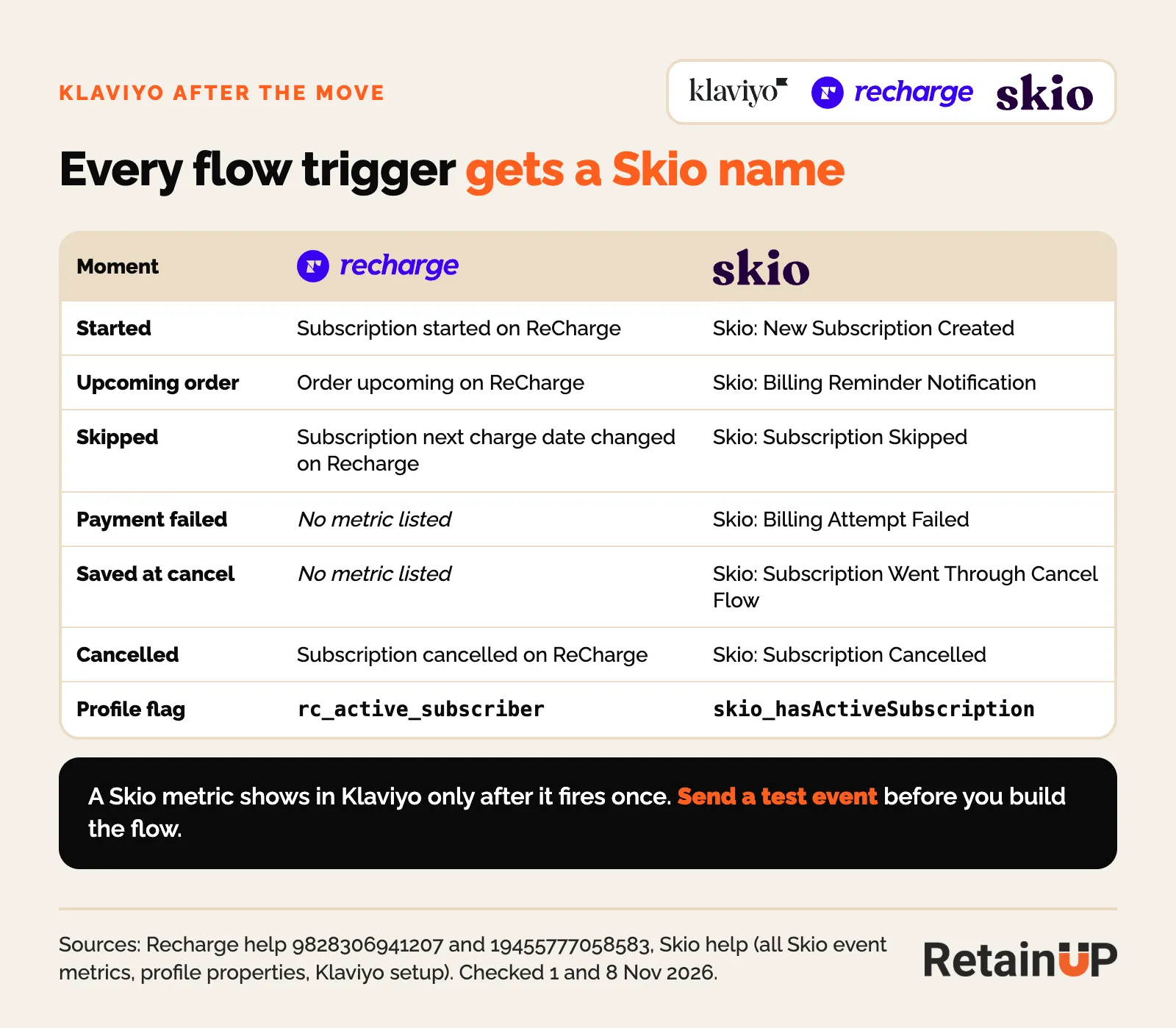
Two things catch brands out. A Skio metric only shows in Klaviyo after it has fired once, so send a test event before you build the flow. And migrated subscribers can land in a welcome flow meant for new ones, which one Skio merchant reported in an App Store review. Filter the welcome flow by start date before migration day.
Before you publish: the QA list
Skio's going live doc lists the checks. We add two of our own: the default frequency and the old app's scripts.
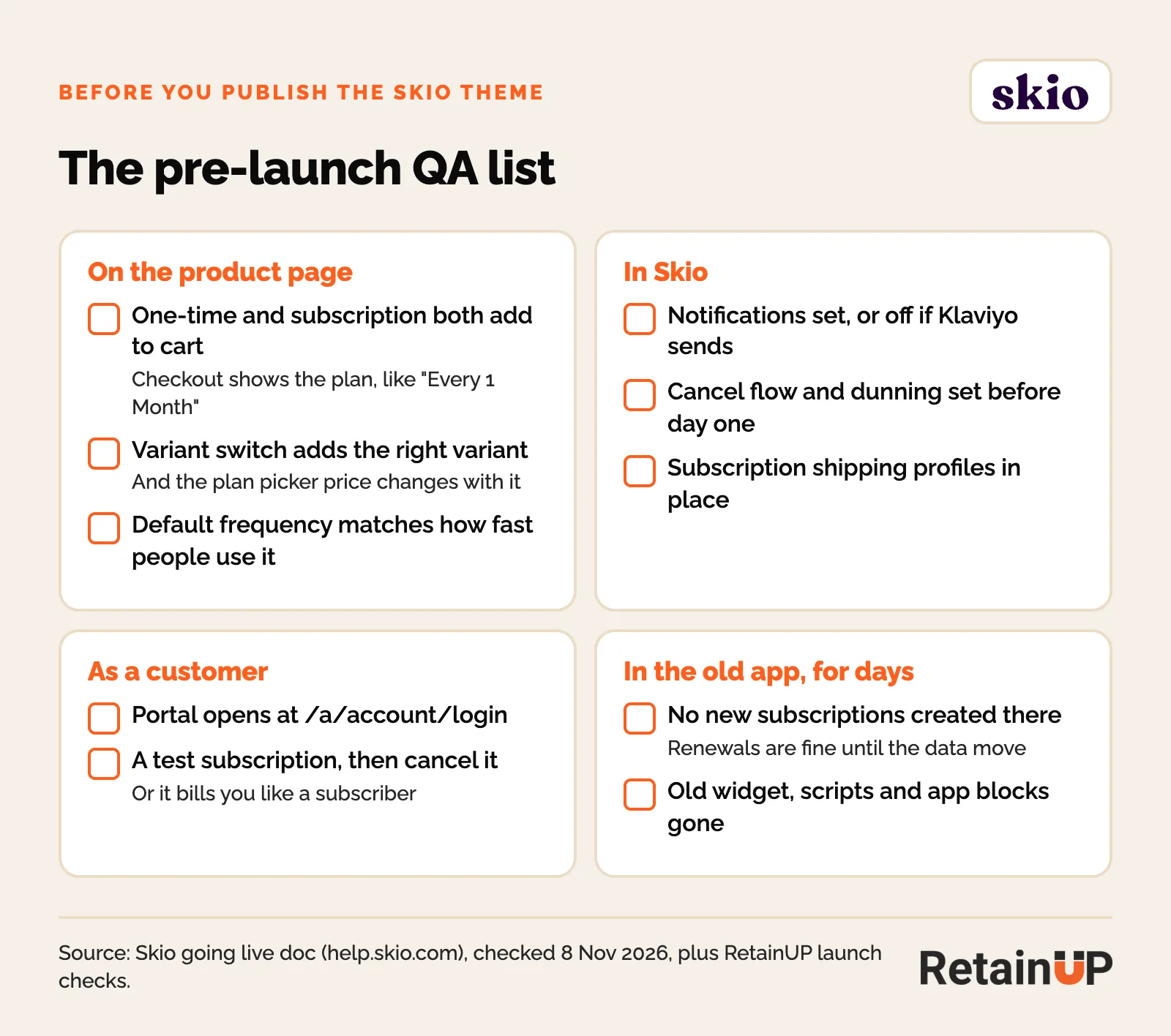
- One-time and subscription both add to cart, and checkout shows the plan, such as "Every 1 Month".
- Switching variants adds the right variant, and the plan picker price changes with it.
- The default frequency matches how fast people use the product.
- The portal opens at /a/account/login.
- A test subscription goes through. Cancel it afterwards, or it bills you like a subscriber.
- Notifications, cancel flow and dunning are set before day one, with subscription shipping profiles in place.
- For a few days after going live, no new subscriptions appear in the old app.
What good looks like on Skio after the move
The move gives you a clean start. What you build on it decides the number.
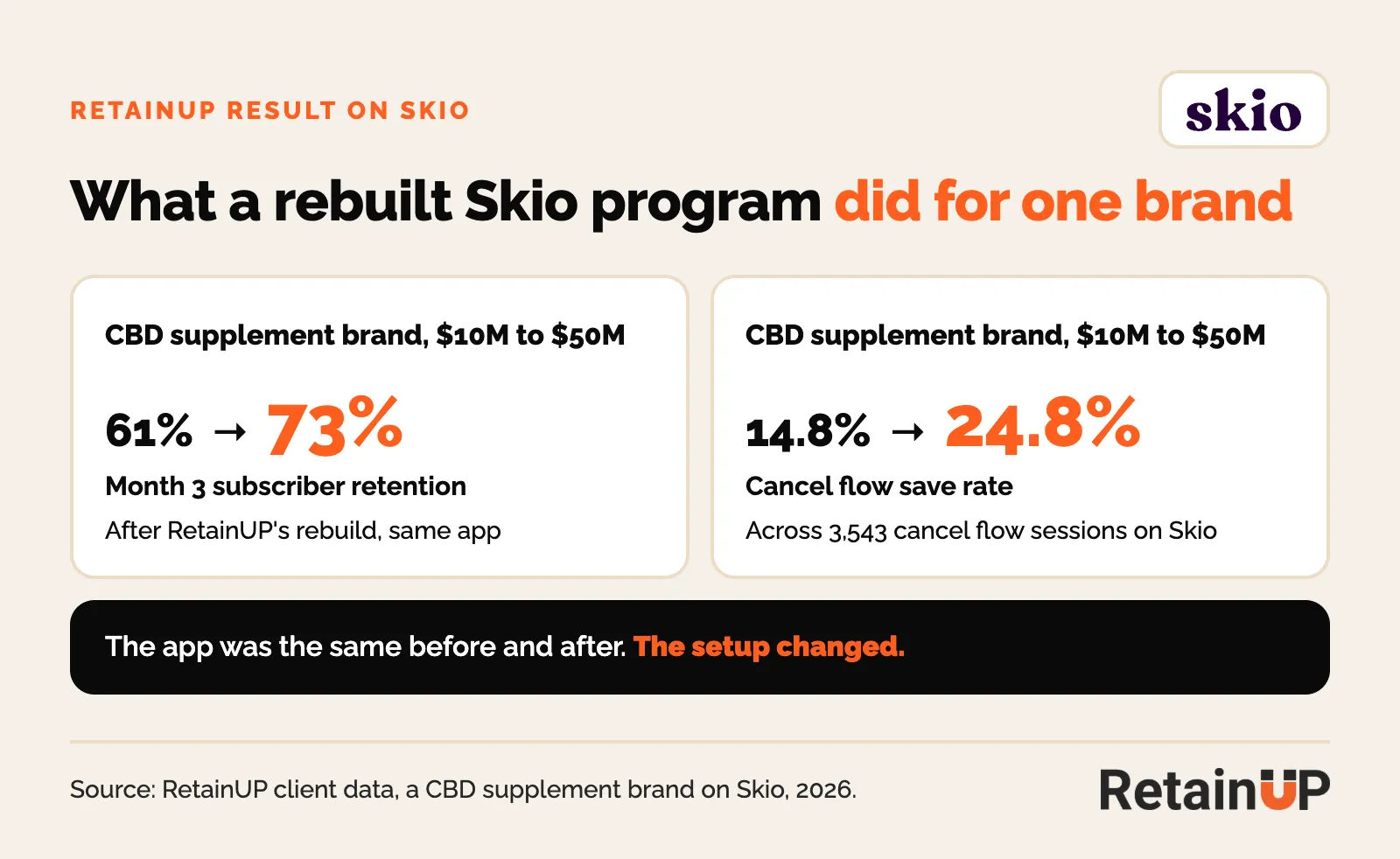
One CBD supplement brand we work with runs on Skio. After we rebuilt the program, month 3 retention went from 61% to 73%, and the cancel flow save rate went from 14.8% to 24.8% across 3,543 cancel flow sessions. Same app before and after.
To see where your own numbers sit: Recharge's supplement retention data, from about 1,750 brands, shows 75.2% of subscribers reaching order 2 and 49.1% reaching order 3. YOCTO's report puts the median store at 52% to order 3. Put your own into the subscription LTV calculator before and after the move.
FAQ
How long does it take to migrate to Skio?
Skio's migrations guide says 4 to 5 weeks in all. The data move itself takes 2 to 3 days and starts after your store has been live on Skio for at least 24 to 36 hours.
Will subscribers be charged twice during a Skio migration?
Skio says it does not turn billing on until your old platform is confirmed off. You turn off billing in the old app on migration day. If the old app bills someone after the copy, their next date in Skio is moved.
Can cancelled subscriptions be migrated to Skio?
No. Skio's data migration overview says cancelled subscriptions cannot be migrated. Export cancel reasons and history before you turn the old app off.
Do subscribers need to re-enter their cards when moving to Skio?
Not usually. On Shopify Payments nothing is needed. Stripe, PayPal and Authorize.net connect through Skio's migration wizard. Skio cannot move tokens from one payment processor to another.
Where is the Skio customer portal?
At your store URL plus /a/account/login. Redirect the old portal paths and update every email and SMS link that points to them.
Should I wait to move to Skio now that Recharge owns it?
Not if Skio has a lever you need. Skio says nothing changes operationally until the combined product is ready. Do not move from Recharge to Skio for price: on the $499 plans the fee line is now the same.
More in the Migration and Setup Series
Guides for brands setting up, or just moved to, Recharge, Loop, Skio or Stay AI:
- Subscription app migration checklist: day by day, with what breaks
- Best Shopify subscription app 2026: Recharge vs Loop vs Skio vs Stay AI
- Klaviyo after a subscription app switch: every event name mapped
- Recharge vs Skio in 2026: what the acquisition changes
- Outgrowing Appstle, Seal or Shopify Subscriptions: when to switch and where
- Loop vs Recharge: fees, portal and cancel flow
- Stay AI vs Recharge vs Skio: which fits a $1M to $10M brand
- Recharge setup checklist: the retention settings to fix before launch
- Loop retention setup, Skio retention setup and Stay AI retention setup
Moving to Skio? Skio moves the data. The Subscription LTV Maximizer™ rebuilds the offer, cancel paths, portal and Klaviyo flows on Skio in 30 days, for $5,000.
One email a week on subscription retention: the numbers, the strategy, and what to fix first.

Rahi Jain
Rahi Jain is a subscription LTV specialist who helps $1M to $10M DTC brands reduce subscription churn and maximize LTV on Recharge, Skio, Stay AI and Loop.
More about Rahi