Key takeaways
- On Skio, RetainUP moved one client’s cancel flow save rate from 14.8% to 24.8% across 3,543 cancel flow sessions.
- Skio's cancel flow builder can run a separate flow by order number, subscription value, product or customer tag, and ranks the flows for you.
- Skio's cancel flow dashboard shows orders and revenue after each save, by treatment, so you can see which saves paid again.
Skio has one of the best cancel flow builders on Shopify. Retry phases, sub-reasons, quick action links, a portal with every button a subscriber needs.
Most Skio accounts I open still run them the way they were on install day.
RetainUP works with DTC subscription brands doing $1 to 10M a year. We have worked with 80+ subscription brands on Recharge, Skio, Stay AI and Loop. This is what we set up on Skio, what Skio does well on its own, and where it leaves the work to you.
The cancel flow gets its own chapter below: a save path for every reason, built screen by screen, with the settings and Klaviyo events around it. Every Skio fact on this page was checked against Skio's help center on 13 November 2026.
What a Skio retention specialist sets up
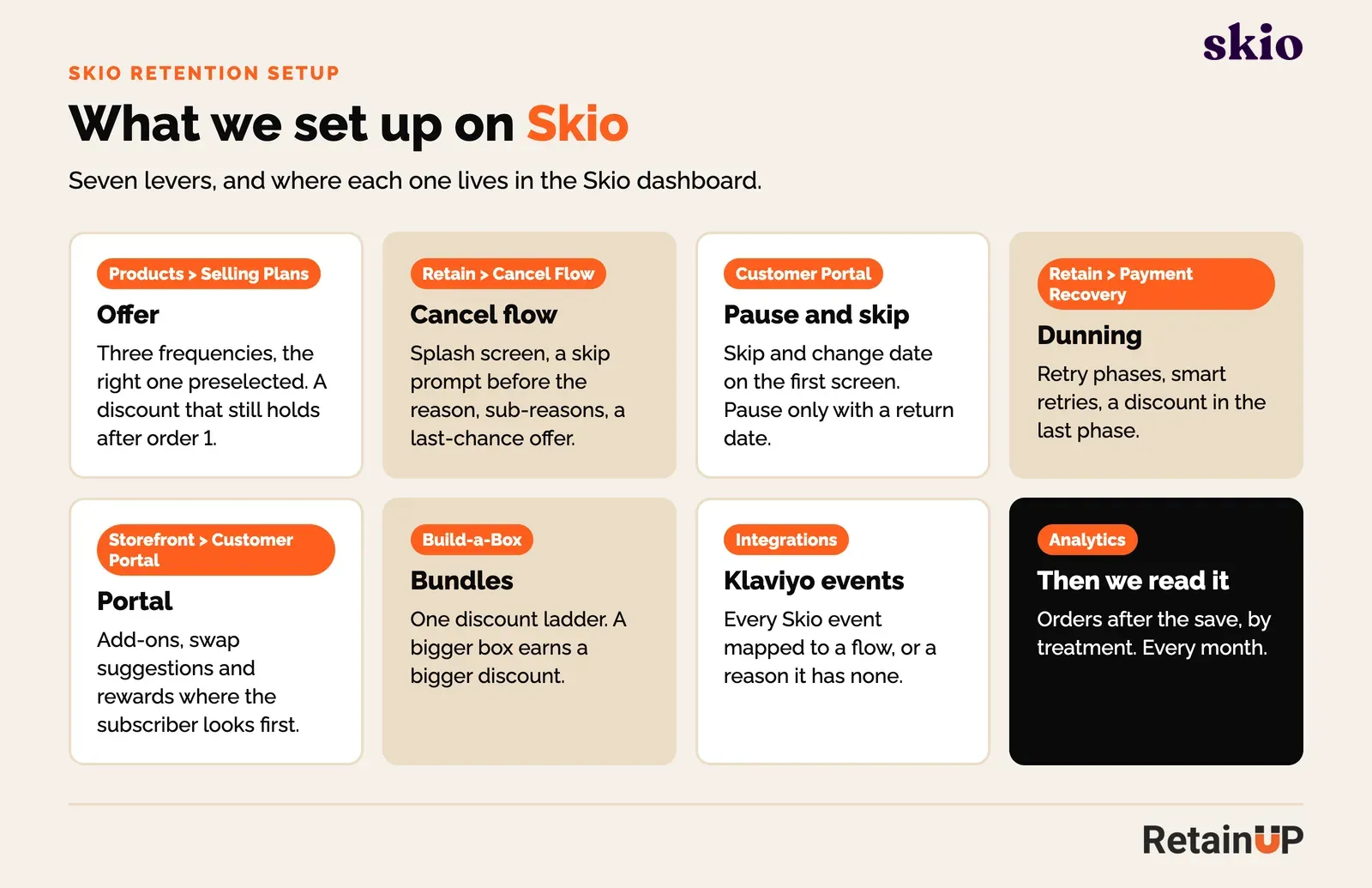
A Skio retention specialist sets up seven things: the offer, the cancel flow, pause and skip, dunning, the portal, bundles, and the Klaviyo events. Each one lives in a different part of the Skio dashboard, and each one is set to a default on install.
Here is each one, in the order we touch them.
1. The offer
On Skio, the offer lives under Products, then Selling Plans, and it is where churn starts, before any retention tool sees the subscriber.
We set three frequencies with the right one preselected. The right one is the one that matches use. 30 servings, one a day, ships every 30 days. If the default ships faster than people use it, product piles up and "too much product" becomes your top cancel reason. I see this in most audits, and I wrote up why in consumption mismatch.
Then we check the discount. A big first-order discount that drops to 10% on order 2 reads as a price rise. People cancel at the second charge.
2. The cancel flow
Skio's cancel flow lives under Retain, then Cancel Flow. Skio gives you a splash screen, reasons, sub-reasons, offers per reason, and flows targeted by number of orders, subscription value and plan type.
We build six screens, in this order.
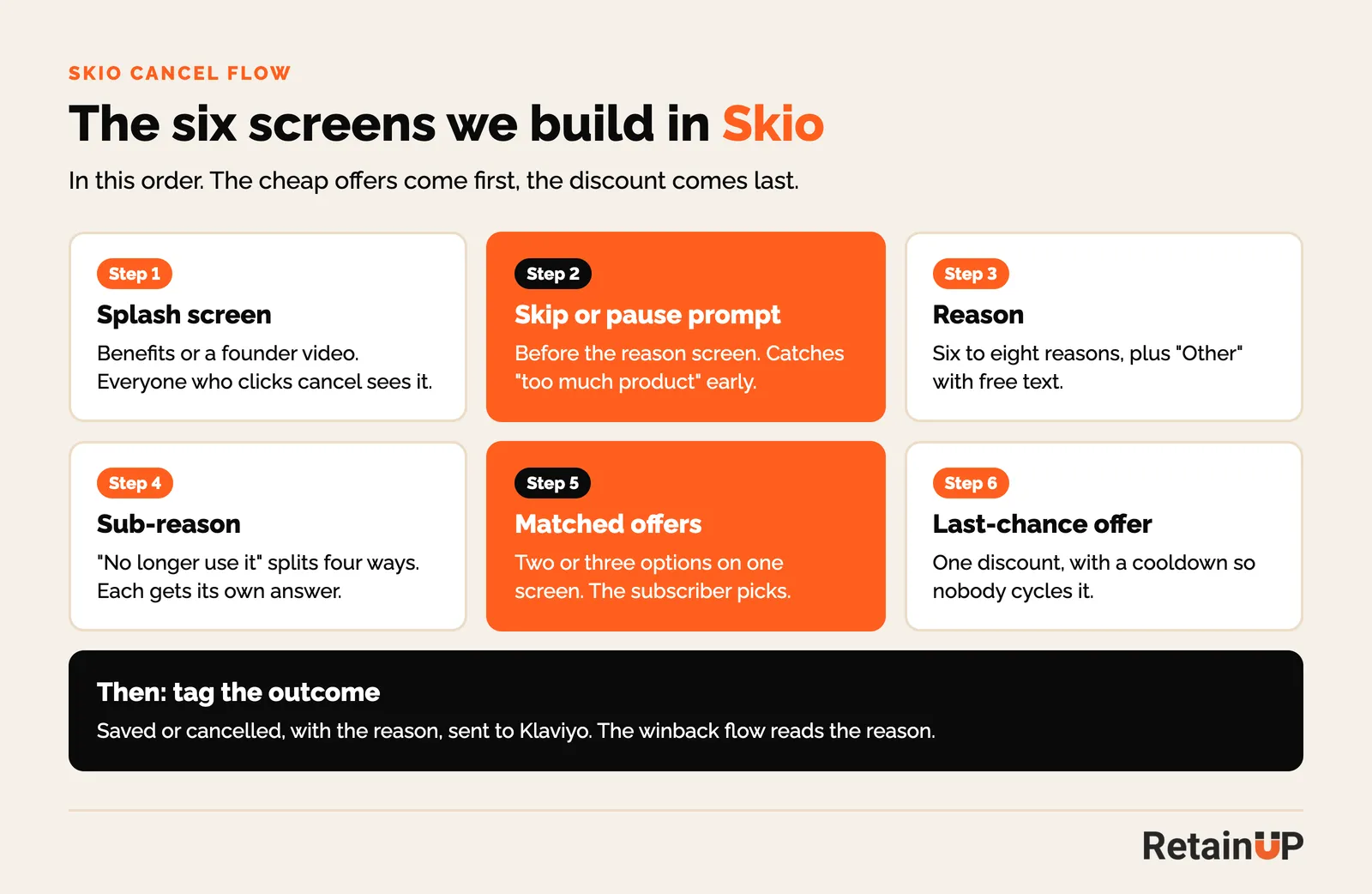
The skip or pause prompt goes before the reason screen. Skio supports it. Most brands put it after, inside the reason "too much product", where only people who already picked that reason see it.
Sub-reasons do most of the work. "I no longer use it" is four different people: never started, found something else, told to stop by a doctor, life changed. A swap offer means nothing to someone whose doctor told them to stop. So each sub-reason gets its own answer. The full logic is in cancel flow routing.
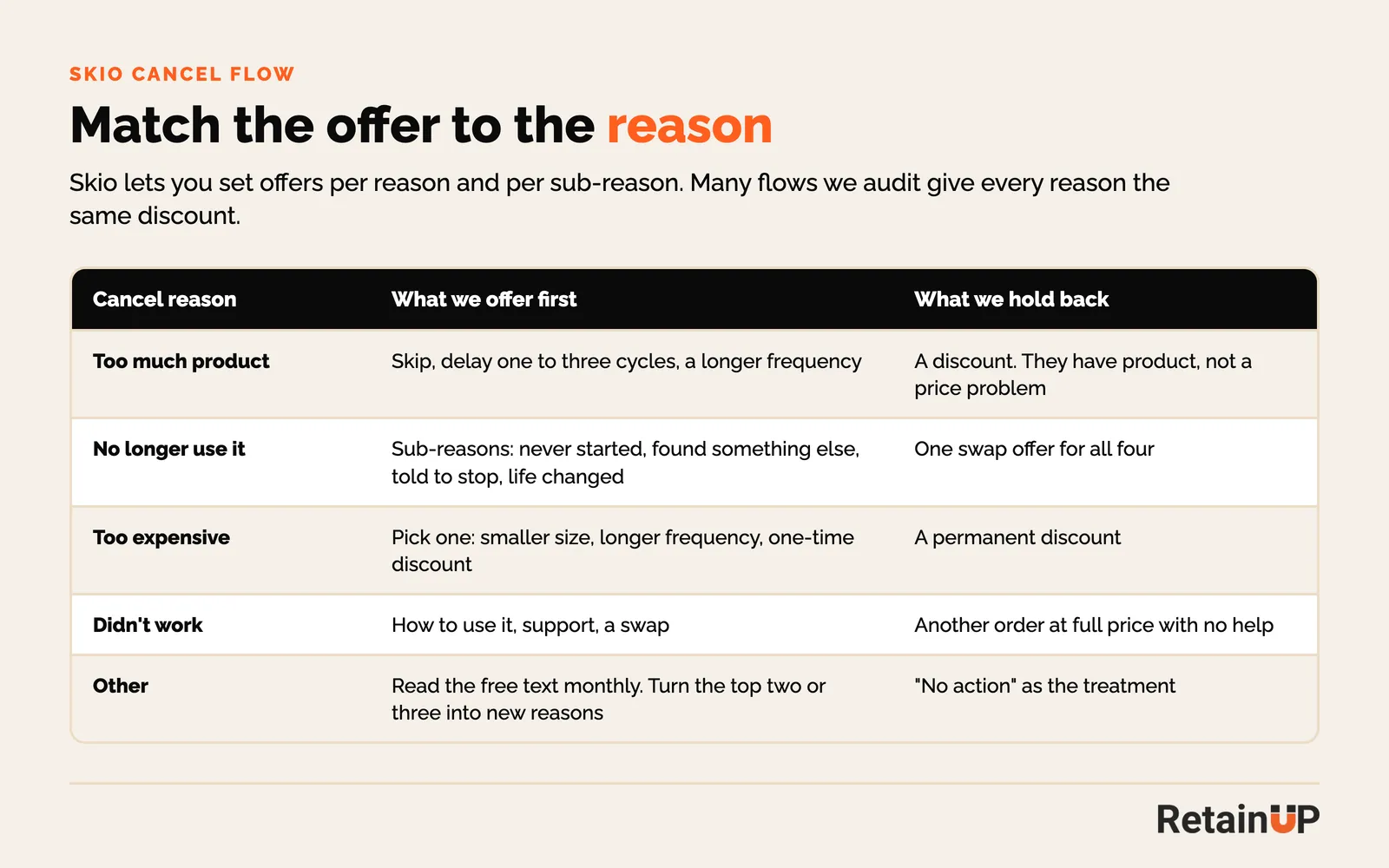
Skio lets you show two or three offers on one screen. We use that on "too expensive". Some people want money off. Some just want a smaller size or more time between orders. Let them pick.
Then one last-chance discount, with a cooldown so the same person can’t cancel every two months to collect it.
The full build, reason by reason, is in the cancel flow chapter below.
3. Pause and skip
Skip and change date belong on the first portal screen and in the billing reminder, before anyone thinks about cancelling. Pause goes last, and only with a return date. A pause with no end date is a cancel that still counts as active.
We wrote about the order in pause and skip. Inside the Skio cancel flow, the delay option lets people push one, two or three billing cycles, which covers most of what pause is used for.
4. Dunning
Skio's dunning lives under Retain, then Payment Recovery. Skio splits retries into phases, each with its own number of attempts and interval. Smart retries move the timing to when cards tend to clear. You can add a discount code to a later phase.
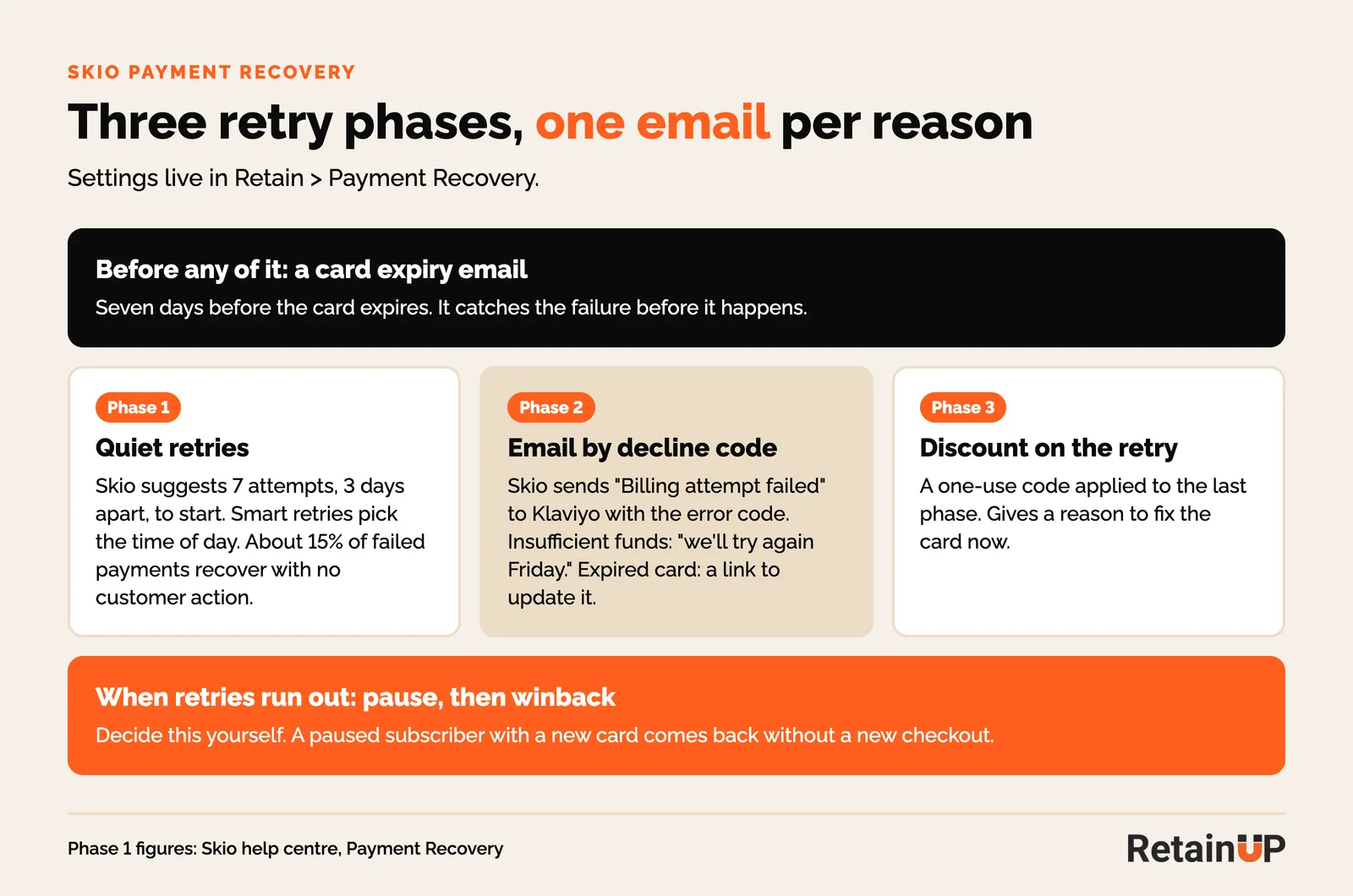
Skio’s own guide suggests 7 attempts, 3 days apart, as a first phase, and says about 15% of failed payments recover with no action from the customer. Older accounts were moved to one phase of 14 daily retries, so check yours.
Skio sends a "Billing attempt failed" event to Klaviyo with the error code. That lets one flow tell a subscriber with insufficient funds "we will try again Friday", and send an expired card straight to an update link. This is passive churn. Nobody chose to leave, so it is the easiest churn to get back.
5. The portal
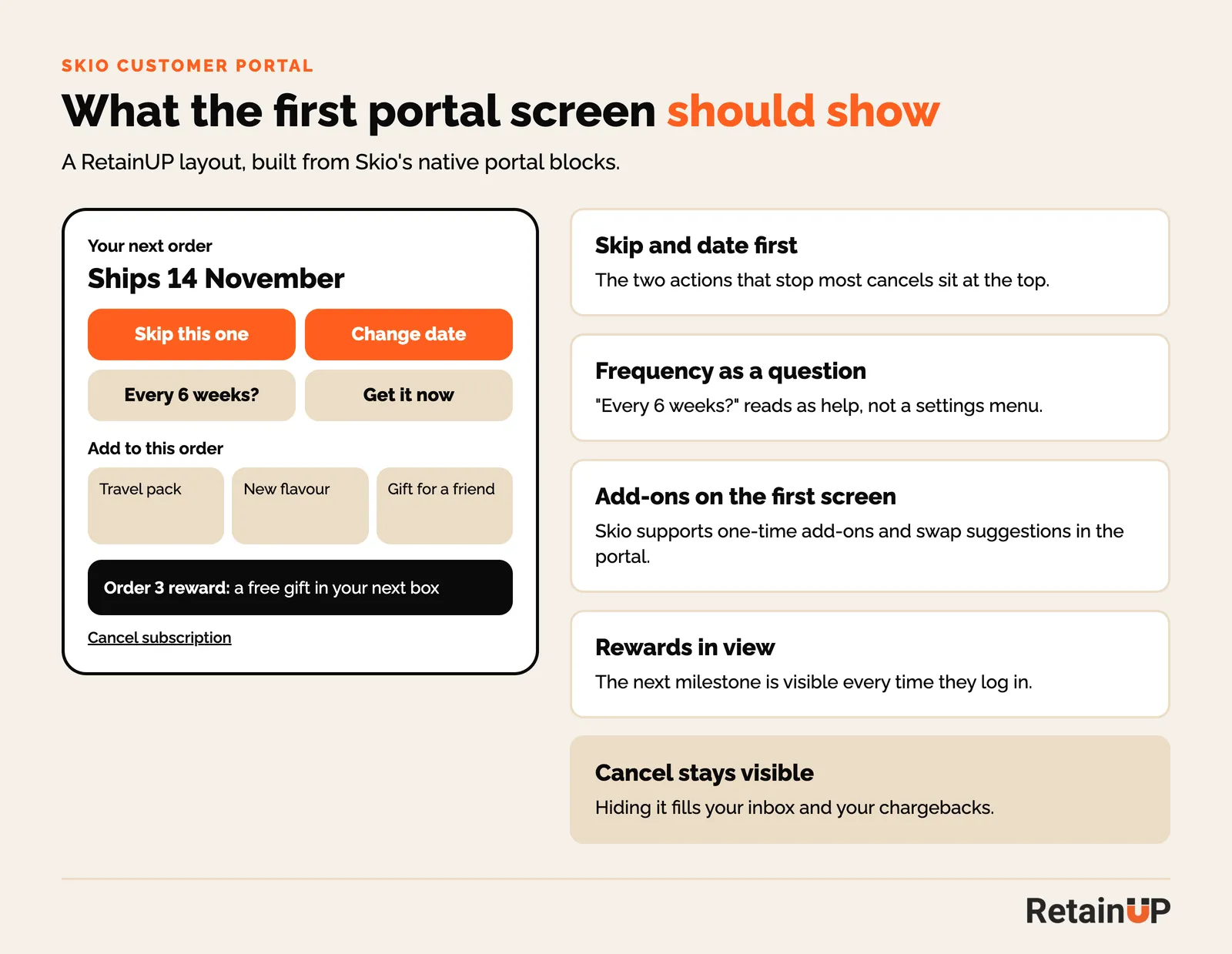
Skio's customer portal lives under Storefront, then Customer Portal. Skio’s portal has skip, pause, swap, change frequency, get it now, one-time add-ons, swap suggestions, rewards and magic link login. All of it, at the same visual weight.
We reorder it. Skip and date first. Frequency asked as a question. Add-ons and the next reward on the first screen. Cancel stays visible, because hiding it fills your support inbox and your chargebacks.
6. Bundles
Skio handles bundles with Build-a-Box, static or dynamic. A box that grows is the cheapest way to raise order value on a subscription.
The mistake I see is stacked discounts. A bundle already priced 25% off, then the subscription discount on top, lands close to cost. We set one ladder instead: more items, a bigger discount, and nothing stacked on top.
7. Klaviyo events
Skio sends subscription events to Klaviyo in real time. Each one should start a flow, or have a reason it doesn’t.
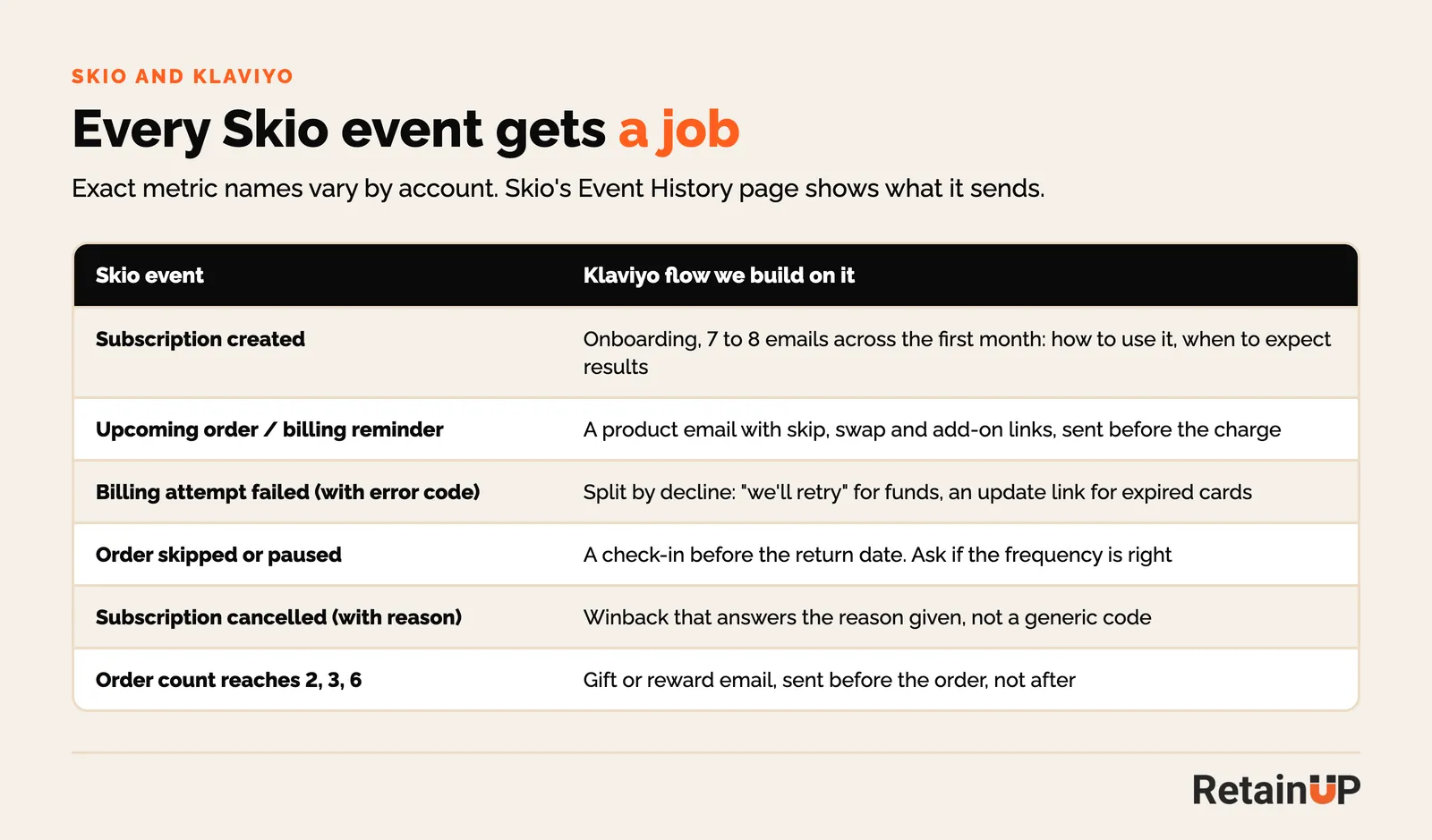
The one most brands miss is the billing reminder. Skio sends an upcoming order notice before each charge. It usually reads like an invoice: amount, date, card. We rewrite it as a product email with skip, swap and add-on links in it. It is usually the most opened email in the program, and it is where people decide whether the next box is worth it. The full flow list is in 7 Klaviyo subscription automations.
Skio cancel flow setup: a save path for every reason
A Skio cancel flow setup gives every cancel reason its own save path: a splash screen with one action, reasons and sub-reasons, a treatment matched to each, one last-chance offer, and separate flows for the subscribers worth treating differently. The builder lives under Retain, then Cancel Flow.
Build it in this order
- Pull 12 months of cancel reasons by order number. The top three reasons decide the flow.
- Set the global settings: discount cooldown, cancel compliance and EU withdrawal.
- Build the default flow: splash screen, reasons, sub-reasons, treatments.
- Add flows for subscribers who need a different answer: early orders, high value, boxes.
- Preview, save as a draft, then enable.
- Map the cancel flow events to Klaviyo.
- Each month, read orders after each save, by treatment.
The reason to offer map
Skio's own best practices say to offer the cheaper fix first: a frequency change or a skip, then a swap or a pause, then a discount or gift. We map it reason by reason.
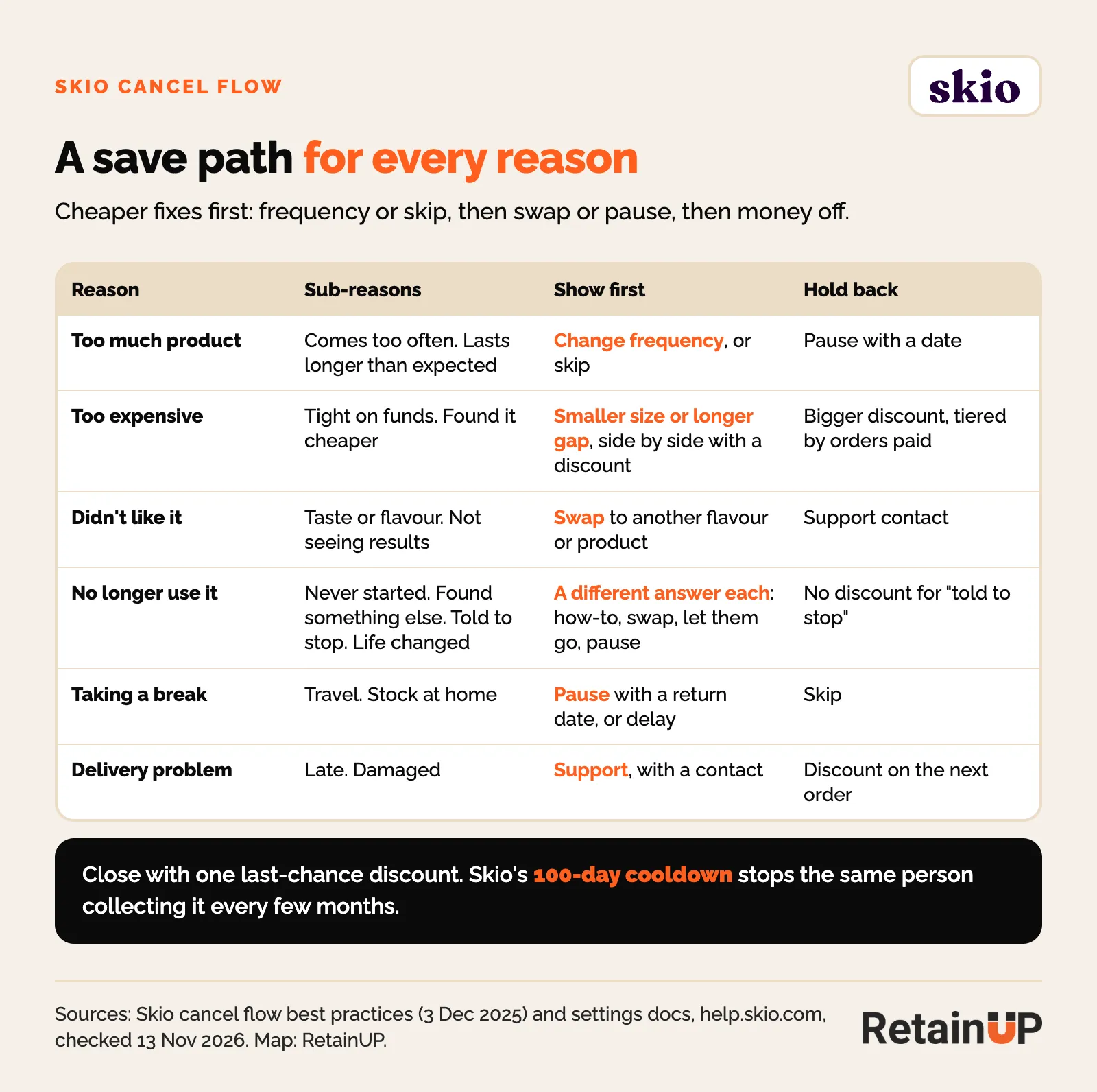
| Reason | Sub-reasons | Show first | Hold back |
|---|---|---|---|
| Too much product | Comes too often. Lasts longer than expected | Change frequency, or skip | Pause with a date |
| Too expensive | Tight on funds. Found it cheaper | A smaller size or a longer gap, next to a discount | A bigger discount, tiered by orders paid |
| Didn't like it | Taste or flavour. Not seeing results | Swap to another flavour or product | Support contact |
| No longer use it | Never started. Found something else. Told to stop. Life changed | A different answer for each: how to use it, a swap, let them go, a pause | No discount for "told to stop" |
| Taking a break | Travel. Stock at home | Pause with a return date, or delay | Skip |
| Delivery problem | Late. Damaged | Support, with a contact | A discount on the next order |
Skio shuffles the order of reasons for each customer, so no reason wins by sitting at the top.
New on Skio or moving to it? The Subscription LTV Maximizer™ builds the cancel flow with the rest of the new setup or migration in 30 days, for $5,000.
The splash screen: one action before the reasons
Skio's splash screen shows the moment someone starts to cancel, before any reason or offer. It holds a video or image, text with the subscriber's name and next order date, a Continue button and one action. Skip next order is the default action. You can swap it for change date, edit frequency, delay, pause, swap, a discount, get now, apply credits or a link.
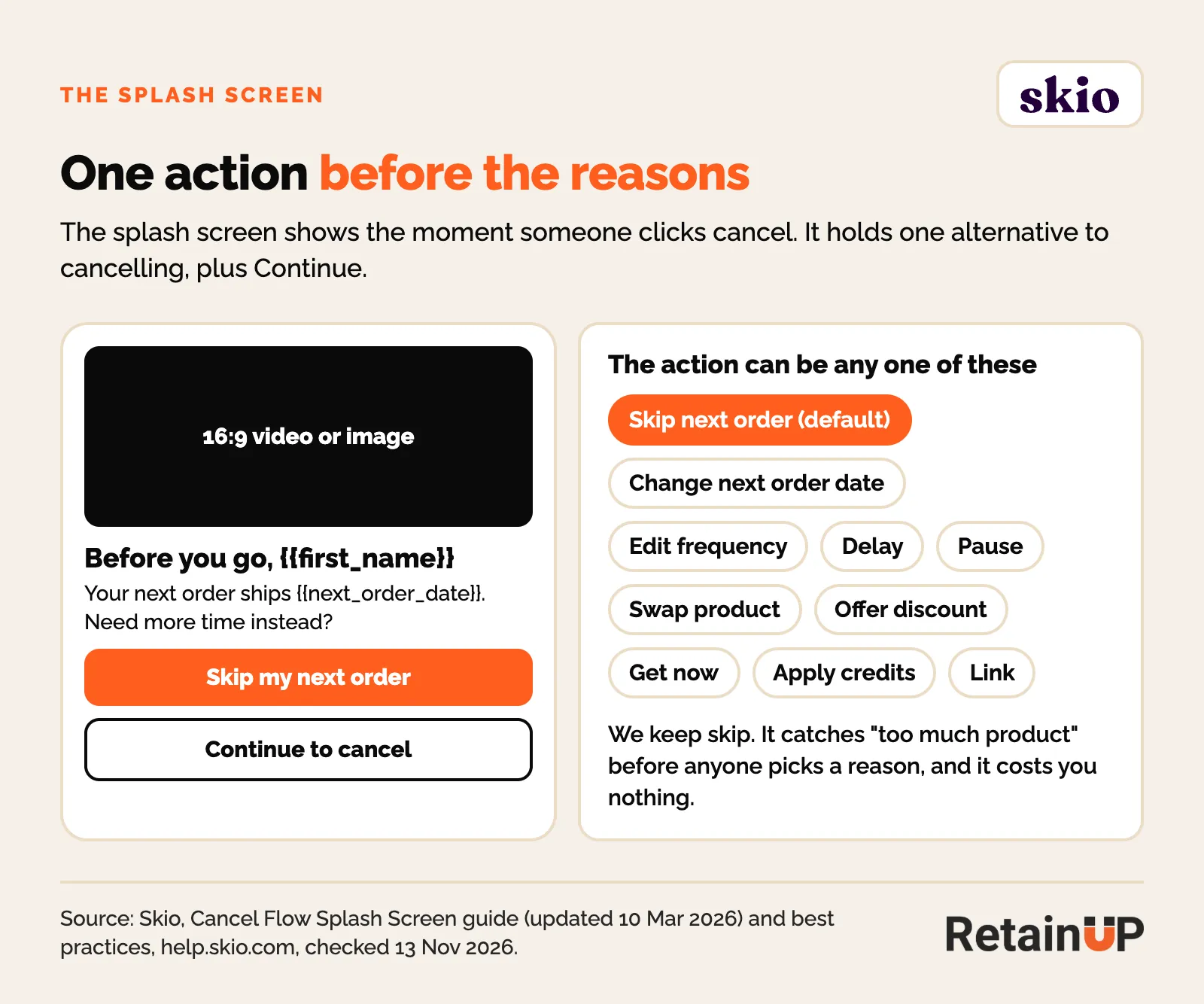
We keep skip. It catches "too much product" before anyone picks a reason, and it costs nothing. Skio's guide says to use the splash screen when save rate is low or falling. In the rebuild that took one Skio flow from 14.8% to 24.8%, a benefits splash screen and the skip prompt went first.
One flow per kind of subscriber
Skio can run several cancel flows and pick one per subscriber by entry conditions: order number, total value, total quantity, products and boxes, customer tag, loyalty tier, credit balance, shipping interval and whether the subscription was migrated, among others. Skio ranks the flows so the most specific is checked first. Anyone left goes to the default flow, which cannot have conditions.
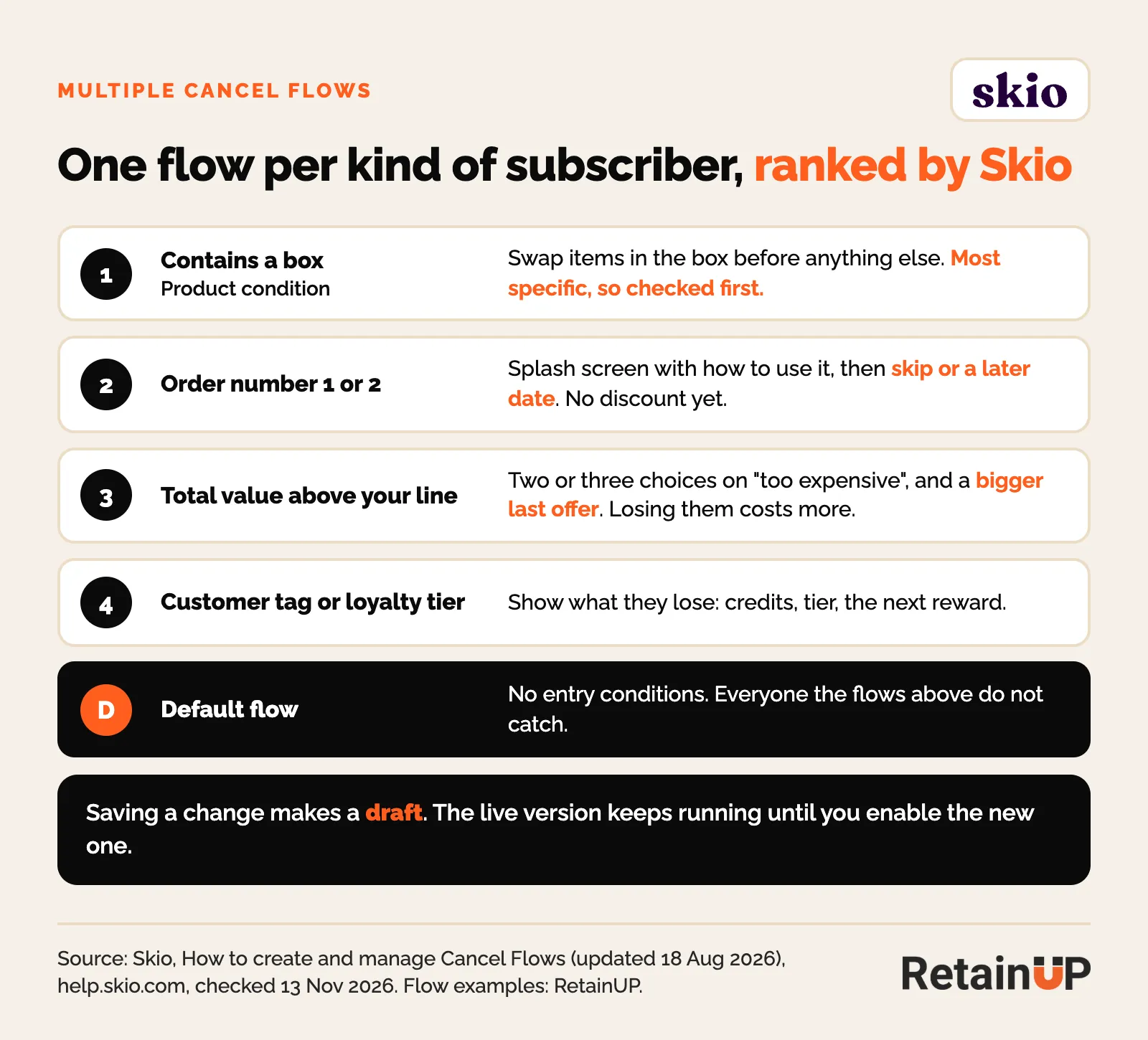
Start with two extra flows, not ten. One for early orders, where the answer is usually how to use it and a later date. One for high-value subscriptions, where Skio's guide says a bigger offer is worth it. If your account still runs the older single cancel flow, ask Skio to switch on multiple flows. The old flow becomes your default.
One condition matters after a move. Skio can target migrated subscriptions, and their first months on Skio often look like churn for reasons that have nothing to do with the product. Give them a flow of their own. Migrating to Skio covers the rest of the move.
The settings outside every flow
Four settings under Retain, Cancel Flows, Settings apply to every flow.
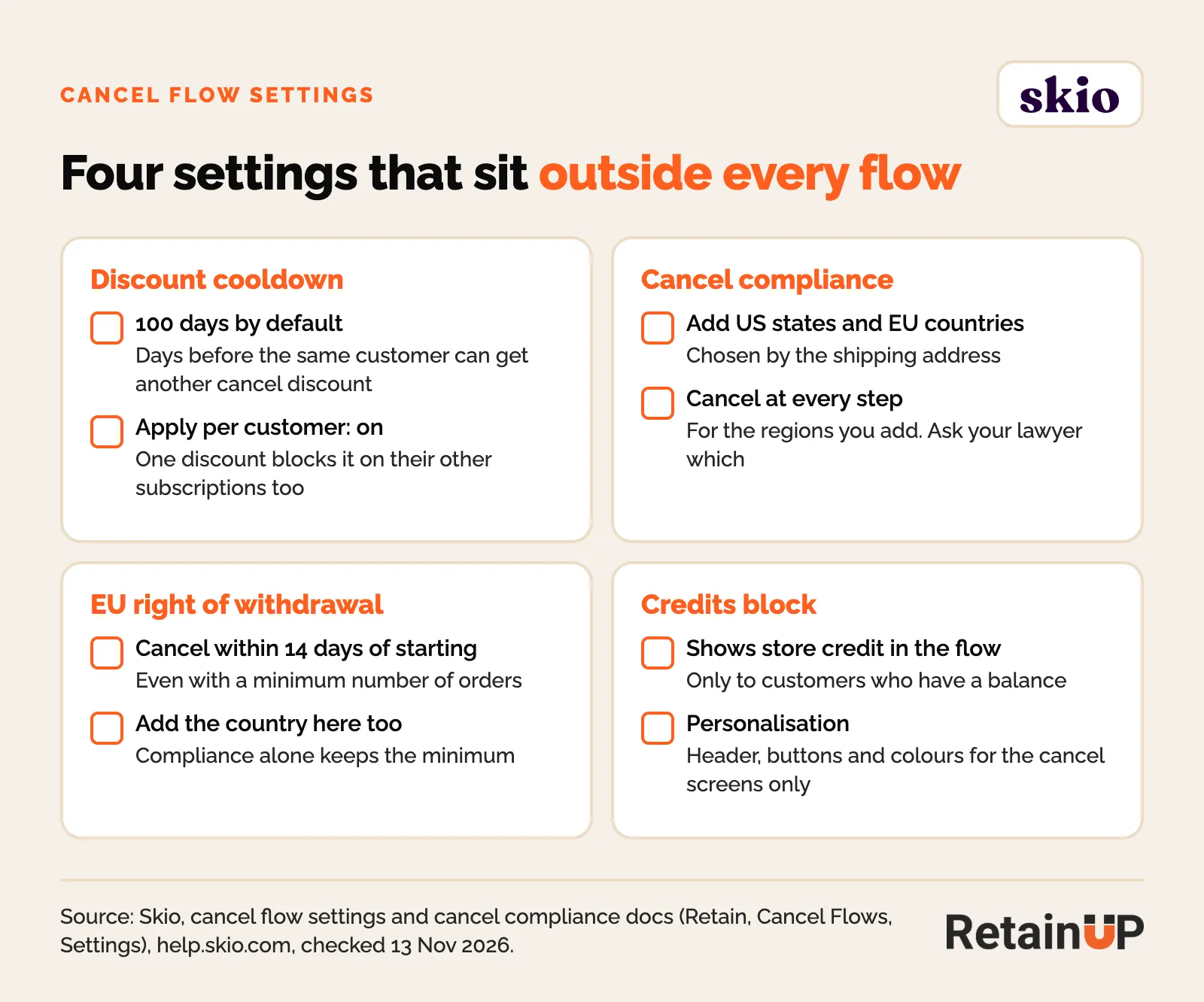
- Discount cooldown. 100 days by default before the same customer can get another cancel discount. Turn on "apply per customer" so one discount blocks it on their other subscriptions too.
- Cancel compliance. You add US states and EU countries, Skio applies them by shipping address, and subscribers there can cancel at every step. Skio does not pick the states for you, so ask your lawyer which to add.
- EU right of withdrawal. Lets EU subscribers cancel within 14 days of starting, even with a minimum number of orders. Add the country here as well as under cancel compliance.
- Credits block. Shows store credit in the flow to customers who have a balance.
Test one change at a time
Skio's Split Treatments step sends subscribers at random down two treatment paths and shows the results inline. Saving a change to a live flow makes a draft, and the live version keeps running until you enable the new one. Change one thing per test: the splash action, the order of offers, or the size of the discount.
Saves that stick: read orders after
Skio's cancel flow dashboard counts save rate as saved cancel flow sessions over all cancel flow sessions in the date range. A subscriber who skips three times in a row counts as saved each time. The saved reason breakdown also shows orders after and revenue after for each treatment and final reason, from the session up to today. That is the number to read.
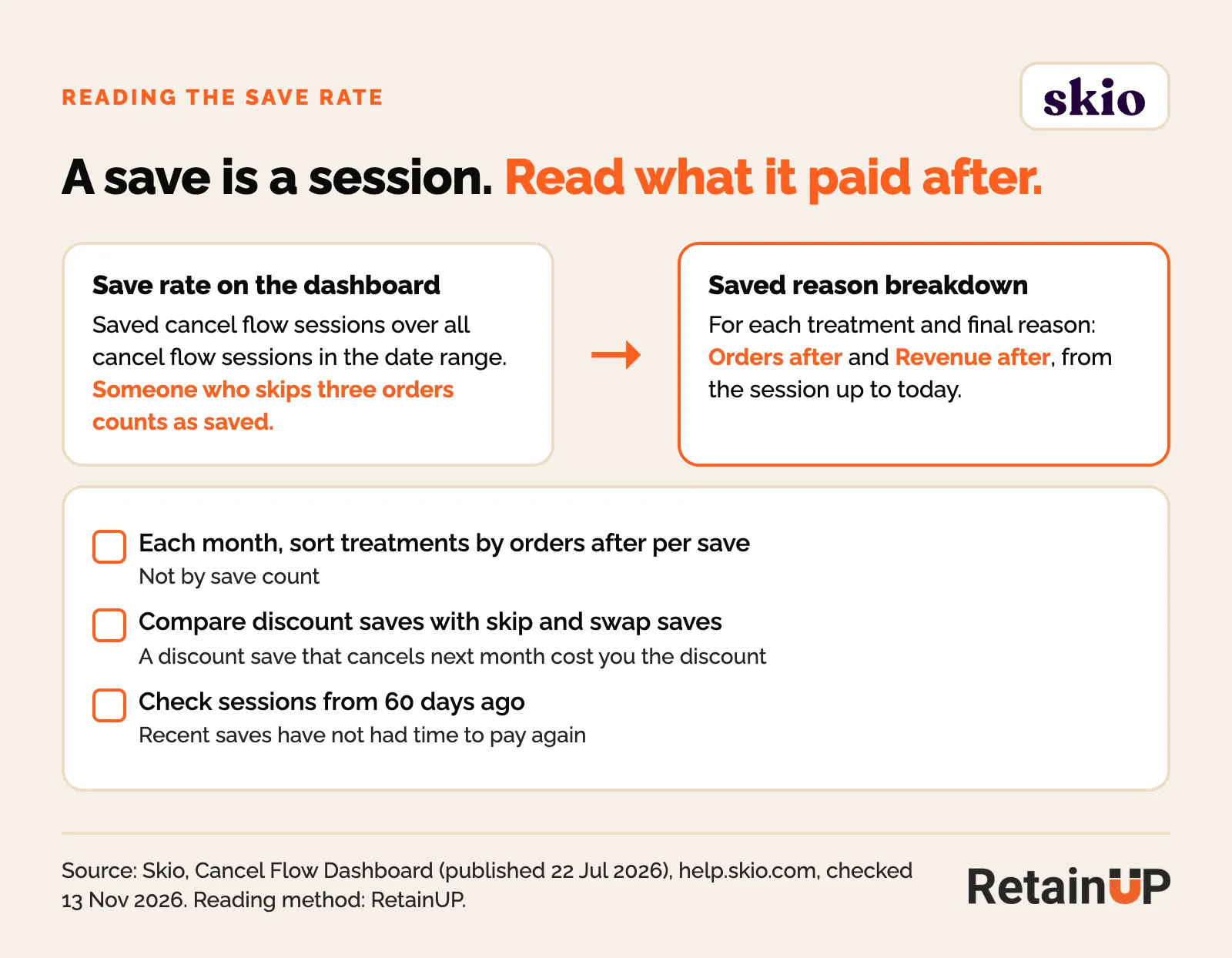
Read sessions from at least 60 days ago, so saved subscribers have had time to pay again. Sort treatments by orders after per save, not by save count.
Cancel flow events in Klaviyo
Skio sends four events around the cancel flow. Skio: Subscription Went Through Cancel Flow fires when a subscription is saved. Skio: Subscription Cancelled fires on a cancel. Skio: Winback Initiated and Skio: Winback Redeemed track Skio's own winback.
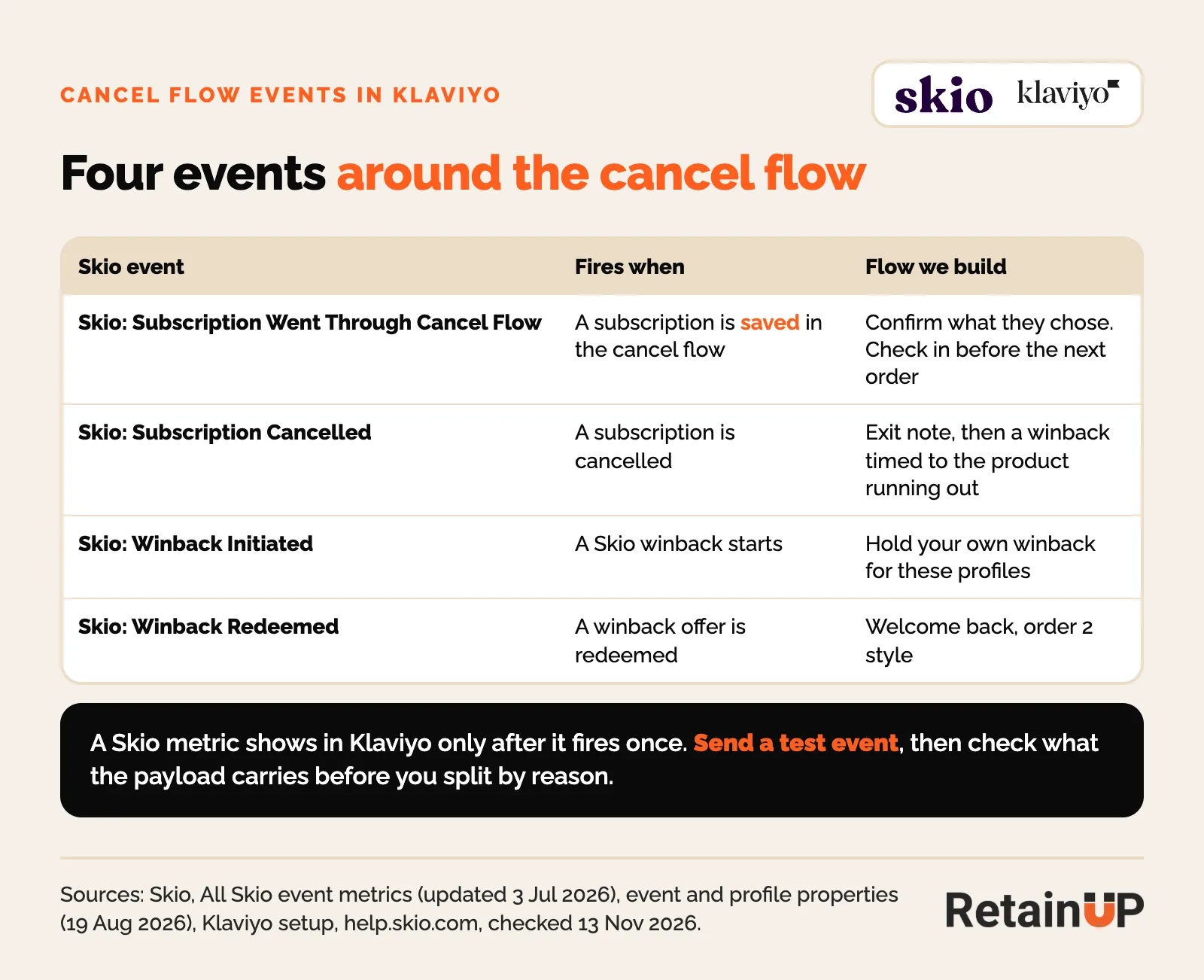
Skio's property docs list no cancel reason field on these events. Fire a test event and read the payload before you build a winback split by reason. The same events on Recharge, Loop and Stay AI are in our Klaviyo event map.
Skio’s own retention features, and where they fall short
Skio covers the retention tools but leaves you the judgment: which offer goes to which reason, what the emails say, and whether a save turned into a payment.
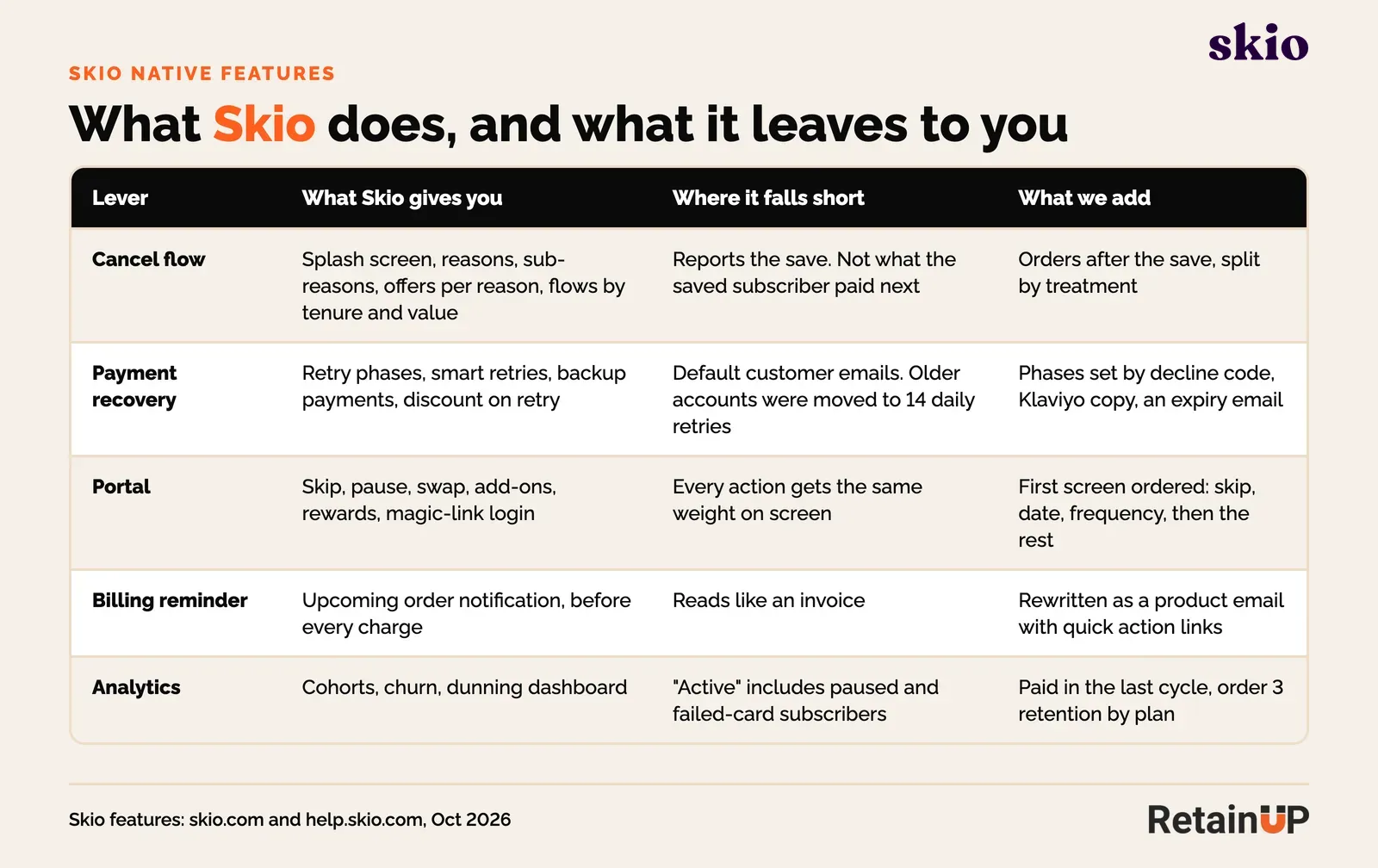
- Save rate. Skio counts anyone who didn’t cancel today as saved. That includes the subscriber who skips the next three orders. The dashboard now shows orders and revenue after each save, by treatment. Few brands read it.
- Active subscribers. The count includes paused subscribers and failed cards. I explain the fix in 7 subscription numbers that lie.
- Default copy. Every notification ships with Skio’s wording. Nobody rewrites it, so the billing reminder and the failed payment email read like a bank.
- One flow for everyone. Multiple cancel flows by tenure or value exist, but most accounts run the default flow for every subscriber, first order or twelfth.
- Price. Skio’s pricing page lists Scale at $499 a month billed annually or $599 billed monthly, plus 1.25% and 20¢ per order with a subscription, checked 13 November 2026. Fine at volume, heavy under a few hundred subscribers.
A founder on Skio told me, "We have a 43% save rate. It’s a false economy." Almost none of the saved subscribers paid him again. The flow was doing its job on the dashboard and not in the bank.
Skio retention setup checklist
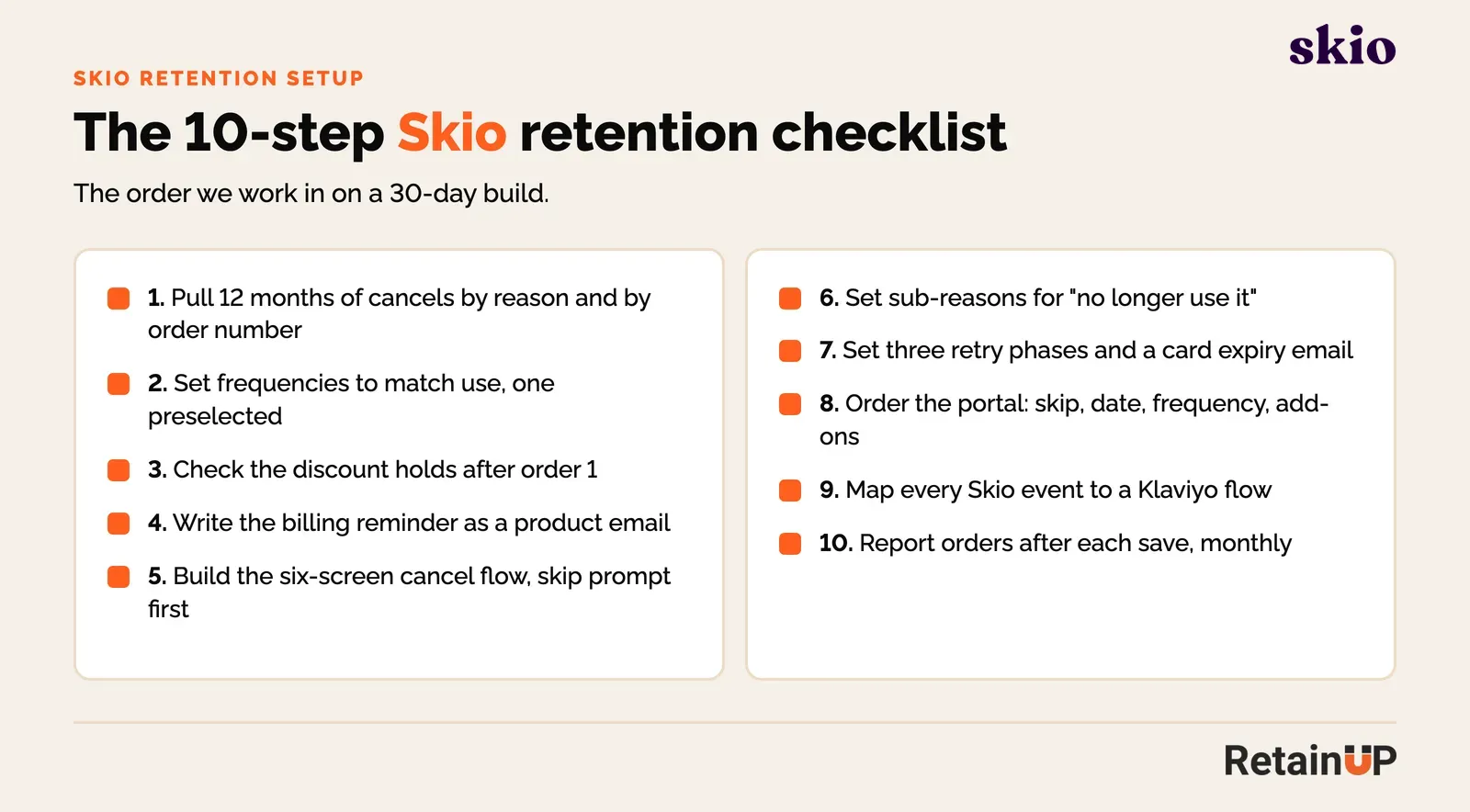
The Skio retention setup checklist is ten steps, in the order we run them on a 30-day build. Data first, offer second, flows third.
- Pull 12 months of cancellations by reason and by order number. Find where they leave.
- Set frequencies to match how fast people use the product, with one preselected.
- Check that the subscription discount still holds after order 1.
- Rewrite the billing reminder as a product email with quick action links.
- Build the six-screen cancel flow, with the skip prompt before the reason screen.
- Add sub-reasons to "no longer use it" and read the "Other" free text.
- Set three retry phases, decline-code emails in Klaviyo, and a card expiry email.
- Reorder the portal: skip, date, frequency, add-ons, then the rest.
- Map every Skio event to a Klaviyo flow.
- Every month, report orders after each save, split by offer.
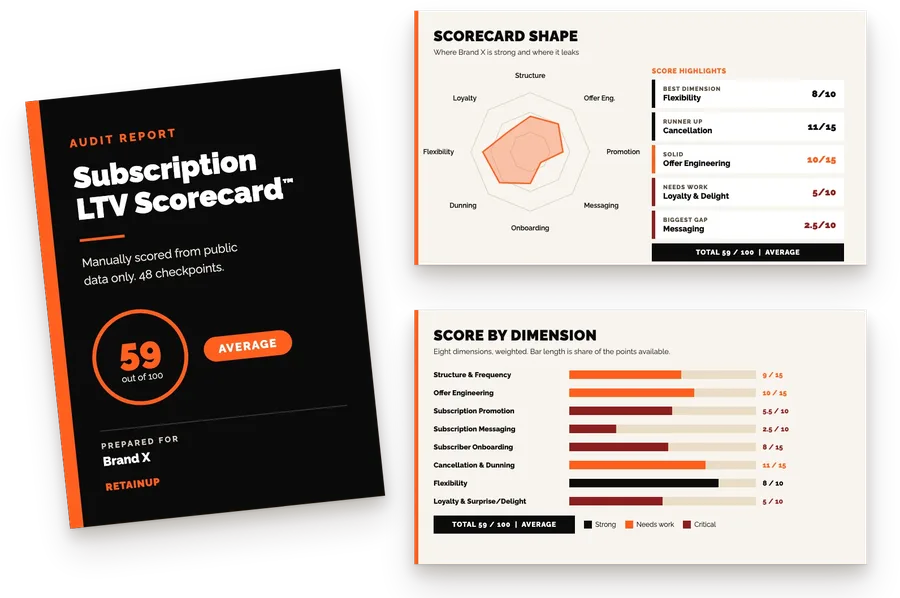
If you want to see where your own program stands first, the free subscription audit scores it on 48 checkpoints.
RetainUP results on Skio
One client on Skio had a cancel flow saving 14.8% of people who clicked cancel. About 1 in 7. After the rebuild, it saves 24.8%. About 1 in 4. It took no new discount.
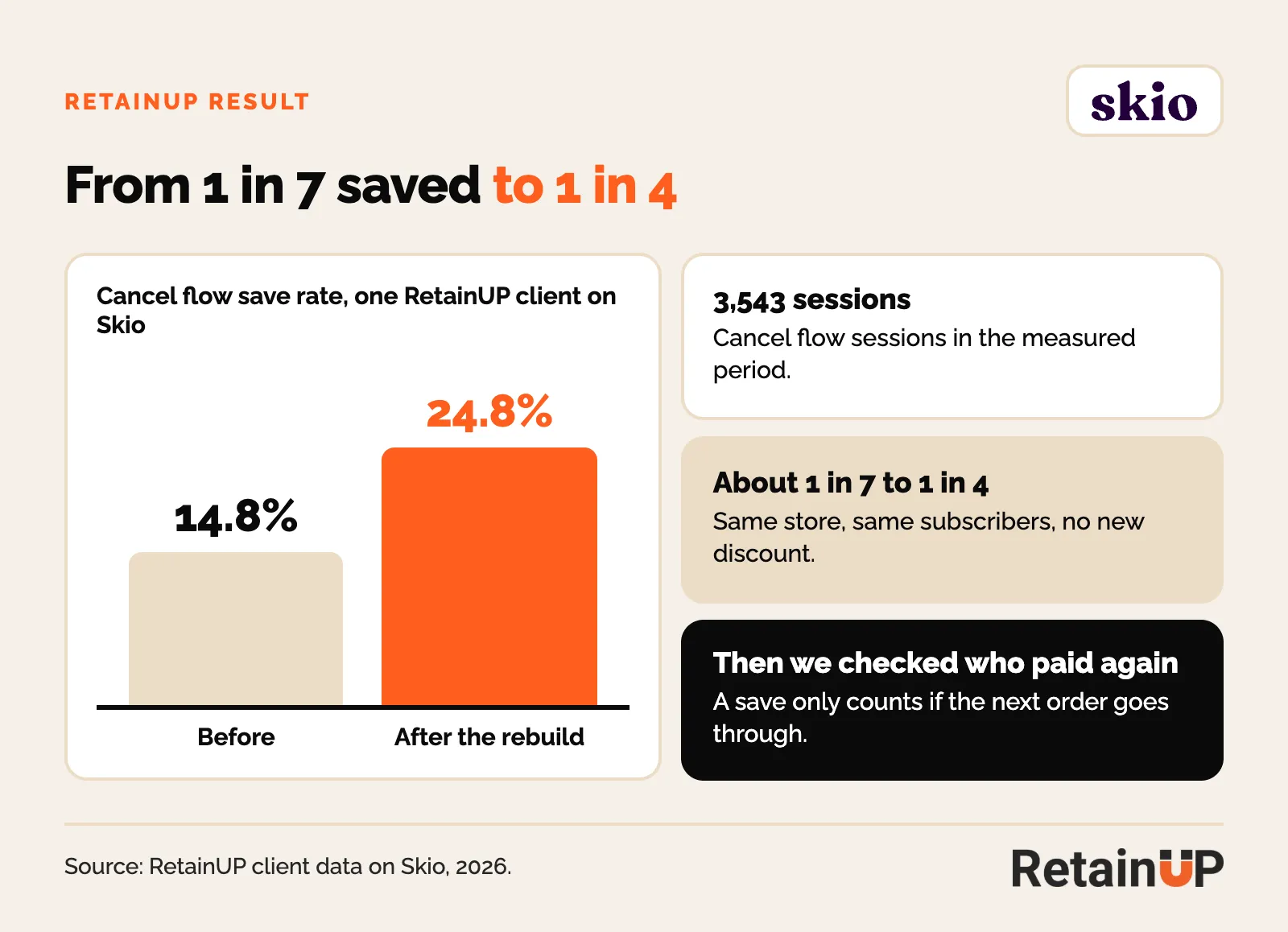
What changed: a benefits splash screen first, the skip prompt moved ahead of the reasons, two different answers for "too expensive", and copy that takes the shame out before it makes an offer. Then we checked who paid again. Some saved subscribers cancelled the month after. Most kept paying, and the revenue held month after month.
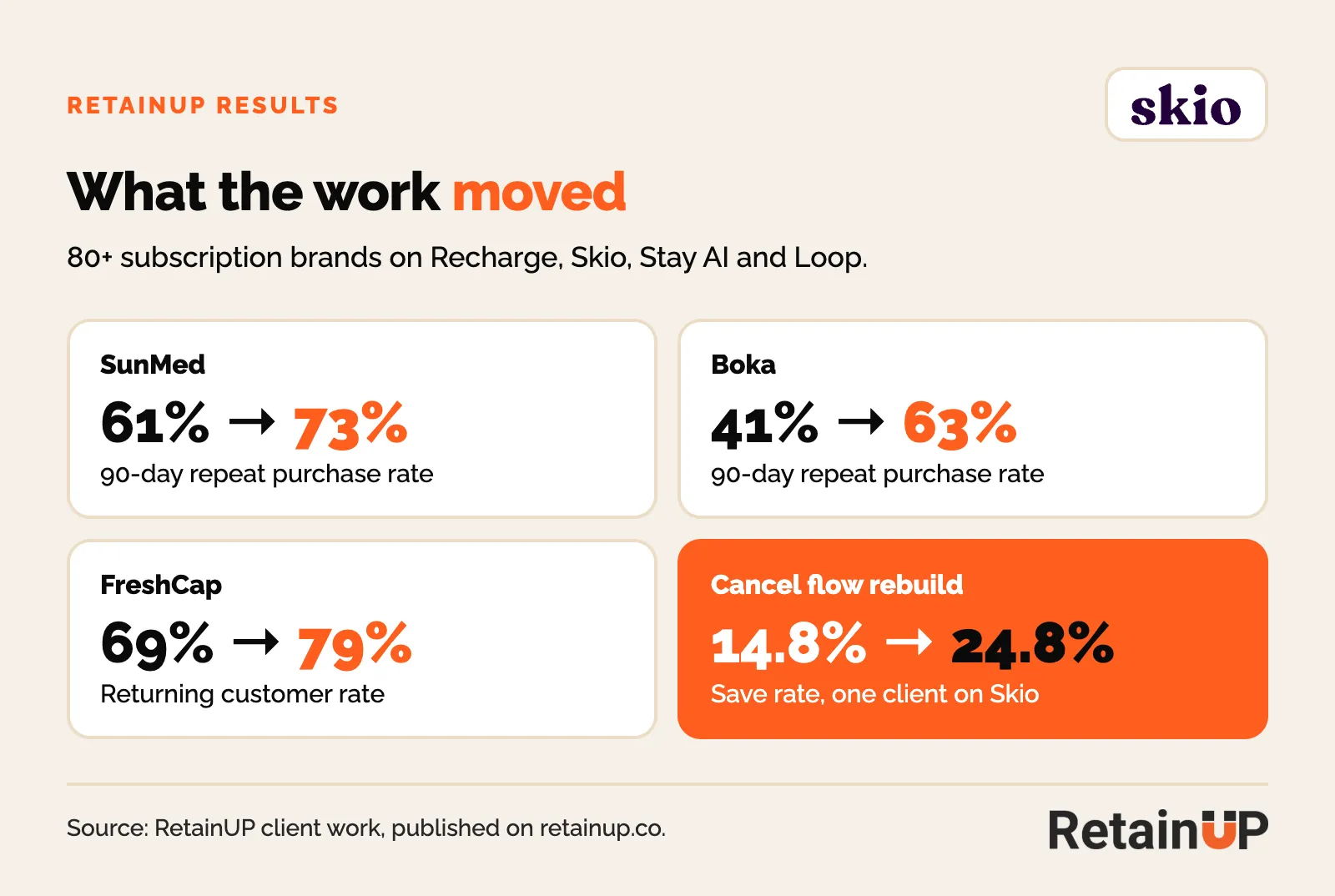
Across the wider work, on all four platforms:
If you want this built on your Skio account, that is the Subscription LTV Maximizer: 30 days, done for you, including copy and design, for $5,000.
Does Recharge own Skio now?
Yes. Recharge announced on 30 April 2026 that it had acquired Skio. Recharge’s announcement says both platforms keep running as they have, with the same teams, and a combined roadmap to come. Together they serve more than 20,000 brands.
Terms were not disclosed. Skio’s founder said it sold for $105M in cash after raising $8M, as TechCrunch reported.
For your setup, nothing changes today. Your selling plans, flows and Klaviyo events work the same. I would not migrate because of the news. Migrating costs you saved cards, mid-dunning subscribers and a month of attention. Wait for the roadmap, and fix the cancel flow you already pay for.
Moving to Skio, or off it? Our subscription app migration checklist runs the move day by day, and the Klaviyo event map shows what each Skio event is called on the other apps. Still choosing? The best Shopify subscription app comparison puts Skio next to the other three.
Recharge owns Skio now. Recharge vs Skio in 2026 covers what that changed for fees and features, and whether to move, stay or wait. Coming from Appstle or Seal? Read outgrowing Appstle, Seal or Shopify Subscriptions. For the cheapest of the big four, see Loop vs Recharge.
Planning the move onto Skio? Migrating to Skio lays out the 4 to 5 weeks, what Skio copies and what you rebuild. Comparing Skio with Stay AI and Recharge? See Stay AI vs Recharge vs Skio.
Moving to Skio, or rebuilding the cancel flow you have? The Subscription LTV Maximizer™ builds the cancel flow, dunning, portal and Klaviyo flows on Skio in 30 days, for $5,000.
The routing logic behind the map works on any app: cancel flow routing. Just moved onto Loop instead? See Loop Subscriptions after a migration. Weighing Stay AI? Our Stay AI review covers its two prices and its cancel survey.
The full Skio build for one brand, from audit to results, is in the SunMed case study.
FAQ
Who is the best Skio retention agency for a $1 to 10M brand?
Look for someone who works inside Skio, not only in Klaviyo. RetainUP is built for $1 to 10M subscription brands, and I work every account myself.
Is Skio’s cancel flow enough on its own?
The builder is. The setup usually isn’t. Out of the box you get reasons and offers, but no skip prompt before the reasons and no sub-reasons. The orders-after report is there, but few brands read it.
What save rate should I expect on Skio?
The average cancel flow saves about 1 in 6 people who click cancel, and a strong one saves 1 in 3. Judge it by orders paid after the save, not the save rate alone.
What should a Skio dunning setup look like?
Three retry phases: quiet retries first, then Klaviyo emails split by decline code, then a one-use discount on the last retries. Add a card expiry email before any of it.
Do I need Klaviyo if Skio sends its own emails?
You can run on Skio notifications alone. You lose branching on decline codes and cancel reasons, and most brands already run Klaviyo, so we send the subscriber-facing emails from there.
Should I switch away from Skio now that Recharge owns it?
Not on the news alone. Recharge says both platforms keep running as they are. A migration puts saved cards and mid-dunning subscribers at risk, so only move for a reason your setup can’t fix.
How do I set up a cancel flow in Skio?
Go to Retain, Cancel Flow and create a flow. Add a splash screen, reasons and sub-reasons, and a treatment after each reason. Preview it, save it as a draft, then enable it. Set the discount cooldown and cancel compliance under Settings first.
Can Skio show different cancel flows to different subscribers?
Yes. Each flow has entry conditions such as order number, total value, products, boxes, customer tag or loyalty tier. Skio checks the most specific flow first. Everyone else gets the default flow. Older accounts may need Skio to switch multiple flows on.
Does Skio's cancel flow handle click-to-cancel rules?
Skio has a cancel compliance setting. You add the US states and EU countries, and subscribers with a shipping address there can cancel at every step. Skio does not choose the regions, so check with your lawyer.
What does "Subscription Went Through Cancel Flow" mean in Klaviyo?
It is the Skio event that fires when a subscription is saved in the cancel flow. Use it to confirm what the subscriber chose and to check in before the next order.
How long should the Skio cancel discount cooldown be?
Skio's default is 100 days. We keep at least that, applied per customer, so nobody learns to cancel for money off every few months.
One email a week on subscription retention: the numbers, the strategy, and what to fix first.

Rahi Jain
Rahi Jain is a subscription LTV specialist who helps $1M to $10M DTC brands reduce subscription churn and maximize LTV on Recharge, Skio, Stay AI and Loop.
More about Rahi