Key takeaways
- When one supplement brand moved from Appstle to Loop, the migration created 348 subscriptions and cancelled 232 the same day, so raw data showed 440 cancels instead of 208.
- Saved cards survive a subscription app switch when the payment gateway stays the same or its tokens are imported, and Skio says it cannot move Shop Pay methods between stores.
- Subscribers in the middle of dunning lose their retry position in a migration, so tag them before the export and import them paused.
"Can I switch between subscription apps with active subscribers?" It comes up on the Shopify forums every few weeks. The answer is yes. Most brands switch without a single customer typing in a card again.
What breaks is quieter. Subscribers stuck halfway through dunning. Reminder emails that stop. Klaviyo flows that never fire again. Numbers that look worse, or better, than they are. This guide covers those, with a checklist and a day-by-day plan. If you are still choosing where to go, start with our comparison of the best Shopify subscription app.
Can you switch subscription apps without losing subscribers?
Yes, if the cards stay where they are. Every big app runs a migration team. Loop, Skio and Stay AI list it in their paid plans, and Recharge has its own. They move subscriptions, next charge dates and, in most cases, payment tokens.
They don't move your setup. Dunning state, notification settings, Klaviyo events and portal links are yours to check. I've seen every one of them go wrong on a live store.
What moves and what doesn't
Subscriptions, products, prices, discounts and next charge dates move. Retry position, email settings, Klaviyo event names and old portal links don't, or only partly.
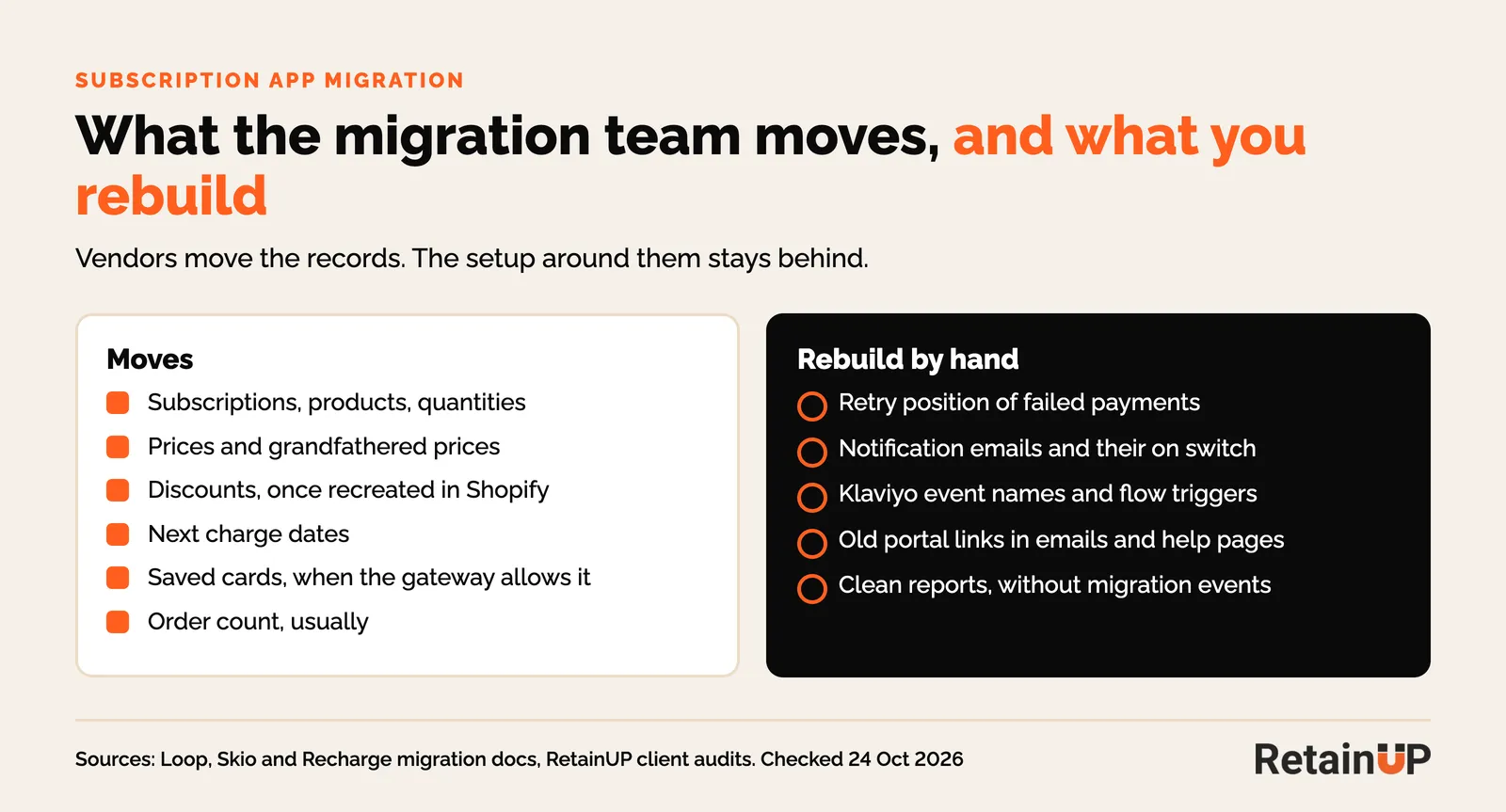
| Item | Moves? | What to do |
|---|---|---|
| Subscriptions, products, quantities | Yes | Check the variant mapping file line by line |
| Prices and discounts | Yes, if recreated first | Recreate discount codes in Shopify before import. Keep grandfathered prices |
| Next charge dates | Yes | Freeze edits in the old app. Spot-check 20 records |
| Saved cards | Usually | Depends on where the card lives. See below |
| Dunning position | No | Tag and export failed-payment subscribers first |
| Order count | Usually | Check it, or your order 3 gifts fire on the wrong order |
| Portal links | No | Redirect the old portal URL, update every email and help page |
| Notification emails | No | Rebuild, turn on and test each one |
| Klaviyo events | No | New app, new event names. Rebuild flow triggers |
Saved cards and payment tokens
Cards survive when the gateway stays the same. A saved card is a token held by a payment gateway, not by the subscription app. Change the app and keep the gateway, and the token can move. Change the gateway, and customers may have to enter their card again.
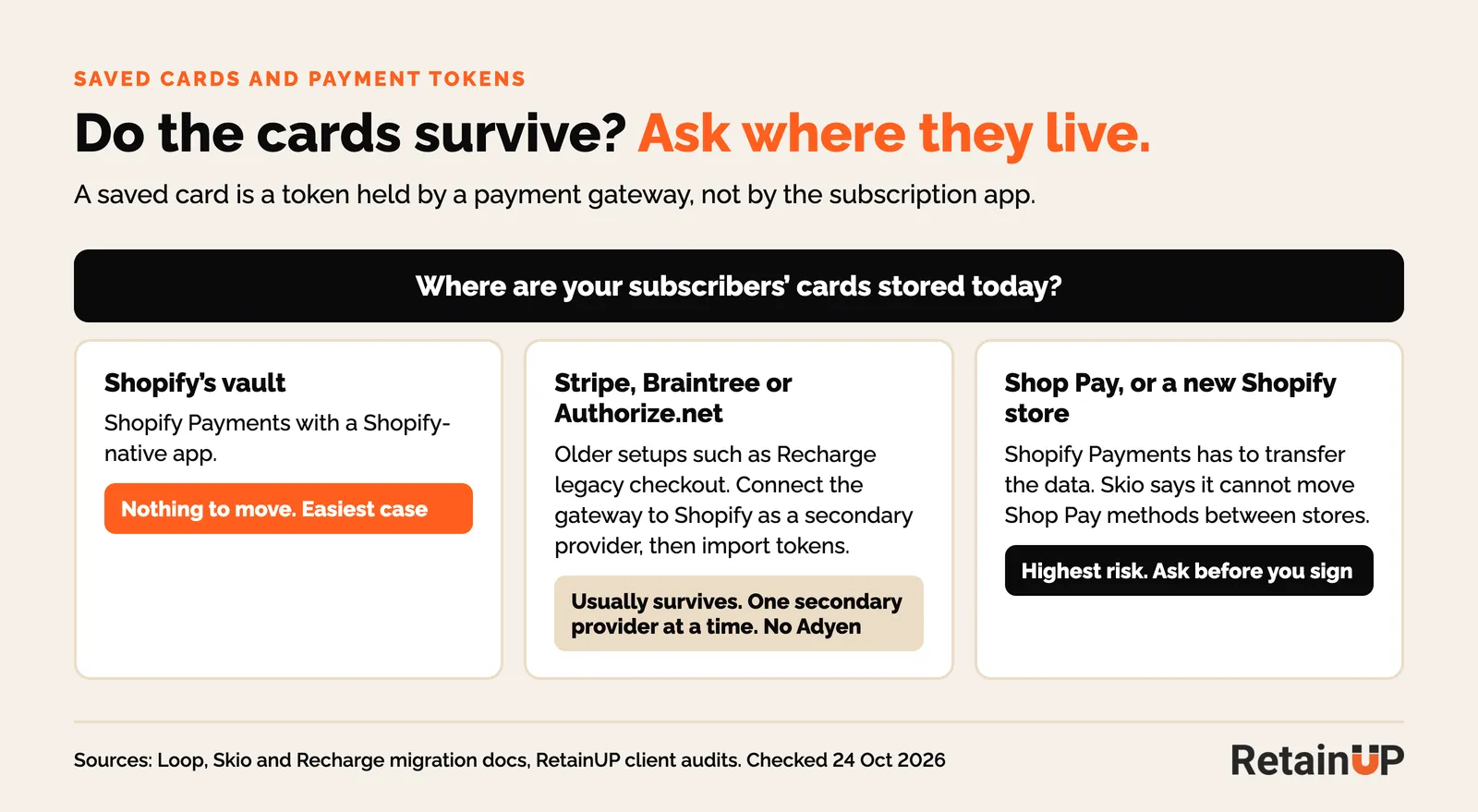
Three cases cover most brands.
Cards already in Shopify's vault
If you are on Shopify Payments with a Shopify-native app, the cards are already in Shopify. Loop's guide says there is no payment data to move in that case. This is the easy one.
Cards held by Stripe, Braintree or Authorize.net
Older setups, like Recharge's legacy checkout, keep cards at an outside gateway. That gateway gets connected to Shopify as a secondary provider and the tokens are imported. Loop's payment docs add two limits: billing keeps running through the outside gateway until the customer updates their card in Shopify, and Adyen tokens can't be migrated. Shopify allows one secondary provider at a time.
Moving from Braintree to Stripe first? Recharge says that transfer takes 7 to 14 business days, and charges for existing customers are blocked until it finishes. Move any charge dates out of that window.
Shop Pay and store-to-store moves
Moving to a new Shopify store is harder. Skio's docs say the Shopify Payments team has to transfer the card data, and that Skio cannot migrate Shop Pay payment methods from one store to another. On one Loop brand we audited, Shop Pay carried 64% of payment attempts. Ask about Shop Pay before you sign.
Subscribers who are mid-dunning
They usually arrive in the new app looking healthy. The retry schedule lives in the old app's billing engine, so the new app treats a failing subscriber as a normal active one. The next charge fails, and a fresh retry ladder starts from zero.
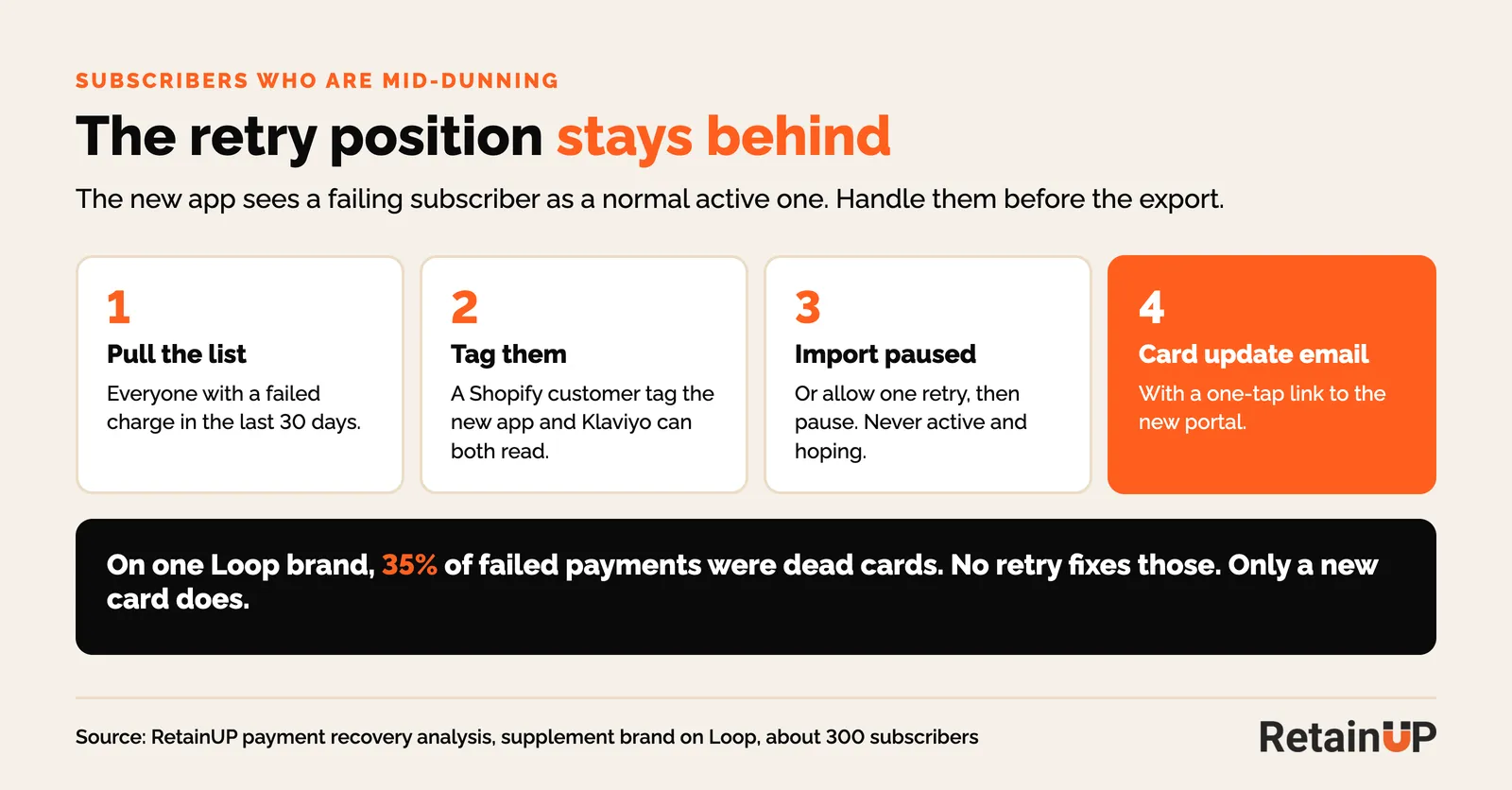
Before the export, pull everyone with a failed charge in the last 30 days. Tag them in Shopify. Decide one of two things for each: import them paused and send a card update email, or let the new app retry once and then pause. Don't import them active and hope.
This is the same leak as passive churn in a normal month, just bigger. On that Loop brand, 35% of failed payments were dead cards that no retry can fix. Only a new card brings those back.
Next charge dates
Keep them exactly. The new app should bill each subscriber on the day the old one would have. A shifted date reads as a surprise charge, and a surprise charge reads as a reason to cancel.
Two rules. Freeze edits in the old app once the export starts, because the migration team won't pick up changes made after. And never let both apps bill. Skio's process brings new subscriptions into Skio first, checks them for 24 to 36 hours, then moves existing subscriptions over 2 to 3 days, with recurring billing switched off in the old app.
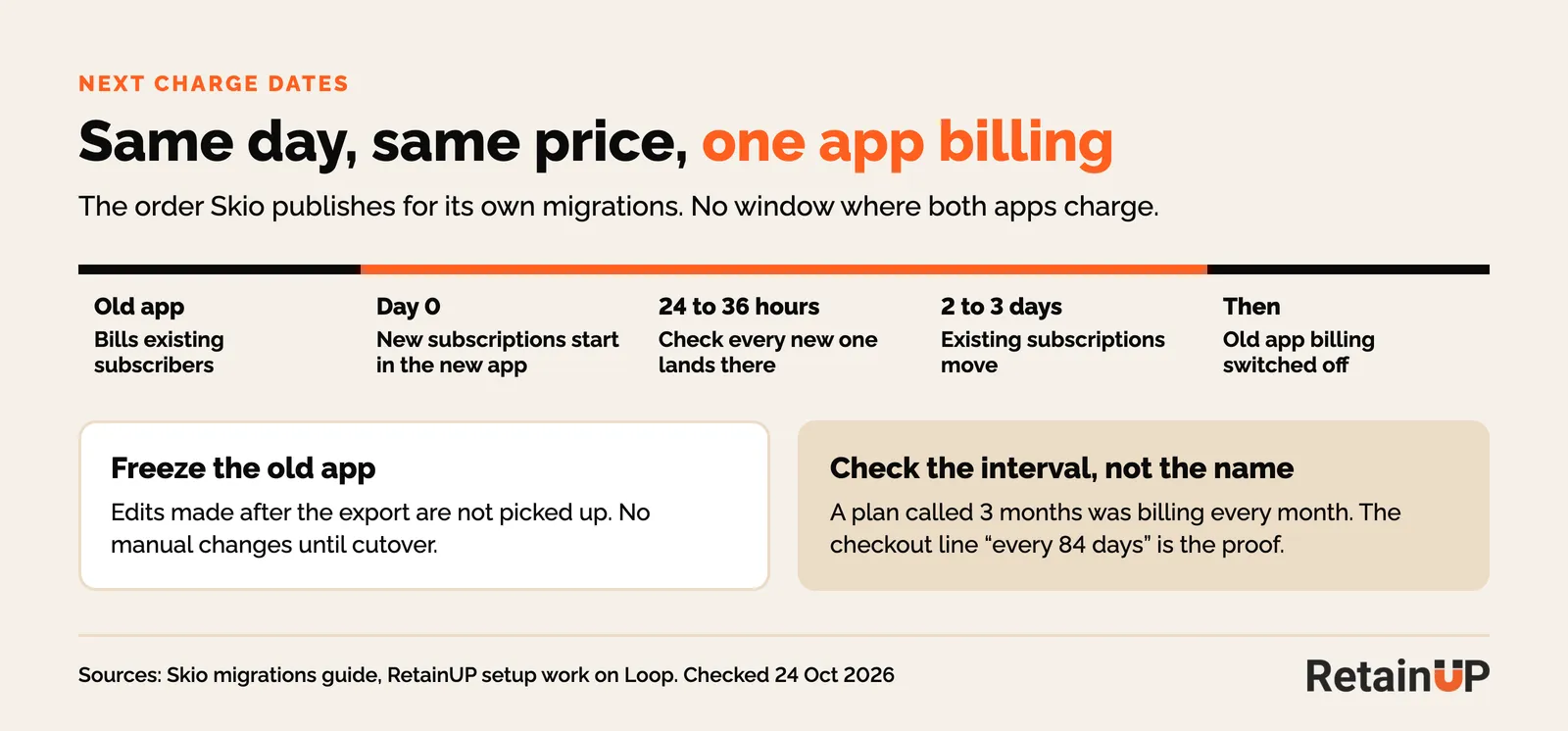
Then check the interval on every plan, not the name. On one Loop store, a plan called 3 months was set to deliver every month. The checkout's last line, "Recurring subtotal every 84 days", is the proof.
The customer portal
Every old portal link breaks on cutover day. They live in more places than you think: reminder emails, order confirmations, the account page, help center articles, SMS flows and saved bookmarks.
Redirect the old portal path to the new one. Skio says it updates login links and can redirect the old portal. Then click every link from a real subscriber account, on a phone. A subscriber who can't find skip will find cancel, or email support to do it.
Emails and flows
Don't assume the new app's notification emails match the old ones. Rebuild and read each one: upcoming charge, payment failed, card expiring, skip and cancel confirmations. Turn the old app's emails off the same day, or subscribers get two.
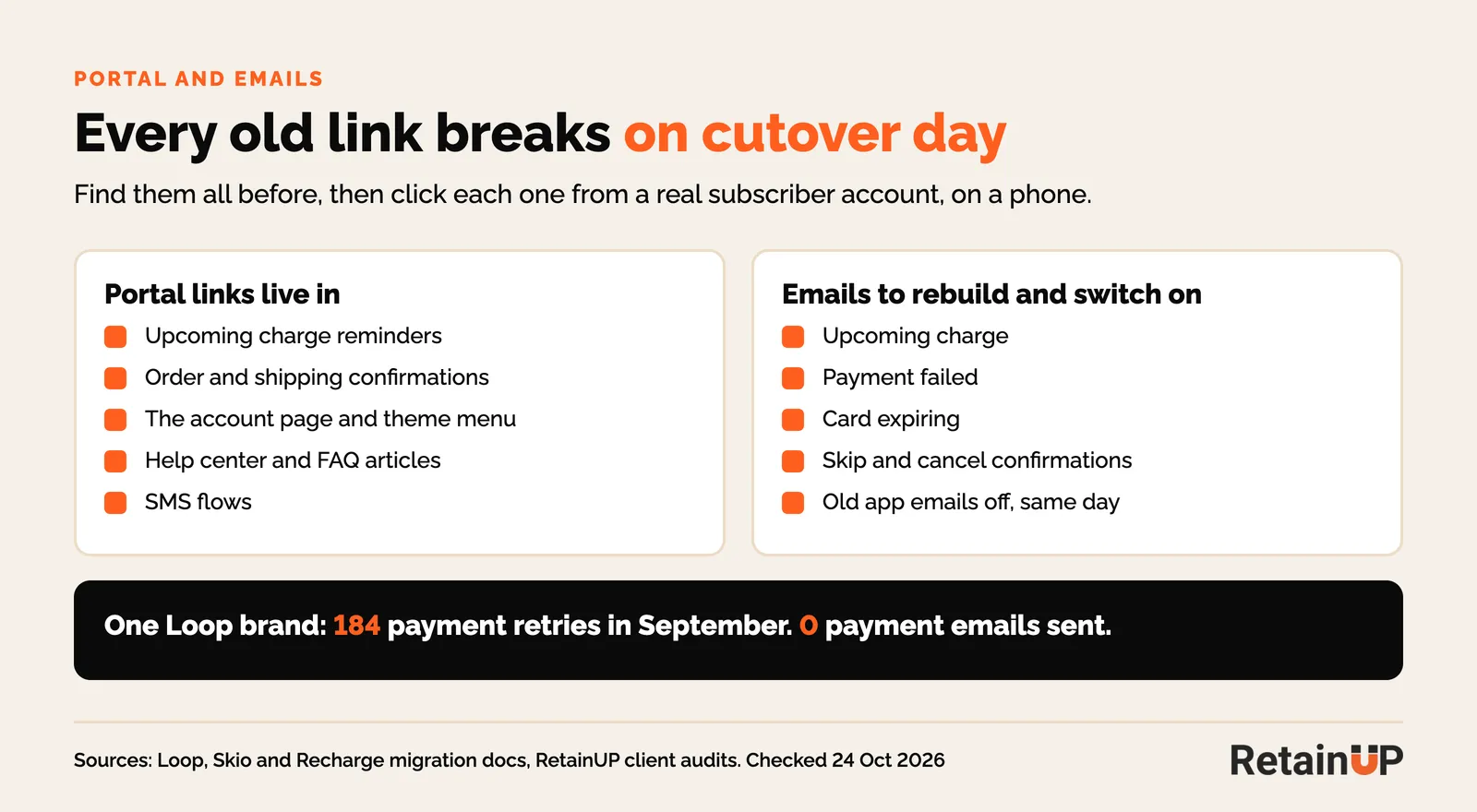
Check they are on, not just built. On one Loop brand, the payment failure emails had stopped in September. There were 184 retries that month and no emails. Nobody noticed, because nothing errors when an email doesn't send.
Klaviyo
Every Klaviyo flow triggered by the old app stops on cutover day. The new app sends its own events with its own names. The old metrics stay in Klaviyo, so the flows look fine. They just never trigger again.
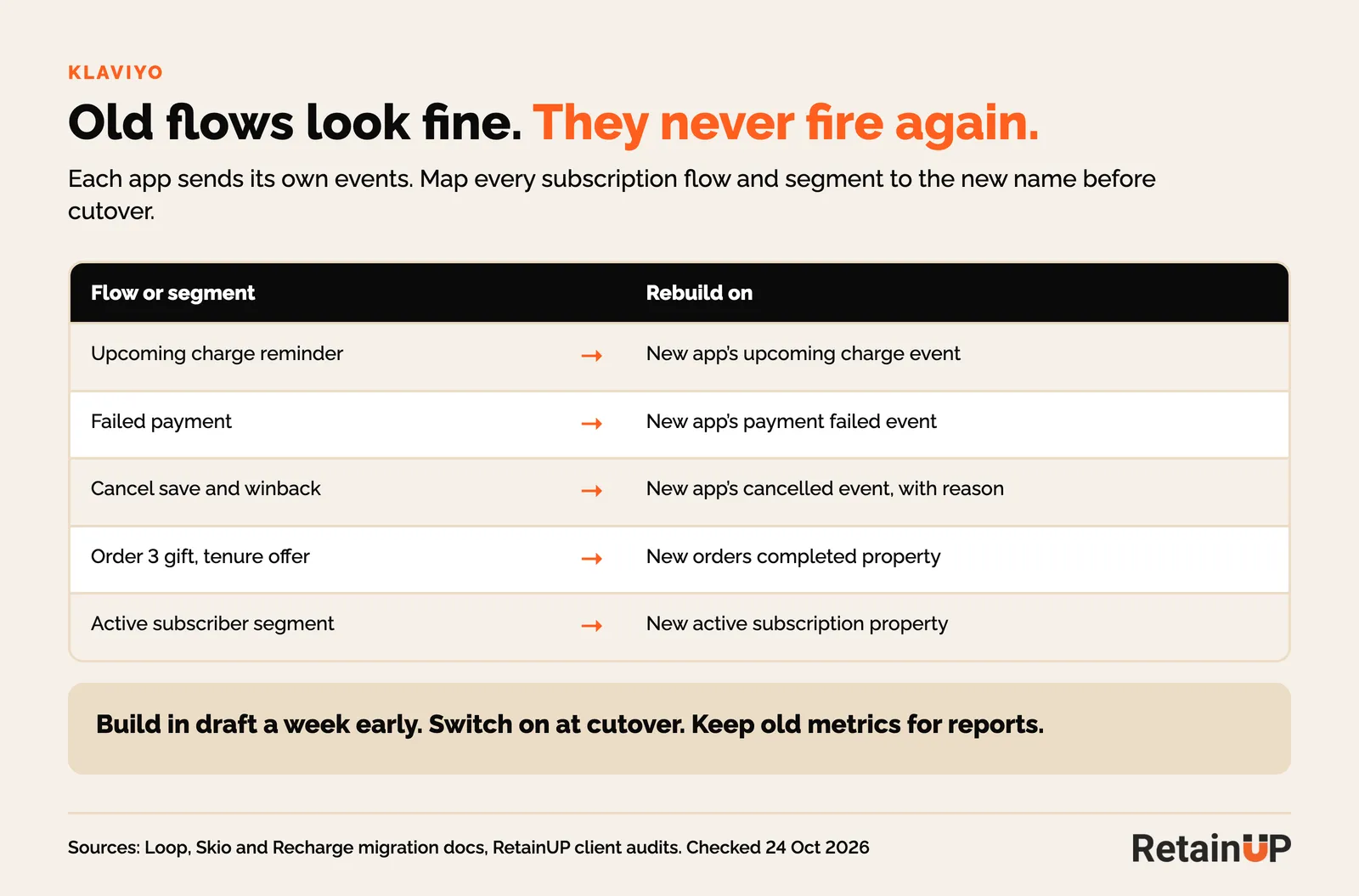
A week before cutover, list every flow and segment that uses a subscription metric or profile property. Map each one to the new app's event. Build the new versions in draft. Switch them on at cutover and turn the old ones off. Keep the old metrics for reporting.
The flows that matter most are the ones in our list of Klaviyo subscription automations: upcoming charge reminder, failed payment, cancel and winback. Segments built on "active subscriber" need the new property too.
Clean the data after cutover
A migration leaves debris in your numbers. Take it out before you read a single chart.
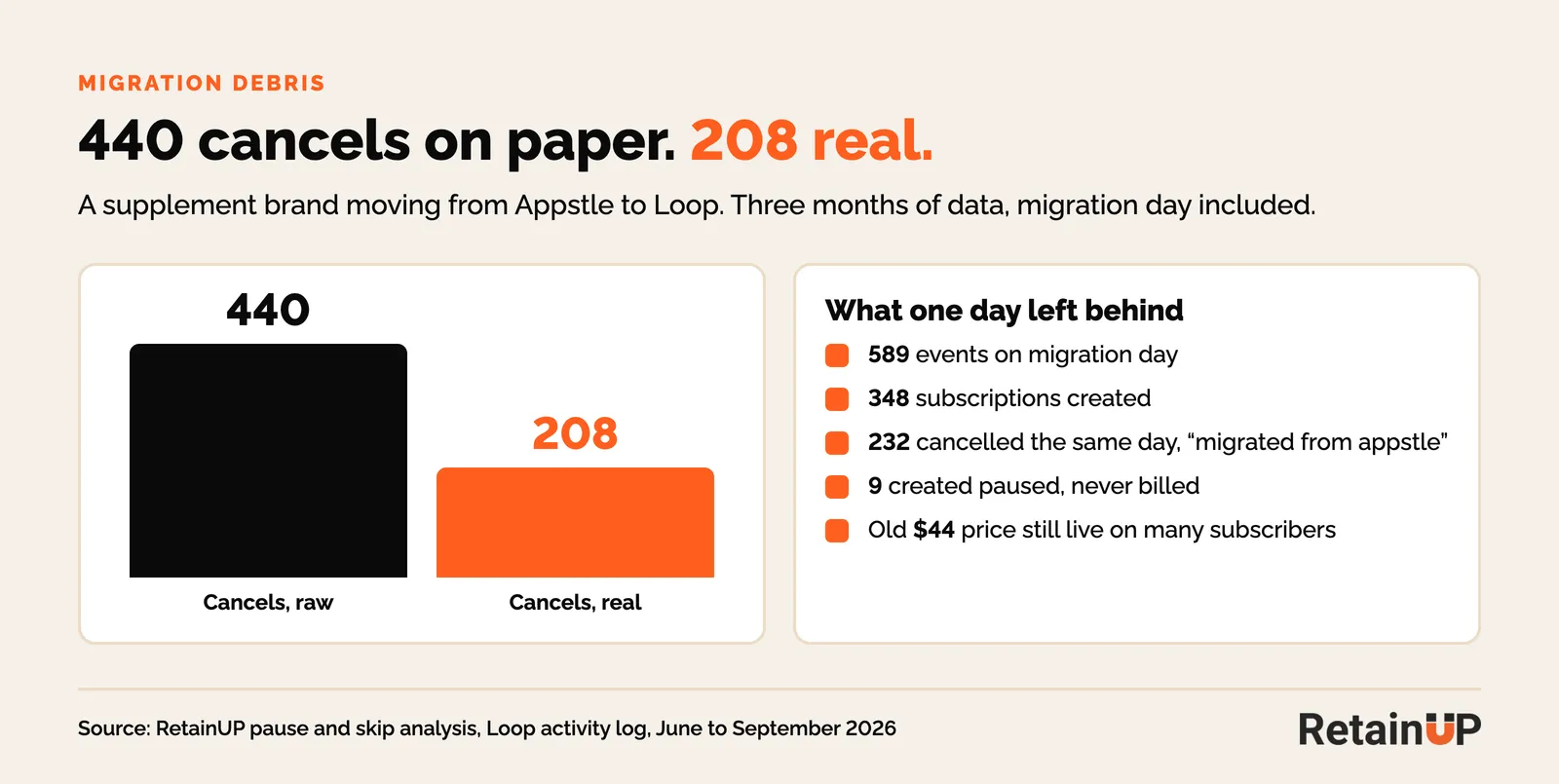
A supplement brand on Loop with about 300 subscribers moved from Appstle on 29 June. 589 events landed that day. The migration created 348 subscriptions and cancelled 232 of them, all tagged "migrated from appstle". Counted raw, the brand cancelled 440 subscriptions in three months. The real number was 208.
Nine more were created paused that day and never billed. They sat in the paused count for three months. And many subscribers still paid the old $44 a month, which is fine, as long as you know it before you test a price.
So in week one, rebuild active count from the activity log and match it to the dashboard. Filter migration events out of churn, cohort and save rate reports. Cohort charts get a break at the migration date, so read them as we describe in how to read a cohort chart.
Pre-migration checklist
Do these before you book a cutover date.
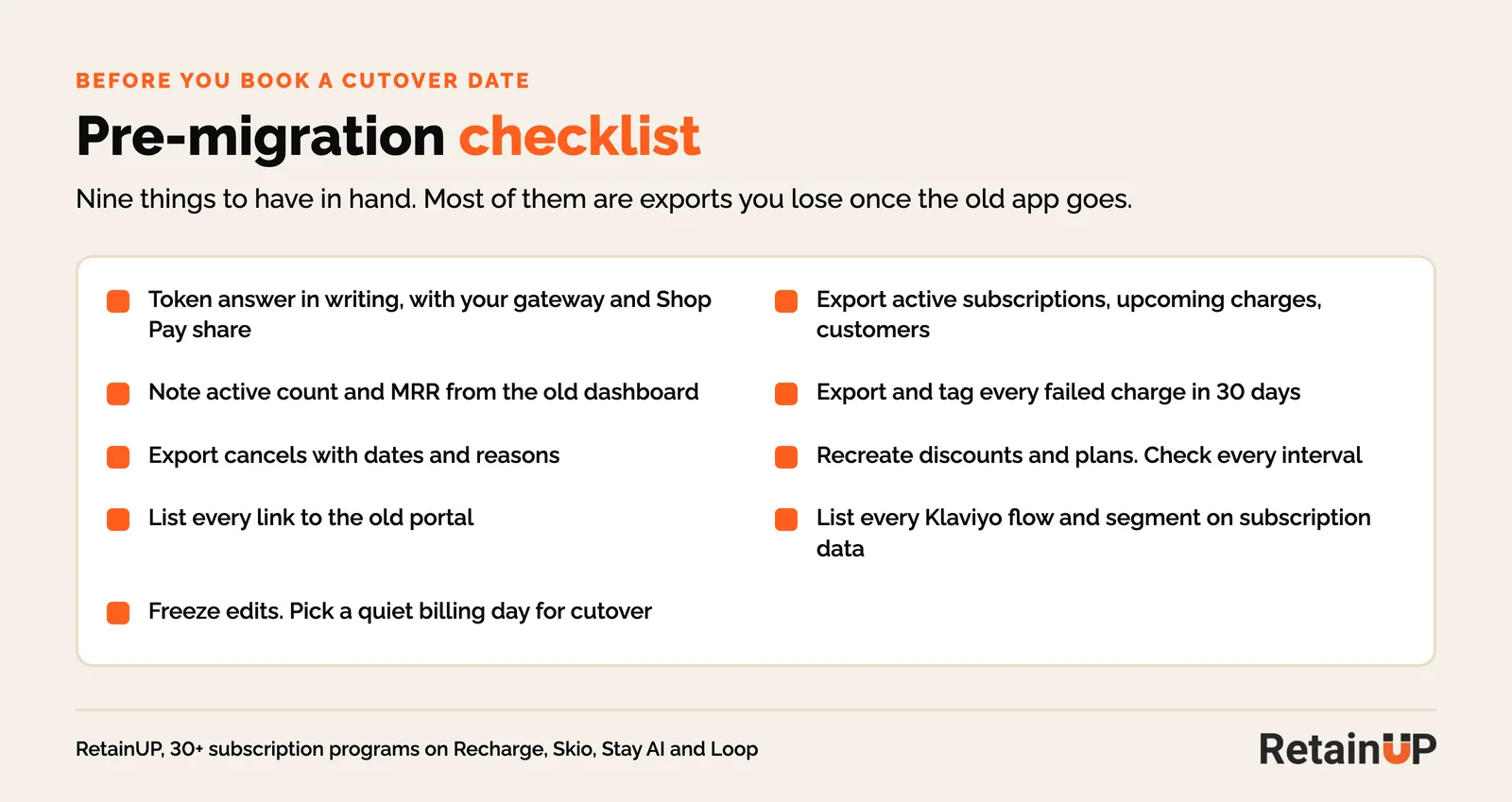
- Ask the new app, in writing, how your card tokens move. Name your gateway and your Shop Pay share.
- Export active subscriptions, upcoming charges and customers from the old app. Note the active count and MRR on its dashboard.
- Export everyone with a failed charge in the last 30 days. Tag them in Shopify.
- Export cancels with dates and reasons. You lose this history once the old app goes.
- Recreate discount codes and selling plans in the new app. Check every interval.
- List every email, help page, SMS and theme link that points at the old portal.
- List every Klaviyo flow and segment that uses a subscription metric or property.
- Agree a freeze: no manual edits in the old app from export to cutover.
- Pick a cutover day away from your biggest billing day.
Day-by-day migration plan
Most migrations run two to five weeks end to end. The cutover itself takes about a week. Here is the plan I would run, built from Skio's and Loop's published processes plus what breaks in practice.
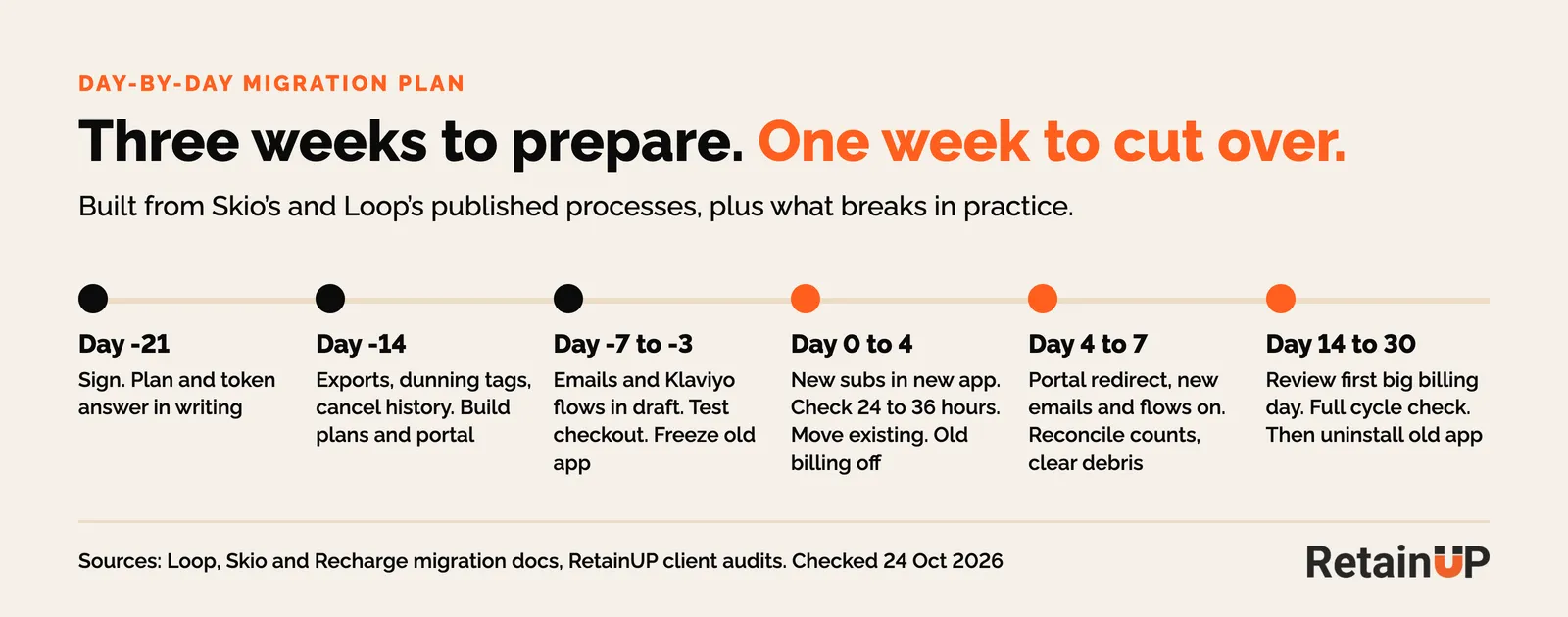
| Day | What happens |
|---|---|
| Day -21 | Sign. Get the migration plan and the token answer in writing |
| Day -14 | Exports, dunning tag list, cancel history. Build selling plans and the portal in the new app |
| Day -7 | Rebuild notification emails. Draft the new Klaviyo flows. Test checkout on an unlisted product |
| Day -3 | Freeze the old app. Final export |
| Day 0 | New subscriptions go into the new app. Publish the new theme widget |
| Day 1 to 2 | Check every new subscription lands in the new app |
| Day 2 to 4 | Approve the migration preview. Existing subscriptions move. Old app billing off |
| Day 4 | Portal redirect live. Old emails off, new emails and Klaviyo flows on |
| Day 7 | Reconcile active count and MRR against the old export. Clear migration debris |
| Day 14 | Review the first big billing day: failures, support tickets, double charges |
| Day 30 | One full cycle done. Compare cancel and failure rates to the month before. Then uninstall the old app |
How long does a subscription app migration take?
Two to five weeks, depending on the app and your gateway. Skio puts the full integration and migration at 4 to 5 weeks. Loop says about two weeks, with a test environment and post-launch support. A gateway change adds 7 to 14 business days.
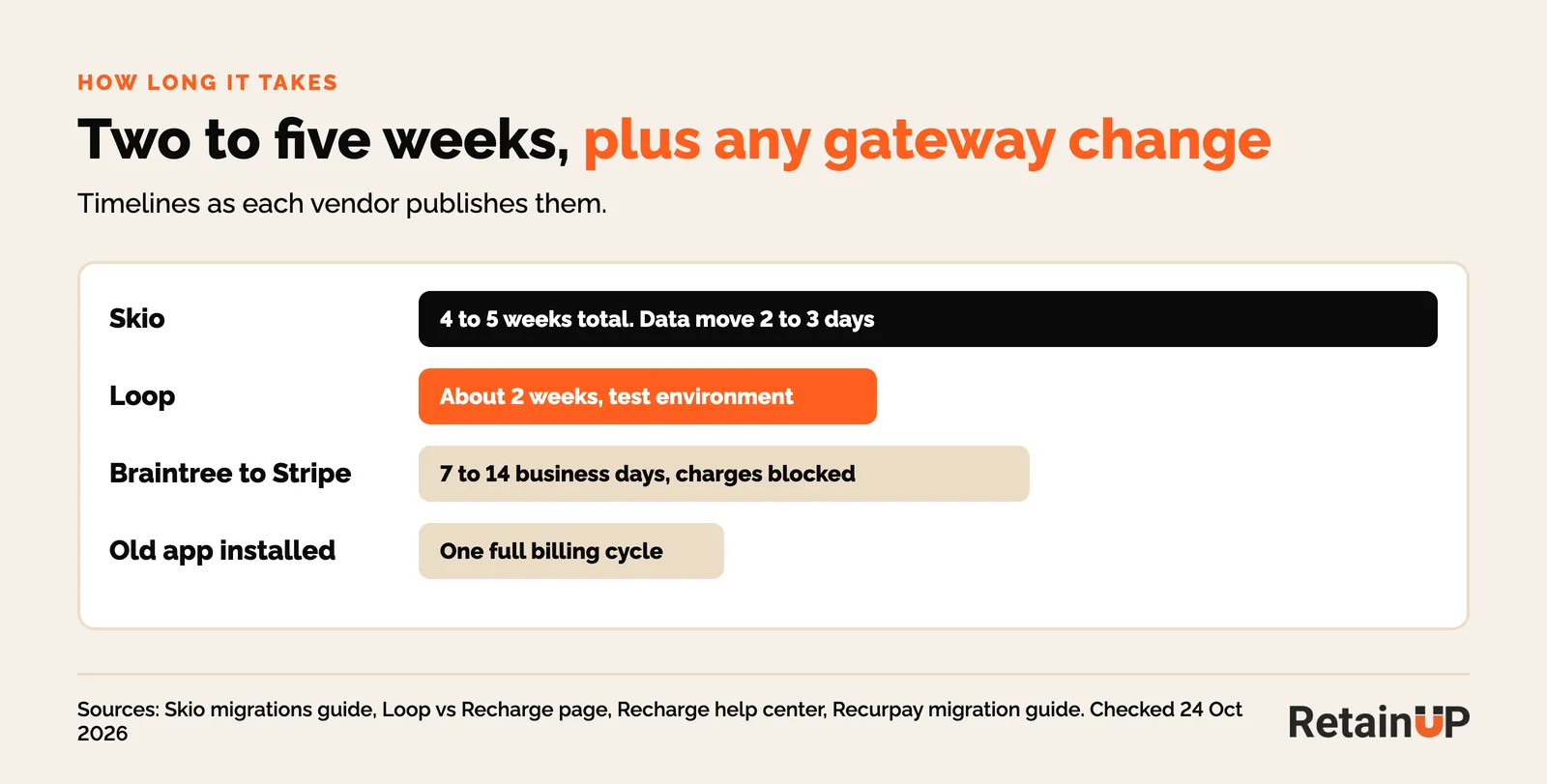
Plan around your billing calendar, not the vendor's. Once the dust settles, a free subscription audit will show whether the new setup is doing its job.
FAQ
Will my subscribers have to re-enter their cards?
Not if your payment gateway stays the same or its tokens can be imported into Shopify. They may have to if you change gateway or move to a new Shopify store. Shop Pay methods are the hardest to move between stores.
Will subscribers notice the switch?
They notice a new portal and new emails. Charge dates and prices should not change. Tell them a week before, with the new portal link, so the first email from the new app is expected.
Can I migrate from Recharge to Loop, or Skio to Recharge?
Yes. Every major app runs migrations from the others, and Loop, Skio and Stay AI list it in their paid plans. Recharge now owns Skio, so a move between those two is in-house.
What happens to subscribers in failed payment retries?
Their retry position stays behind in the old app. Export them first, tag them, and import them paused with a card update email, or they show up active and fail again.
Should I switch apps to fix churn?
Only for a lever your app can't set, like bundles or a backup card. Most churn problems we find are setup, and they move with you to the new app. Our Subscription LTV Maximizer fixes the setup in 30 days, on whichever app you run.
One email a week on subscription retention: the numbers, the strategy, and what to fix first.

Rahi Jain
Rahi Jain is a subscription LTV specialist who helps DTC brands maximize their LTV from subscriptions.
More about Rahi