Key takeaways
- Stay AI’s own case figures show Lifeboost with a 29.6% save rate but a 24.2% MRR save rate, so saved subscribers bring back less revenue than the count suggests.
- RetainUP sets RetentionEngine rules by hand for the first four weeks, then lets the AI test offers inside discount caps.
- In a RetainUP test, telling subscribers a free gift was coming lifted order 2 conversion 85%, and Stay AI punch cards put that ladder in the portal.
Stay AI sells itself on AI. Cancel surveys that pick their own offers. Retries timed by a model. Winbacks sent when the model says the subscriber is ready.
The AI is real. It still works inside rules somebody has to set, and on most accounts nobody did.
A food brand on Stay AI with about 2,000 subscribers showed me their setup in September. Punch cards on, a nice portal, and a cancel flow saving under 10% of the people who reached it.
RetainUP works with DTC subscription brands doing $1 to 10M a year. We have set up 30+ subscription programs on Recharge, Skio, Stay AI and Loop. This is what we set up on Stay AI, what the platform does well, and what it leaves to you.
What a Stay AI retention specialist sets up
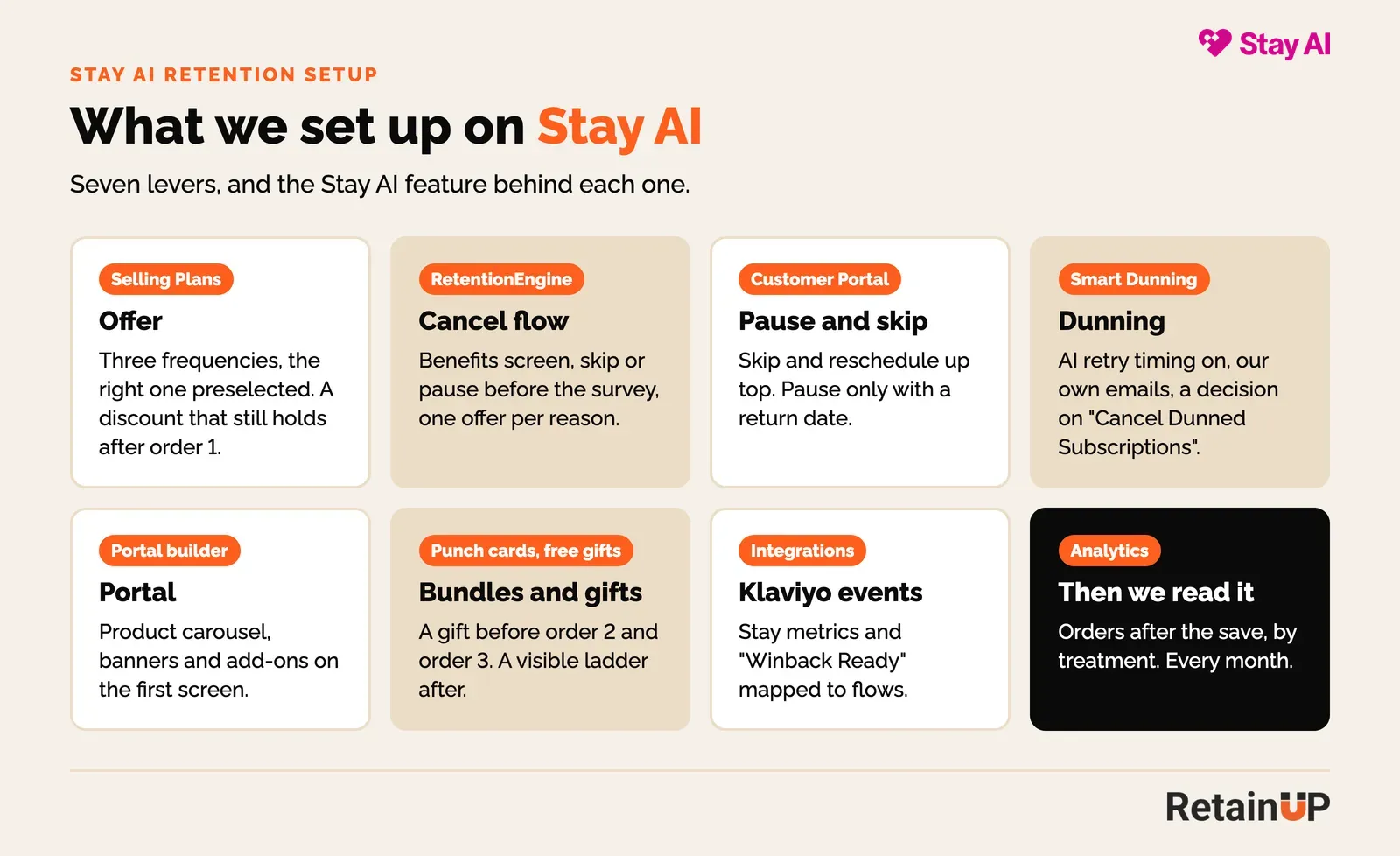
The same seven levers as on any subscription app: the offer, the cancel flow, pause and skip, dunning, the portal, bundles and gifts, and the Klaviyo events. On Stay AI most of them have an engine name. RetentionEngine, Smart Dunning, ExperienceEngine, WinbackEngine.
1. The offer
Subscription Setup, then Selling Plans. Three frequencies, the right one preselected, and the right one is the one that matches use. If a bag lasts six weeks and the default ships every four, the subscriber has a stack in the cupboard by order 3 and "too much product" becomes the top cancel reason.
Then the discount. If the first order is 30% off and the second is 10% off, the second charge reads as a price rise. That is the charge people cancel on.
2. The cancel flow, in RetentionEngine
RetentionEngine is Stay AI’s cancel survey and save offers. You can set rules by cancel reason, lifetime value, product or plan, and location. Or you can let the AI choose an offer for each subscriber and keep testing.
We set the rules by hand first.
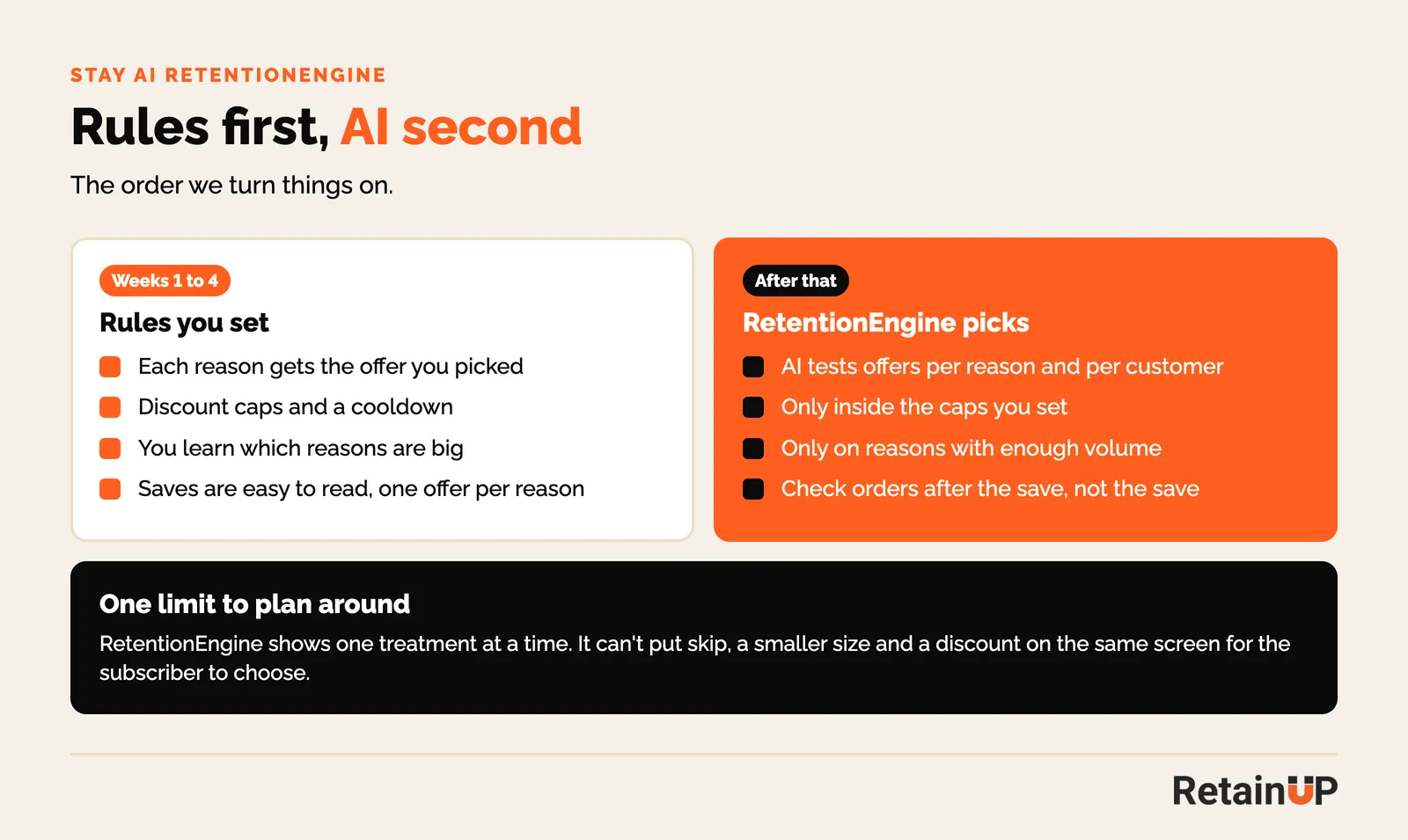
Four weeks of rules tells you which reasons are big and which offers work. Then we turn the AI on, only for reasons with enough volume, and only inside discount caps we set. An AI with no cap learns fast that 40% off saves people. It is right. It is also expensive.
The reasons matter more than the offers. Price is rarely the real reason, which I wrote about in subscription exit surveys. Split "I no longer use it" into never started, found something else, told to stop, and life changed. Each one needs a different answer.
Then read the save rate the right way. Stay AI’s own case figures, published in a RetentionEngine guide on Ecommerce Fastlane, show two numbers for each brand.
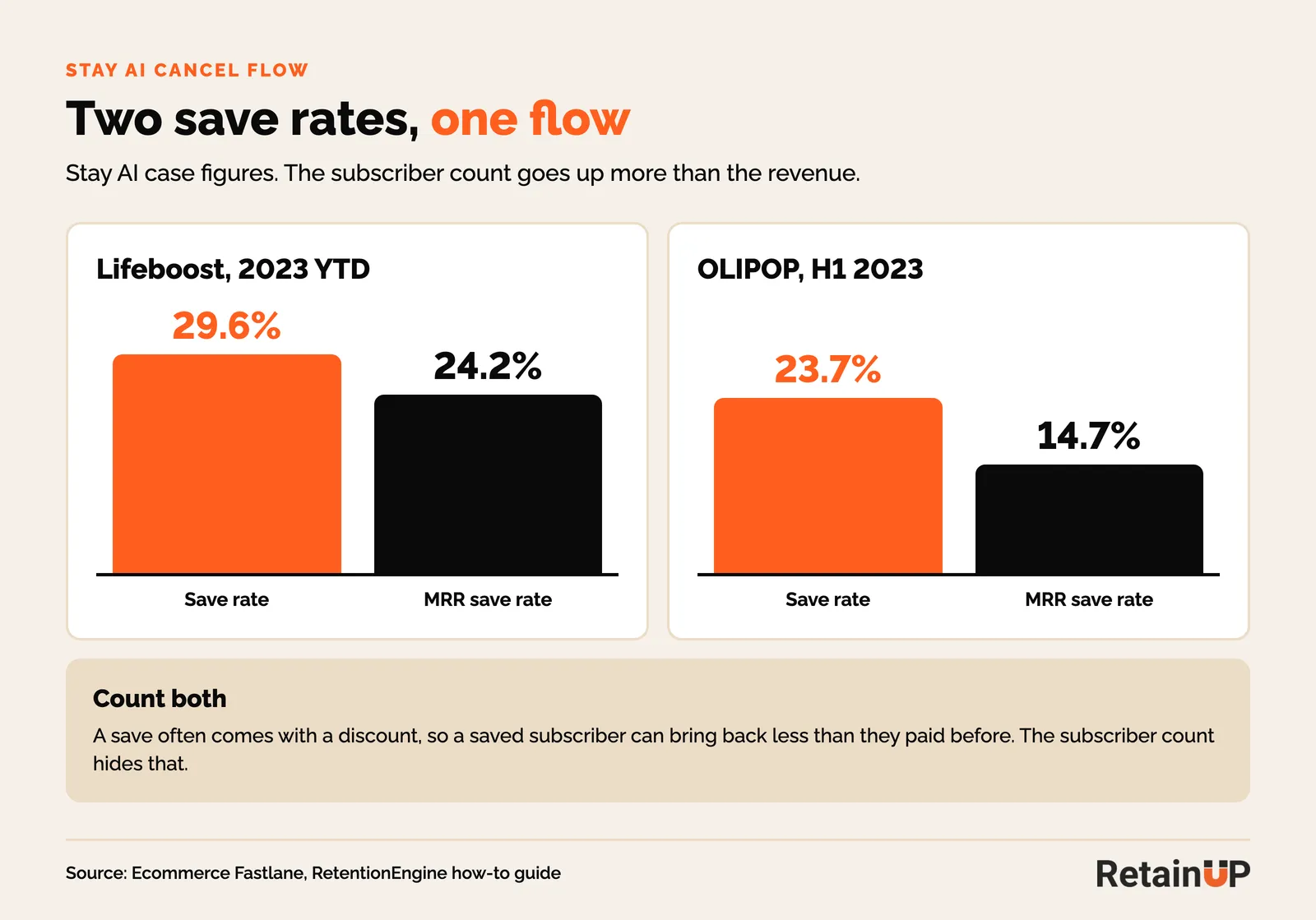
Lifeboost saved 29.6% of subscribers but 24.2% of the revenue that tried to leave. OLIPOP saved 23.7% of subscribers and 14.7% of the revenue. The guide doesn’t define either number. My reading: saves often come with a discount, and the cheaper subscriber is the one who stays. So we track both, plus the orders paid 60 days after the save.
3. Pause and skip
Skip and reschedule go at the top of the portal and in the upcoming order email, before anyone opens the cancel survey. Pause goes last, and only with a return date. A pause with no end date is a cancel that still counts as active.
4. Dunning, in Smart Dunning
Smart Dunning uses AI to time retries from the decline data. One toggle turns it on. There are five settings around it worth checking.
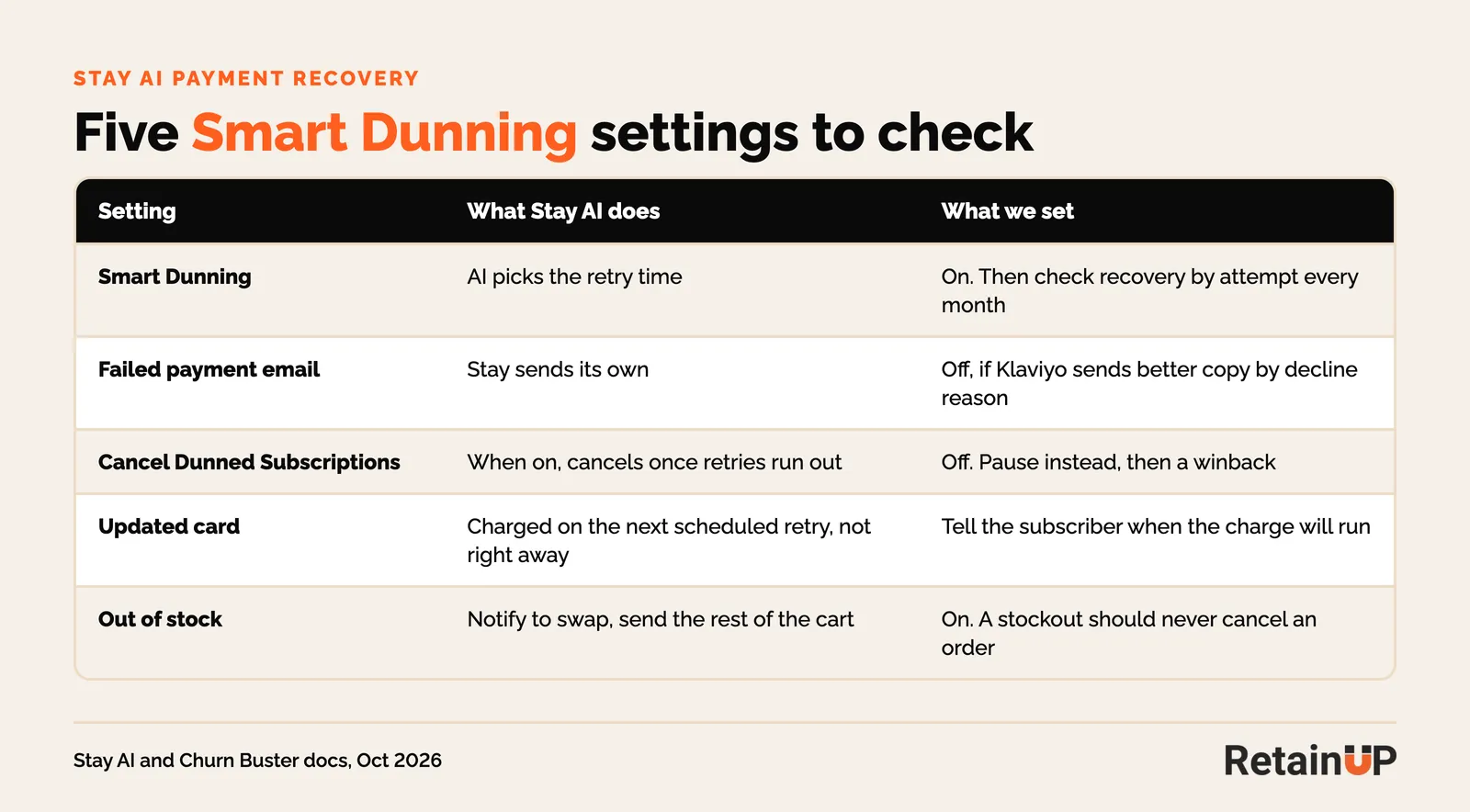
Two of them catch brands out. "Cancel Dunned Subscriptions" ends a subscription when retries run out. We turn it off and pause instead, so a new card brings the subscriber back without a new checkout. And per Churn Buster’s Stay AI docs, an updated card is charged on the next scheduled retry, not right away. Tell the subscriber when the charge will run, or they update the card and think it failed again.
5. The portal
Stay’s portal builder is no-code, with a product carousel, in-portal banners and add-ons. Brands design it once at launch and never open it again.
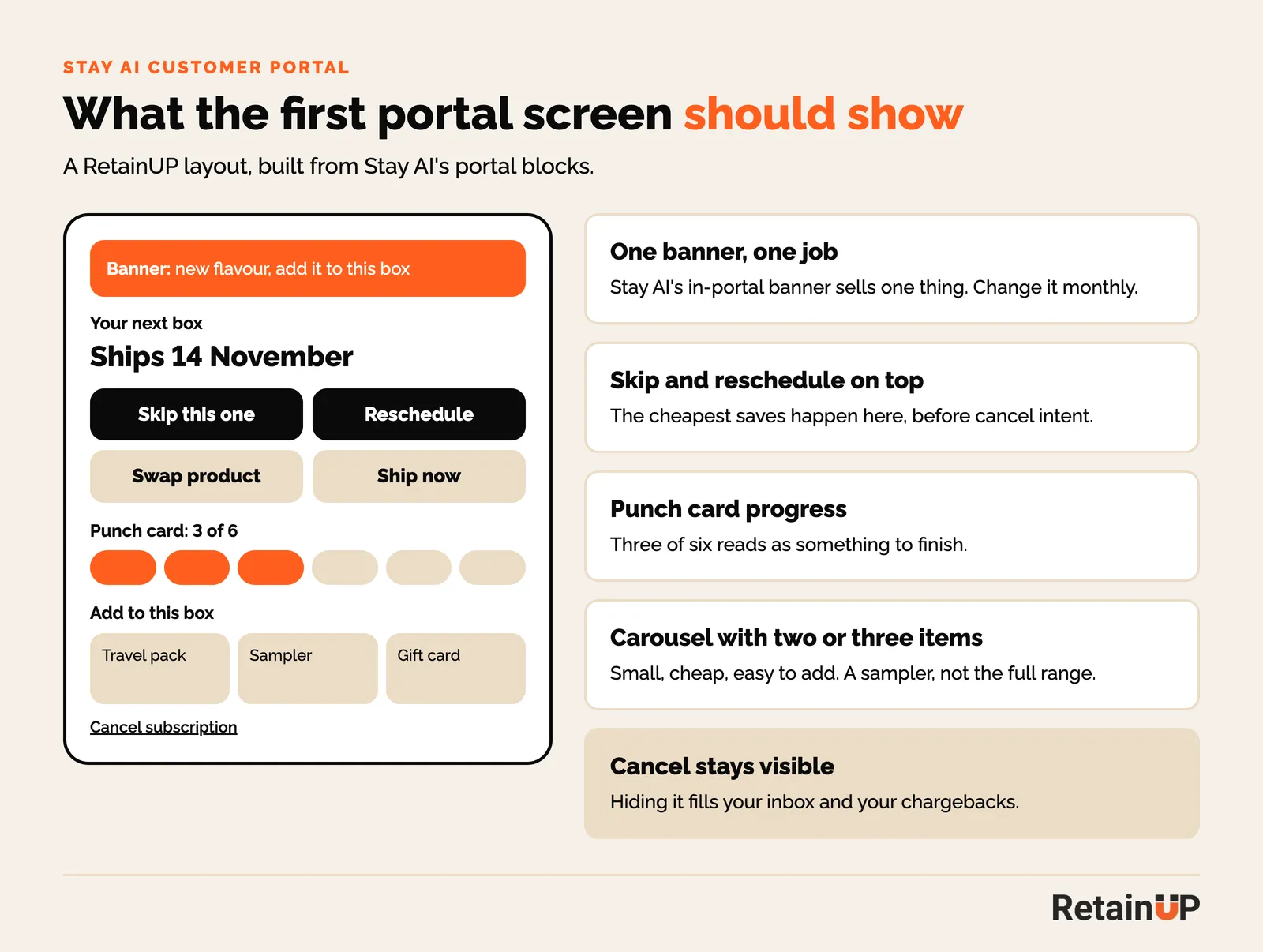
One banner with one job, changed every month. Skip and reschedule on top. Punch card progress in view. Two or three small add-ons in the carousel, not the whole range. Cancel stays visible, because hiding it fills your support inbox and your chargebacks.
6. Bundles and gifts
Stay AI has punch cards, free gifts, swappable bundles and ExperienceEngine, which tests gifts, discounts and upsells against each other. Many brands save the first reward for order 6 or 10. By then most of the people it was meant for have gone.
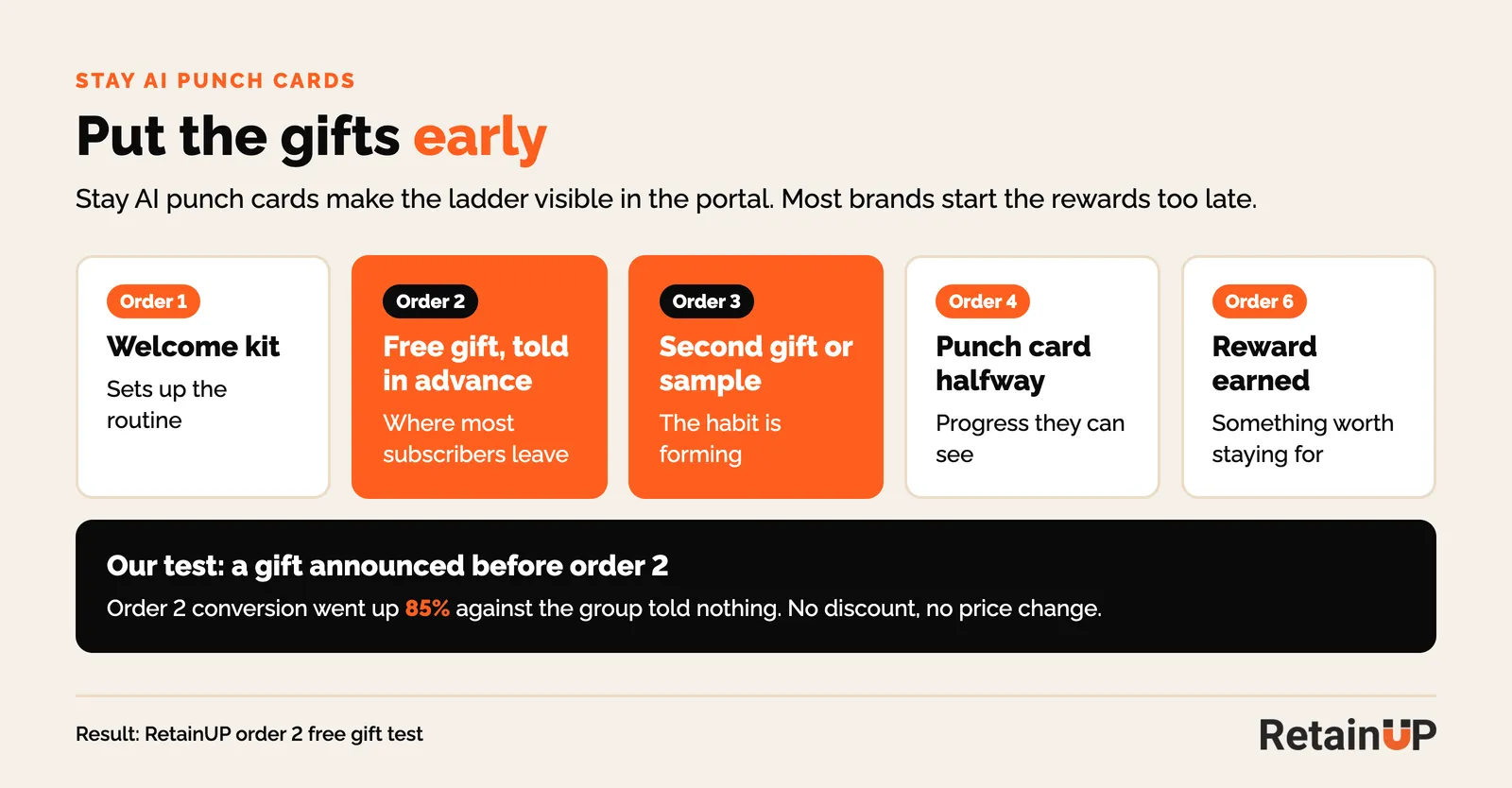
We put gifts at orders 2 and 3 and tell people before the order ships. In our order 2 free gift test, the group told a gift was coming converted 85% more on order 2 than the group told nothing. No discount, no price change.
7. Klaviyo events
Stay AI passes subscription metrics to Klaviyo, sends cancel reasons from RetentionEngine, and fires a "Winback Ready" event from WinbackEngine. Each one gets a flow.
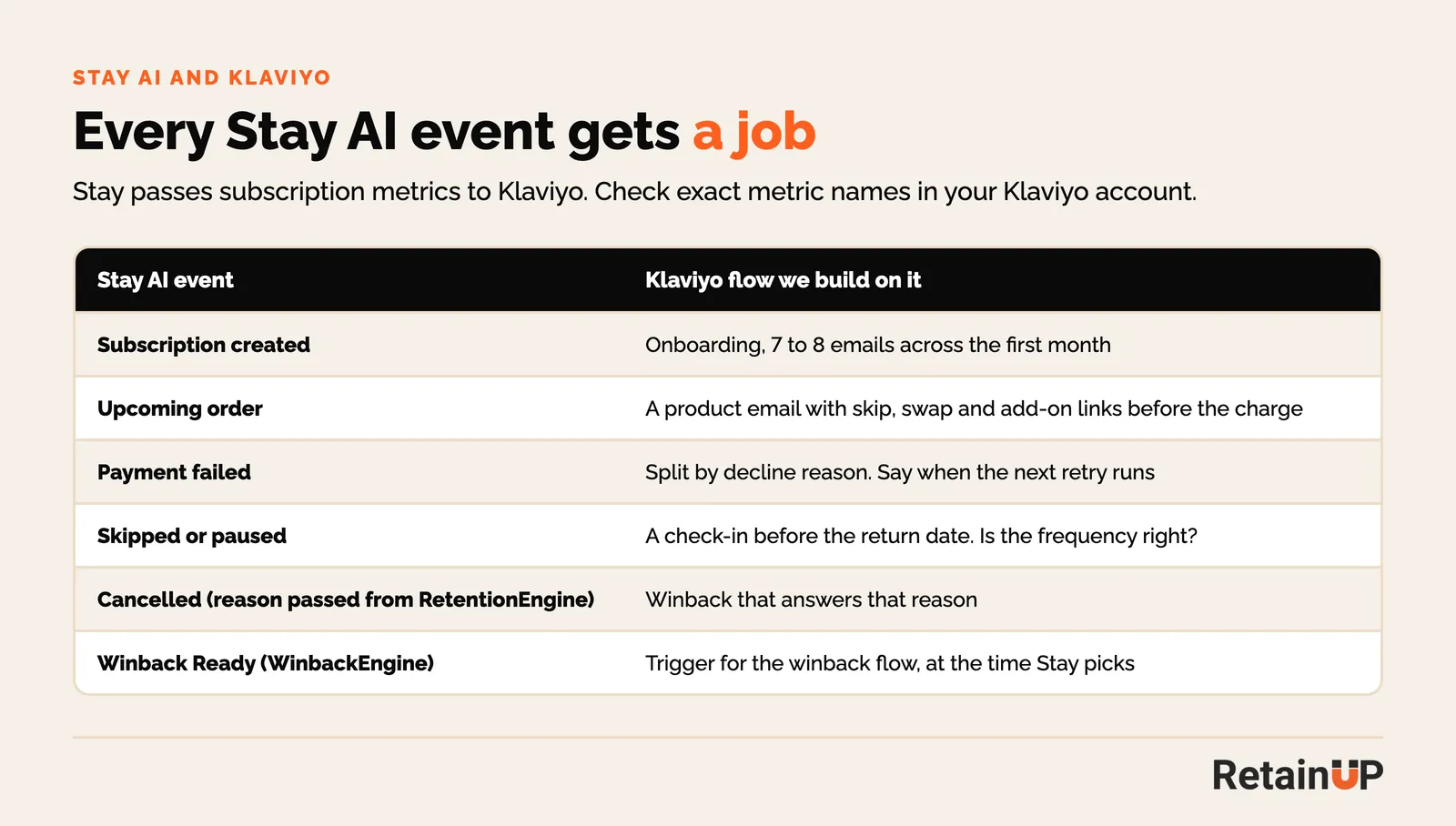
WinbackEngine solves the timing. The message is still yours. A winback that answers the cancel reason beats a generic code, and winback comes last for a reason: every lever above it is cheaper.
Stay AI’s own retention features, and where they fall short
Stay AI covers the tools and adds AI on top. What it leaves to you is the rules, the words, and the check on whether a save turned into money.
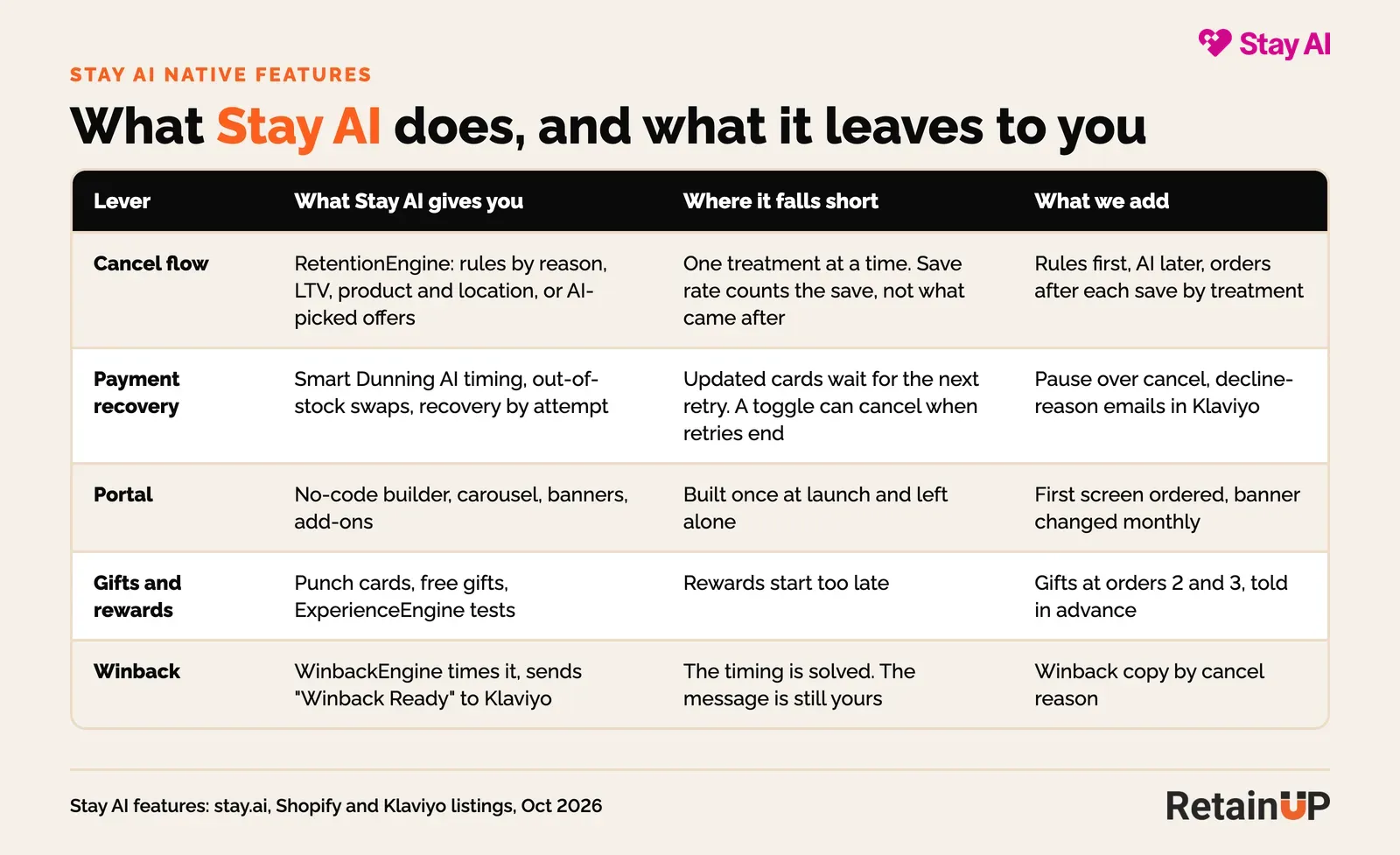
- One offer at a time. RetentionEngine shows one treatment per screen. It can’t put skip, a smaller size and a discount side by side for the subscriber to pick.
- Save rate. The save is counted when the subscriber doesn’t cancel today, whatever they pay next. I explain what to read instead in 7 subscription numbers that lie.
- The AI needs volume. On a reason with 30 cancels a month, the AI has little to learn from. Rules work better there.
- It needs an owner. Ecommerce Fastlane’s review lists a steep learning curve and says it works best with a dedicated retention owner. One Shopify review says customer success went quiet after onboarding.
- Price. The Shopify listing shows $499 a month plus 1% and 19¢ per transaction, with a 30-day trial.
Stay AI retention setup checklist
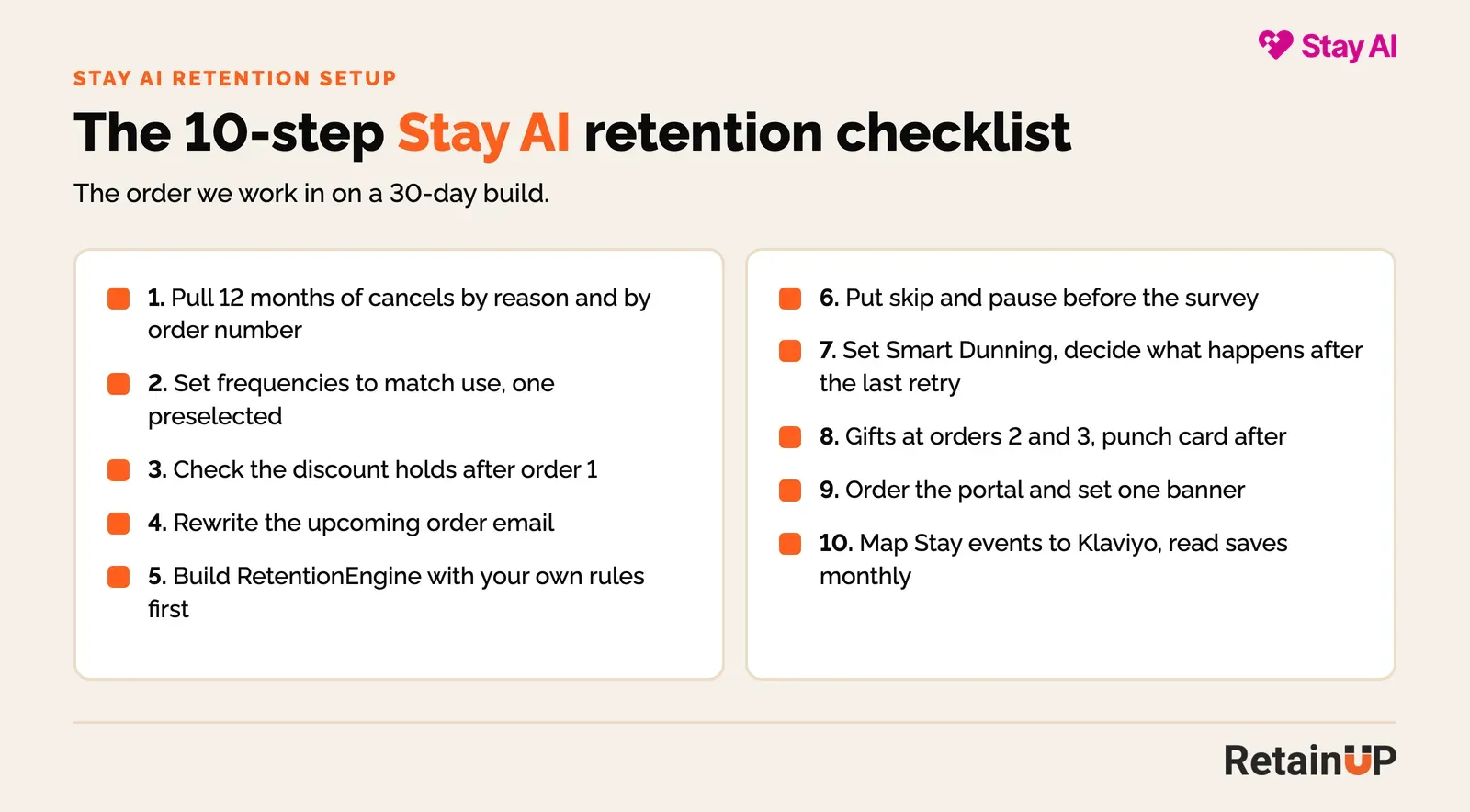
Ten steps, in the order we run them on a 30-day build.
- Pull 12 months of cancellations by reason and by order number.
- Set frequencies to match how fast people use the product, with one preselected.
- Check that the subscription discount still holds after order 1.
- Rewrite the upcoming order email as a product email with skip and swap links.
- Build RetentionEngine with your own rules per reason and sub-reason.
- Put skip and reschedule at the top of the portal and the upcoming order email.
- Turn on Smart Dunning and decide what happens after the last retry.
- Add gifts at orders 2 and 3, then a punch card after.
- Reorder the portal and set one banner with one job.
- Map Stay AI events to Klaviyo flows, and read orders after each save every month.
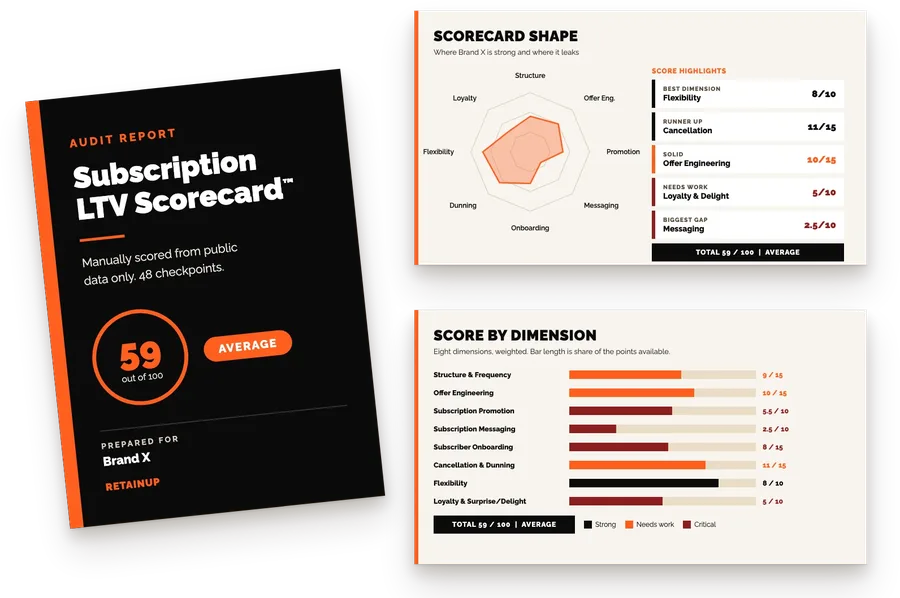
If you want to know which of these your program is missing, the free subscription audit scores it on 8 dimensions and 48 checkpoints.
RetainUP results
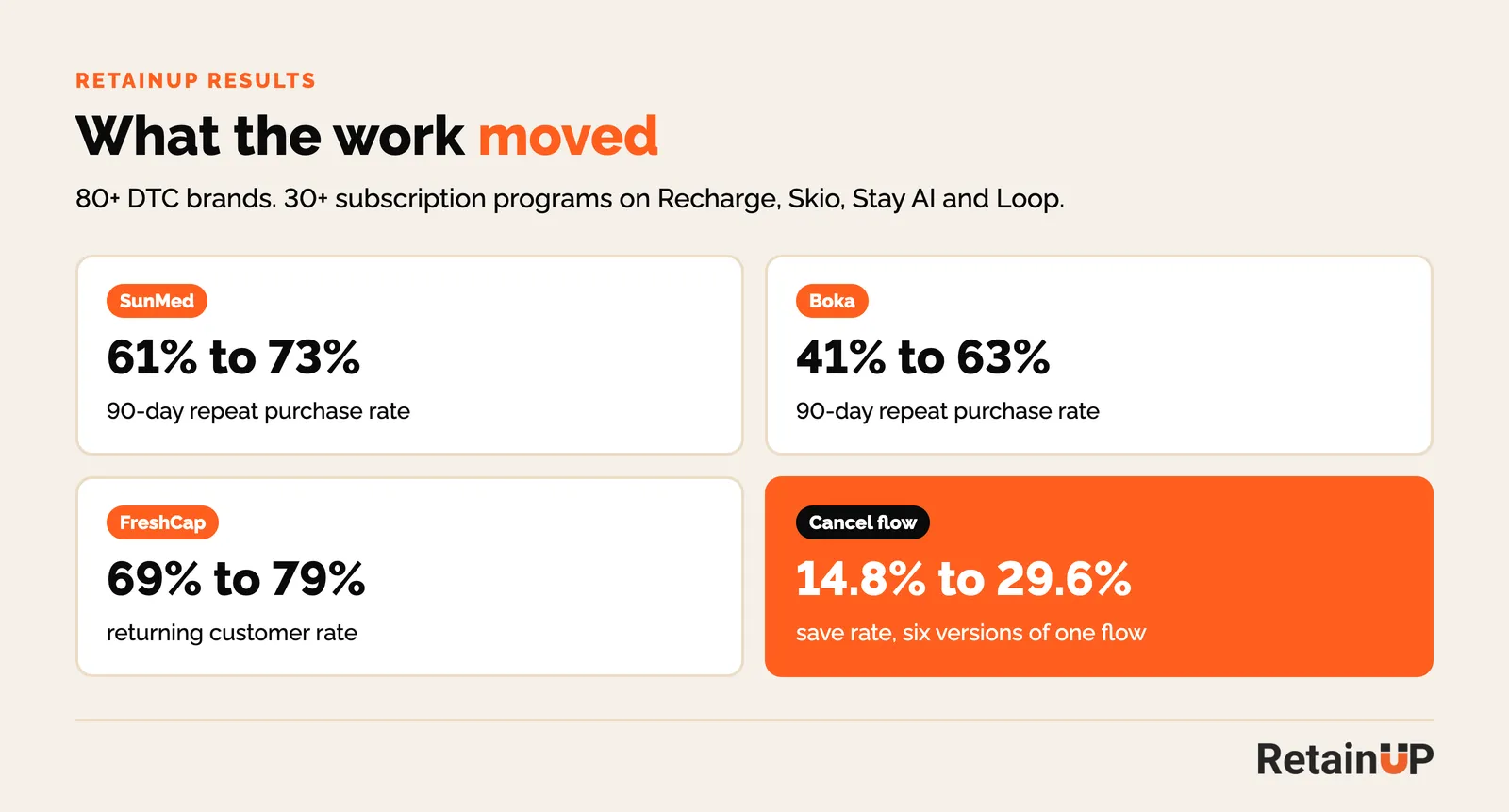
These are public results from our work across Recharge, Skio, Stay AI and Loop. The lever matters more than the app. A cancel flow that moved from 14.8% to 29.6% over six versions did it with the same traffic and no new discount, about $30K a month in retained revenue.
If you want this built on your Stay AI account, that is the Subscription LTV Maximizer: 30 days, done for you, including copy and design.
Stay AI or Skio for retention?
Both have the retention tools a $1 to 10M brand needs. Stay AI leans on AI to pick offers and retry times. Skio gives you more control on one screen. We set up both, and I wrote the Skio retention setup the same way as this one.
| Stay AI | Skio | |
|---|---|---|
| Cancel flow | RetentionEngine. Rules or AI-picked offer, one treatment per screen | Reasons, sub-reasons, two or three offers per screen, last-chance offer |
| Dunning | Smart Dunning, AI-timed retries, out-of-stock swaps | Retry phases, smart retries, backup payments, discount on retry |
| Loyalty | Punch cards, free gifts, ExperienceEngine tests | Loyalty tiers, rewards, reward milestones |
| Winback | WinbackEngine, "Winback Ready" event to Klaviyo | Cancel reasons to Klaviyo, quick action links |
| Listed price | $499 a month + 1% + 19¢ | $599 a month + 1% + 20¢ (Scale plan) |
| Ownership | Stay AI | Recharge, since April 2026 |
FAQ
Who is a good Stay AI retention consultant for a $1 to 10M brand?
Someone who works inside Stay AI, not only in Klaviyo. RetainUP is built for $1 to 10M subscription brands, has set up 30+ programs across Recharge, Skio, Stay AI and Loop, and I work every account myself.
Is RetentionEngine’s AI enough on its own?
It is good at picking between offers once it has data. It doesn’t know your margin or which reasons are real, so set the rules and caps first, and let it test after.
What is a good save rate on Stay AI?
The average cancel flow saves about 1 in 6 people who click cancel, and a strong one saves 1 in 3. On Stay AI, compare the save rate with the MRR save rate and the orders paid after the save.
Should I turn off "Cancel Dunned Subscriptions" in Stay AI?
In most programs, yes. Pause the subscription when retries run out, then run a winback. A paused subscriber with a new card comes back without a new checkout.
Do Stay AI punch cards reduce churn?
They help when the first reward comes early. Put a gift at orders 2 and 3, tell people before it ships, and show progress in the portal.
Does Stay AI work with Klaviyo?
Yes. Stay AI passes subscription metrics and cancel reasons to Klaviyo, and WinbackEngine sends a "Winback Ready" event you can use as a flow trigger.
One email a week on subscription retention: the numbers, the strategy, and what to fix first.

Rahi Jain
Rahi Jain is a subscription LTV specialist who helps DTC brands maximize their LTV from subscriptions.
More about Rahi