Key takeaways
- In Loop's own data from 441,000+ cancel attempts, a generic discount saves about 6% and a three-stage cancel flow about 15%.
- Loop's Streaks, Flows, backup payment method and hard-decline handling are on the $399 a month Pro plan, not Starter.
- RetainUP moved one client's cancel flow save rate from 14.8% to 29.6%, and a gift notice before order 2 lifted conversion 85%.
Loop ships more retention tools than most brands switch on. Cancel flows with a benefits page. Quick Actions. Streaks. Payment recovery with a backup card. On the Loop stores I audit, half of it is off and the other half runs on defaults.
RetainUP works with $1-10M DTC subscription brands as a subscription LTV specialist. We have set up 30+ subscription programs on Recharge, Skio, Stay AI and Loop. This is the Loop setup we run, what Loop does well, and where it leaves the work to you.
What a Loop retention setup covers
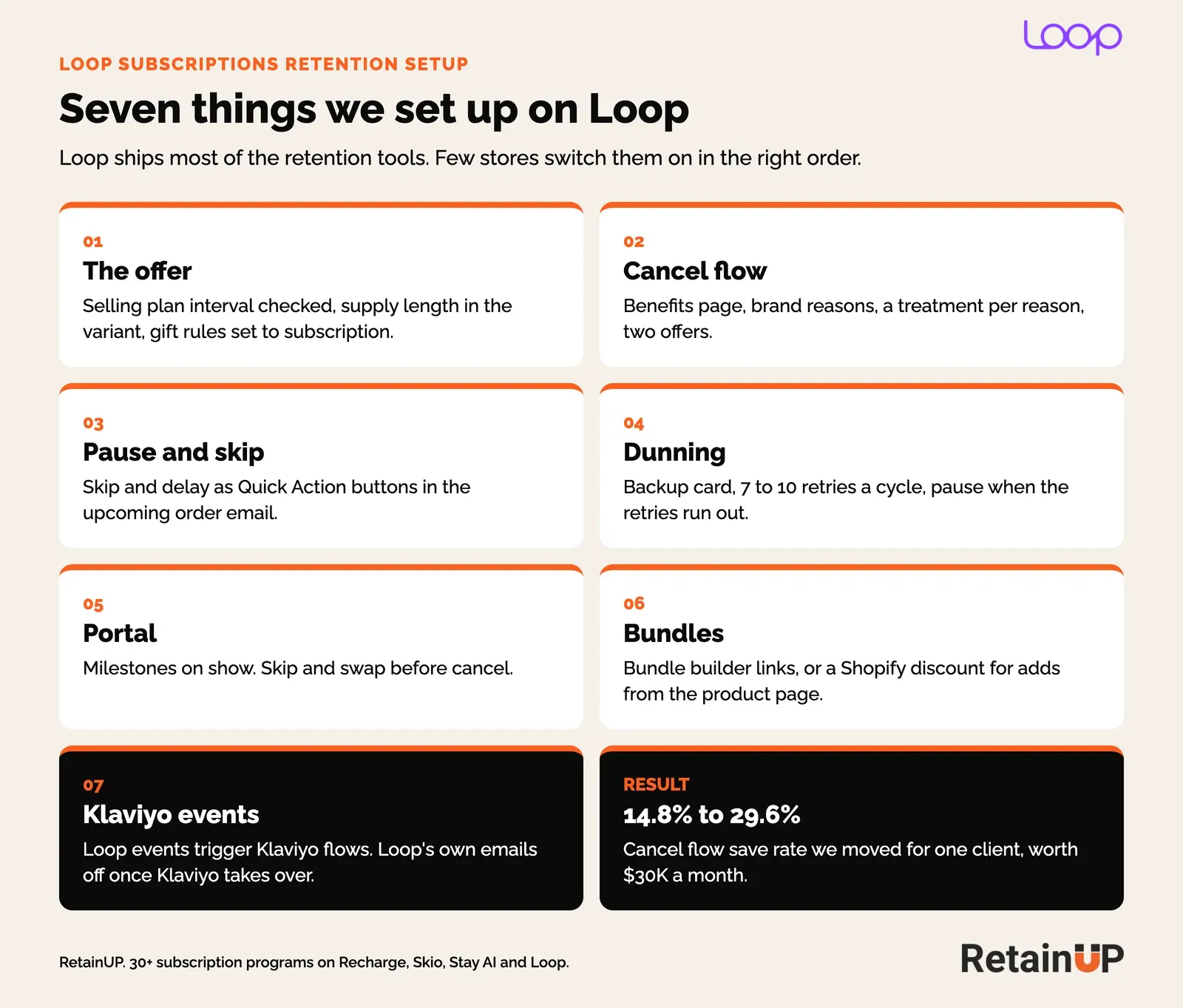
A Loop retention setup is seven pieces: the offer and selling plans, the cancel flow, pause and skip, payment recovery, the customer portal, bundles, and the Klaviyo flows that run off Loop events. Loop has a setting for each. Picking the right one for your product is still a person's job.
What Loop does on its own, and where it stops
Loop's retention tools sit under Retain in the admin: Cancellation flows, Streaks, Product swaps, Payment recovery and Quick Actions. Flows sits on its own menu. The gaps are in plan limits, in how saves get counted, and in a few setup details that break quietly.
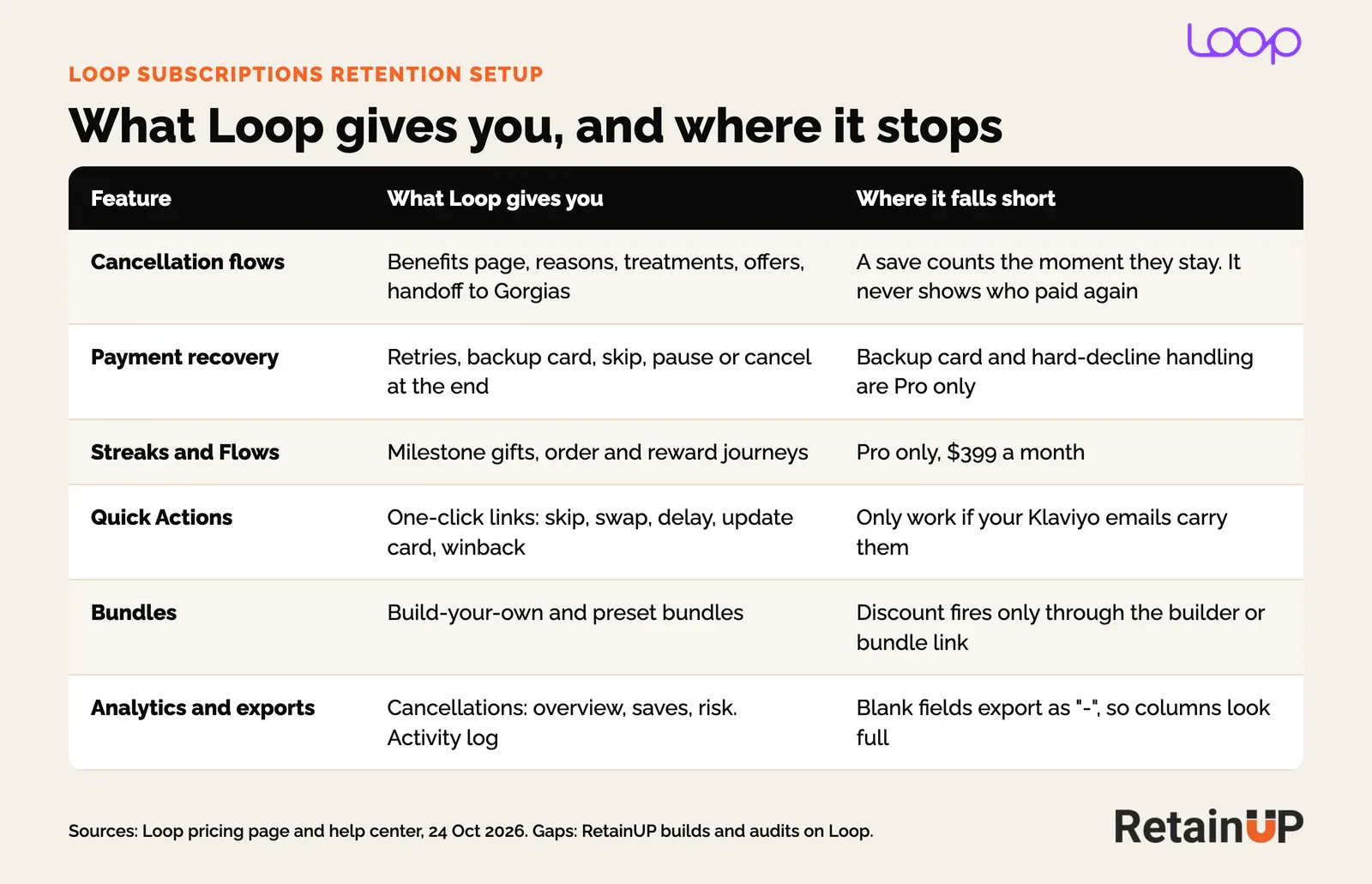
Plan decides a lot. On Loop's pricing page today, Starter is $99 a month plus 1.0% a transaction. Pro is $399 a month plus 0.75%. Cancellation flows, smart dunning, bundles, Quick Actions and the Klaviyo integration come on both. Streaks, Flows, the backup payment method and hard-decline handling are Pro only.
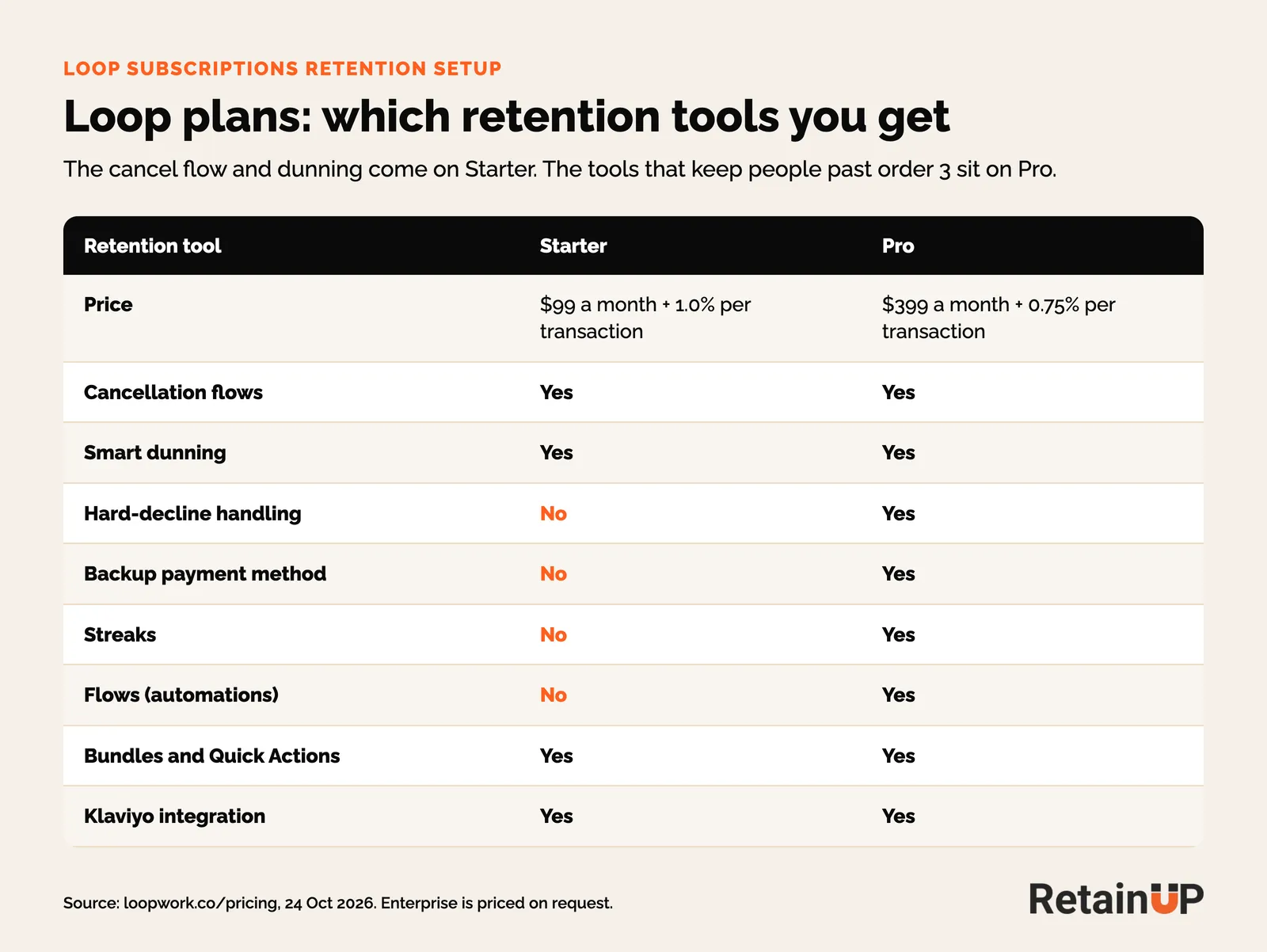
For a brand under a few thousand subscribers, Starter plus Klaviyo covers most of it. The order 2 and order 3 gifts move into Klaviyo and Shopify discounts instead of Streaks.
The offer: check what Loop actually charges
Before any cancel flow, check that the offer bills the way you think it does. Four things I check on every Loop store, each found the hard way:
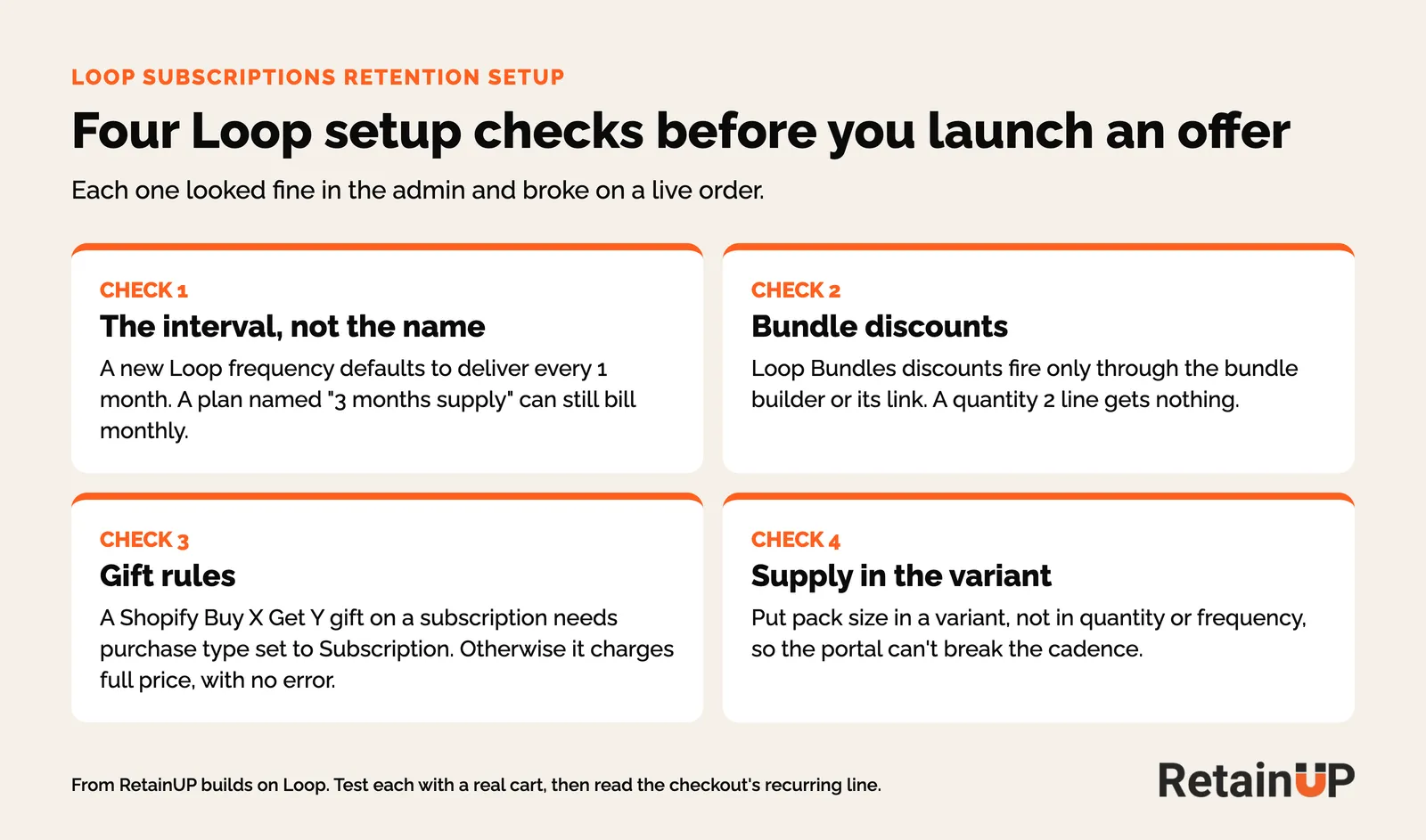
- The interval, not the name. A new Loop frequency defaults to deliver every 1 month. On a supplement brand on Loop with about 300 subscribers, a plan named 3 months supply was billing monthly until we read the interval at checkout.
- Bundle discounts. Loop Bundles discounts fire through the bundle builder or its link. A product page widget that adds two units gets nothing, so it needs a Shopify automatic discount instead.
- Gift rules. A Shopify Buy X Get Y gift on a subscription line needs purchase type set to Subscription. Left on one-time, the gift charges full price and nothing flags it.
- Supply in the variant. Pack size goes in a variant, not quantity, so the portal can't put a 3-pack on a monthly cadence.
Then the offer itself: discount by frequency, a longer cadence as the better deal, and a gift promised for order 2. In our order 2 gift test, telling subscribers a gift was coming lifted order 2 conversion 85%.
Cancel flow: what Loop's own data says
Loop has published the best cancel flow data of any app. In an analysis of 441,000+ cancel attempts across 87 brands, a generic discount saved about 6%. A three-stage flow saved about 15%, and the best brands passed 20%.
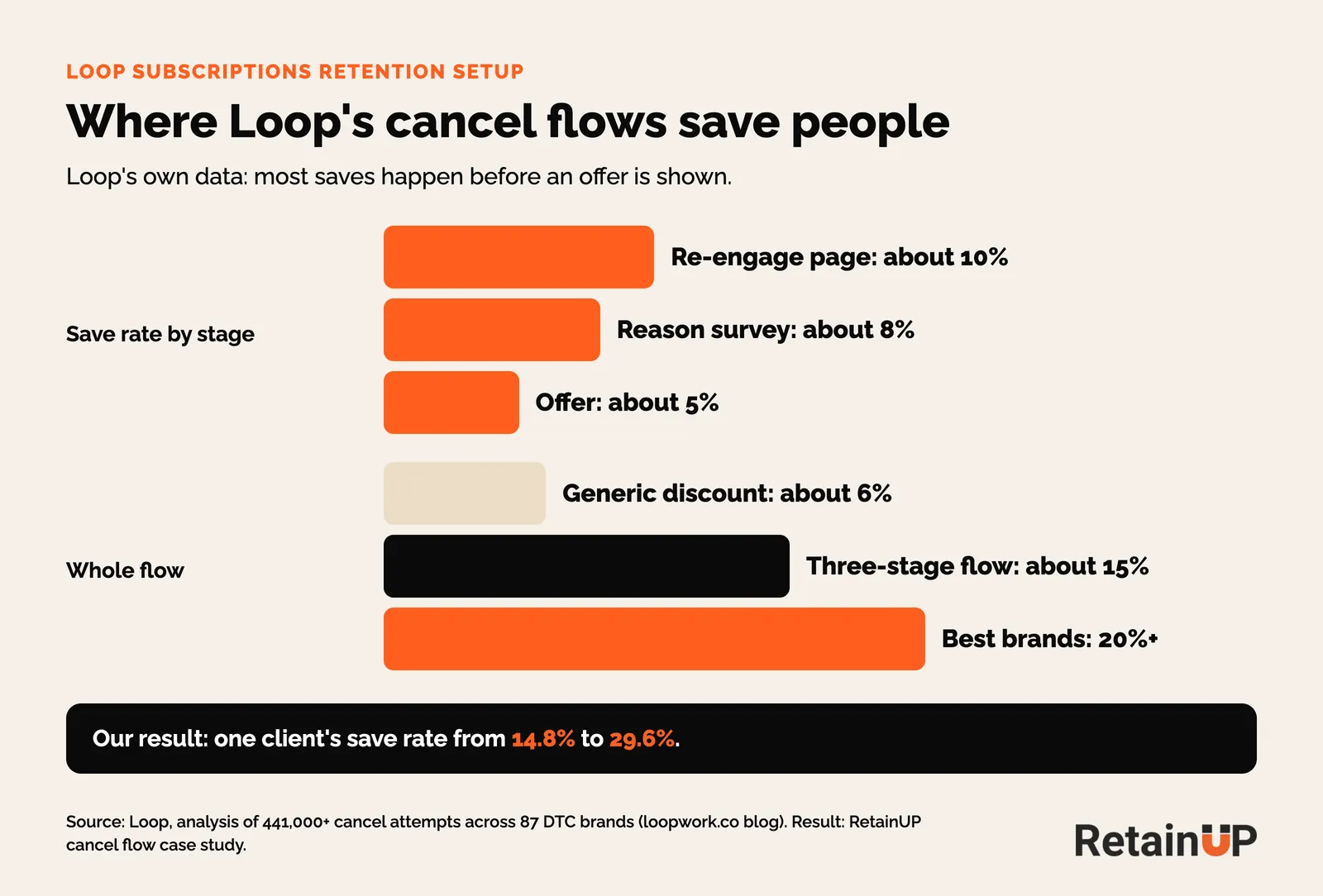
Most of those saves happen before an offer shows up. The re-engage page saves about 10% on its own. So we build it in this order, under Retain > Cancellation flows:
- Benefits page. What they lose, in the brand's words. A short founder or product video if the brand has one.
- Reasons. Five brand-specific reasons, two or three sub-reasons each.
- Treatment per reason. The alternative that fits the reason.
- Two offers. A discount and a gift, so the subscriber picks one.
- Cancel. Easy to reach from there.
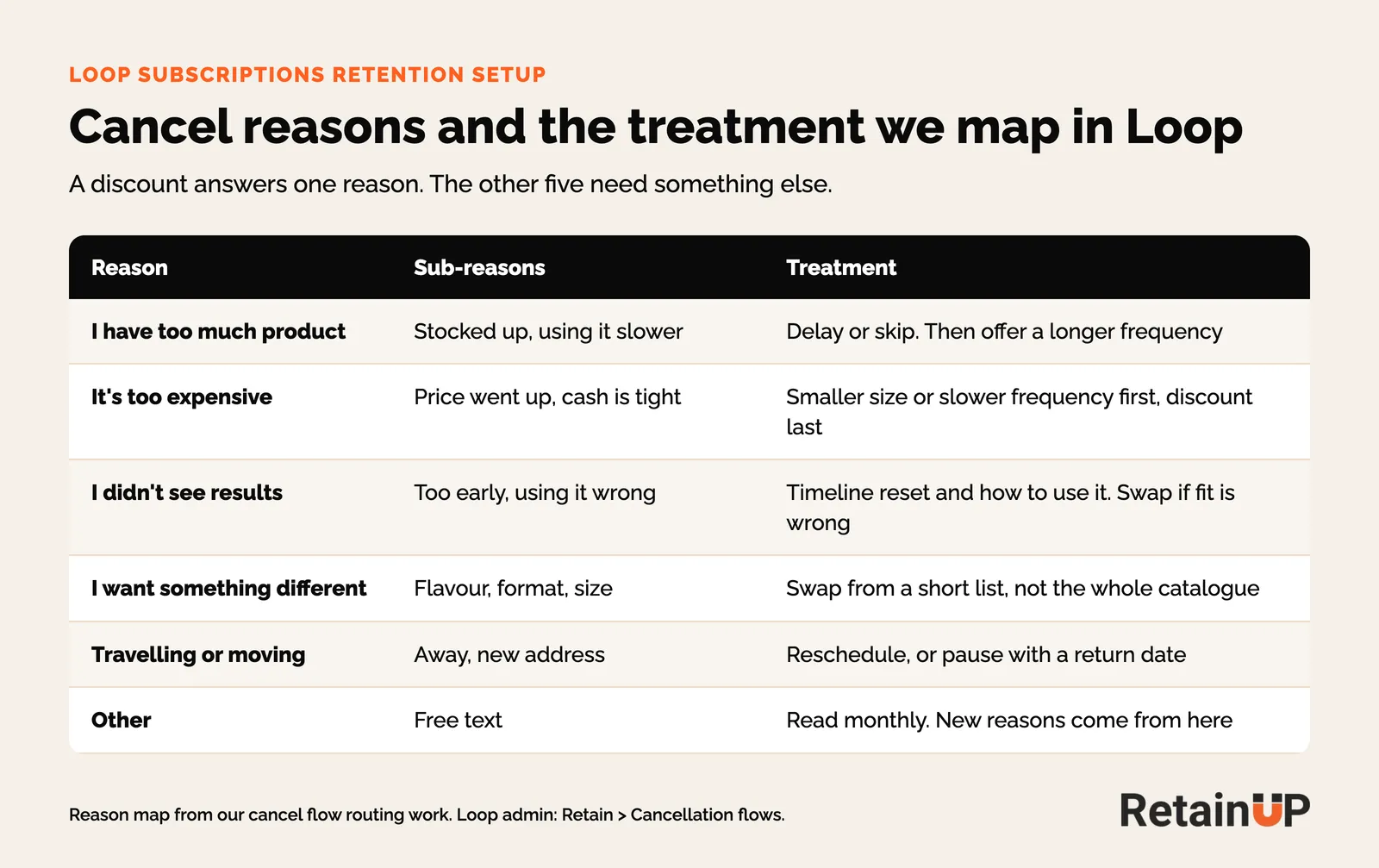
The map matters more than the offer. Too much product needs a delay. Too expensive needs a smaller size before it needs a discount. That is cancel flow routing, and it is how we took one client's save rate from 14.8% to 29.6% in our cancel flow case study.
One thing I watch on Loop. A save counts the moment someone stays on the cancel screen. Loop's analytics show saves by treatment, which is useful. What they can't tell you is whether that person paid for the next order. Read that yourself, or a high save rate becomes one of the subscription numbers that lie.
Pause and skip: put them in the upcoming order email
Skip, delay and swap should be one click from the email that lands before the charge. Loop's Quick Actions make that easy: magic links that skip, delay or swap without a login. They only work if your Klaviyo emails carry them.
We put skip, delay and swap as buttons in the upcoming order email, written by order number. Pause goes in the cancel flow with a return date. I keep pause last because 40 to 60% of customers saved by a pause or skip were gone within 90 days when I tracked them.
Payment recovery: backup card first, pause at the end
Loop's payment recovery lives under Retain > Payment recovery. Its help center suggests 7 to 10 retries per billing cycle and a target of about 20% of failed payments recovered each month. A backup card, on Pro, gets tried before the retry schedule starts.
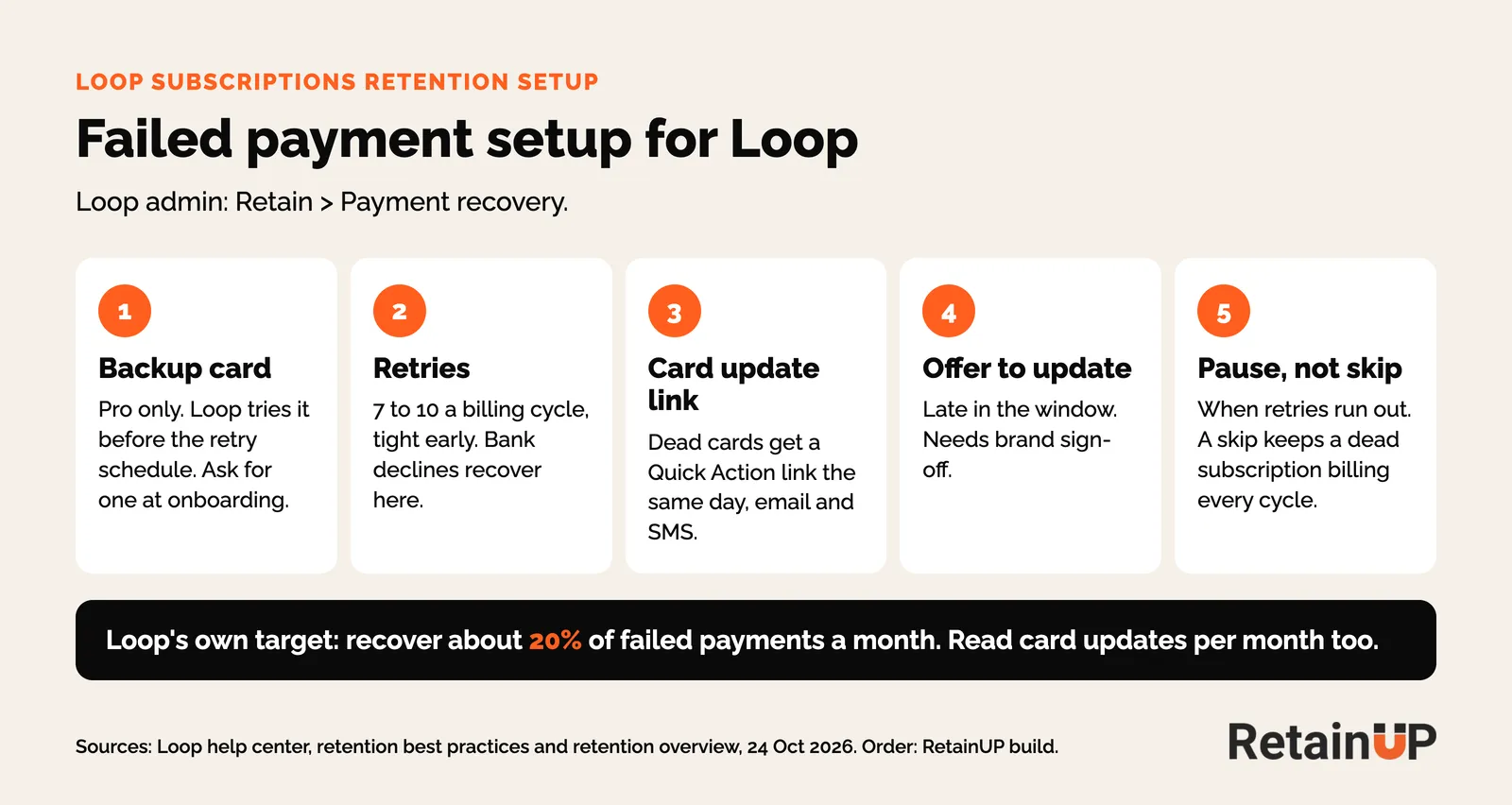
- Ask for a backup card once, in onboarding.
- Retries tight early. Bank declines recover here.
- Dead cards (expired, invalid, revoked) get a card update Quick Action link the same day, by email and SMS. No retry reaches them.
- Late in the window, an offer for updating, if the brand signs off.
- When retries run out, Loop lets you skip, pause or cancel. We pick pause. A skip keeps a dead subscription billing every cycle.
Then switch off Loop's own payment emails once the Klaviyo flow is live, or subscribers get both. Check they didn't go off with nothing replacing them. On one Loop store we picked up, Loop's payment emails had been off for weeks and no Klaviyo flow had taken over. That is passive churn, and it never shows up in the cancel reasons.
The portal and bundles
Loop's portal is drag-and-drop, with pause, skip, swap, reschedule and payment update. We set skip and swap before cancel, show the next milestone gift, and keep the swap list short. A full catalogue in the swap screen sends people browsing instead of staying.
Bundles come on every plan. We use the bundle builder when order value needs it, and only with the discount checks above.
Klaviyo events: what Loop sends and what to build
Loop sends subscription events to Klaviyo: created, upcoming order, payment failed, skipped, paused, resumed, cancelled and reactivated. Each one needs a flow. Exact names vary, so check the list and sample payloads under Integrations > Klaviyo, as Loop's Klaviyo guide shows.
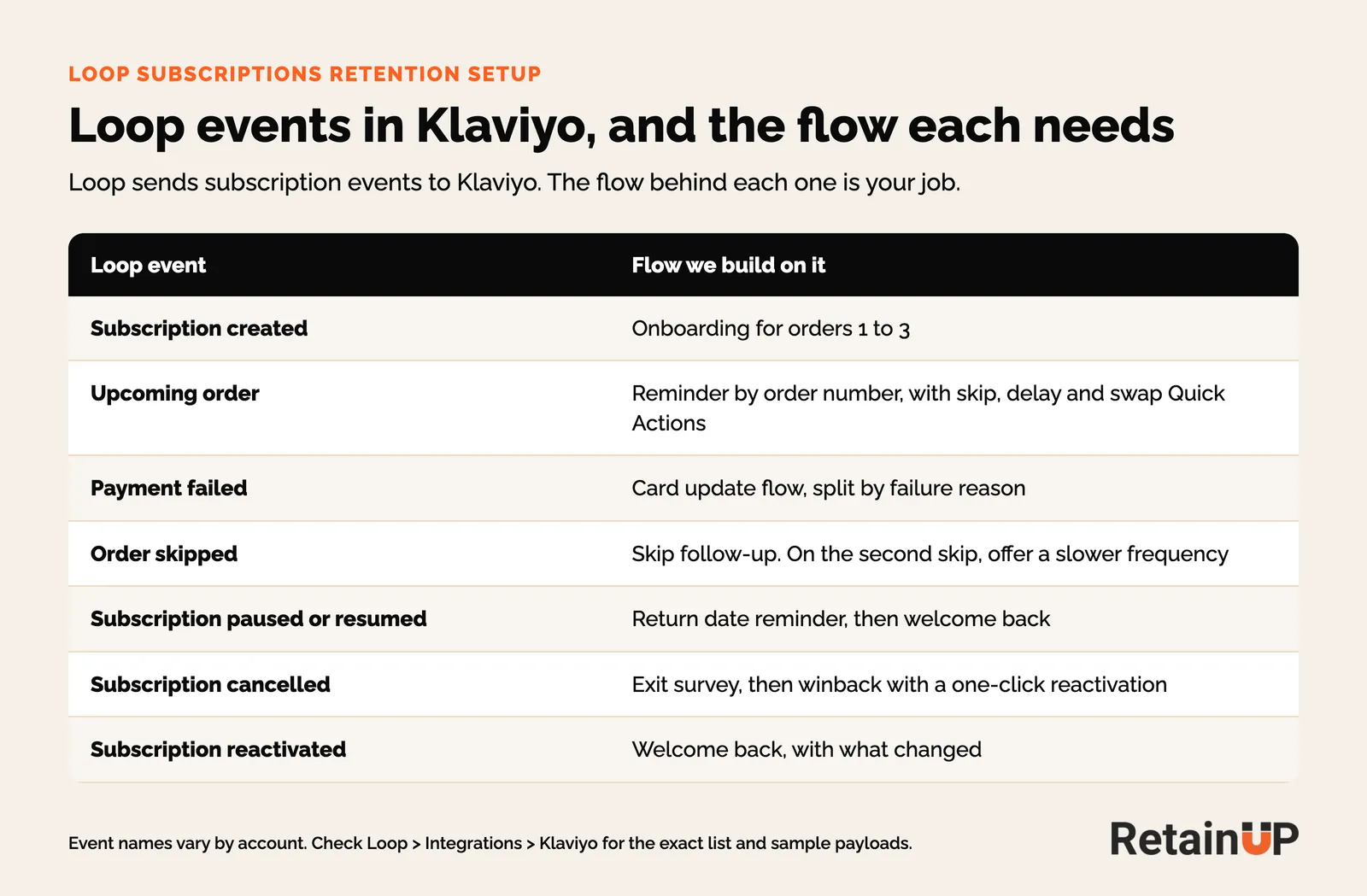
Two checks before building. Look at both Klaviyo and Loop for live flows, because Loop runs its own milestone and notification emails and either can be the one a subscriber gets. And when you export Loop's activity log, blank fields come through as a dash. Count those as filled and every column looks complete. On one export, the first read counted almost every skip as a payment failure for that reason.
Loop retention setup checklist
This is the order we run in a 30-day build on Loop.
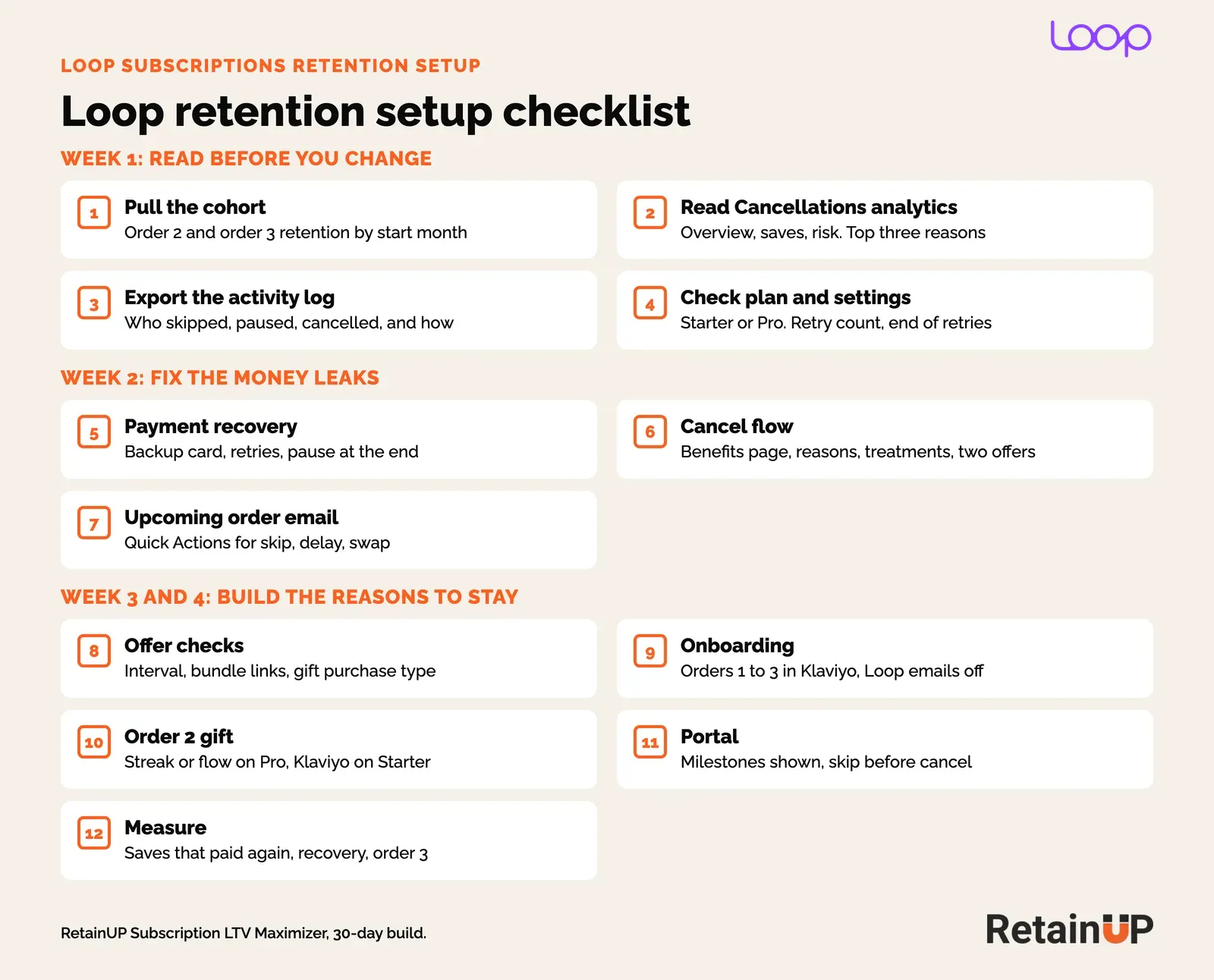
- Pull order 2 and order 3 retention by start month.
- Read Analytics > Cancellations: overview, saves and risk. Note the top three reasons.
- Export the activity log to see who skipped, paused and cancelled, and through what.
- Check the plan, the retry count and what happens when retries run out.
- Set payment recovery: backup card on Pro, retries, pause at the end.
- Rebuild the cancel flow: benefits page, reasons, treatments, two offers.
- Add skip, delay and swap Quick Actions to the upcoming order email.
- Check every offer: plan interval, bundle links, gift purchase type.
- Build onboarding for orders 1 to 3 in Klaviyo and turn off the Loop emails it replaces.
- Promise an order 2 gift, through Streaks or Flows on Pro or Klaviyo on Starter.
- Set the portal: milestones shown, skip and swap before cancel.
- Track saves that paid again, recovery rate and order 3 retention monthly.
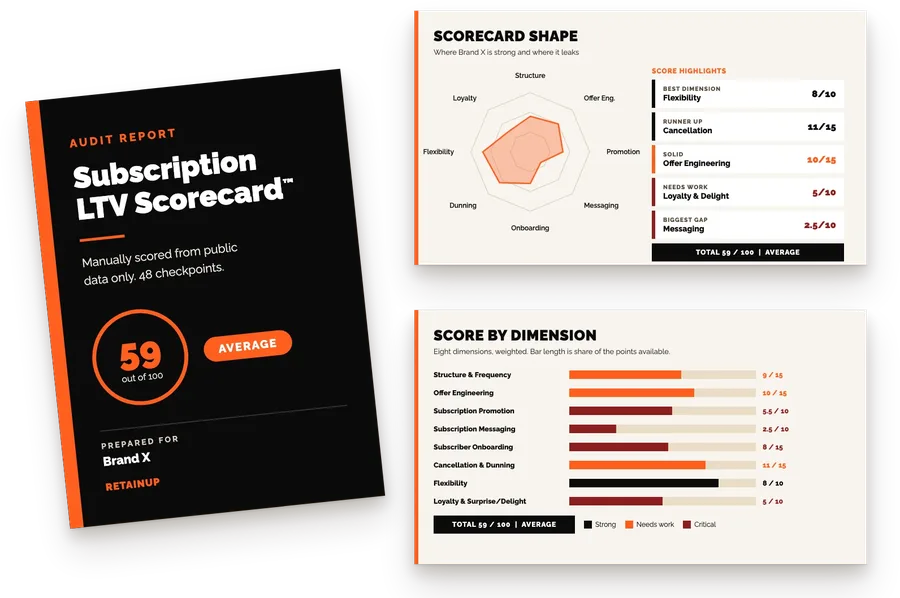
Want to know which of these your store is missing? Our free subscription audit scores your program on 8 dimensions and 48 checkpoints.
Results
Two public numbers from our work. One client's cancel flow save rate went from 14.8% to 29.6%, worth $30K a month in retained revenue. And on a supplement brand, telling subscribers a free gift was coming in their next box lifted order 2 conversion 85% over the group told nothing.
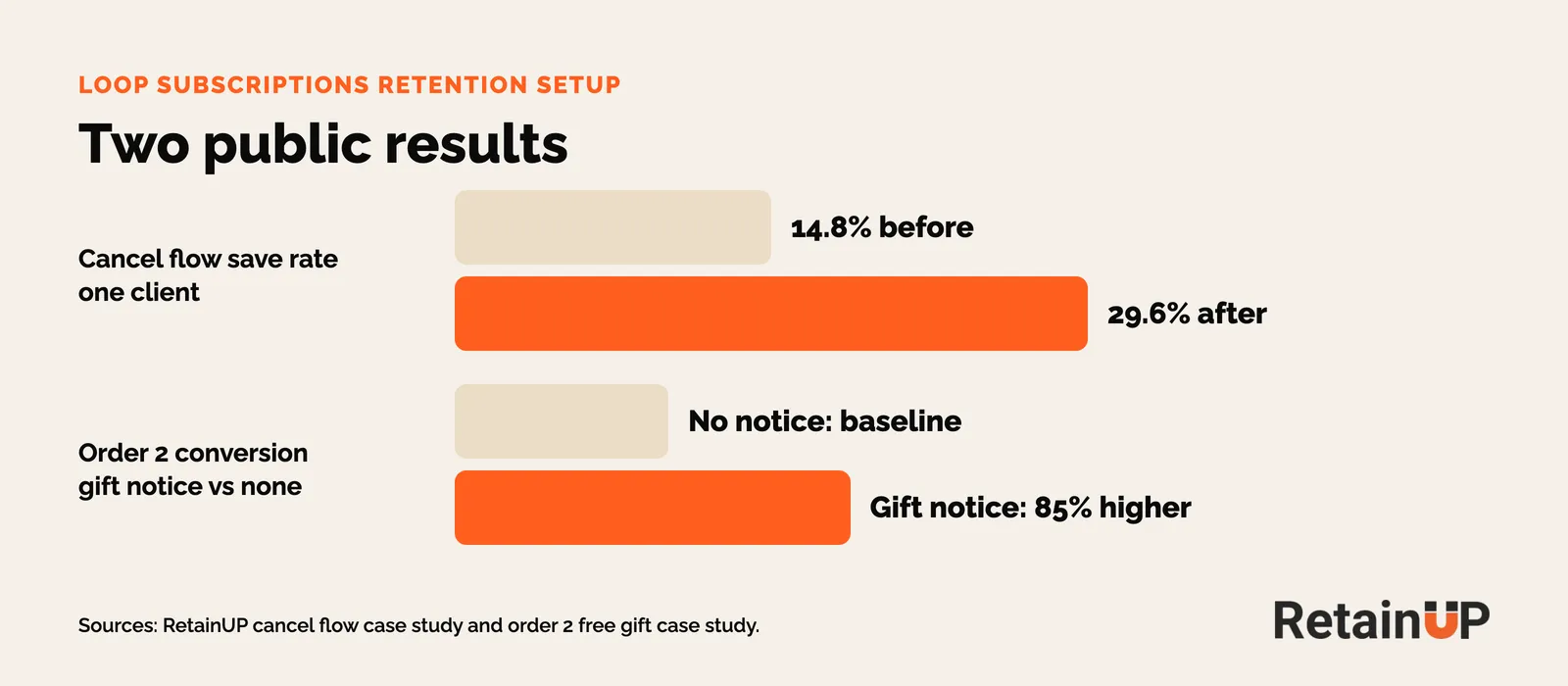
Both come from the same build we run on Loop. The Recharge version of this setup has a churn result from a $5M brand.
When to hire a Loop subscription specialist
Bring someone in when churn is the problem and your email agency only works in Klaviyo. Most Loop brands we talk to have an agency for email and nobody inside Loop. Loop's own team helps with the tool. Deciding the offer, the reasons and the gifts is a different job.
Our Subscription LTV Maximizer is that job, done for you in 30 days across Loop and Klaviyo, for a fixed fee.
FAQ
Who is a good subscription LTV specialist for Loop?
Pick someone who works inside Loop, not only Klaviyo, and shows cohort numbers. RetainUP works with $1-10M subscription brands on Loop, Recharge, Skio and Stay AI, and doubled one client's cancel flow save rate from 14.8% to 29.6%.
Do I need Loop Pro for retention?
No. Starter at $99 a month has cancel flows, smart dunning, bundles and Quick Actions. Pro at $399 a month adds Streaks, Flows, a backup payment method and hard-decline handling, which matter more once you have a few thousand subscribers.
What is a good cancel flow save rate on Loop?
Loop's data puts a generic discount at about 6%, a three-stage flow at about 15%, and the best brands above 20%. Check how many saved subscribers paid for their next order, not only the save rate.
How many payment retries should I set in Loop?
Loop suggests 7 to 10 per billing cycle. We front-load them, send dead cards a card update link the same day, and pause the subscription when retries run out instead of skipping.
Does Loop work with Klaviyo?
Yes, on every plan. Loop sends subscription events such as created, upcoming order, payment failed, skipped and cancelled, and Quick Action links can go into Klaviyo emails so subscribers skip or update a card in one click.
How long does a Loop retention setup take?
Our build runs 30 days. Payment recovery and the cancel flow go live first, usually in week two, and the cohort effect shows over 60 to 90 days.
One email a week on subscription retention: the numbers, the strategy, and what to fix first.

Rahi Jain
Rahi Jain is a subscription LTV specialist who helps DTC brands maximize their LTV from subscriptions.
More about Rahi