Key takeaways
- On a $5M brand running Recharge billing and Klaviyo, RetainUP cut monthly churn from 22% to 9% in 30 days.
- Recharge sends its upcoming order metric to Klaviyo 3 days before a charge by default, and bundles need the $499 a month Scale plan.
- RetainUP moved one Skio client's cancel flow save rate from 14.8% to 24.8% by giving each cancel reason its own alternative.
On its own, Recharge bills your subscribers, retries failed charges, runs a cancel flow with offers and gives customers a portal to skip, swap and reschedule. RetainUP adds the decisions Recharge leaves to you: the offer, a save path for each cancel reason, a retry and card update plan, and the Klaviyo flows that run off Recharge events.
Most Recharge stores I open still run the settings they launched with. Cancel flow on the default reasons. One failed payment email. A billing notice that reads like a receipt. And a Klaviyo account full of Recharge events with no flow on them.
RetainUP works with $1-10M DTC subscription brands. We have worked with 80+ subscription brands on Recharge, Skio, Stay AI and Loop, and Recharge is the one we see most. This is what we change on it, in the order we change it.
Launching on Recharge, or just moved onto it? Start with the launch checklist below. It covers the retention settings to fix before your first subscriber renews, several of which are hard to change once they are live.
What a Recharge retention setup covers
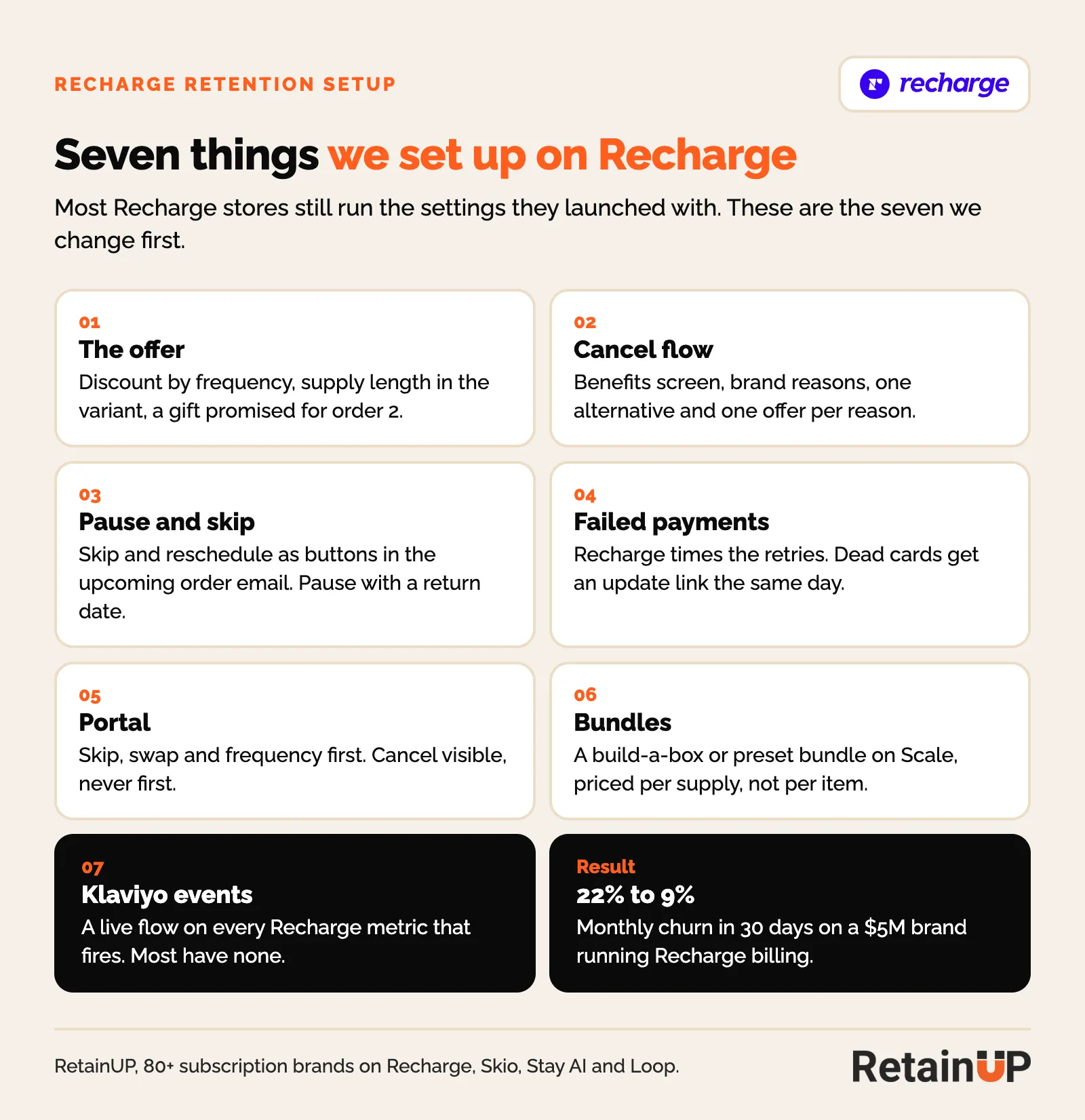
A Recharge retention setup is seven pieces: the offer, the cancel flow, pause and skip, dunning, the customer portal, bundles, and the Klaviyo flows that run off Recharge events. Recharge gives you the tools for all seven. It does not decide how any of them should work for your product.
Billing works on day one. Retention takes someone sitting with your cohorts, your cancel reasons and your failed charges, and making calls the app can't make for you.
Recharge setup checklist: what to fix before launch
Recharge's own onboarding checklist gets you live: payment processor, install, products and rules, theme and widget, shipping, tax, inventory, portal, staff, legal, notifications, discounts, a test order, then launch. It stops there. None of it decides who stays past order 2.
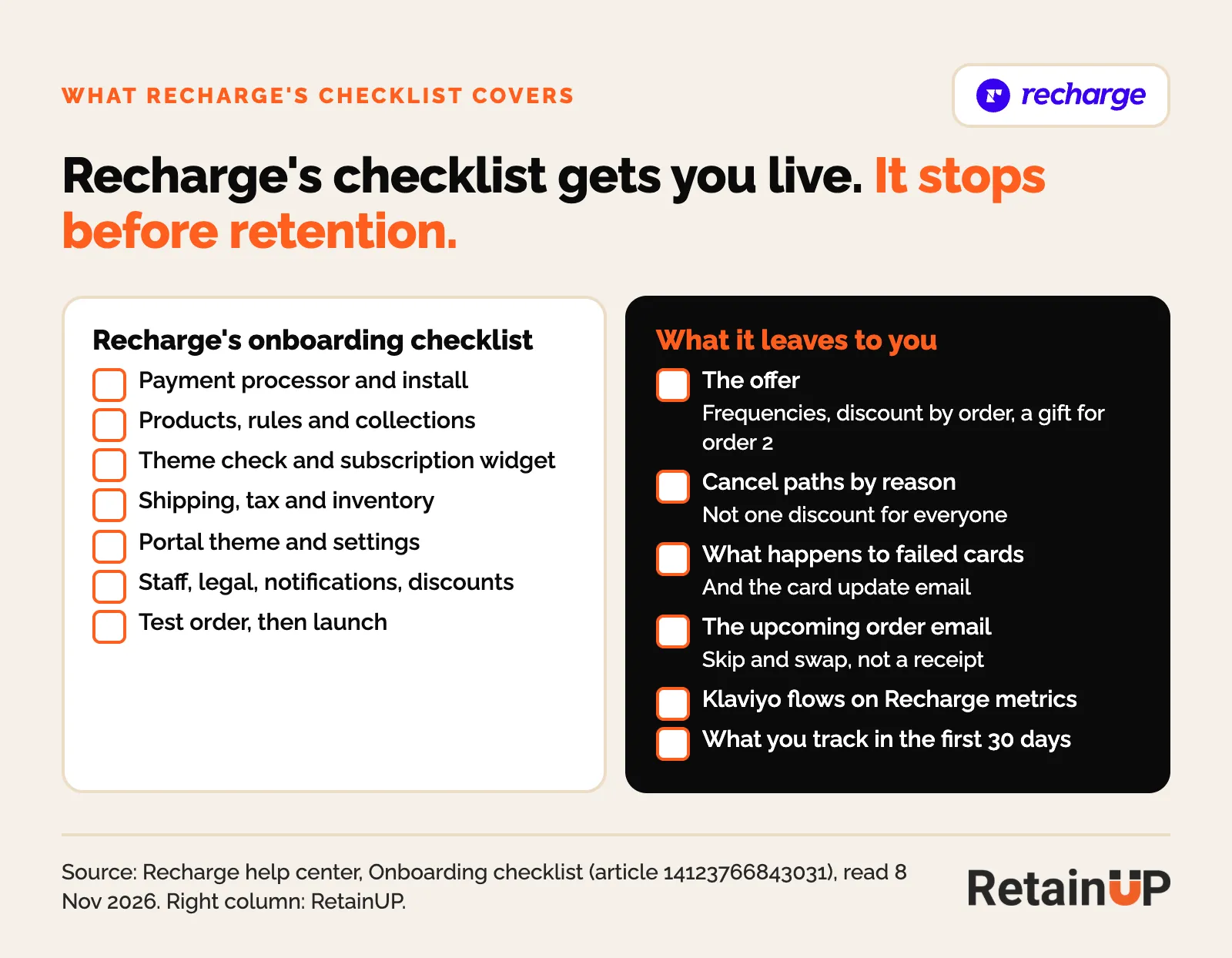
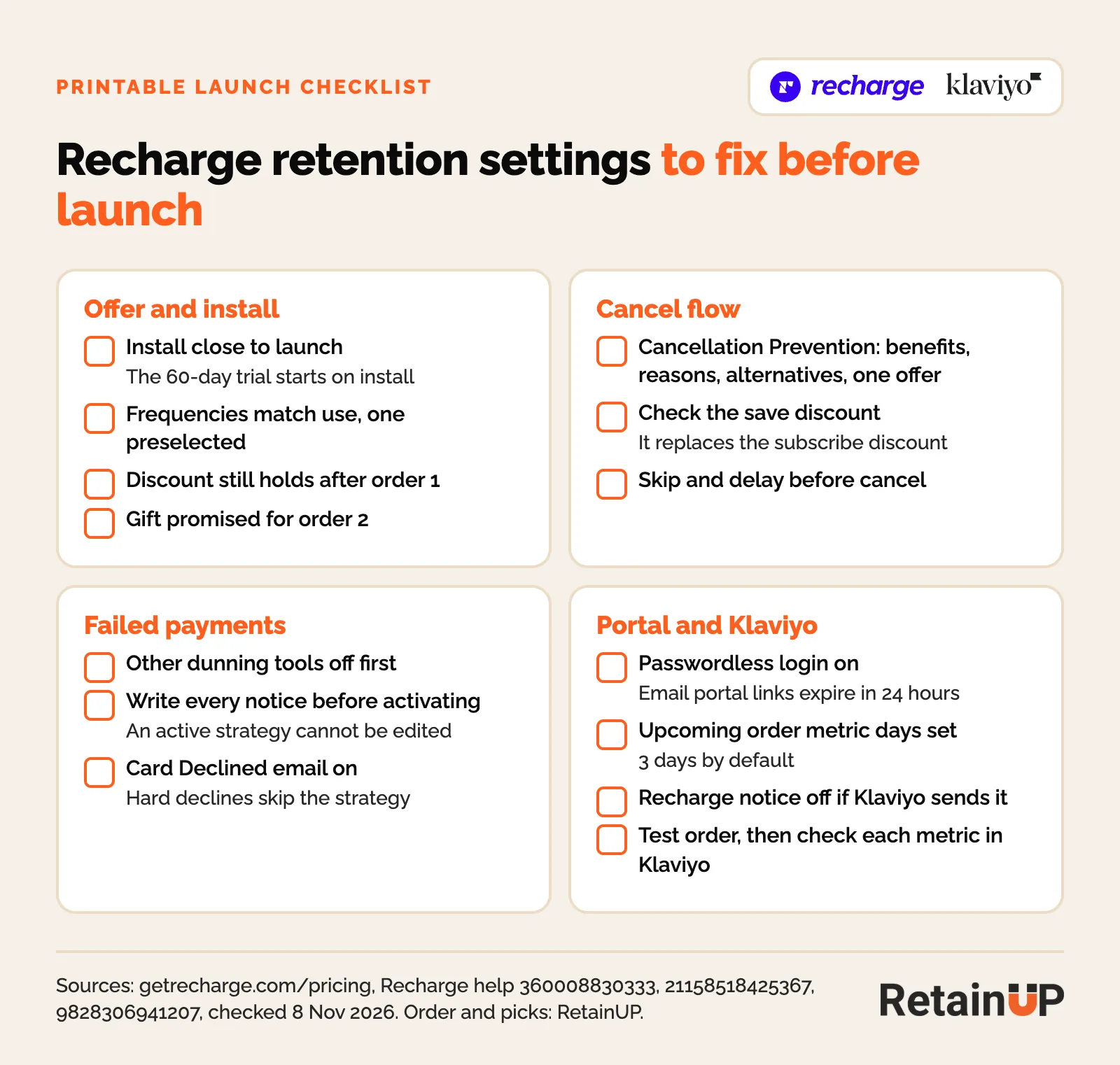
These are the retention settings we fix before launch. Some take minutes now and a rebuild later.
1. Install close to launch
Recharge's 60-day free trial on Starter starts the day you install the app, not the day you launch. Install when the build starts, not two months early.
2. Build the cancel flow before the first subscriber can cancel
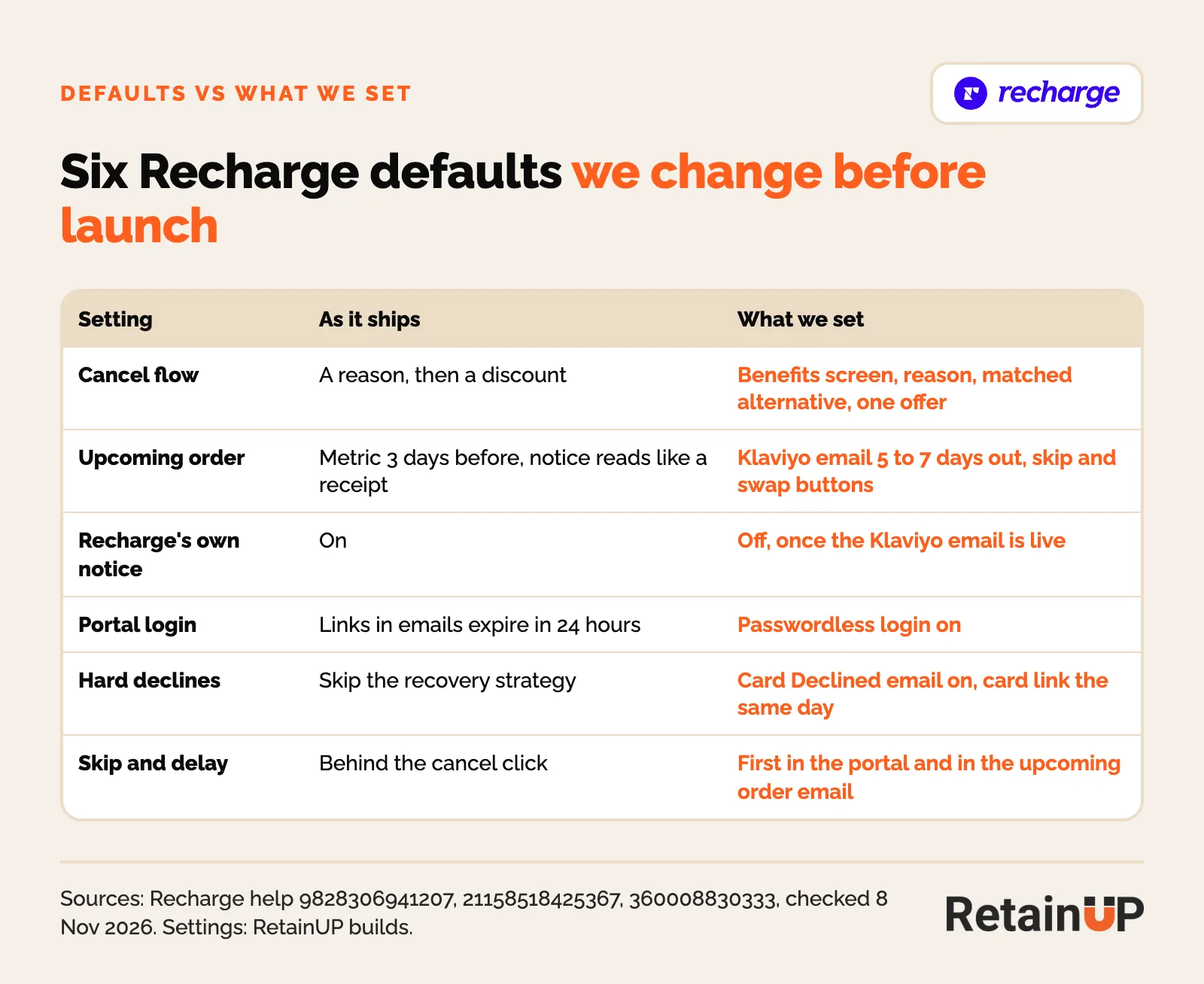
Recharge's cancel flow is a Cancellation Prevention experience. On stores created before 23 October 2023, turning one on removes the old cancellation and retention settings, and Recharge's help center says you cannot go back. On the old settings, a discount accepted at cancel replaces the subscriber's existing subscription discount, so check that a "save" offer does not cost them their subscribe price.
3. Write the failed payment notices before you activate
Failed Payment Recovery has four rules to know before day one, all from Recharge's help center:
- Turn off any other dunning tool first. Once active, Recharge takes over every charge already in a retry cycle.
- You cannot edit a strategy after you activate it, even if you turn it off. Changes mean a new strategy, so write and preview every notice first.
- Charges that fail with a hard decline skip the strategy. Turn on the Card Declined email so those subscribers still get a card update link.
- The notices count as transactional, so no marketing content, and Klaviyo cannot send them. Recharge retries for up to 120 days after the first failed charge by default.
4. Turn on passwordless login
Portal links Recharge sends to Klaviyo work without a login for 24 hours, then send the customer to passwordless login, or to email and password if passwordless is off. Turn it on before the first upcoming order email goes out, or the skip button in that email ends at a password screen.
5. Set the upcoming order timing and turn off the duplicate
By default Recharge sends the Order upcoming metric to Klaviyo 3 days before the charge. Change the days under the Upcoming order email settings, and turn Recharge's own notice off once your Klaviyo email is live.
6. Place a test order, then check Klaviyo
Run the test order on Recharge's list, then check that each Recharge metric shows in Klaviyo before you build a flow on it. Here is the full list as a printable sheet.
Launching on Recharge or moving onto it? The Subscription LTV Maximizer™ builds the new setup or migration in 30 days, for $5,000.
What Recharge does on its own, and where it stops
On its own, Recharge gives you Cancellation Prevention, Failed Payment Recovery, a customer portal with skip, swap and reschedule, and a Klaviyo integration that sends every subscription event. Most brands use a fraction of it. The gaps are in how each one is set up, and in a few features that sit behind the Scale plan.
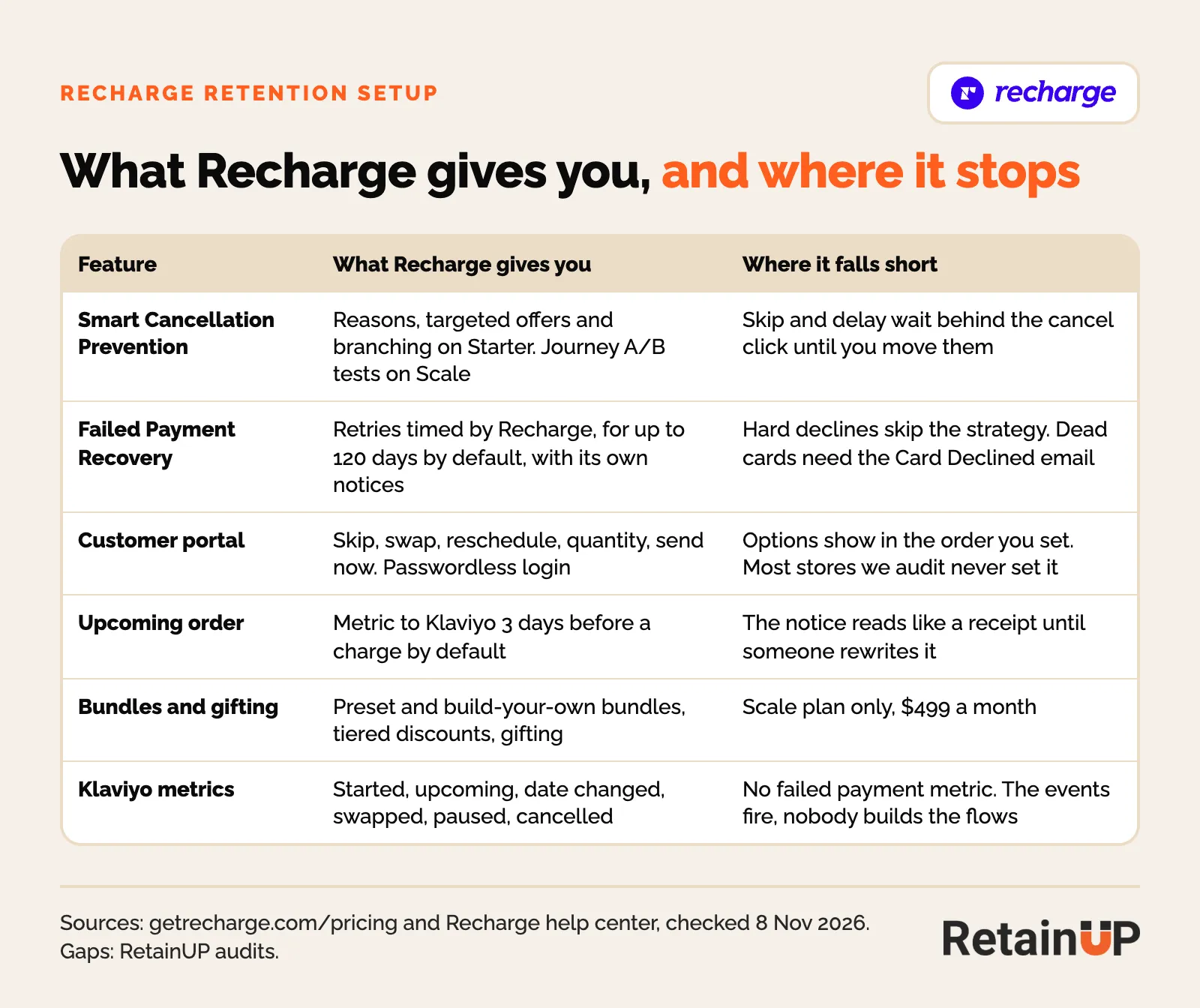
Pricing decides part of the build. On Recharge's pricing page, checked 8 November 2026, Starter is $149 a month plus 1.50% and 20 cents a transaction, with a 60-day free trial. Scale, the plan that used to be called Plus, is $499 a month plus 1.25% and 20 cents. Both get Smart Cancellation Prevention, Failed Payment Recovery, Win Back and automated workflows. Bundles, tiered discounts, surprise and delight gifting and subscriber journey A/B tests are Scale only. At a $50 order, Starter stays the cheaper plan below about $1.7M a year.
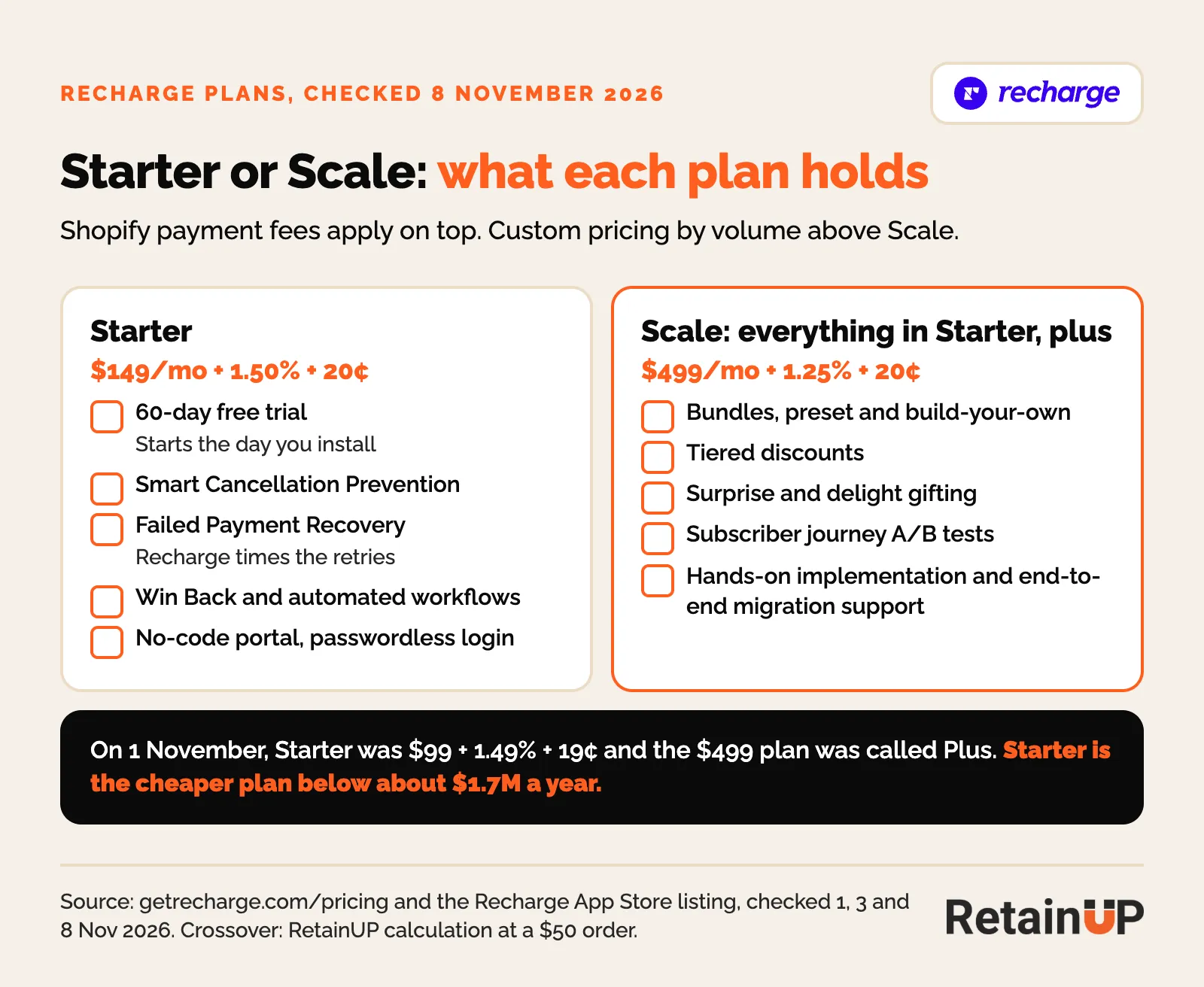
So a brand on Starter who wants an order 3 gift builds it in Klaviyo and Shopify, not in Recharge's gifting tools. That is fine. It just has to be planned, not discovered in week three.
Start with the offer, before the cancel flow
The offer decides who cancels before any cancel flow runs. If a 30-day tub ships every 30 days to someone who takes it five days a week, the cancel flow is cleaning up a frequency problem.
What we set on Recharge first:
- Discount by frequency, so a longer cadence is the better deal.
- Supply length in the product variant, not in quantity. A 3-pack is its own SKU, so the portal can't split pack size from cadence.
- A gift promised for order 2, told to the subscriber before the second charge. In our order 2 gift test, that notice alone lifted order 2 conversion 85%.
Too much product is the cancel reason I see most in audits. The fix for that sits in the offer, which is why consumption mismatch comes up in almost every one.
Cancel flow: Cancellation Prevention in the right order
Recharge's cancel flow is called Cancellation Prevention. It asks for a reason, shows an incentive, and lets you A/B test offers. Stores set up after 23 October 2023 only get this flow builder, per Recharge's help center.
The default flow leads with a discount. We rebuild it in five steps.
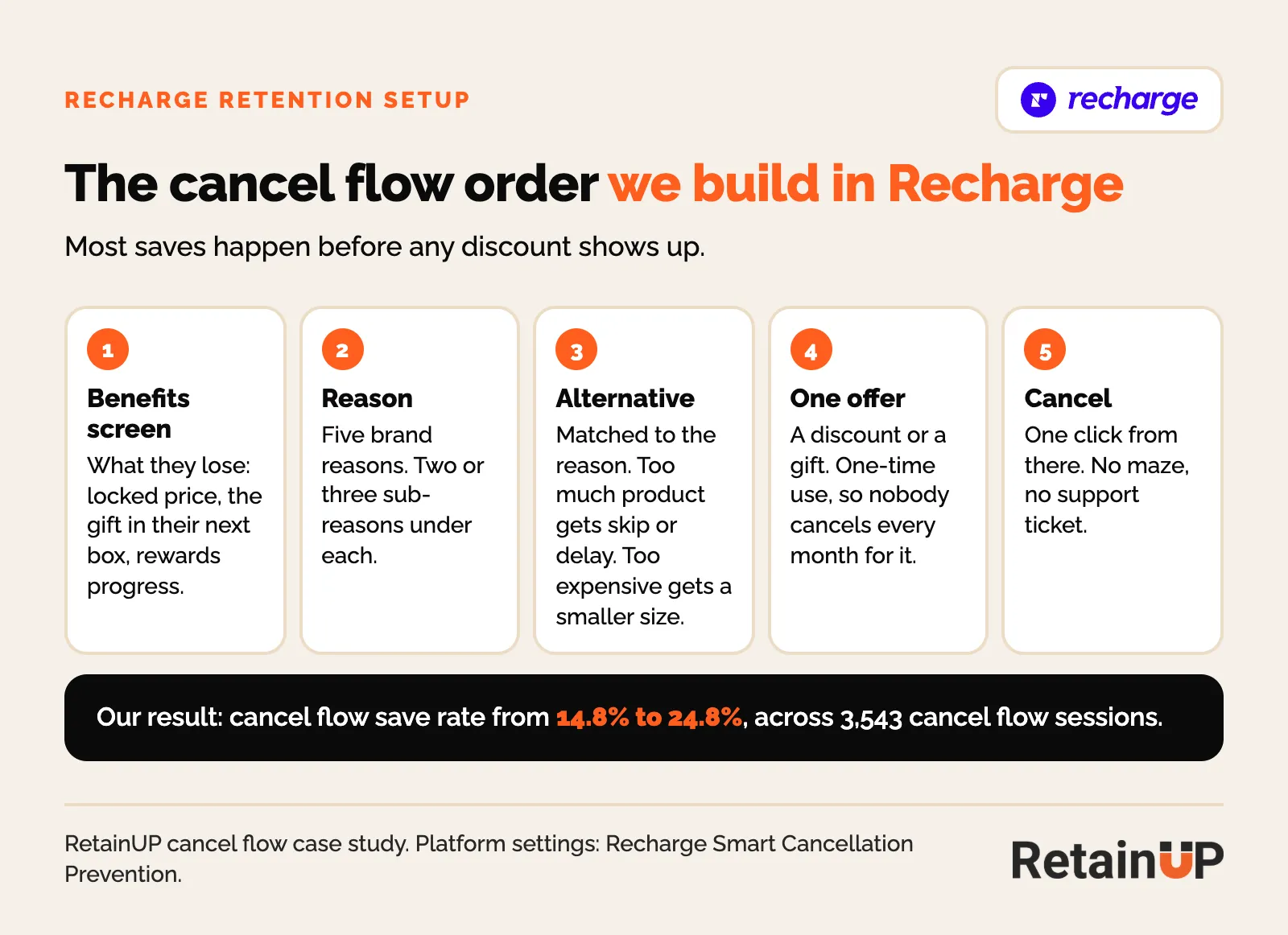
- Benefits screen. What they lose: the locked price, the gift in the next box, rewards progress.
- Reason. Five reasons in the brand's words, two or three sub-reasons each.
- Alternative. Matched to the reason. Too much product gets skip or delay. Too expensive gets a smaller size or slower frequency.
- One offer. A discount or a gift, one-time use, so nobody learns to cancel every month for it.
- Cancel. One click from there.
Recharge lets you set one offer per reason. That is enough if the reasons are right. The part that moves save rate is routing each reason to the right response, not the size of the discount. For one Skio client this took the save rate from 14.8% to 24.8%, across 3,543 cancel flow sessions.
One warning on the number. A save means they stayed at the cancel screen. Check how many of those saved subscribers paid for the next order before you call it a win.
Pause and skip: move them out of the cancel flow
Skip and reschedule should be one click from the upcoming charge email. On most Recharge stores they sit inside the cancel flow, so a subscriber who only wanted to delay one box has to say they are leaving first.
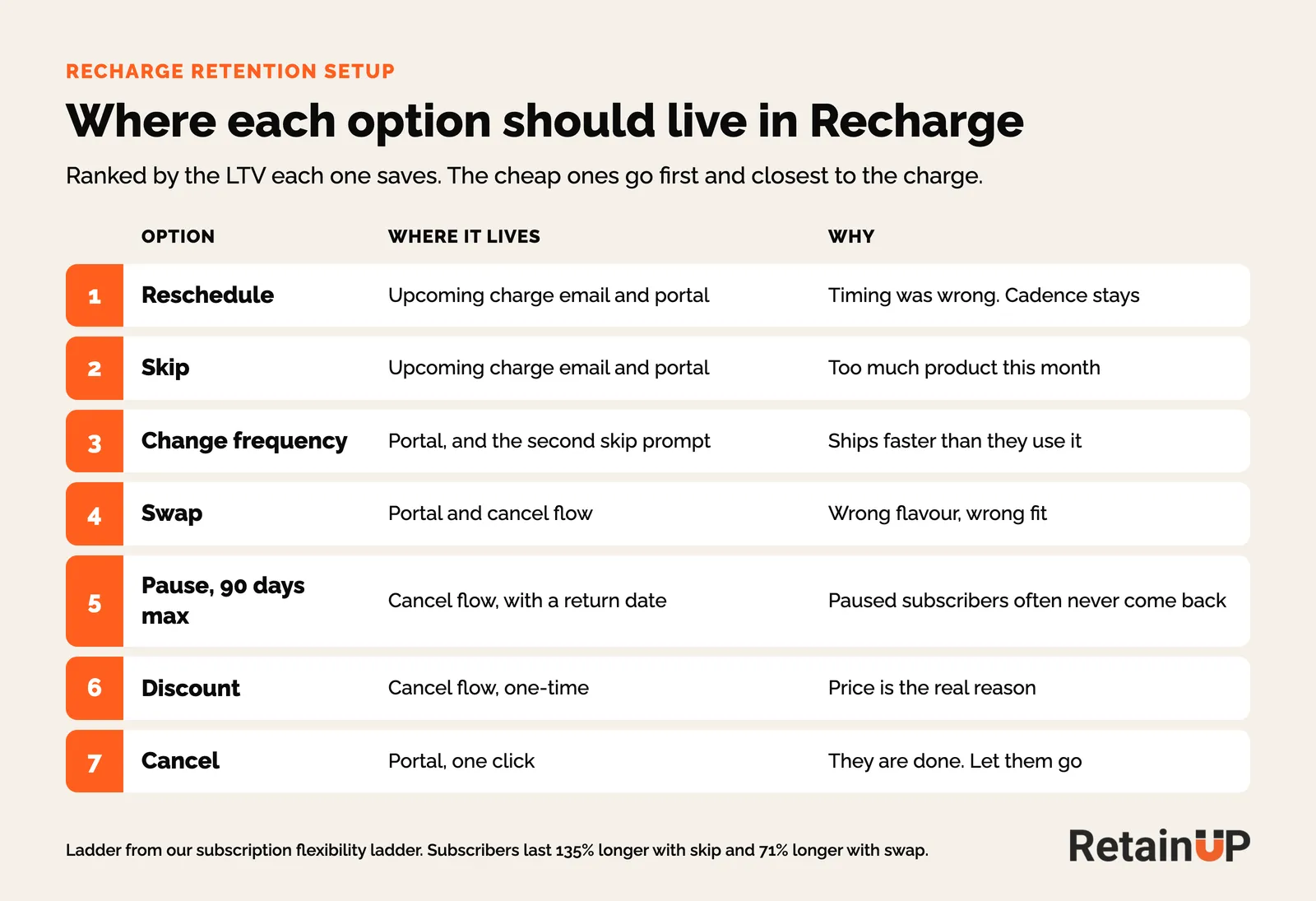
We rank the options by the LTV each one saves. That is the subscription flexibility ladder. Reschedule and skip go first and closest to the charge. Pause goes late, with a 90-day cap and a return date, because 40 to 60% of customers saved by a pause or skip were gone within 90 days when I tracked them.
Rewrite the upcoming charge email
Recharge sends its Order upcoming metric to Klaviyo 3 days before a charge by default, and you can set it anywhere from 1 to 45 days. That email gets opened more than anything else you send in month one. Most brands use it to say a card is about to be charged.
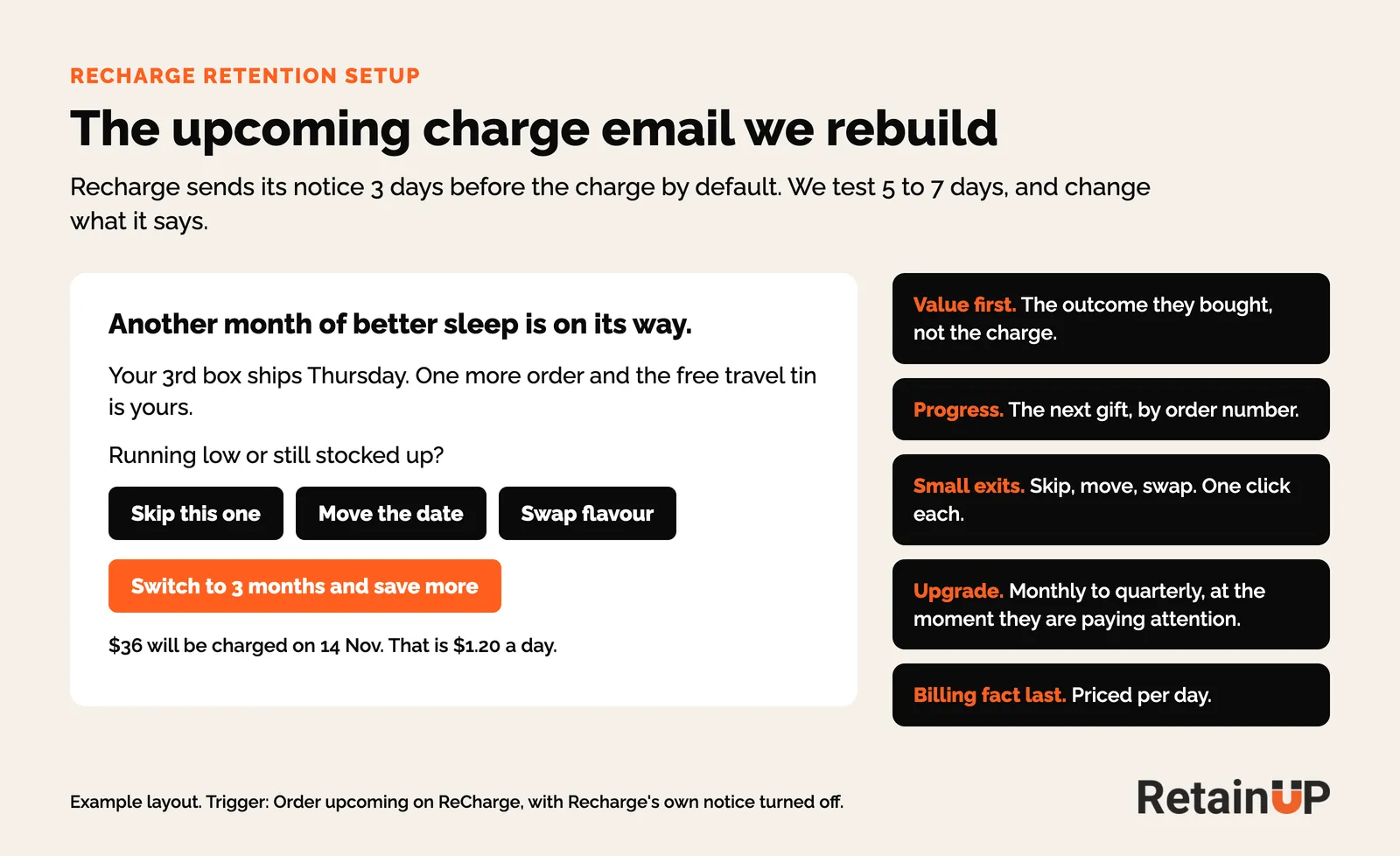
We move it to Klaviyo, turn Recharge's own notice off so nobody gets two, and test 5 to 7 days out. The email leads with what the product is doing for them. Skip, move the date and swap are buttons. The billing line goes last, priced per day.
The portal link in that email skips the login for 24 hours, then falls back to passwordless login. That is why passwordless login sits on the launch checklist above.
Dunning: split dead cards from bank declines
A failed charge has two causes, and they need opposite handling. A dead card (expired, invalid, revoked) never recovers by retry. A bank decline (insufficient funds) usually does, if you wait.
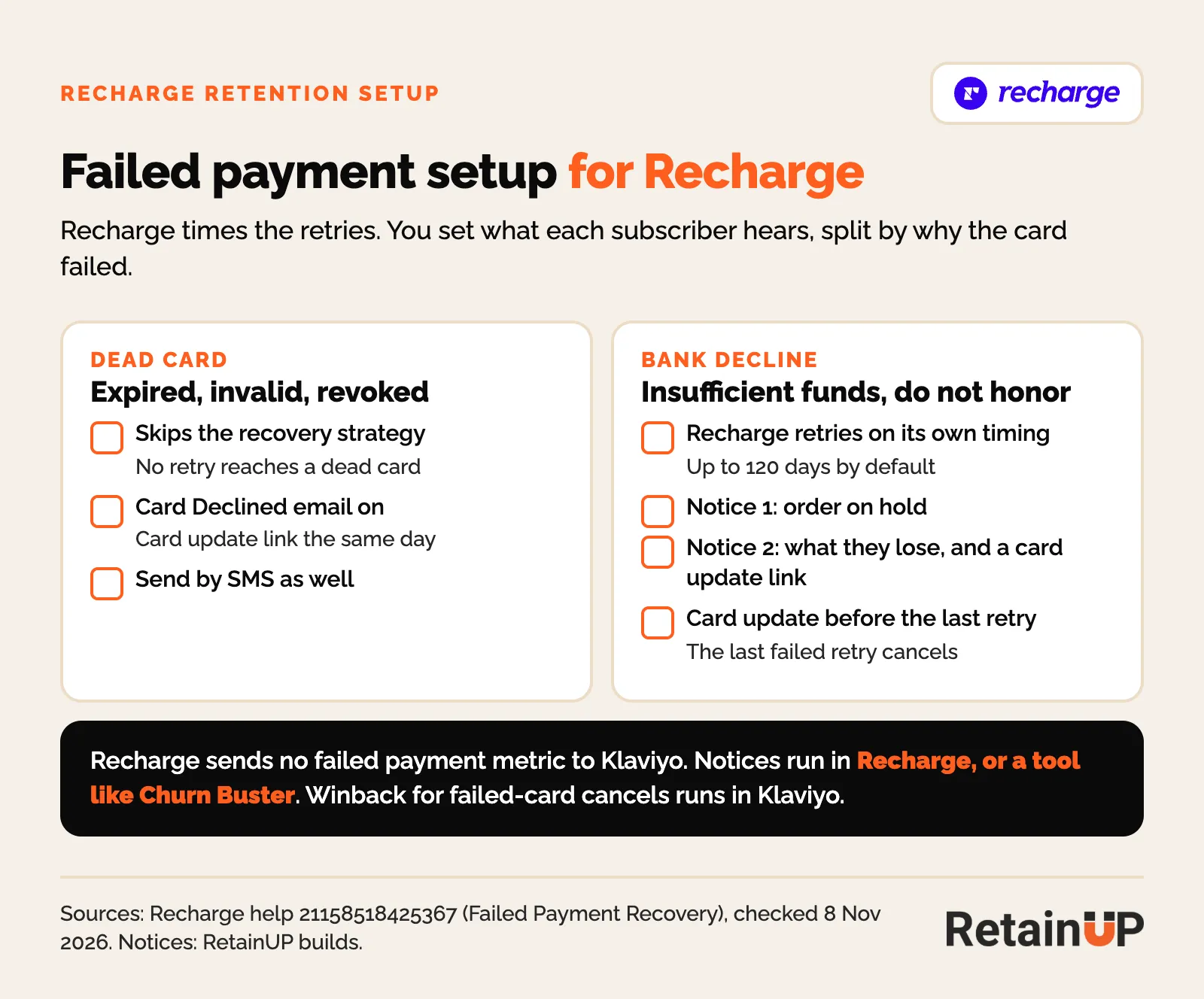
Recharge's failed payment recovery handles the retries, and its current help center says Recharge sets the retry timing itself. You do not pick retry days. You set what each subscriber hears around them. Recharge sends no failed-charge metric to Klaviyo, so the messages run from Recharge's own dunning notifications, or a dunning tool like Churn Buster:
- Let Recharge time the retries. It keeps trying for up to 120 days after the first failed charge by default.
- Dead cards get a card update link the same day, by email and SMS. The button lands on the payment page, already logged in.
- Bank declines get quiet retries first, timed near paydays.
- Get the card update in before the last retry. When every retry fails, Recharge cancels the subscription, and a cancel throws away a customer who never chose to leave.
This is passive churn, and it rarely shows up as a cancel reason. On a Recharge brand I audited this month, charges failed every day for 90 days, and no failed payment email was live.
The portal and bundles
The Recharge customer portal is where subscribers manage their own plan: skip, swap, reschedule, change quantity or send now. You choose what shows and in what order. We put skip, swap and frequency first, keep cancel visible, and add the next gift by order number so the subscriber sees what is coming.
Bundles need Scale. When a brand is on Scale and order value is the problem, a build-a-box or a preset bundle priced per supply works. When order value is fine, we skip bundles. More SKUs in a box is more ways for the cadence to go wrong.
Klaviyo events: every Recharge metric needs a flow
Recharge sends a metric to Klaviyo for almost every subscription action. Most brands have flows on two of them, started and cancelled. The rest fire into nothing.
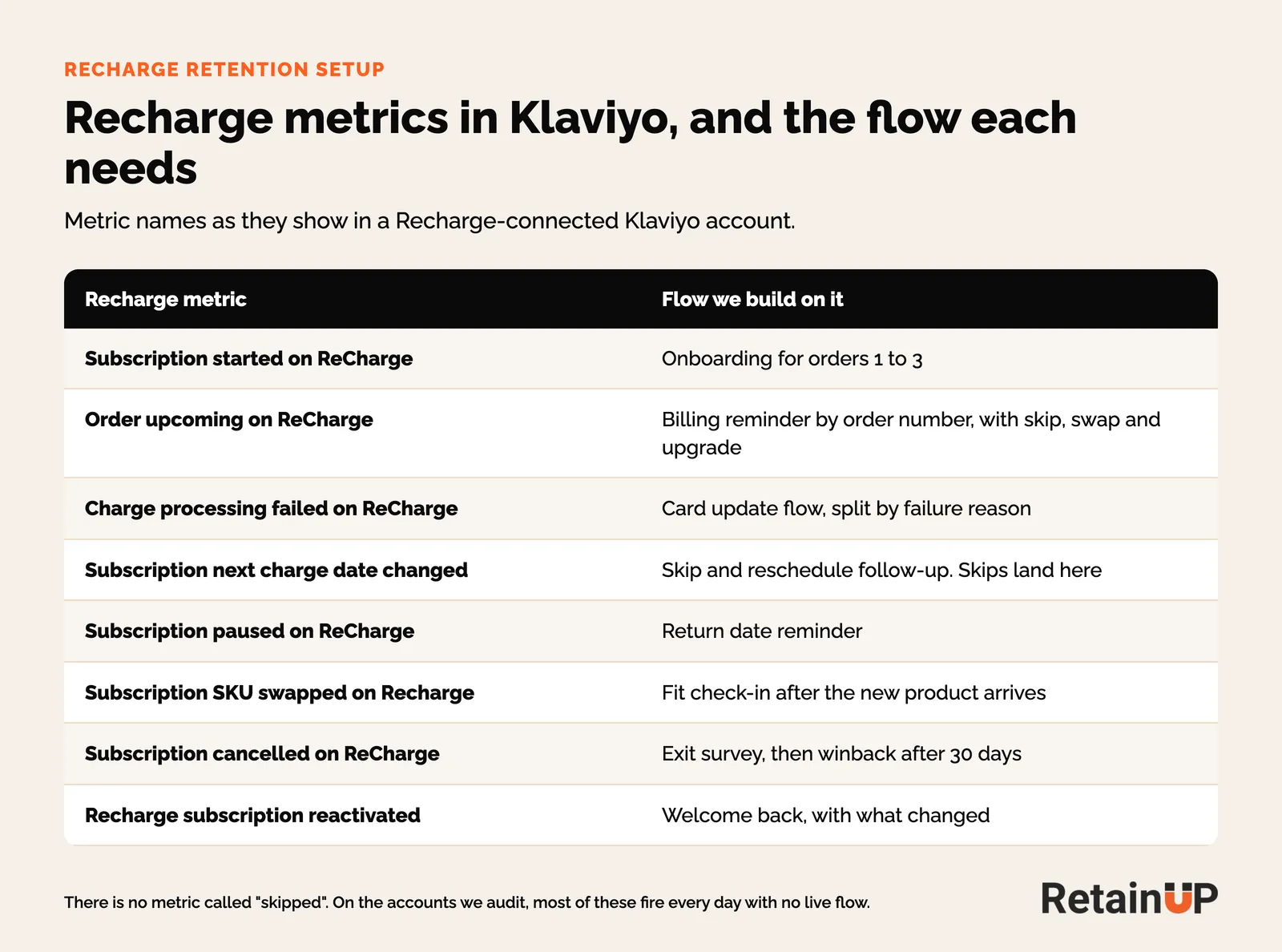
One thing that trips people up. There is no metric called skipped. A skip arrives as Subscription next charge date changed, the same metric as a reschedule. So the skip follow-up runs off that metric, filtered by how far the date moved.
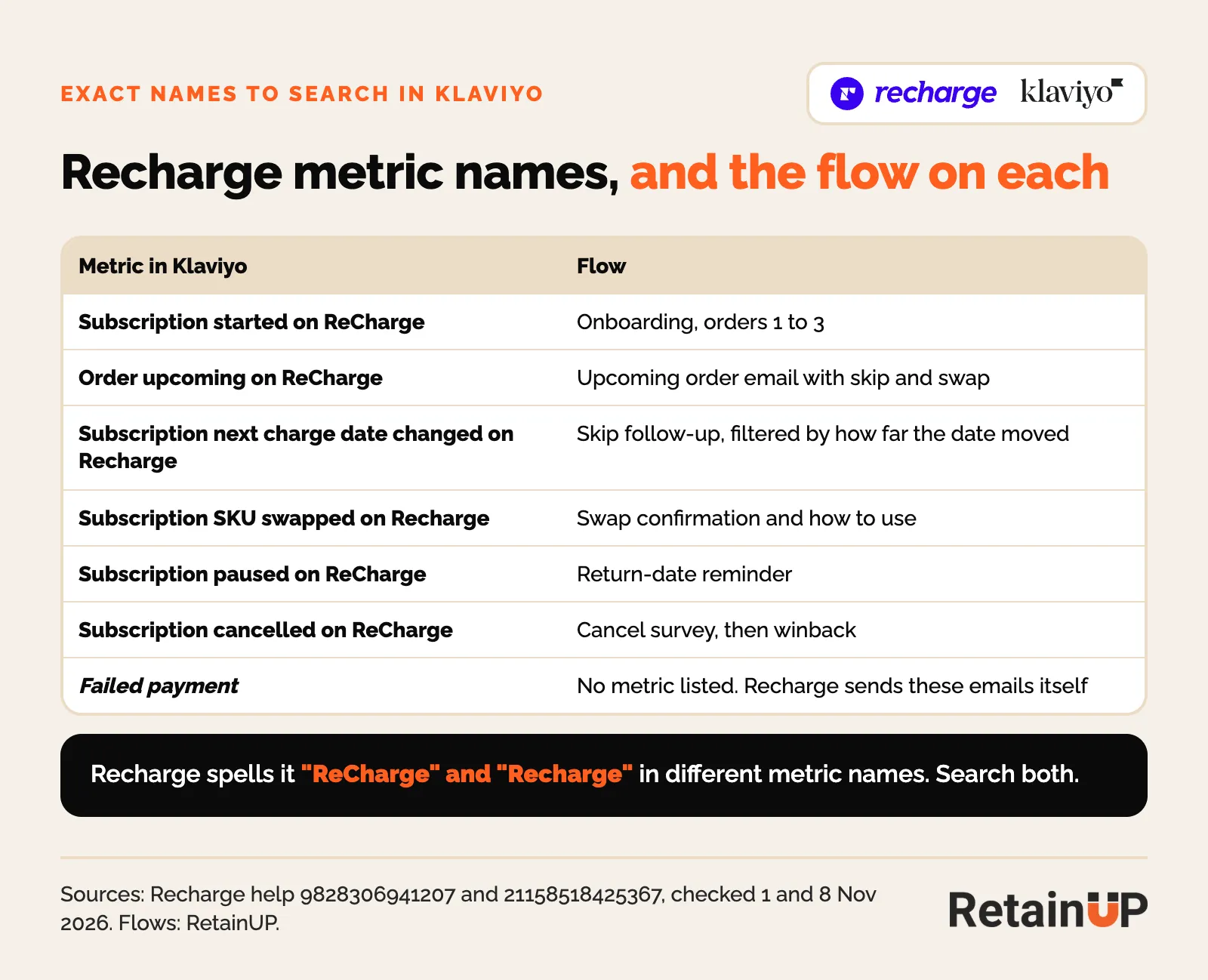
Search for each name in both spellings. Recharge writes "ReCharge" in some metric names and "Recharge" in others. The same events on Loop, Skio and Stay AI are in our Klaviyo event map.
The seven Klaviyo subscription automations we build cover the rest: onboarding, renewal reminders, the cancel survey and winback.
Recharge retention setup checklist
A Recharge retention setup takes 30 days, in this order: read the data in week one, fix the money leaks in week two, build the reasons to stay in weeks three and four.
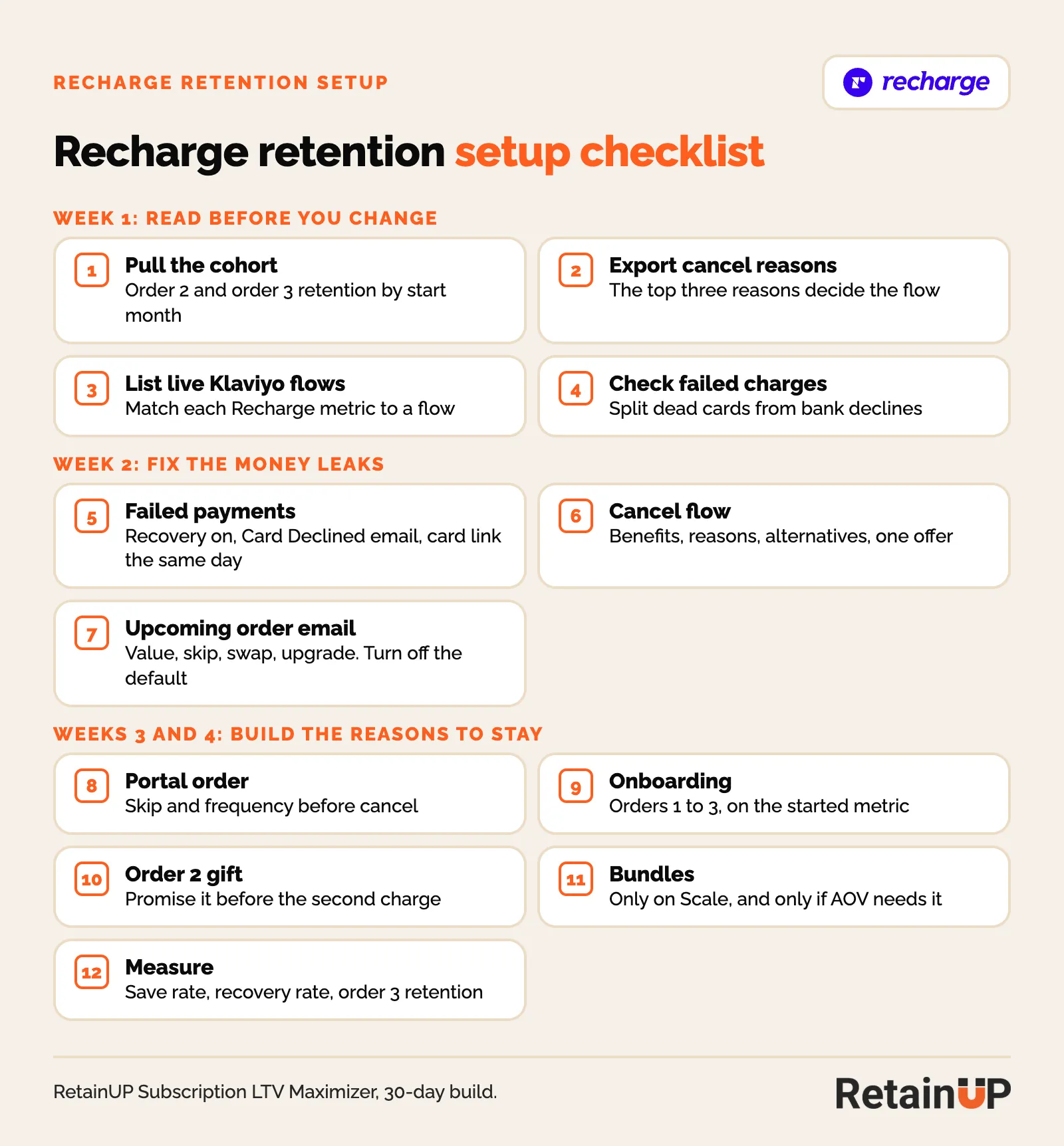
- Pull order 2 and order 3 retention by start month.
- Export cancel reasons. The top three decide the cancel flow.
- List every live Klaviyo flow and match it to a Recharge metric.
- Split failed charges into dead cards and bank declines.
- Turn on Failed Payment Recovery and the Card Declined email, with the card link the same day, and a winback flow for anyone cancelled by a failed card.
- Rebuild Cancellation Prevention: benefits, reasons, alternatives, one offer.
- Move the upcoming charge email to Klaviyo with skip, swap and upgrade buttons. Turn the default off.
- Reorder the portal so skip and frequency come before cancel.
- Build onboarding for orders 1 to 3 off Subscription started.
- Promise a gift for order 2 before the second charge.
- Add bundles only if you are on Scale and order value needs it.
- Track save rate, recovery rate and order 3 retention every month.
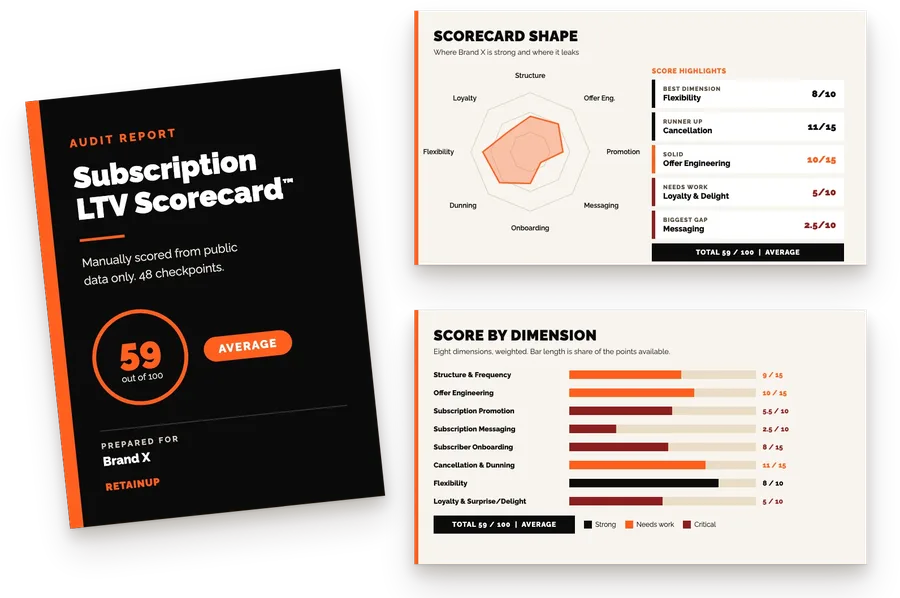
If you would rather see where your own program stands first, our free subscription audit scores it on 8 dimensions and 48 checkpoints.
The first 30 days after launch: five numbers to watch
The five numbers to watch in the first 30 days after a Recharge launch are order 2 rate, order 3 rate, failed payment recovery rate, cancel flow save rate, and skips and swaps.
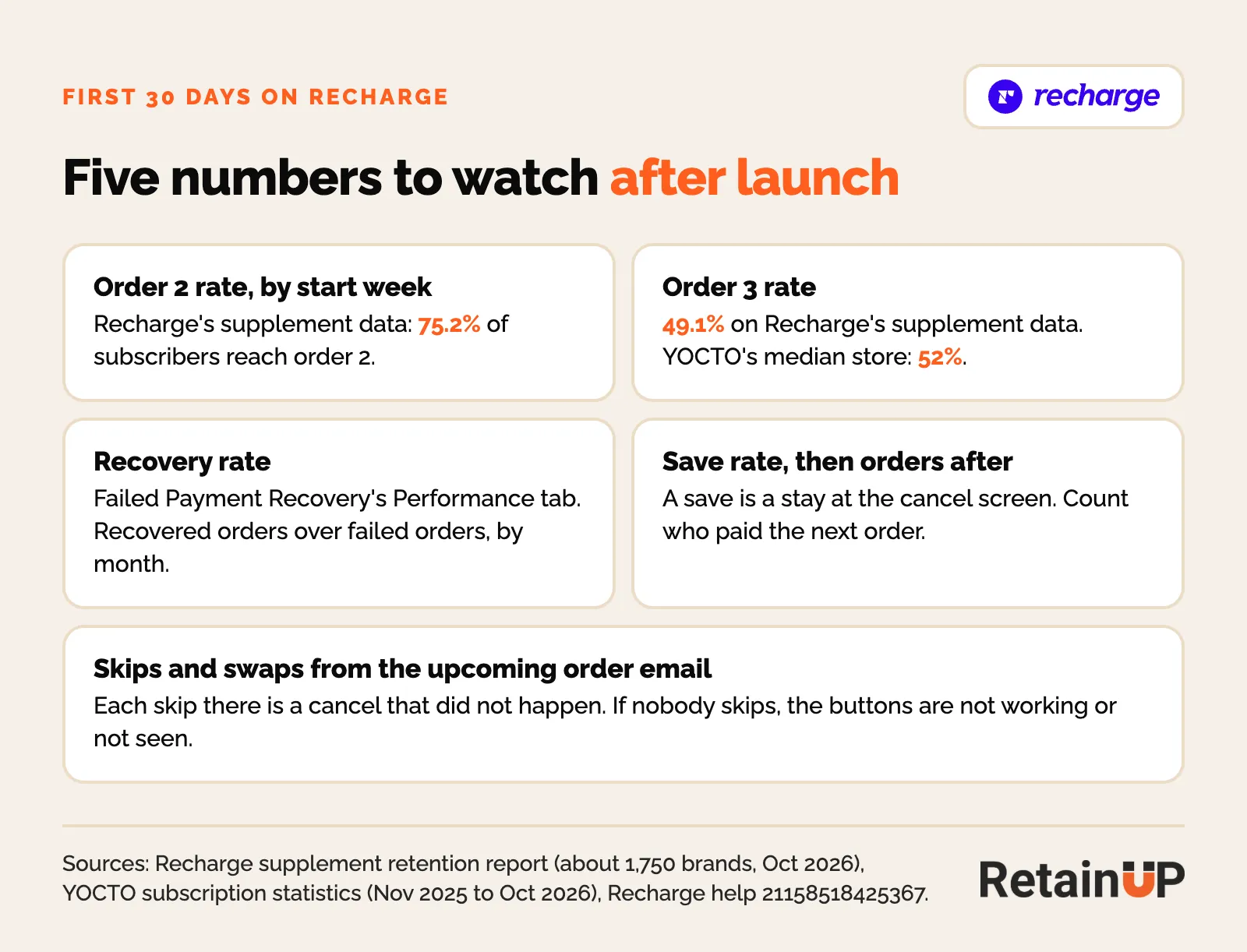
Order 2 is the first number that tells you the setup works. On Recharge's supplement data, from about 1,750 brands, 75.2% of subscribers place a second order, 49.1% a third and 34.4% a fourth. YOCTO's report puts the median store at 52% to order 3. Read yours by start week, not by month, so launch week has its own line.
- Order 2 and order 3 rate, by the week subscribers started.
- Recovery rate, on the Performance tab of Failed Payment Recovery: recovered orders over failed orders, grouped by the month they failed.
- Save rate, then orders after the save. A save means they stayed at the cancel screen. Count who paid the next order.
- Skips and swaps from the upcoming order email. Each one is a cancel that did not happen.
Then put your order 2 and order 3 rates into the free subscription LTV calculator to see what each point is worth.
Results on Recharge
On Recharge, RetainUP cut one brand's monthly churn from 22% to 9% in 30 days and lifted another's take rate from 35% to 69%. A $5M subscription brand came to us running Recharge billing and Klaviyo, losing 22% of subscribers a month. Customers weren't using the product, so they had no reason to stay. We built onboarding, anticipation emails, the cancel flow and surprise gifts around the habit. Monthly churn fell to 9% in 30 days.
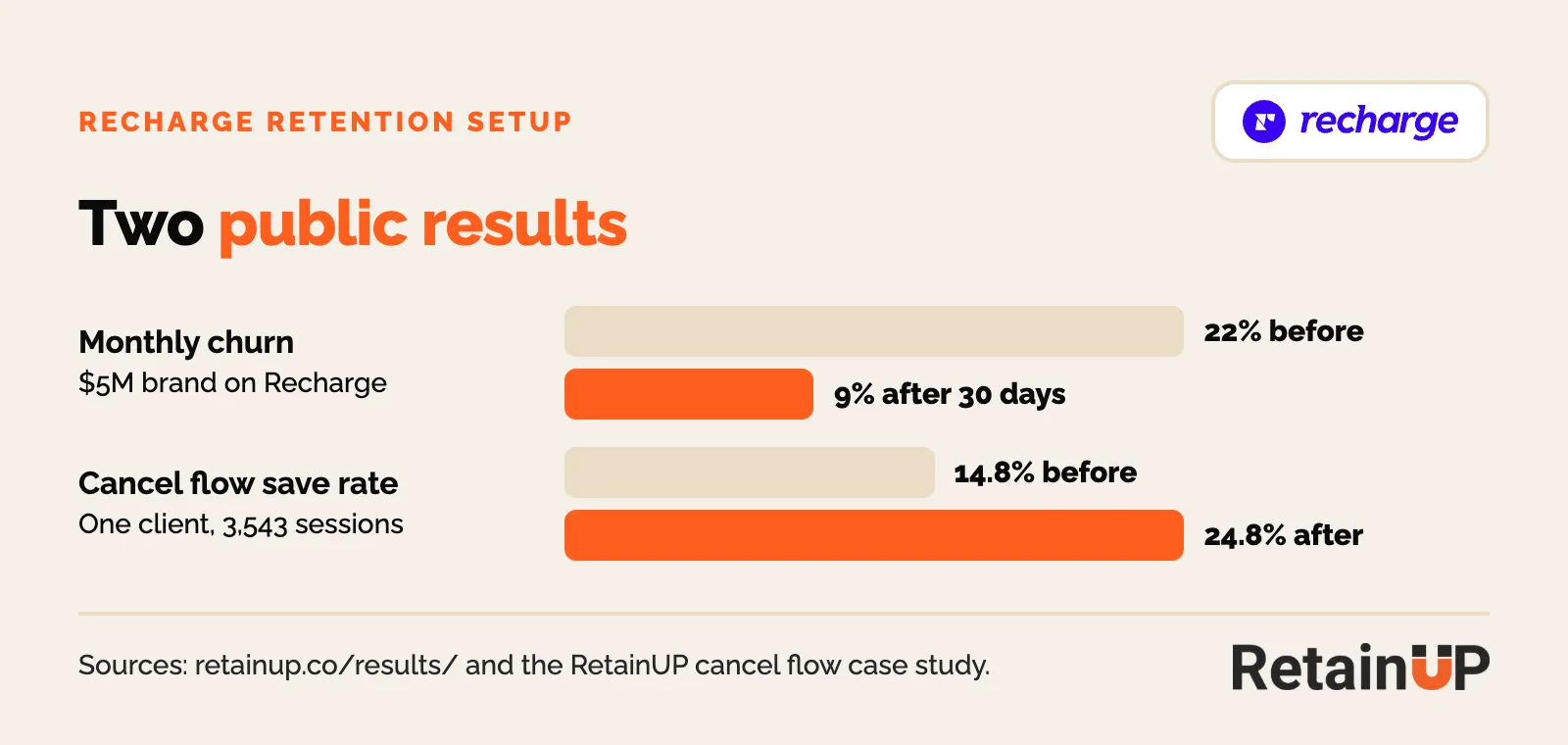
The cancel flow result above, 14.8% to 24.8%, came from a Skio store. All three are on our results page.
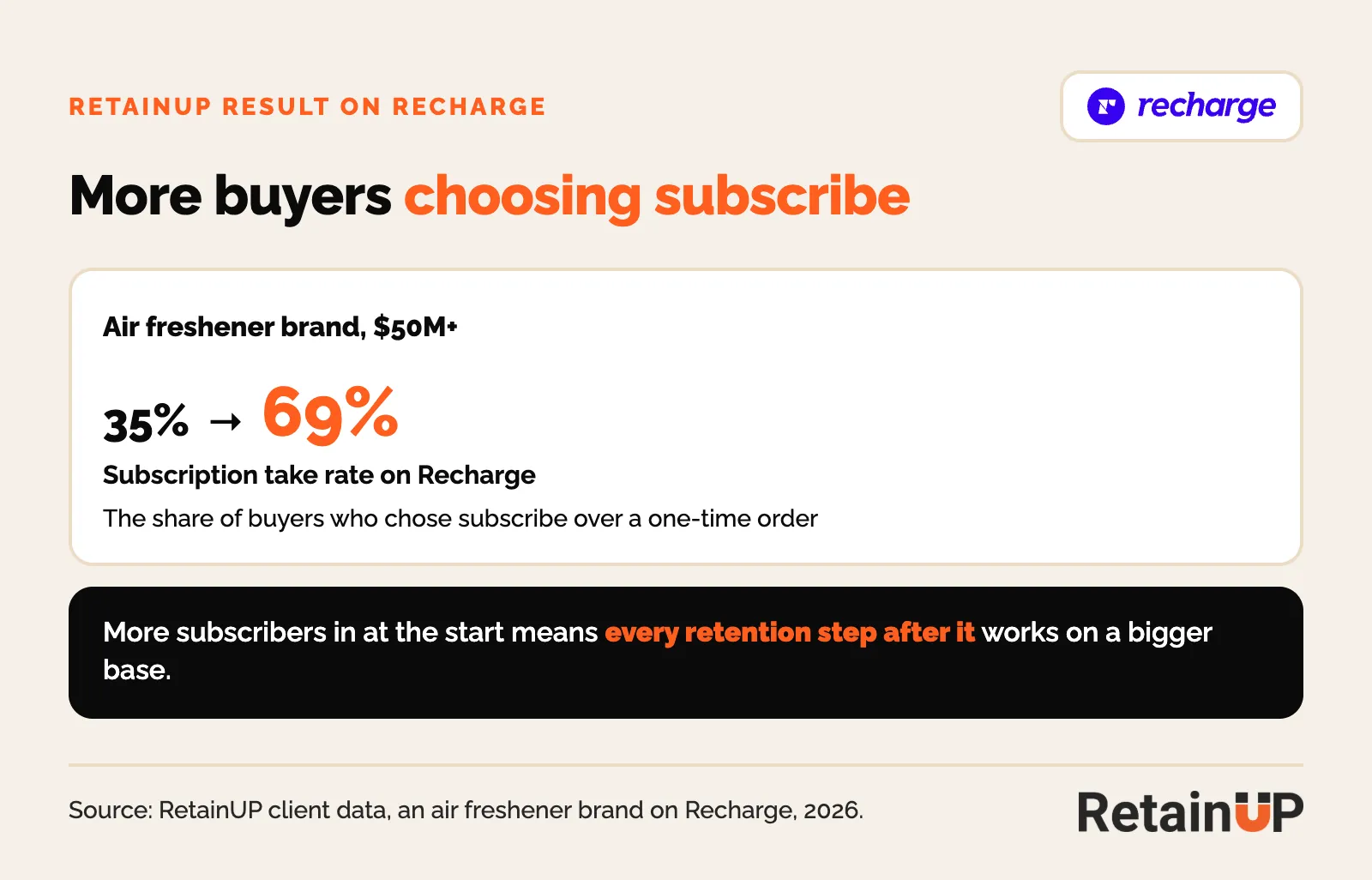
The second Recharge result starts before anyone subscribes. On Recharge, an air freshener brand's subscription take rate, the share of buyers who choose subscribe over a one-time order, went from 35% to 69%. Every step after it works on twice the base.
When to bring in a Recharge retention consultant
Hire help when the dashboard says churn is the problem and nobody on the team owns the subscription layer. That is most $1-10M brands. The email agency runs Klaviyo. Recharge support answers tickets. Nobody reads the cohorts and decides what the cancel flow, the offer and the portal should do.
Our Subscription LTV Maximizer is that build, done for you in 30 days inside Recharge and Klaviyo, for $5,000.
Moving to Recharge, or off it? Our subscription app migration checklist runs the move day by day, and the Klaviyo event map shows what each Recharge event is called on the other apps. Still choosing? The best Shopify subscription app comparison puts Recharge next to the other three.
Comparing Recharge with the apps around it? Recharge vs Skio in 2026 covers what changed now that one company owns both, and Loop vs Recharge puts fees, portal and cancel flow side by side. Coming from a cheaper app? Read outgrowing Appstle, Seal or Shopify Subscriptions first.
Weighing Recharge against Stay AI as well? Stay AI vs Recharge vs Skio compares fees at $1M to $10M, the cancel flow, failed payments and Klaviyo signals. Moving the other way, onto Skio? Migrating to Skio has the 4 to 5 week plan.
FAQ
Who is the best Recharge retention consultant for a $1-10M DTC brand?
Look for someone who works inside Recharge, not only Klaviyo, and can show cohort results. RetainUP works with $1-10M subscription brands and cut one Recharge brand's monthly churn from 22% to 9% in 30 days.
Is Recharge's cancel flow good enough on its own?
The tool is fine. The default setup leads with a discount and puts skip behind the cancel click. Rebuilt with a benefits screen and an alternative per reason, one Skio client's save rate went from 14.8% to 24.8%.
How many times should Recharge retry a failed payment?
Recharge decides. Its Failed Payment Recovery sets the retry timing itself and keeps trying for up to 120 days by default. Expired and invalid cards skip the retries and get a card update link the same day, Recharge cancels the subscription when the last retry fails, so the card update has to land before then.
Do I need Recharge Scale for retention?
No. Starter at $149 a month plus 1.50% and 20 cents includes Smart Cancellation Prevention, Failed Payment Recovery, Win Back and automated workflows. Scale, formerly Plus, at $499 a month plus 1.25% and 20 cents adds bundles, tiered discounts, gifting and journey A/B tests. Gifts and bundles can also be built in Klaviyo and Shopify.
Which Recharge events should trigger Klaviyo flows?
At least Subscription started, Order upcoming, Subscription next charge date changed and Subscription cancelled. Skips arrive as a next charge date change, since there is no separate skipped metric. Recharge sends no failed-charge metric, so your failed payment emails run from Recharge’s own dunning notifications or a tool like Churn Buster.
How long does a Recharge retention setup take?
Our build runs 30 days. The first lift usually shows in week two, when dunning and the cancel flow go live, and cohort retention shows the full effect over 60 to 90 days.
What should I set up in Recharge before launch?
Beyond Recharge's own onboarding checklist: the offer and frequencies, a Cancellation Prevention flow with an alternative per reason, a Failed Payment Recovery strategy with every notice written, the Card Declined email, passwordless login, the upcoming order timing, and a test order checked in Klaviyo.
When does the Recharge free trial start?
Recharge's pricing page says the 60-day free trial on Starter starts the day you install the app. Install when the build starts, not weeks before.
Can I edit a Recharge Failed Payment Recovery strategy after it is live?
No. Recharge's help center says you cannot edit a strategy after you activate it, even if you turn it off. Make a new strategy, and activate it before turning the old one off.
One email a week on subscription retention: the numbers, the strategy, and what to fix first.

Rahi Jain
Rahi Jain is a subscription LTV specialist who helps $1M to $10M DTC brands reduce subscription churn and maximize LTV on Recharge, Skio, Stay AI and Loop.
More about Rahi