Key takeaways
- A third to a half of failed subscription payments are dead cards. No retry reaches them. Only a new card does.
- The update link has to open on the card form. One brand linked to the portal login and got zero clicks.
- Changing the default card in a Shop Pay wallet does not update existing subscriptions, so the next renewal fails on the old card.
Your subscriber did not cancel. They did not click anything. Their card failed, and the money stopped.
Retries handle some of that. But a big share of failed payments are cards that will never work again, and for those the only fix is the customer typing in a new one. This page is about getting them to do it. It sits inside the subscription churn guide, next to failed payment recovery and the retry schedule.
Dead cards: the failures no retry reaches
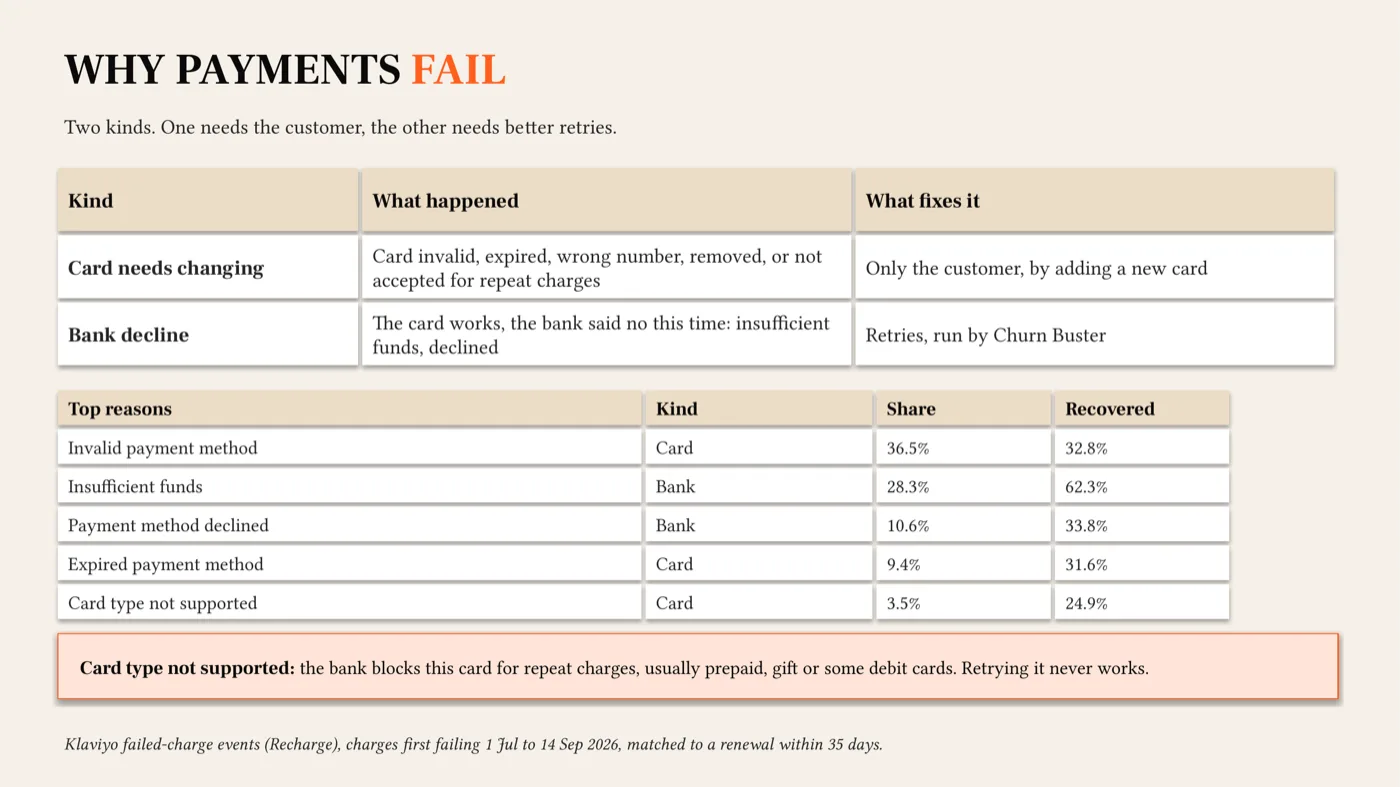
Before you change any setting, split your failures in two.
| Kind | What happened | What fixes it |
|---|---|---|
| Bank decline | The card works. The bank said no this time: insufficient funds, declined, do not honor. | Retries. The customer does nothing. |
| Dead card | Invalid, revoked, expired, wrong number, removed, or not accepted for repeat charges. | Only the customer, by adding a new card. |
You can retry a dead card a hundred times and it will still fail. So the size of this second group decides how much a card update flow is worth to you.
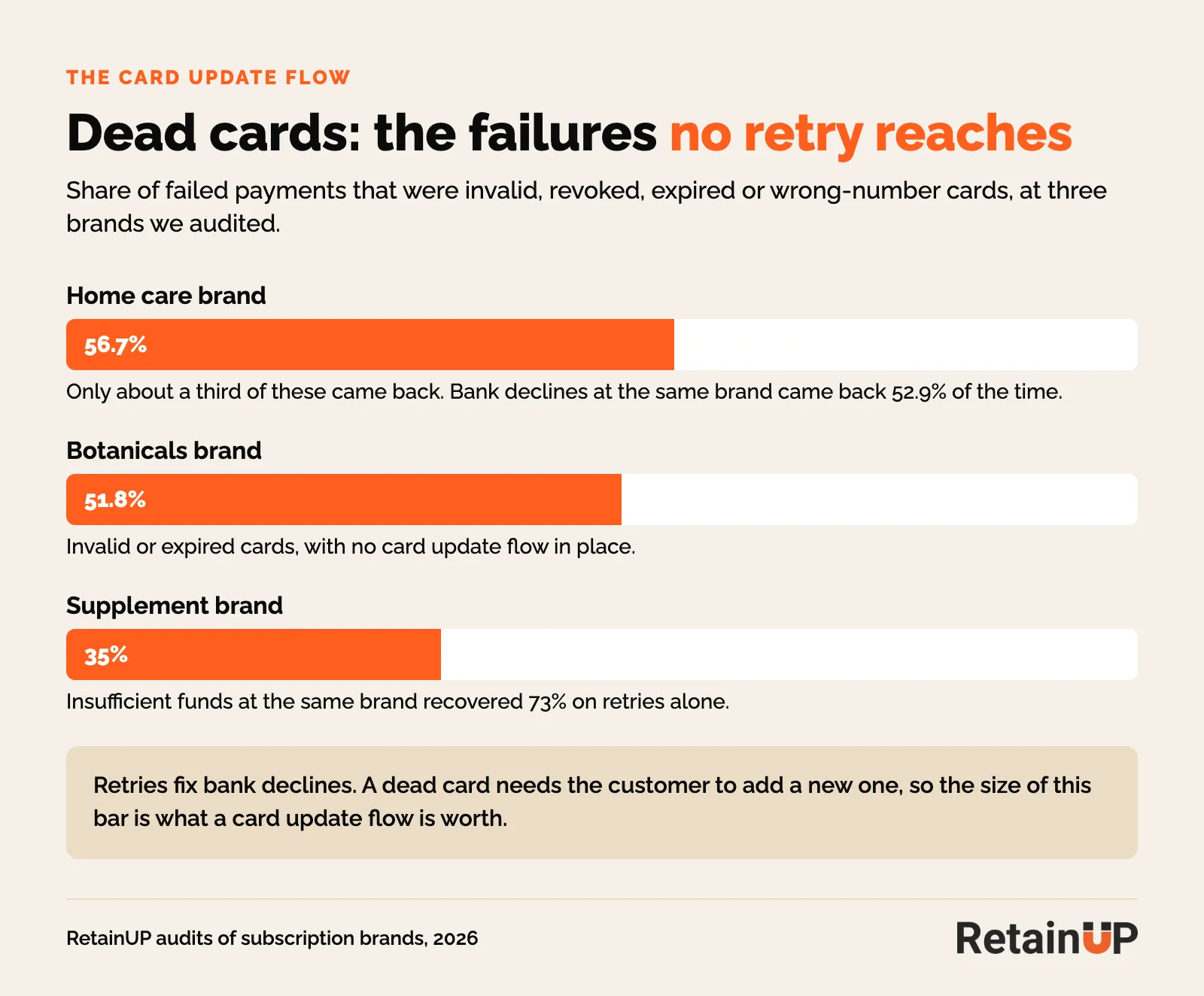
And it is rarely small. At one home care brand we work with, dead cards were 56.7% of all failures, and only about a third of them came back. Bank declines at the same brand came back 52.9% of the time on retries alone. At a supplement brand it was 35% dead cards. At a botanicals brand, 51.8% of failures were invalid or expired cards, and there was no card update flow at all.
Before the card fails: expiry emails and the backup card
The cheapest card update is the one that happens before the charge. Nothing failed, nothing to recover.
The card expiring email
Send it 30 days and 7 days before the card expires, with the update link. One email, and the payment never fails. Most brands skip it entirely. At one supplement brand, cards were expiring every day. Nobody was telling anyone.
And Loop sends one natively, at 30, 15 and 3 days. Check it is on. About 30% of cards change every year, going by Recurly and Stripe research, and card updaters cut hard declines by 30 to 50%.
Ask for a backup card, once
George Lindh has seen a single backup card ask lift payment recovery by 40% or more. It cuts the insufficient funds failures. When the main card is empty, the app charges the second one. On Loop, no dunning email goes out at all.
Ask once, in onboarding, in the pre-delivery email, or in early December before holiday spending drains accounts. And ask in the portal too. When one supplement brand turned the portal ask on, backup cards started coming in straight away.
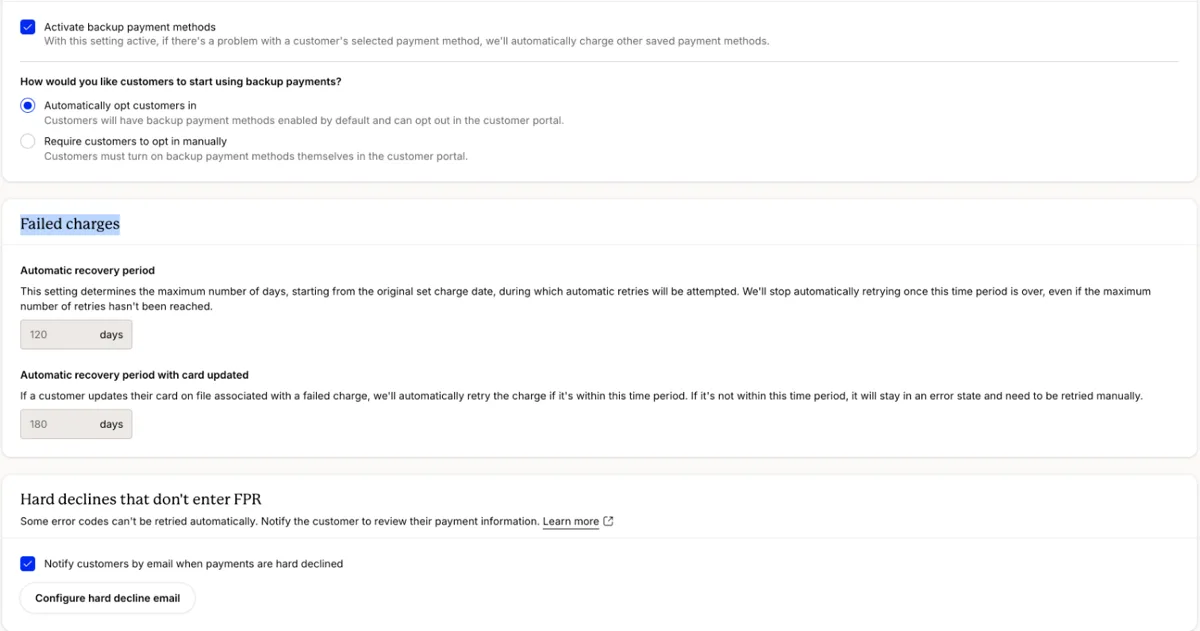
In Recharge, both live under Churn tools, Failed Payment Recovery, Settings. Turn backup payment methods on. Turn the hard decline email on too. It stays off until you do. Those cards cannot be retried. The rest of the setup is in the Recharge retention setup.
Split the flow by failure reason
One flow for everyone is how most brands run it. It is easy to build, and it is wrong for a big part of the list, because it wastes the first few days on dead cards and nags people whose card would have cleared on Friday.
- Dead card (invalid, revoked, incorrect number, expired): skip the retries. Send the update link the same day, by email and SMS.
- Bank decline (insufficient funds, do not honor): retry quietly first. At one supplement brand insufficient funds recovered 73% by retry alone. Ask for a card from email 2.
- Card type not supported: a setup fault. Fix it in Shopify Payments.
And if your app does not send the failure reason to Klaviyo, send everyone the card-first version. It costs you a little on the bank declines and wins on the dead cards. How to time the quiet retries is in payment retry schedules that work.
The link has to open on the card form
For a dead card, the customer has to give you a new one. The whole job is making that single step easy.
This is where most brands lose the money. At one brand, the failed payment email asked people to log in to the portal to update their card. It got zero clicks. Nobody remembers a password for a subscription they set up six months ago.
When the link opens straight on the card form, it works. At a pet care brand, subscribers who updated their card came back 62% of the time, against 26% for those who did not.
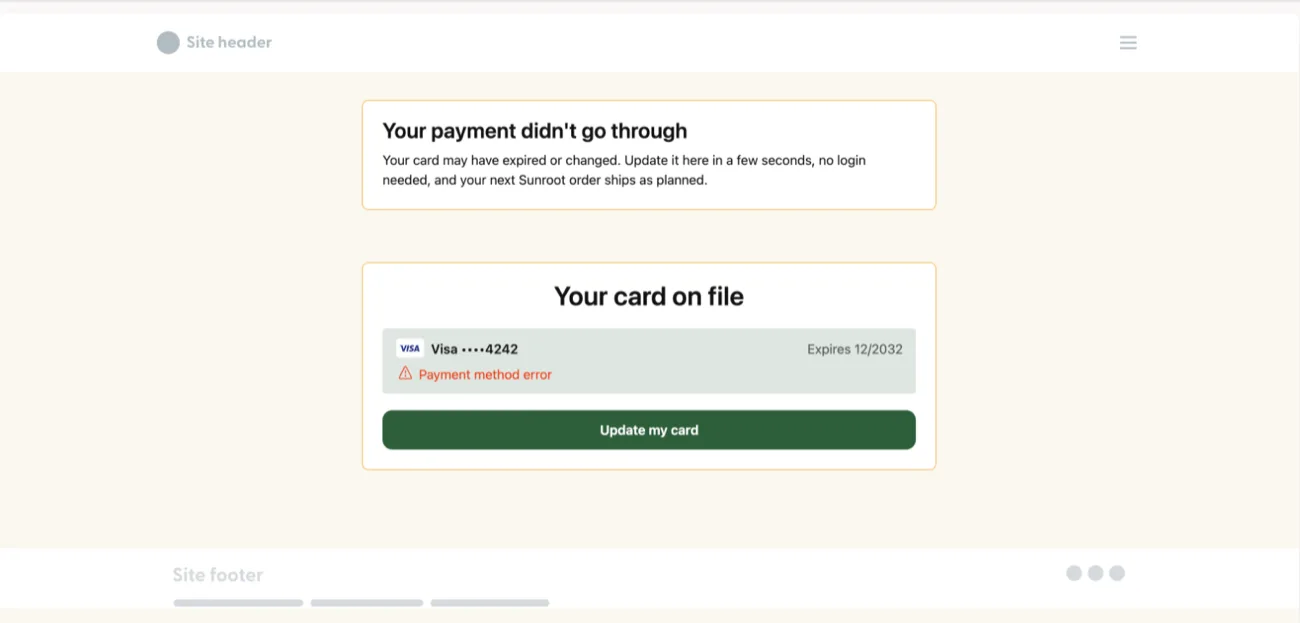
In Recharge this is the payment methods landing page, under Failed Payment Recovery, Settings, and the customer fixes the card there without logging in or resetting a password. Brand it. Say what happened in one line. On Loop and Skio, Quick Actions links land the customer in the portal already logged in. Loop says 30% of Mammaly's subscribers updated their payment method that way.
And you can put the action in the email itself. Zaymo does this. Cornbread Hemp on Skio ran Quick Actions in its billing emails, so subscribers could fix payment without logging in, and 25% of people who clicked took a real action. Their recovery rate was 44%.
Shop Pay subscribers: why the card update does not stick
Shop Pay catches a lot of brands out. It holds the card, so your subscription app can't edit it. The app can only ask Shopify to send the customer an update link.
The busiest Shopify Community thread on this, "ShopPay payment method is not updating for subscription customers", has 1,109 views. The app blamed Shopify. Shopify blamed the app. Nobody posted a fix.
And when a customer changes the default card in their Shop Pay wallet, existing subscriptions stay on the old card. They think they fixed it. The next charge fails anyway. And two more limits catch people out. Shop Pay allows two updates per payment method every 20 minutes, so a third try gets blocked. And a Shop Pay method can't be swapped for a plain card without a new checkout.
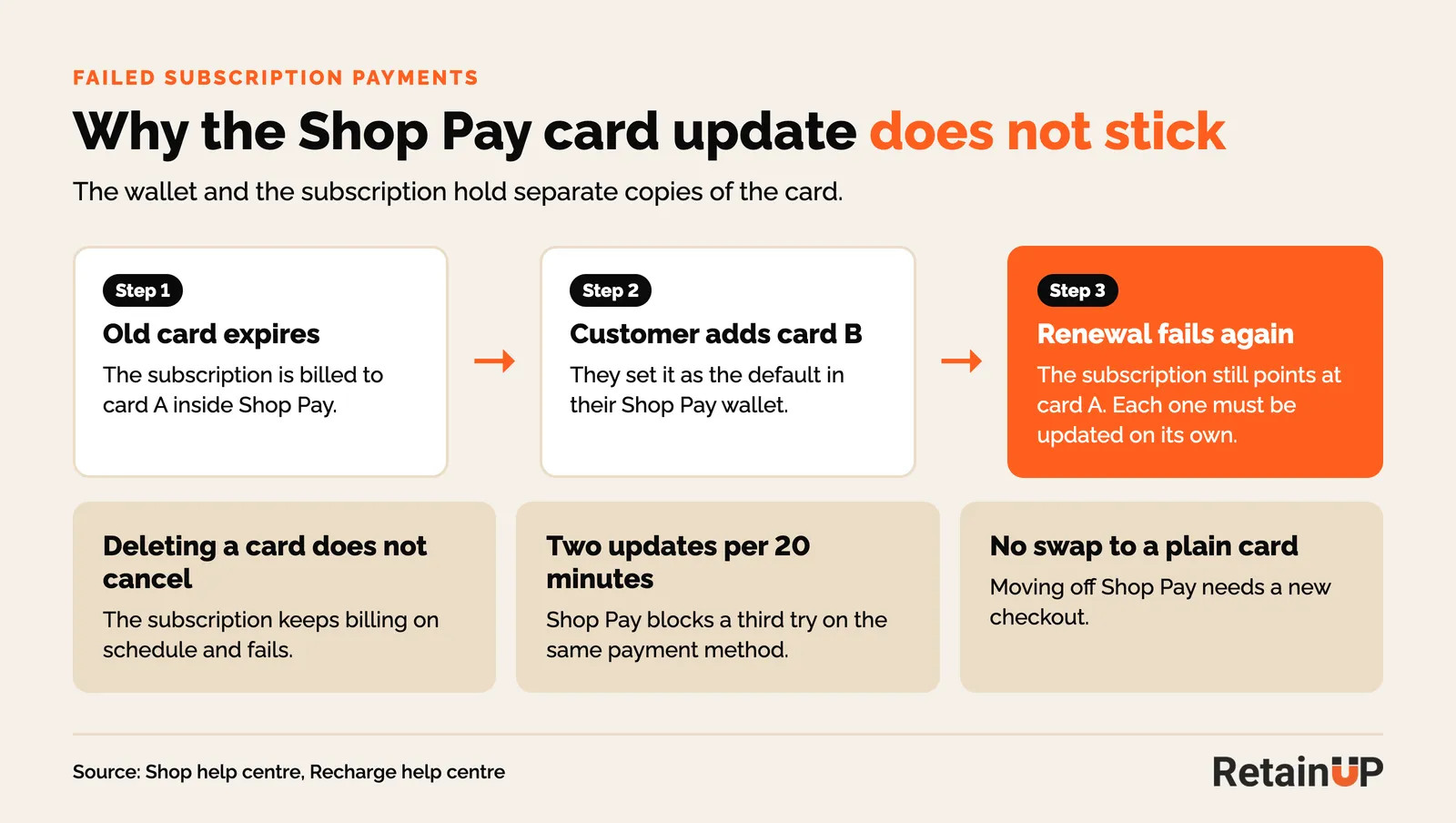
Then there is revoked. Skio says it often follows a customer removing the card from Shop Pay, which breaks the billing agreement. Nothing is left to retry.
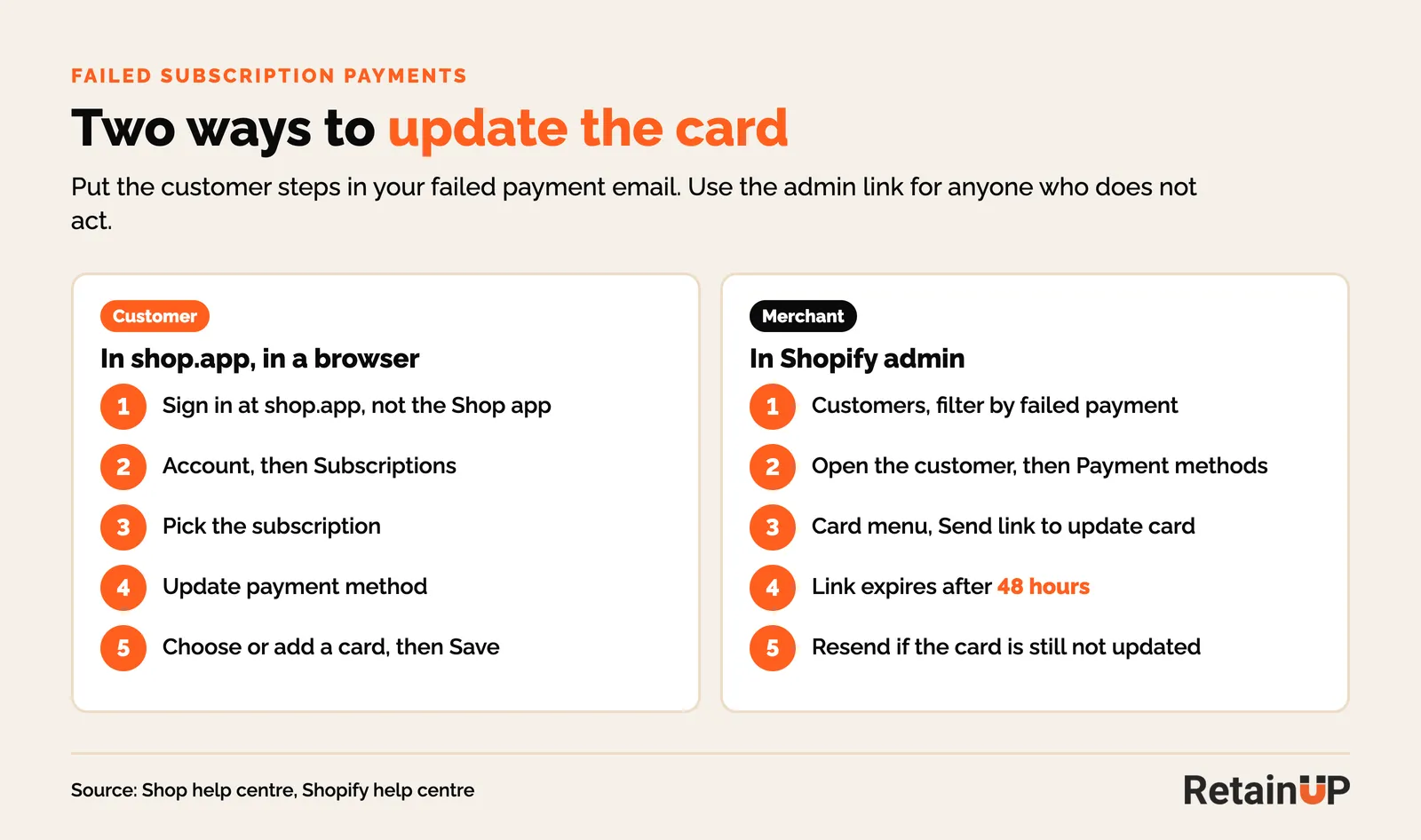
So send Shopify's own update link. In the Shopify admin, open the customer, go to Payment methods, open the card menu and choose Send link to update card. The link expires after 48 hours. Send it again if they miss it.
- Recharge: customer profile, Manage payment methods, Request an update via email.
- Skio: Manage, Update payment method, send the secure link.
- Loop: subscription, Payment details, Send link to update payment details. Loop's quick action URL also works for revoked methods.
- Stay AI: the portal button triggers Shopify's email, and only active or paused subscriptions can be updated in Shop Pay. A cancelled one can't.
So put the five shop.app steps in the day 1 email too, so the customer can do it without waiting on you.
The messages: 3 emails and 1 SMS
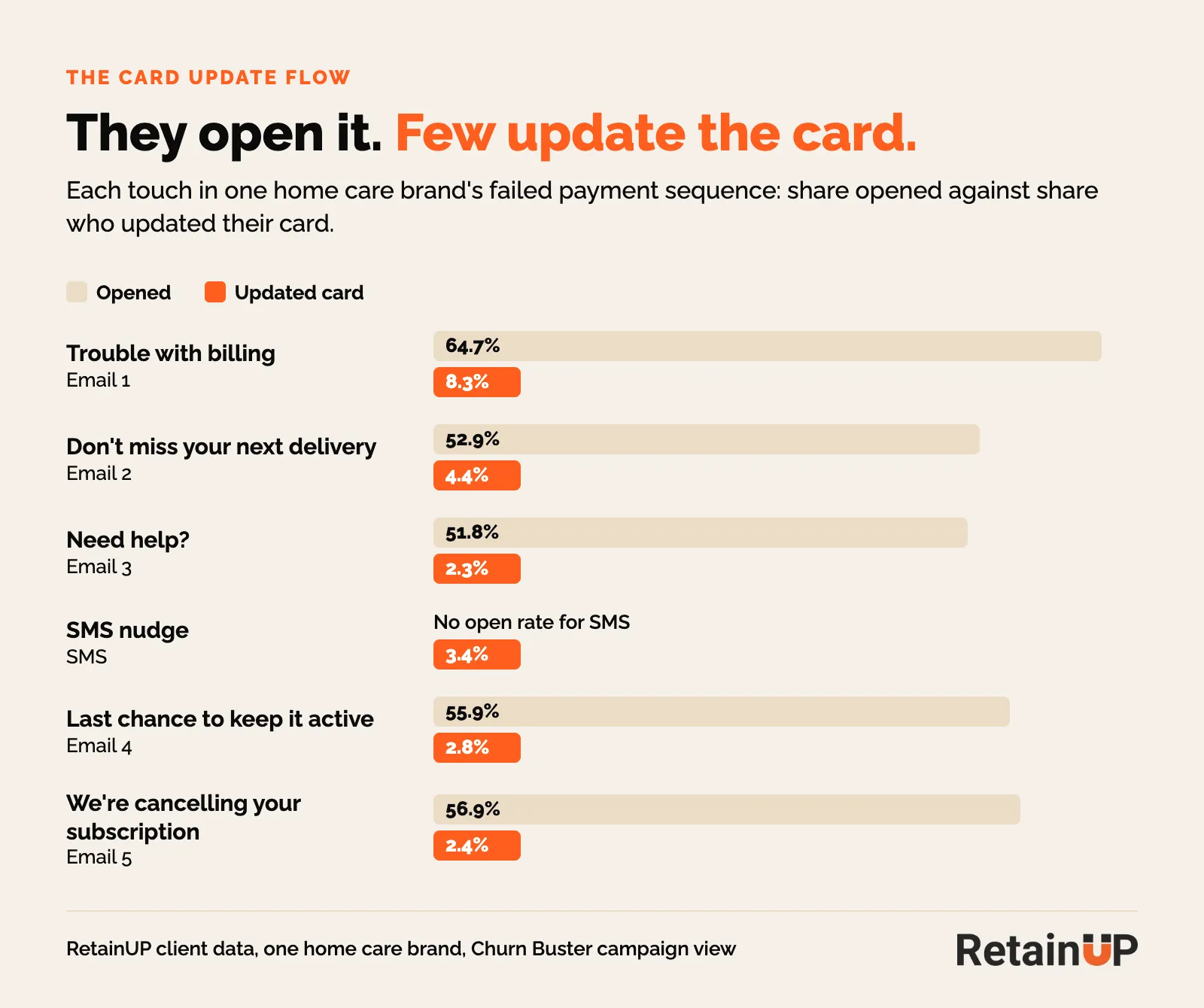
The copy matters more than people expect. At the home care brand, 52 to 65% of subscribers opened the dunning emails, and only 2 to 8% updated their card. They see it and they do not act. So one email is never enough, and every email needs the one-tap link at the top.
| When | Channel | Message |
|---|---|---|
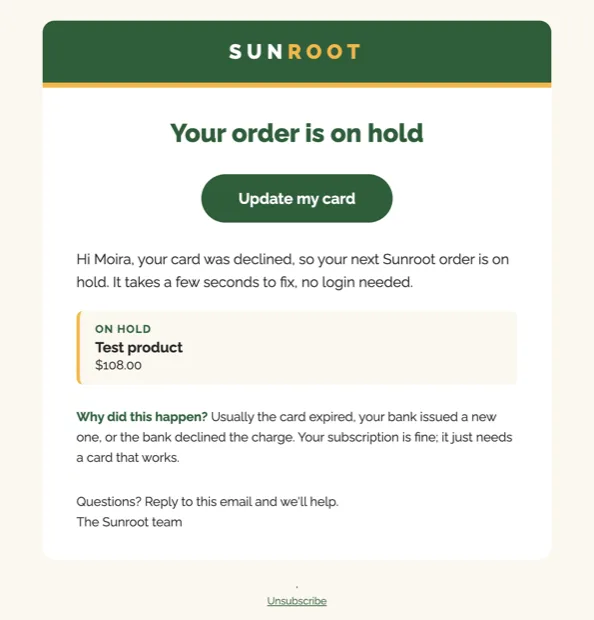
| Day 1 | Email + SMS | "Your order is on hold." Update card button at the top. One line, no product pitch. For Shop Pay, the five shop.app steps. |
| Day 3 to 5 | What they lose: the next order date, the locked price, progress to the next gift. | |
| Day 7 to 10 | An offer for updating, for example "Update in 48 hours, get 15% off your next order". | |
| Last retry | "We've paused your subscription. Update your card to restart." |
So keep each one short. A heading, one line, a button. The first goes out within the hour. The SMS goes with it.
What every email should say
The customer never sees the decline code. Skio's docs say its default failure notices show only the card brand, last four digits and expiry. So say it plainly in your own words.
- Which card failed: the brand and last four digits.
- What is on hold: the product, and the order date it misses.
- Why, in one line. Usually the card expired, or the bank issued a new one.
- The date the subscription pauses if nothing changes.
And send in the subscriber's daytime. Loop sends its recovery messages only in local daytime hours. If you run milestone gifts, split the flow by order number and tell the customer which gift they are about to miss. That one is from George Lindh. It gives email 2 something real to say.
The offer belongs at the end
Only the later emails carry an offer: update your card and get 10 to 15% off your next order, with a unique code. At a French supplement brand the 10% sat on email 3. Recovery stayed flat. The discount is the last push. The link is the fix.
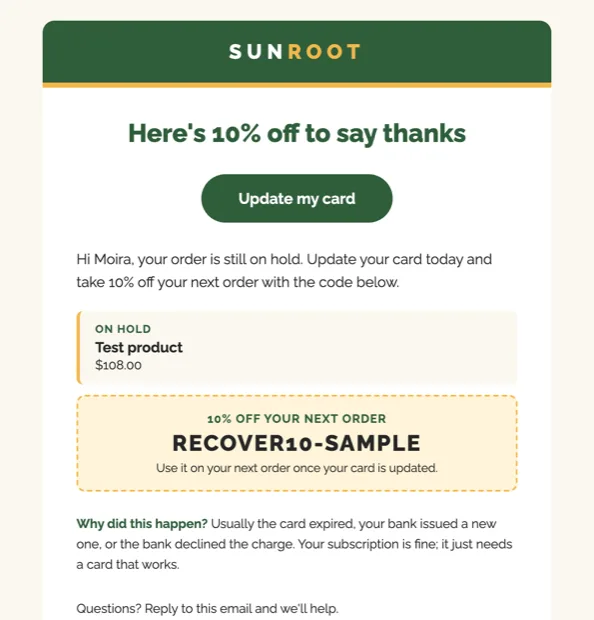
Loop shared a holiday number on this: a 5% discount on the later retries lifted recovery about 16%. So the order is silent retries, then a reminder, then a discount, and only then a bigger one. Loop's own playbook goes a step further and sizes the offer by subscriber: nothing on a first failure, 10% by the third, 15% for anyone who has spent over $500.
How long to keep sending
Three emails and an SMS cover the usual retry window. On one Recharge build we ran seven, on day 0, 1, 2, 4, 6, 9 and 13. If they still bring people back, keep going to 30 days. After two weeks it gets very low. But 1% back is money you would otherwise lose. For high-volume brands we have run it to 45 days.
It does not take a big build to pay off. At a CBD brand, a simple four-email version was bringing money back within its first two months.
Building it in Klaviyo
You can send from the app. But Klaviyo gives you the timing, the copy and the design. Here is the build we use with Loop or Recharge.
- Trigger. The app's payment failed event. On Recharge that is "Charge processing failed on Recharge". Split on the failure reason if the app sends it.
- Exit. The payment succeeds or the card is updated. The flow stops the moment a charge goes through.
- Turn off the app's own emails. Recharge's AI strategy sends five of its own, linking to the same page. You do not want two senders running. Pick one.
- Retries. Six attempts over 14 days, on day 1, 3, 5, 7, 10 and 14. Not 19.
- Measure monthly. Recovered orders over failed orders, and card updates per month.
If you are not sure which events your app sends, the subscription app Klaviyo events guide lists them.
Then check the flow every month. These emails stop. Nobody notices. At the pet care brand they stopped after an app update. At the supplement brand they stopped in September and nothing replaced them, which is the worst version: the app's emails off, Klaviyo's never on.
After the last retry: pause, do not skip
When the retries run out, pause the subscription. Don't cancel. Don't skip. A cancelled Shop Pay subscription can't take a new card. They have to buy again. Most won't.
Check yours today. Recharge cancels when every retry fails, with no pause option, so on Recharge the card update ask has to land before the last retry, and anyone cancelled by a failed card goes into a winback flow of their own. Loop lets you pick skip, pause or cancel.
The last email says "we've paused your subscription, update your card to restart", with a link that reactivates it in one click. After 30 days, close the ones still paused, count them as passive churn, and send them to winback. Why skip and cancel both go wrong is in failed payment recovery.
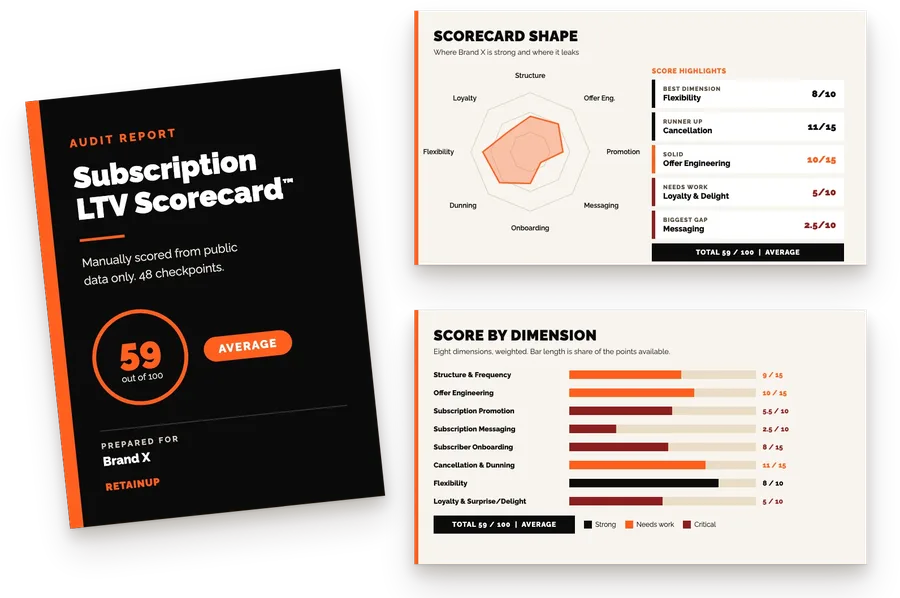
If your card update flow has gone quiet or never existed, the Subscription LTV Optimizer™ checks your store, app and Klaviyo every month and ships the fixes, for brands with 5,000+ active subscribers at $3,000 a month. For a quicker read, the free audit covers 48 checkpoints and names your top 3 leaks in 24 hours.
FAQ
What is a dunning email for a subscription?
A dunning email tells a subscriber their payment failed and asks them to fix it, usually by updating their card. For subscriptions, run three emails and one SMS over the retry window. Each one leads with an update button that opens straight on the card form, with no login. Save any discount for the later messages, and pause the subscription after the last retry.
Why are customers not updating their card after a failed payment email?
Usually the link asks them to log in. One brand's email sent people to the portal login and got zero clicks, because nobody remembers a password for a subscription set up months ago. Opens are fine, often 52 to 65%. The problem is the step after. Point the button at a card form that needs no login.
Why can't my customers update their card in Shop Pay for their subscription?
Changing the default card in the Shop Pay wallet does not change existing subscriptions. They think they fixed it. Each subscription is updated on its own in the Shop account, in a browser. Send them Shopify's update link from the admin, which expires after 48 hours, and put the shop.app steps in your failed payment email.
Should a dunning email include a discount?
Only the later emails should carry one, such as 10 to 15% off the next order for updating the card, with a unique code. At a French supplement brand the 10% sat on email 3. Recovery stayed flat. Loop saw a 5% discount on later retries lift recovery about 16%. The link does the work. The discount is the last push.
When should I send a card expiring email?
Send it 30 days and again 7 days before the card expires, with a link to update it. The payment then never fails in the first place. Loop sends one natively, so check it is switched on.
One email a week on subscription retention: the numbers, the strategy, and what to fix first.

Rahi Jain
Rahi Jain is a subscription LTV specialist who helps $1M to $10M DTC brands reduce subscription churn and maximize LTV on Recharge, Skio, Stay AI and Loop.
More about Rahi