Key takeaways
- Zaymo puts skip, delay, swap, add-on and reactivate buttons inside a Klaviyo email, so the subscriber never logs into the portal.
- In one of our A/B tests on Recharge, the Zaymo half cut order 2 cancels from 35.2% to 32.4% and order 4 from 17.9% to 14.1%.
- Zaymo sits on top of your emails. Build the billing reminder, winback and cancel emails first, then add the blocks.
Every change a subscriber makes starts with a login. Find the email, click Manage, type a password or wait for a code, find the order, then skip it. A lot of people give up halfway. And the easiest thing left on the page is cancel.
Zaymo takes that trip out. It is an interactive email tool that adds blocks to your Klaviyo emails, and those blocks talk to your subscription app. So the subscriber can skip, delay, swap a flavour, add a product or come back from a cancel, all from inside the email. It sits in our guide to subscription apps for Shopify.
What Zaymo does inside a subscription email
Zaymo pulls your flows and campaigns from Klaviyo. You drop a block into an email and it syncs back. And when someone opens it, Zaymo fetches live data from the subscription app. So the block shows their actual next order.
The blocks we use most:
- Subscription portal block. The next shipment with its products, a Swap button for anything with variants, then Send Now and Delay. This is the one that goes on the billing reminder.
- Product feed. Recommended products with Add to Order, set to add once or subscribe and save.
- Reactivate. One click and a cancelled subscription is live again, with the same products.
- Upgrade. "Your current plan" on top, "Upgrade to" below, one button.
- In-email forms and gifts. A one-question survey, or a gift block you can A/B test.
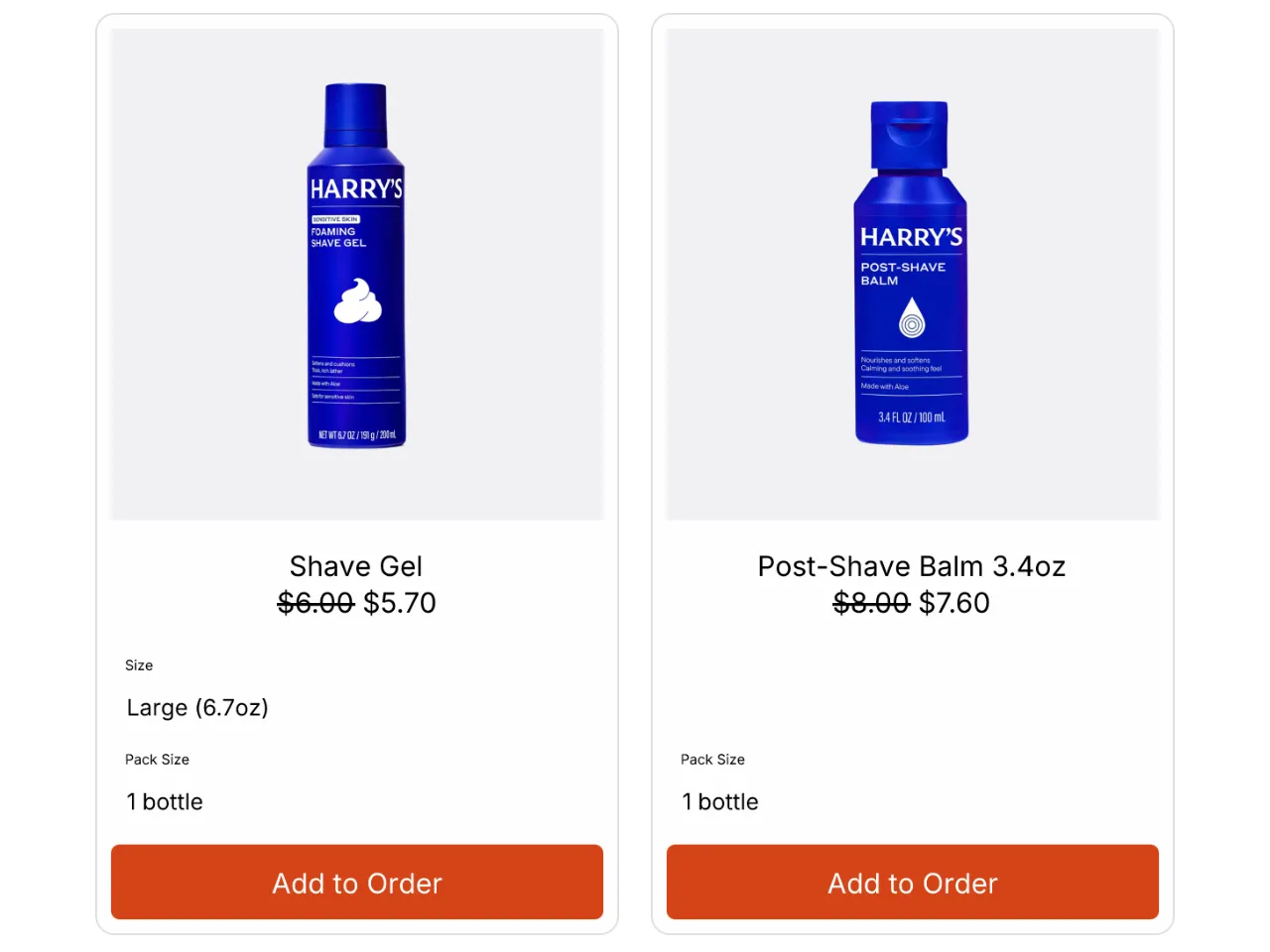
Harry's is the cleanest example we've seen. Swap, Send Now and Delay sit right inside the email, "Powered by Zaymo" under the block, and cancel isn't the first thing you see.
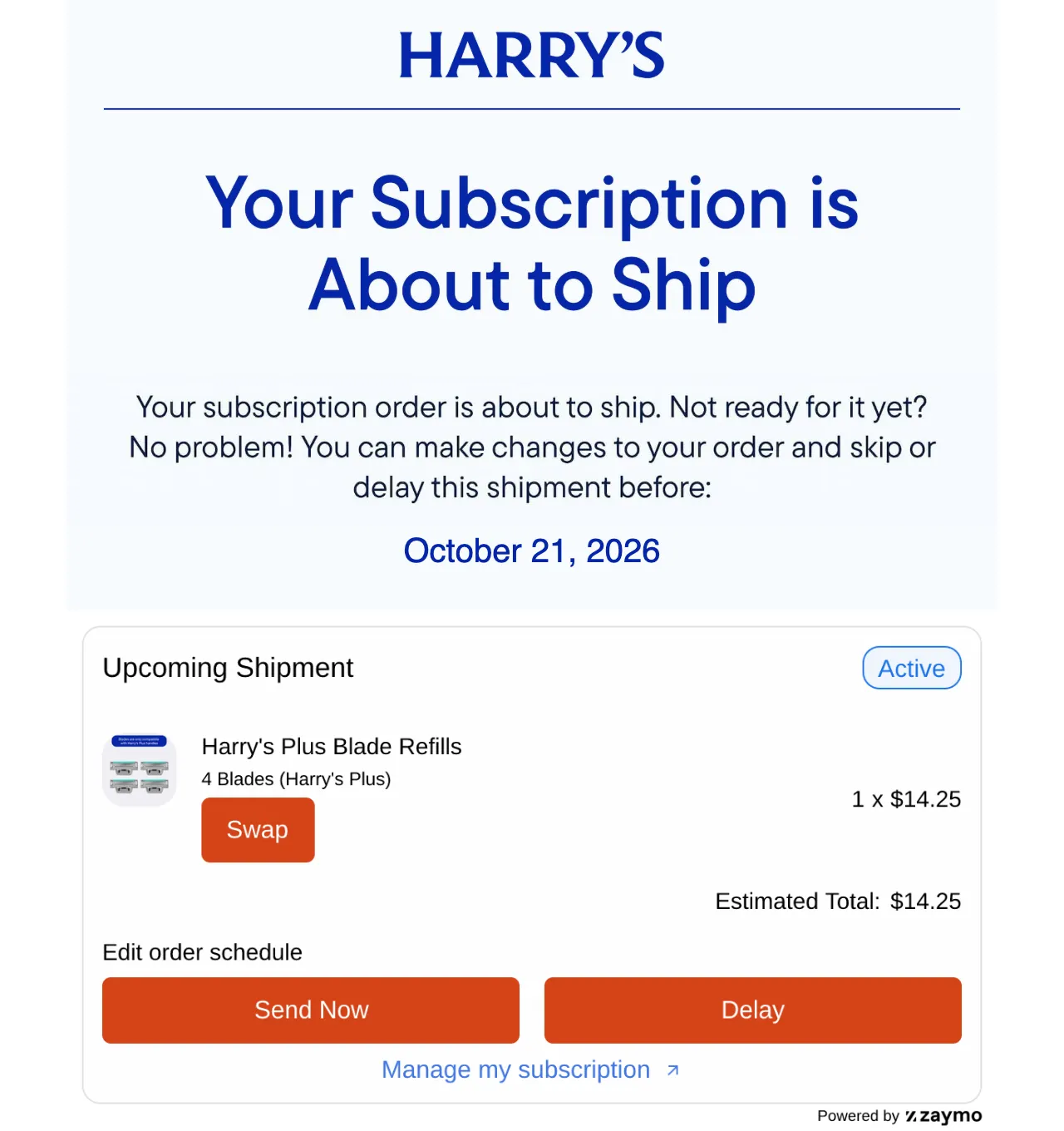
Underneath that block Harry's adds two products, each with its own Add to Order button. No login. Zaymo's case study on Harry's puts the result at 17% fewer cancels from the billing reminder, tested against the same reminder with a portal link. Their number, not ours.
Zaymo's other numbers are strong too, and they are Zaymo's. In-email delays of one to four weeks: about 80% renew again after delaying. In-email swaps of flavour, size or colour cut churn about 20%. In-email forms get 2x the response of a link to a form. And the number of changes a subscriber makes to their settings is one of the biggest predictors of how many orders they stay for.
What subscribers see in Gmail, Apple Mail and Outlook
Not every inbox runs the buttons. Gmail and Apple Mail do. The rest get a magic link to a hosted page with the same actions. Still no login. By Zaymo's own split for an average US consumer brand, Apple Mail is about 45% of opens, Gmail and Yahoo together about 36%, everything else about 19%.
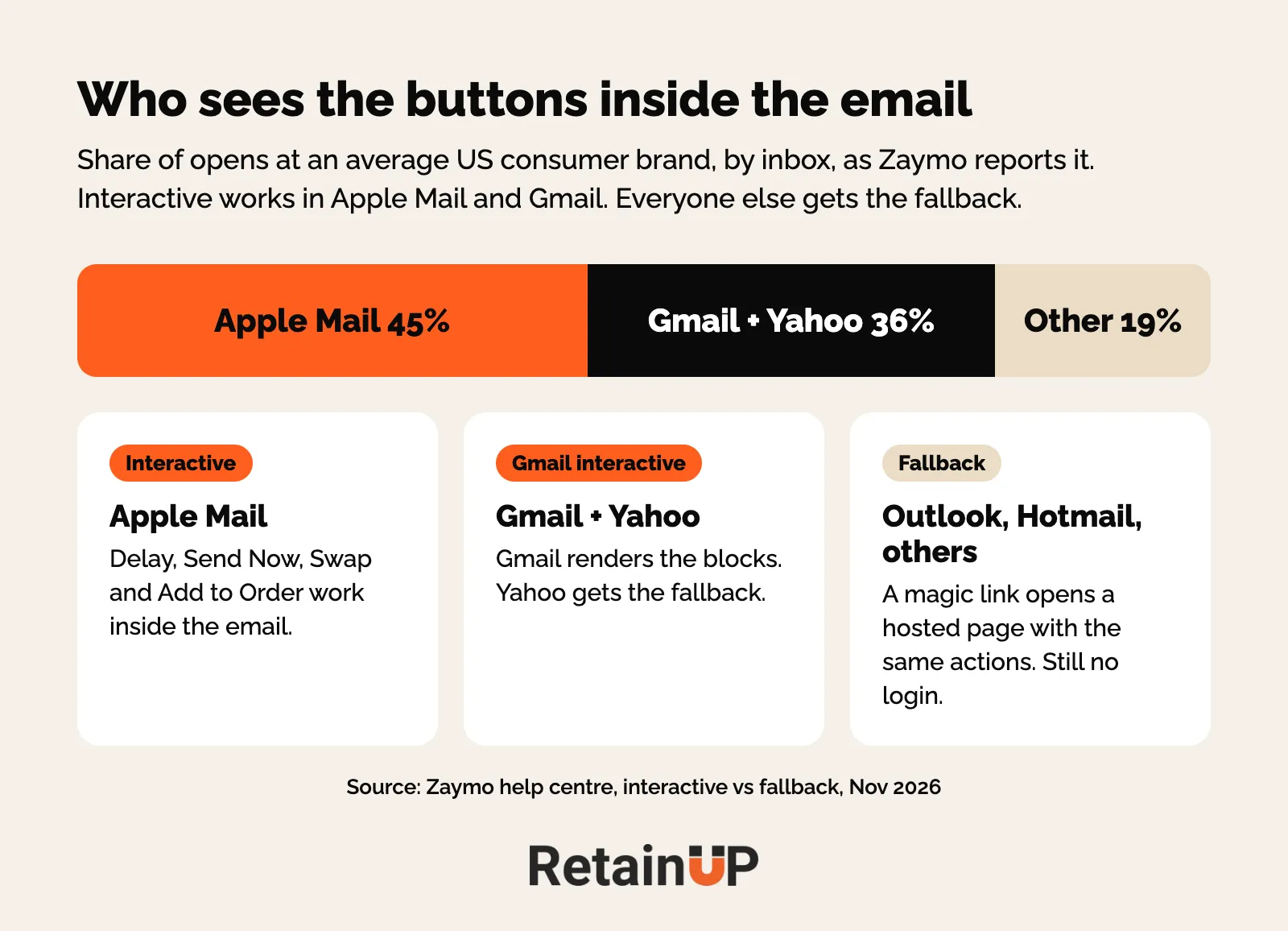
So test both. Klaviyo's preview only shows the fallback. Send real tests to a Gmail and an Apple Mail address before you set anything live.
Where Zaymo fits: billing reminder, winback and payment recovery
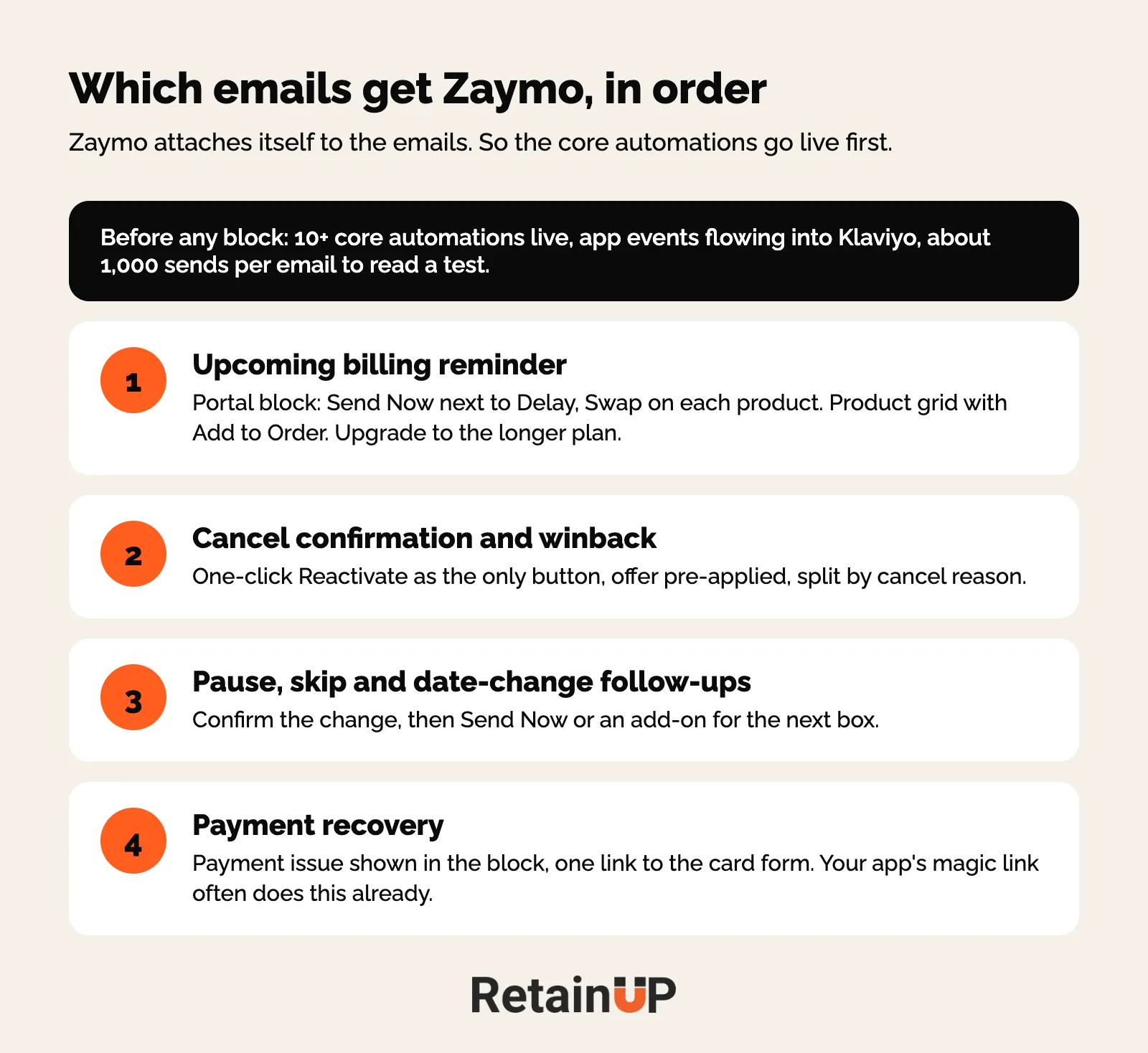
Zaymo is only as good as the email it sits in. So the question is which emails get it, and in what order.
The upcoming billing reminder
This pays first. The reminder is the highest-open email in your stack, and it triggers a cancel spike 3 days before the charge. Most open with a charge amount and a date. The most obvious link is cancel. You have written a bill and attached a cancel button.
Zaymo changes the ask. Cancel stays available. It just stops being the easiest thing on the page. The full rebuild lives in the upcoming billing reminder. Here is the layout we use, with the Zaymo block in slots 4 to 6.
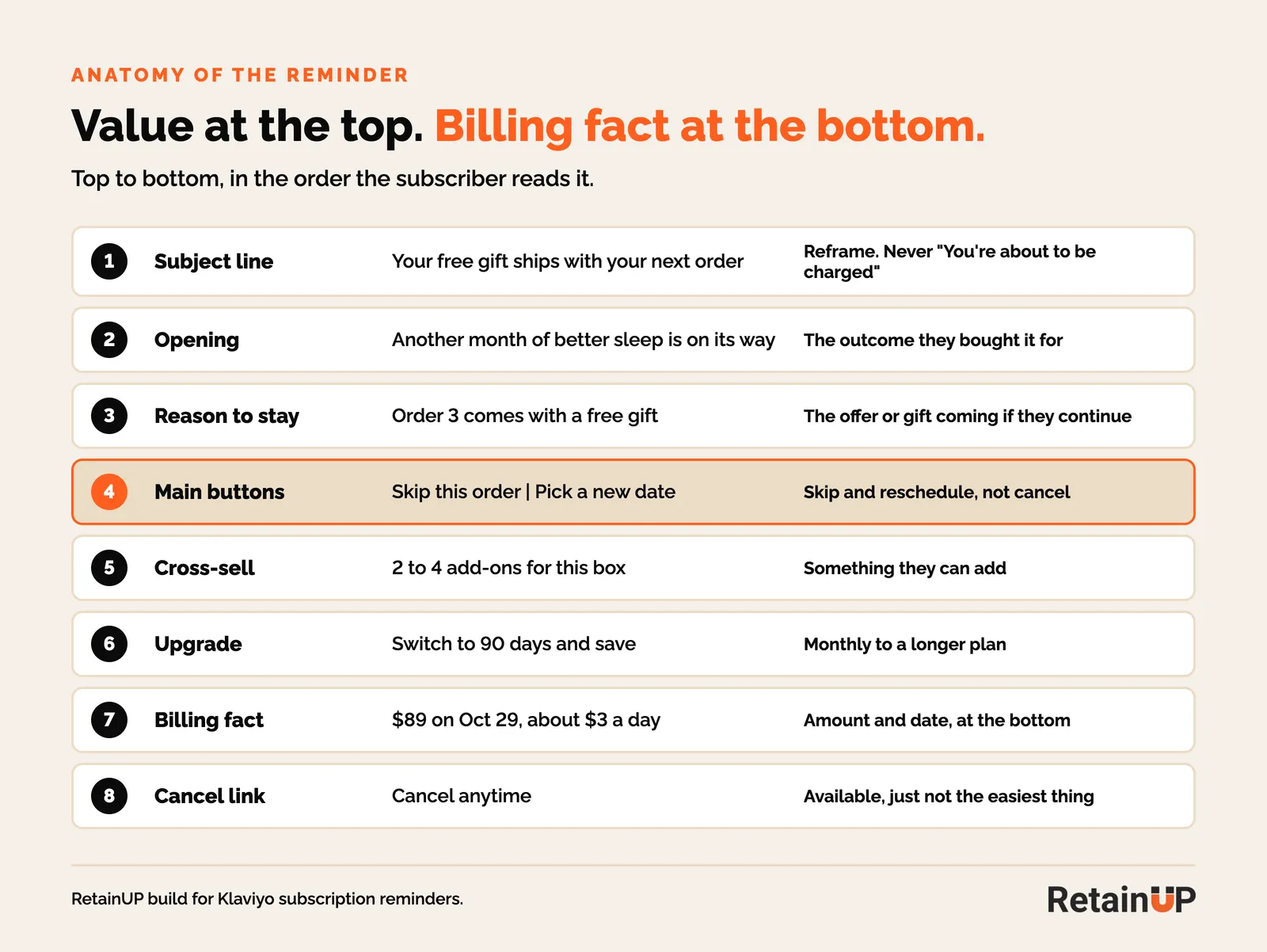
Two rules on the buttons. If you give delay, the positive button sits next to it. So Send Now goes beside Delay. And cap the delay. Four weeks or less makes sense. A brand we scored on Skio uses Zaymo on its reminder to give skip or delay, capped at four weeks on a 90-day plan, and anything more means a portal login. We don't put anything in the email that works against the brand.
Check three settings. Skip item and "Always show delay options" are off by default. The delay cap is set in the block. And the product grid hides anything already in the order, so load 4 to 5 products.
Then the upgrade. Most brands leave it out. Learning with Kelsey offers every monthly subscriber a quarterly upgrade in the reminder, and 1 to 1.5% of subscribers upgrade every month it sends. A monthly subscriber who moves to a 90-day supply is locked in for 3 more months. Which upgrade to offer to whom is in add-ons and upgrades for existing subscribers.
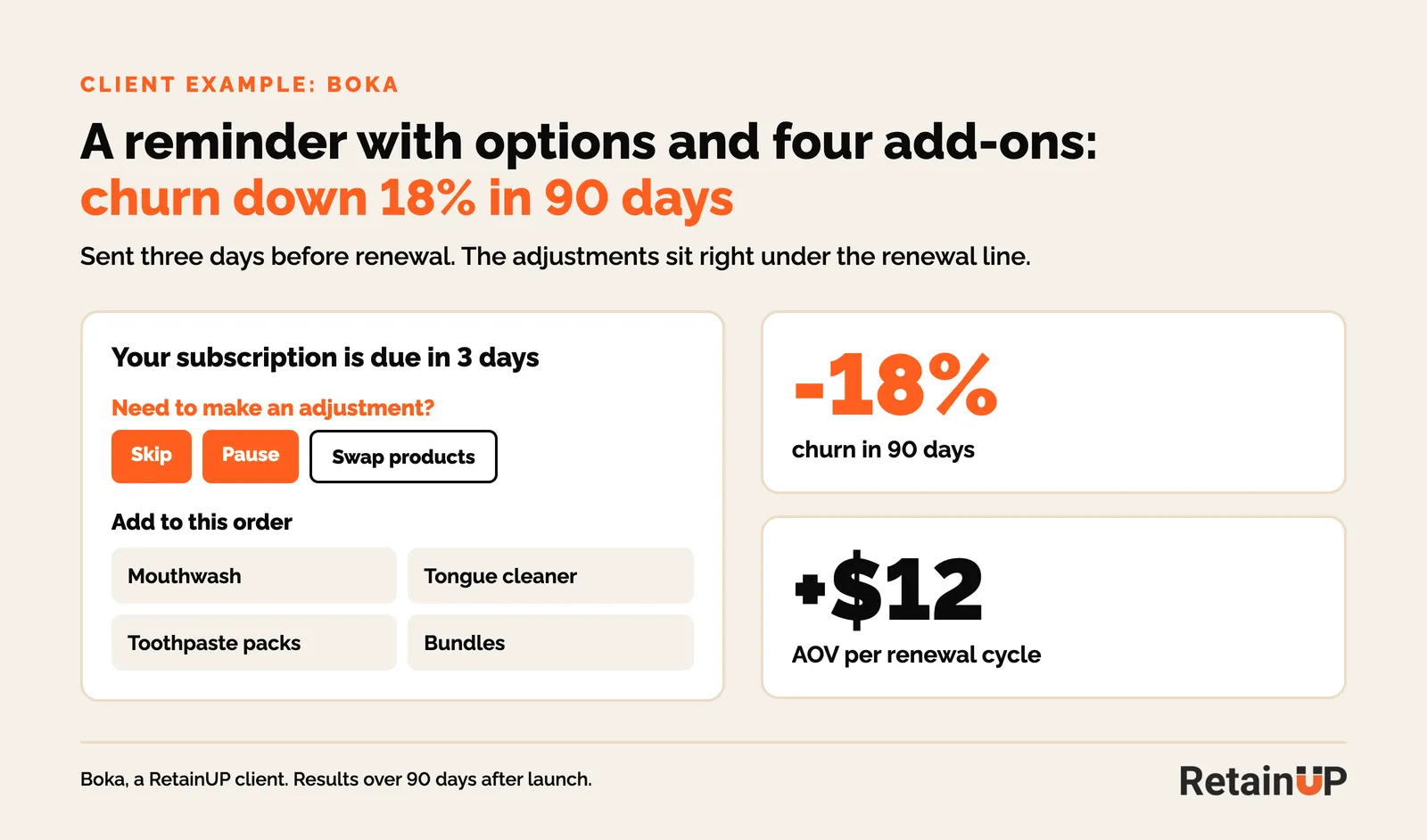
Boka does the same job without Zaymo. "Need to make an adjustment?" sits under the due date, snooze for 1 or 2 weeks in the footer, four add-ons below. Churn went down 18% in 90 days. Links can carry you a long way.
Cancel confirmation and winback
Reactivation is the other big use. It's simple. When someone cancels, the confirmation email and the winback emails get a one-click reactivate button. No portal, no rebuilding the box. One founder we work with called the one-click reactivation idea amazing. That's usually the reaction. Nobody wants to log in to come back.
We split the winback by cancel reason and put the button in each version. The offer still has to beat the new-customer offer. The sequence is in subscription winback flows. The block settings that matter:
- Make Reactivate the only button in the email.
- Show the last 3 cancelled subscriptions, and let them bring back only some.
- Pre-apply the offer in the block. On Recharge the code has to exist in both Recharge and Shopify.
- Leave double confirmation off. Zaymo says about 2% of its brands use it, and it lowers reactivations.
- A product that is discontinued cannot be reactivated. Use a product block set to create a new subscription.
Paused, skipped and date-change emails
The follow-ups after a pause, skip or delay are a quiet spot for it. Someone who just skipped gets an email that confirms it, then a Send Now or an add-on for the next box.
Payment recovery
In the failed payment emails the button should go to the payment page, already logged in. A login wall loses most people. Zaymo's portal block shows the payment issue in the email and links to the card form. The card itself is still updated on your site. Your app's magic link does the same job, so this is the one use where the native option is often enough. On one of our brands only 4.3% of dunned subscribers updated their card, and those who did recovered at 62% against 25.8% for those who didn't. The emails are in the card update flow.
Setting up Zaymo with Recharge, Skio and Loop
Zaymo integrates with all the main subscription platforms. Create the selling plans in the app first. Connect Klaviyo. Connect the subscription app. Then add blocks email by email.
The build order we follow
- Pick the flow in Zaymo. It pulls everything from Klaviyo.
- Turn on the Zaymo A/B test before you edit. Half gets the Klaviyo original, half gets the Zaymo version.
- Add the block, style it, preview it. Then clone it onto the next email in the flow.
- Text edits can be done in Klaviyo and they push into Zaymo. The interactive blocks can only be edited in Zaymo.
- Wait for about 1,000 sends before you read the test. With 70 emails sent you are reading noise.
Recharge: add API keys before big sends
Recharge is strict on rate limits. And Zaymo calls Recharge every time someone opens the email, to fetch that person's subscription. On one of our Recharge accounts the integration page showed a safe campaign size well under the size of a BFCM send. The fix is adding 2 to 3 Recharge API keys to the Zaymo integration before any big campaign.
You make them in Recharge under Apps, then API Tokens, with read and write on customers, discounts, orders, payment methods, plans, products and subscriptions. Paste each into Zaymo and it shows the new safe size. Zaymo's Recharge guide flags one-click campaigns to more than 2,000 people at once, and says support can upgrade a key to handle 600 opens a minute. Flows are rarely the problem. Campaigns are. Gamification blocks fetch no Recharge data, so they don't count. The rest of your Recharge settings are in the Recharge retention setup.
Three more Recharge notes. Recharge can't swap an item inside a subscription, so a Zaymo swap removes the old subscription and creates a new one. Expect that in your reports. Separate Recharge stores by country each need their own Zaymo organization. And a non-subscriber clicking a product block takes two clicks: a magic link, then a Shopify checkout to confirm.
Skio and Loop: check the native Quick Actions first
Skio and Loop both ship their own one-click links. Skio's Quick Actions let a subscriber fix a payment, add products or update details from the email without logging in. Cornbread Hemp put them in its billing reminders and 25% of subscribers who clicked a Quick Action link took meaningful action. Loop has Quick Actions too, including a resume link for paused subscriptions. So on these two, Zaymo is the upgrade. The native setup is in Skio retention setup and Loop retention setup.
If you do add it, Zaymo's provider notes list the gaps. On Loop, pause, cancels and card updates stay in the Loop portal and Zaymo only does delay. On Skio, one-time add-ons need the product marked eligible for one-time, and changes sync every 24 hours.
Whatever the app, Zaymo needs its events flowing into Klaviyo. Missing or doubled? Fix that first. See subscription app events in Klaviyo.
When you need Zaymo and when the native app is enough
Recharge, Loop and Skio all have one-click links that skip or delay without a login. So a lot of brands don't need Zaymo on day one. That's fine.
| Job | Native app link | Zaymo |
|---|---|---|
| Skip or delay one order | Enough. One-click link from the email | Delay inside the email, with Send Now next to it |
| Swap flavour, size or colour | Usually a portal visit | Swap button on the product in the email |
| Add a product to the next order | Loop and Skio links, Recharge portal | Product feed with Add to Order |
| Upgrade to a longer plan | Portal | Upgrade block in the reminder |
| Reactivate after a cancel | Loop resume link, otherwise portal | One-click reactivate in winback |
| Update a card | Magic link to the payment page | Payment issue in the block, link to the card form |
You need it when three things are true. The core emails already exist, because Zaymo attaches itself to the emails. You have enough volume to read a test, so roughly 1,000 sends per email. And the money is in what the native links can't do: upsell, add to box and one-click reactivation.
Then there's the cost. Zaymo's pricing page lists shopping plus subscriptions at $170 a month for up to 2,000 active subscribers, with custom pricing at 200,000 and up (November 2026). Check it before you budget.
So our order on a new client is the core automations first, ten or more of them, then Zaymo on top. On one brand we held it until the onboarding, reminder, renewal and cancel emails were live, then moved four automations onto Zaymo tests at once: the upcoming reminder, renewal, pause and reschedule, and cancellation plus winback.
It helps at BFCM too. One-tap add-on links let subscribers add a discounted item to the next order. Good Protein did this in its portal and add-ons went from 18% to 25% of subscription revenue in its BFCM month. See BFCM for subscription brands.
What it did for one of our brands
One of our brands on Recharge ran Zaymo as a 50/50 test against the plain Klaviyo version. In the Zaymo half, order 2 cancels went from 35.2% to 32.4%, and order 4 cancels from 17.9% to 14.1%. Early numbers. One brand. But order 2 is where most of a cohort is lost, and a three-point drop there carries through every order after it.
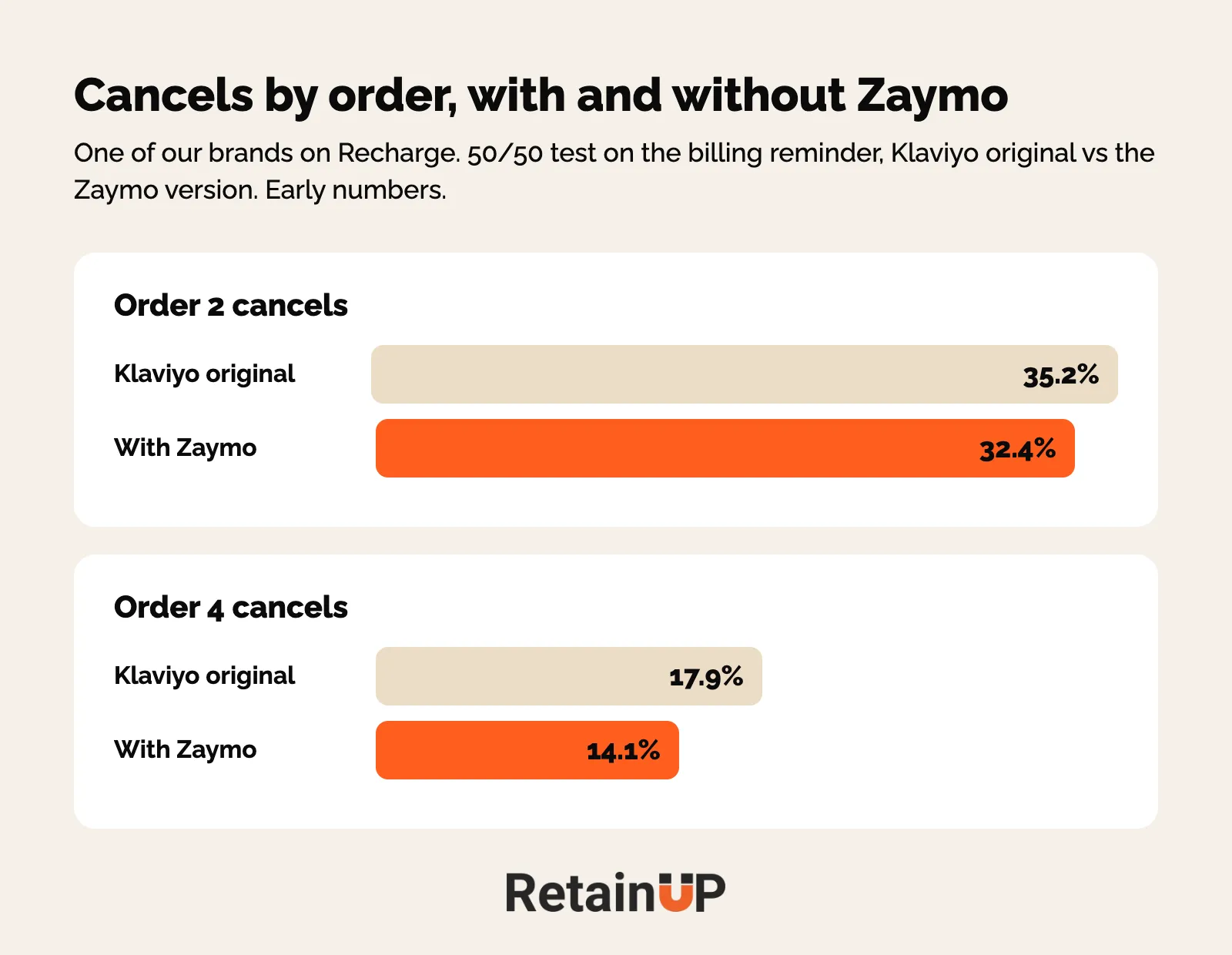
Judge it the same way. Not on clicks in the block. On cancels by order number with and without the block, and on add-on revenue per renewal. Zaymo logs the in-email actions too: one-time adds, adds to the subscription, delays and Send Now. Read those next to the cancels, never instead of them. How to set up the test is in how to A/B test a subscription program.
Zaymo is one of the pieces we install in the Subscription LTV Maximizer™, next to the offer, widget, cancel flow, portal, payment recovery and pause and skip in Recharge, Skio, Stay AI or Loop, plus email and SMS. Live in 30 days, $5,000.
FAQ
What is Zaymo for Shopify subscriptions?
Zaymo is an interactive email tool that adds blocks to your Klaviyo emails and connects them to your subscription app. Subscribers can skip, delay, swap a product, add to their next order, upgrade or reactivate without logging into the customer portal. It works with Recharge, Skio, Loop, Stay AI and other subscription platforms. Gmail and Apple Mail show the buttons in the email, other inboxes get a hosted page.
Does Zaymo work with Recharge?
Yes, Zaymo works with Recharge through an integration you connect on the Zaymo side. Recharge is strict on rate limits, and Zaymo calls Recharge each time an email is opened. Add 2 to 3 Recharge API keys to the integration before any big campaign. Swaps on Recharge replace the old subscription with a new one, so expect that in your reports.
Is Zaymo worth it if my subscription app already has one-click skip links?
Only if your core emails are live and you want more than skip and delay. Recharge, Skio and Loop links already handle a one-click skip. Zaymo earns its cost on swaps, add-ons, plan upgrades and one-click reactivation, and you need roughly 1,000 sends per email to read whether the test worked.
How much does Zaymo cost for subscriptions?
Zaymo's pricing page lists the shopping and subscriptions plan at $170 a month for up to 2,000 active subscribers, as of November 2026. Larger bases are priced on request, and annual billing is discounted. Check the current price with Zaymo before you budget, because it moves with your active subscriber count.
Which emails should get Zaymo blocks first?
Start with the upcoming billing reminder, because it has the highest opens and the biggest cancel spike. Then the cancel confirmation and winback emails with a reactivate button, then the pause, skip and date-change follow-ups. Payment recovery comes last, since your app's magic link to the payment page often does that job already.
One email a week on subscription retention: the numbers, the strategy, and what to fix first.

Rahi Jain
Rahi Jain is a subscription LTV specialist who helps $1M to $10M DTC brands reduce subscription churn and maximize LTV on Recharge, Skio, Stay AI and Loop.
More about Rahi