Key takeaways
- At a home care brand on Churn Buster, 52% to 65% opened every dunning email. Only 2.3% to 8.3% updated their card.
- Churn Buster sets its own retry timing by decline reason, sends one SMS per campaign and ends the campaign in a cancel.
- The last Churn Buster email still got 2.4% to update at day 28, so we asked to run the campaign to day 45.
Churn Buster sits on top of your subscription app and takes over failed payments. The retries, the dunning emails, one SMS, the card update. Your app still bills. Churn Buster chases the money when a charge fails.
We work with it at one of our brands, a home care brand on Recharge. It was set up, tested once against Recharge's own recovery, and then left on defaults. Nobody had touched it since. That's common. So this page is what we look at when we open a Churn Buster account, and what we change. It's part of our guide to subscription apps for Shopify.
What Churn Buster does for a subscription brand
Payment recovery has two halves. A bank decline needs a retry. A dead card needs the subscriber to put in a new one. Churn Buster runs both inside one campaign: silent retries first, which it calls Quiet Recovery, then emails and a text with a link to update the card, with a retry after each message.
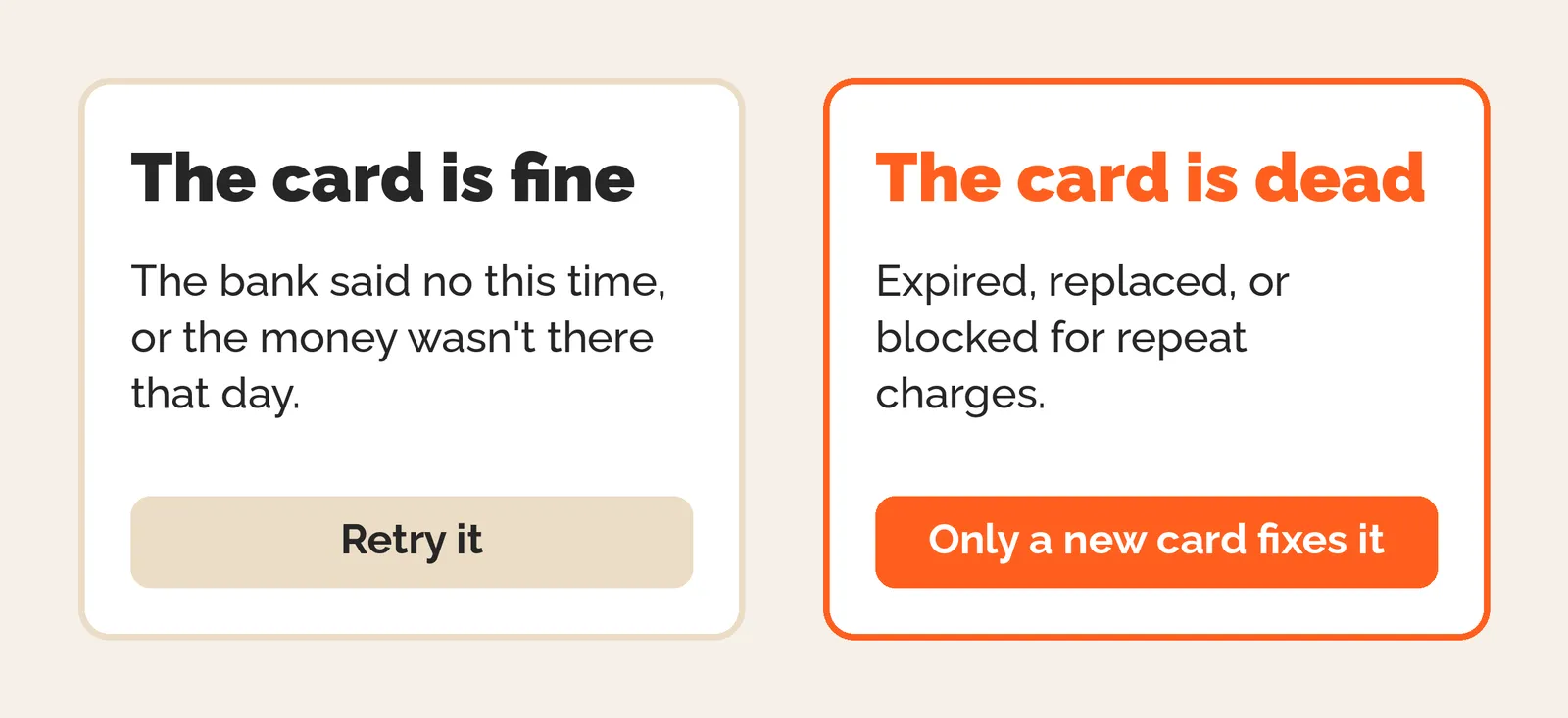
That split matters more than any tool setting. At the home care brand, cards that needed changing were 56.7% of failures and came back 33.2% of the time. Bank declines came back 52.9%. The full breakdown of why payments fail is in failed payment recovery for subscriptions.
Here's the default campaign we found, in Churn Buster's own words:
| Step | What it is |
|---|---|
| Quiet Recovery | Retries with no message to the subscriber |
| Trouble with billing | Email 1, then a retry |
| Don't miss your next delivery! | Email 2, then a retry |
| Need help? | Email 3, then a retry |
| SMS Nudge | One text mid-campaign, then a retry |
| Last chance to keep your subscription active | Email 4, then a retry |
| We're Cancelling Your Subscription | Email 5, then a last retry |
| Day 28 | End campaign and cancel the subscription |
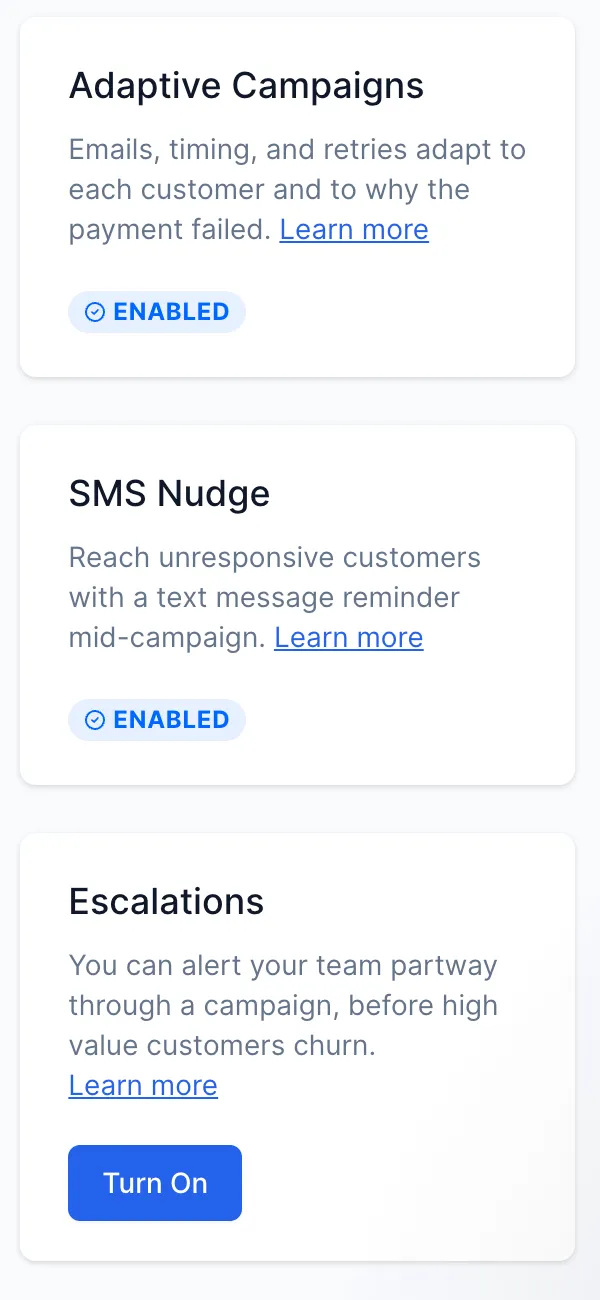
Around the campaign there are three switches. Adaptive Campaigns lets the emails, timing and retries change by customer and by why the payment failed. SMS Nudge sends the text. Escalations alerts your team partway through a campaign, before a high value customer churns. At the home care brand the first two were on. Escalations was off.
Churn Buster also sells Cancel Flows, which their team turns on when you message them. We haven't used it. On the brands we run, the cancel flow lives in the subscription app.
What Churn Buster won't let you change
This is the part that catches people. We learned it on a client plan. We had written two SMS, a daily retry schedule and a pause at day 45. All three had to come out, because Churn Buster doesn't do them.
| Setting | How Churn Buster handles it |
|---|---|
| Retry timing | Set by Churn Buster to the decline reason. No custom schedule, and no payday timing |
| Email copy, branding and sender | Yours to edit in the campaign editor |
| SMS | One per campaign, timed by Churn Buster |
| End of the campaign | Cancels the subscription. No pause option in the Recharge docs |
| Campaign length | Changed by the Churn Buster team on request |
| Discount links | Changed by the Churn Buster team on request |
| Different emails by failure reason | Not documented. Ask their team first |
So it has a standard structure and it wants you to follow it. It's less customisable than building the flow yourself in Klaviyo. For a brand that wants a working recovery campaign with no build, that's fine. For a brand that wants to split dead cards from bank declines and talk to each one differently, you'll hit the edges fast.
If you want your own retry schedule, that's what retry schedules that work covers, set inside the app itself.
Running Churn Buster next to your subscription app's own recovery
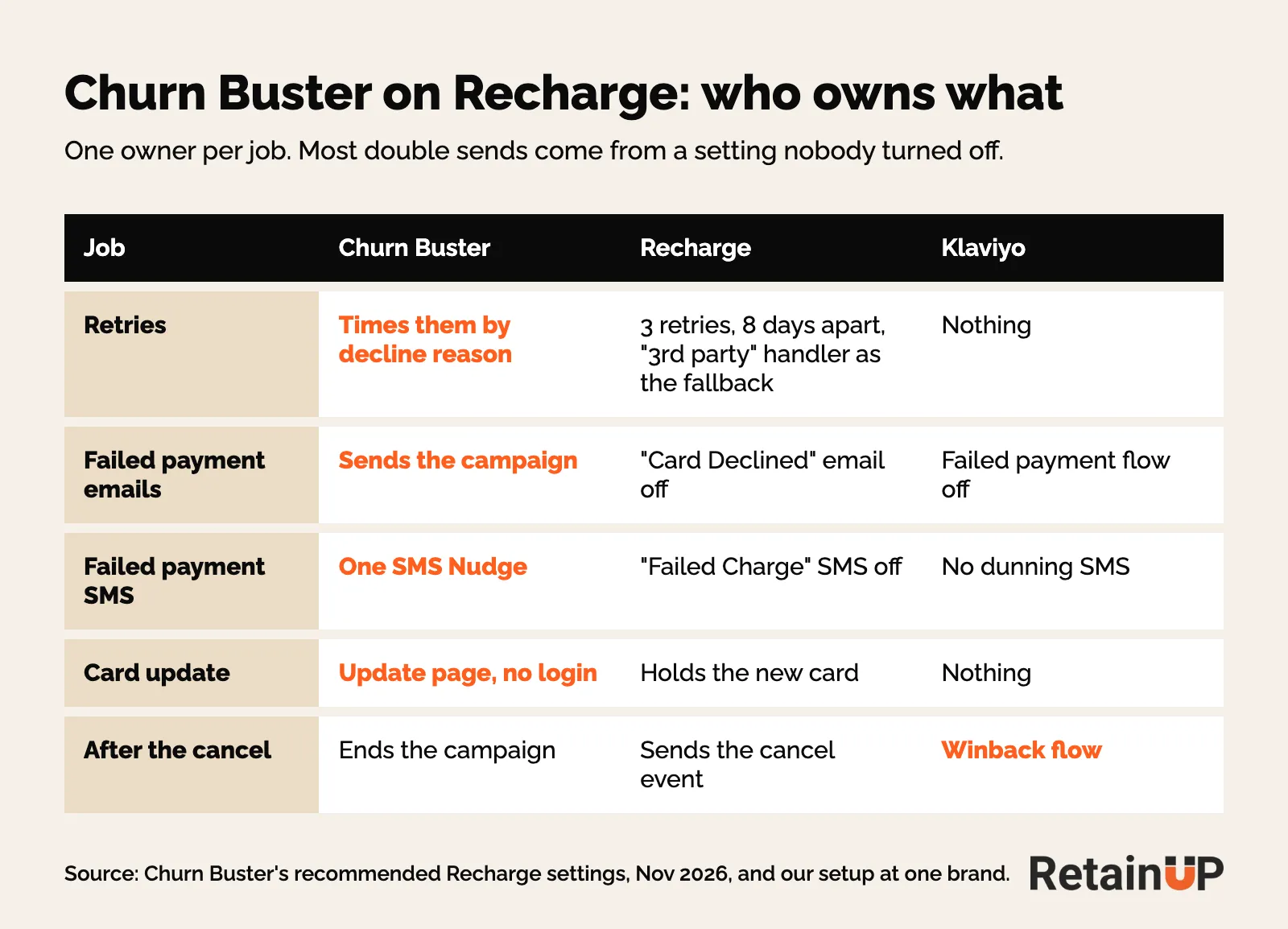
Recharge, Loop, Skio and Stay AI all have their own recovery. They retry with their own logic and send their own emails. Churn Buster gives you more options on the messages. It doesn't replace the app, so the two run side by side, and that handover is where things break.
Pick one owner for the emails
At the home care brand, Churn Buster ran the retries and its own emails. Klaviyo also had a failed payment flow. It had been off since 15 April 2026. And the first Churn Buster email only went out at retry 3. So for the first few days after a failure, nobody told the subscriber anything.
Both tools owned a part, and nobody owned the start. One owner for the failed payment emails, Churn Buster or Klaviyo, with the first email at the first failure. If Churn Buster owns them, turn off the app's own payment emails and the Klaviyo flow. Otherwise people get both.
The Recharge settings Churn Buster asks for
Churn Buster's recommended Recharge settings are short. Set Recharge to 3 retries, 8 days apart, with "3rd party" as the retry handler. That's only a fallback, for when a customer has more than one subscription failing at once. Then turn off Recharge's "Card Declined" email, and the "Failed Charge" SMS if you use Recharge SMS. Recharge cancels at its own max retries, and Churn Buster can cancel at the end of the campaign instead. Which one, you agree with their team.
Klaviyo can't see Churn Buster
Klaviyo held no Churn Buster events at that brand. So anything you want to read about the campaign, you read inside Churn Buster. Your winback and reporting flows still run off the app's events, which subscription app events in Klaviyo maps out.
What Churn Buster costs, and when it pays back
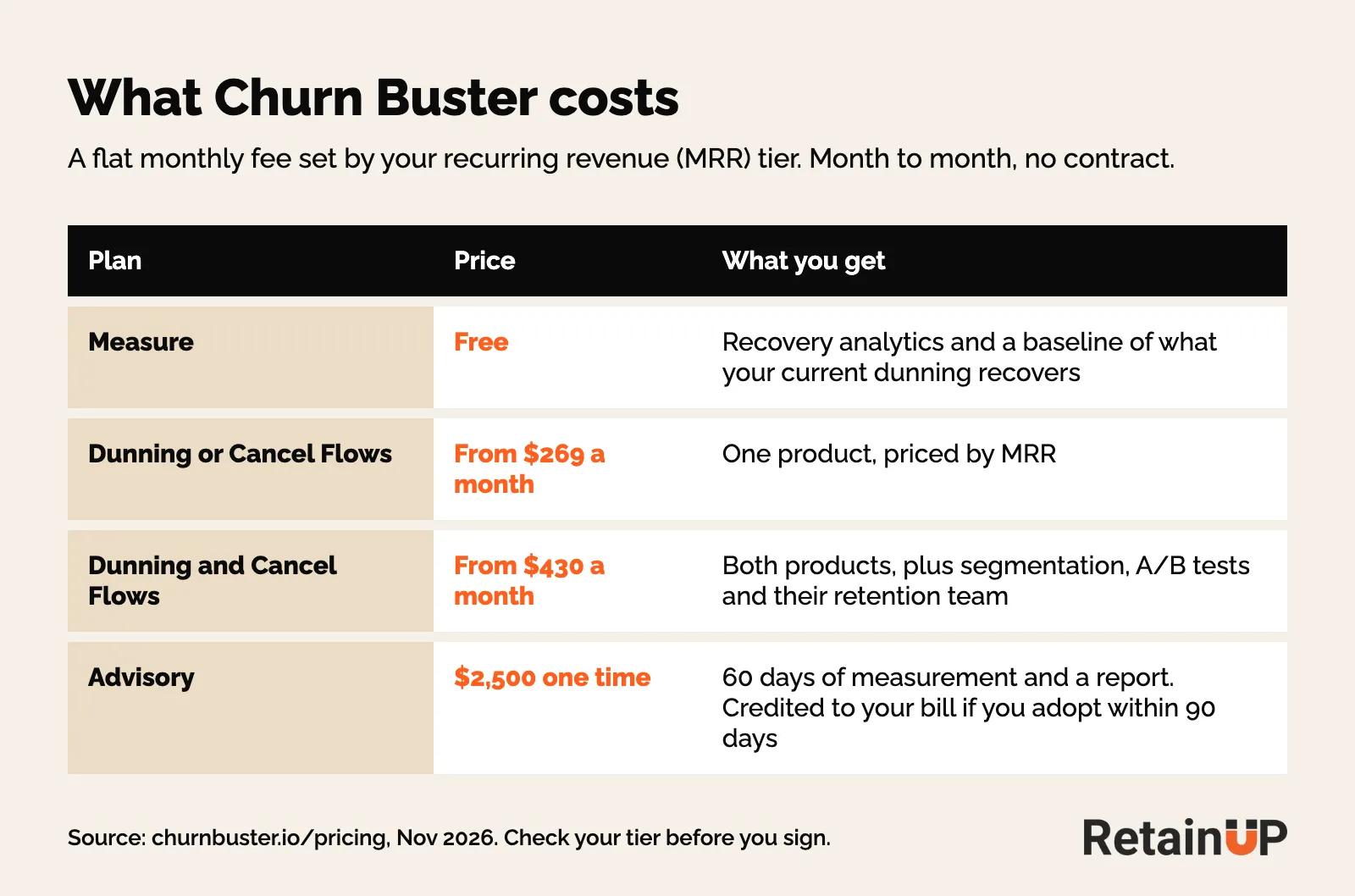
Churn Buster charges a flat monthly fee set by your recurring revenue tier. Their pricing page starts dunning alone at $269 a month and dunning plus Cancel Flows at $430. Month to month, no contract. They say it breaks even at about a 1% lift in recovery rate. That's their number.
The home care brand ran Churn Buster head to head against Recharge's own recovery when they set it up. It seemed to do a little better. Slightly better deliverability, they think. So they kept it. On failed renewals it recovered 41.7%. Recharge's platform median is about 44.9%. So a small edge at best, on defaults.
At another brand, on Stay AI, we said skip it. Stay AI and Klaviyo already cover the retries and the emails, and $430 a month didn't pay back at their size. Tighten the app's settings first.
If you're not sure, Churn Buster has a free Measure plan. It reads what your current recovery gets back, so you have a baseline before you pay for anything. Butter Payments, FlyCode and Redux are the other names here, and they're worth a look at 5,000+ active subscribers. For where 41.7% sits against other brands, see the subscription benchmarks.
Opens are high. Card updates are not.
This is the screen that tells you most of what you need. Every email in the campaign, with its open rate and how many people updated their card from it.
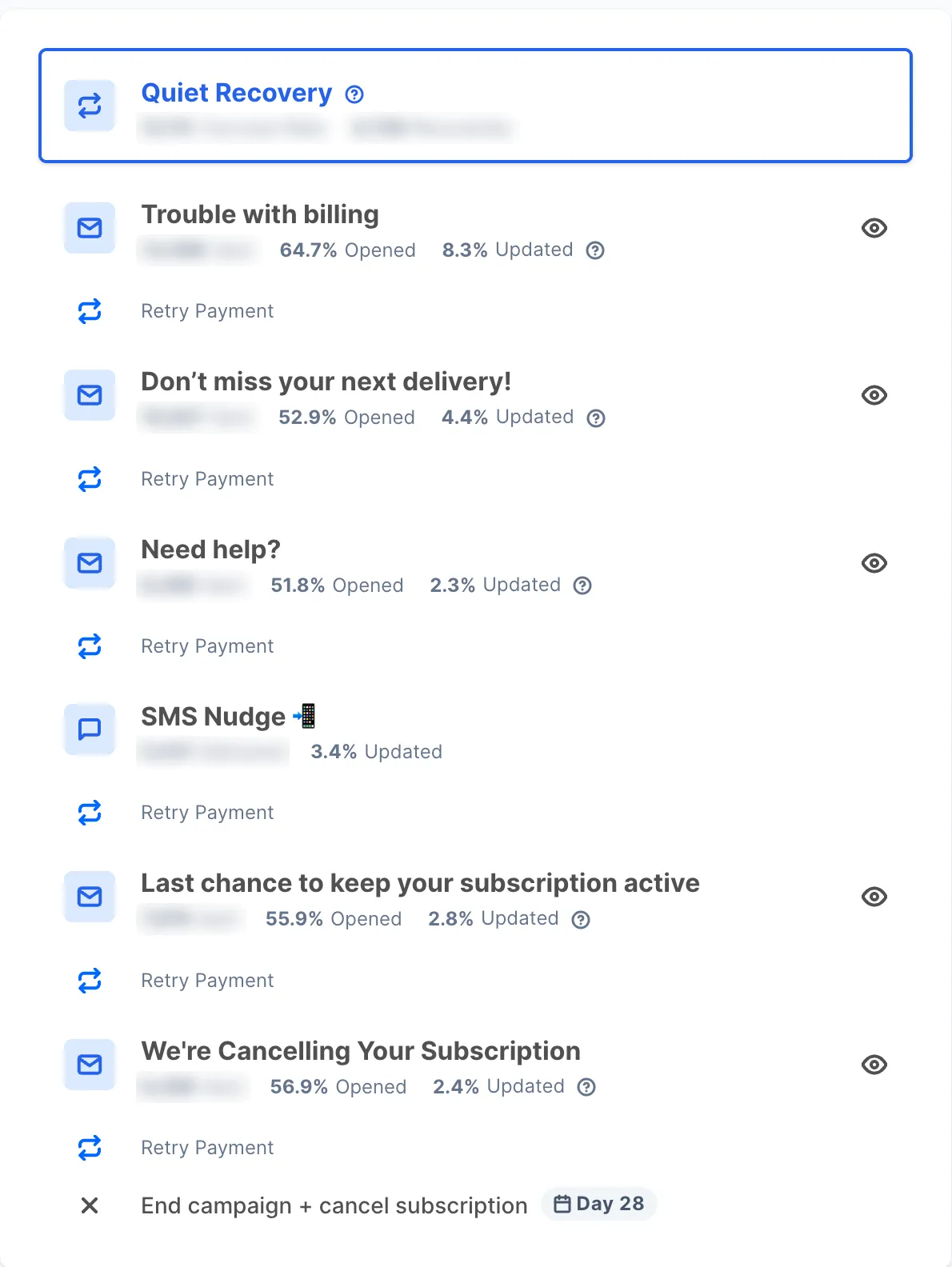
People open failed payment emails. They just don't act on them. The first email, Trouble with billing, got 64.7% opened and 8.3% updated. By the third, Need help?, it's 51.8% opened and 2.3% updated. The SMS Nudge got 3.4%.
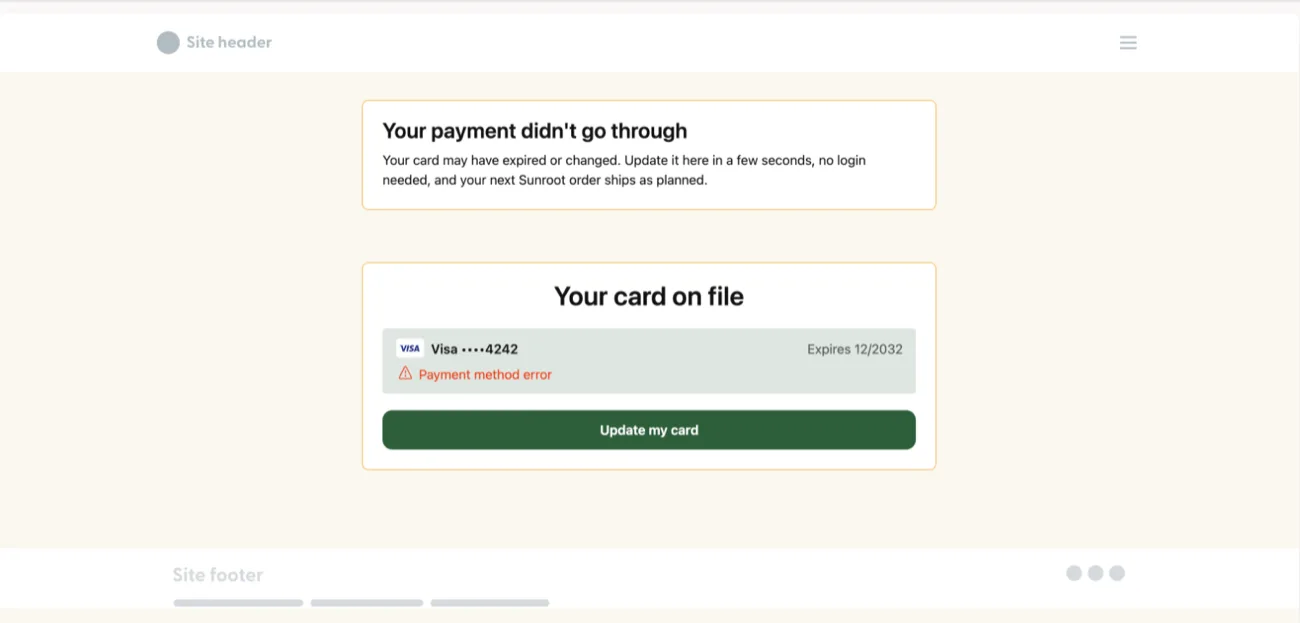
So read updates, not opens. A recovery email with a high open rate and no updates usually has a link problem. The link should open straight on the card form, no login. One brand's login email got zero clicks. Recharge has this built in as the payment methods landing page. One more thing from Churn Buster's own docs: the campaign ends on a successful payment, not on a card update. So someone who just put in a new card can still get an email until the charge clears. The rest of the dead-card side is in the card update flow.
Churn Buster defaults to change after install
Everything here is something Churn Buster supports. Where a change needs their team, that's said.
1. Extend the campaign while the last email still works
Churn Buster's own rule: keep extending while the last email still gets more than 2% to update. At the home care brand, the last email at day 28 got 2.4%. Still worth sending. So we asked for emails 6 and 7, with the campaign running to day 45. The brand agreed on 21 October 2026. Campaign length is a request to the Churn Buster team, not a setting you flip.
2. Put the offer in the last two emails
No incentive anywhere in the default campaign. We added 10% off the next renewal to emails 6 and 7. Only the last two. At another brand the discount sat on email 3 and recovery stayed flat. Persistence did the work, not the discount. Discount links also go through Churn Buster's team.
3. Get the first message out at the first failure
The first email gets the most updates, 8.3% at the home care brand. So if Churn Buster's first email lands at retry 3, either move it up or let Klaviyo send one first-failure email with the update link, and nothing else. Check with Churn Buster before you plan it. Don't guess.
4. Keep SMS Nudge on
It's one text. It reached people the emails didn't and got 3.4% to update, more than three of the five emails. Don't plan a second SMS. Churn Buster sends one.
5. Plan what happens after the cancel
The campaign ends in a cancel, and you can't swap that for a pause. So hand those subscribers to a winback flow off the app's cancel event. Count them as passive churn, which active vs passive churn explains. The flow itself is in subscription winback.
6. Ask before you split by failure reason
Adaptive Campaigns already changes timing by decline reason. Separate emails for dead cards and bank declines aren't in the docs. Ask the team before you write them into a plan.
How to check Churn Buster every month
Tools set up once and never touched drift. Churn Buster is no different. Once a month:
- Updated rate on every email and the SMS. If the last one is still above 2%, ask to extend
- Recovered orders over failed orders, from the app, not Churn Buster's success rate on its own
- Recovery split by dead cards and bank declines
- The app's own payment emails and the Klaviyo flow: off if Churn Buster owns the messages, and not silently off if it doesn't
- What happened to subscriptions after day 28 or 45: cancelled, and in the winback flow
In-email card updates and reactivation through Zaymo are a separate tool, covered in Zaymo for subscription brands.
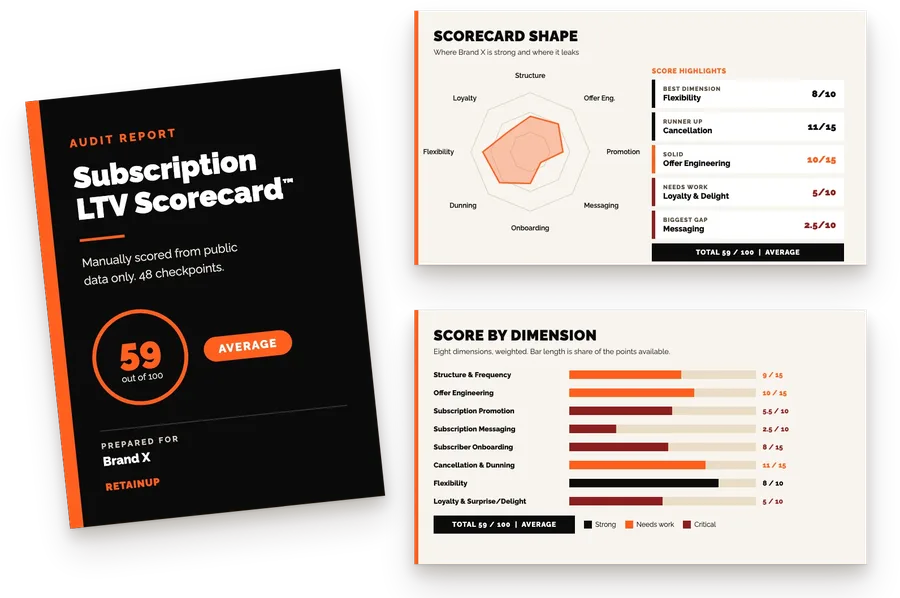
Payment recovery is one of the six things we build in the Subscription LTV Maximizer™, with the offer, widget, cancel flow, portal and pause and skip, on Recharge, Skio, Stay AI or Loop plus email and SMS, live in 30 days for $5,000. If Churn Buster is already in your stack, we work inside its limits. Or start with the free subscription audit: 48 checkpoints and your top 3 leaks in 24 hours.
FAQ
What is Churn Buster?
Churn Buster, also written Churnbuster, is a failed payment recovery tool that runs on top of a subscription app like Recharge. It retries failed charges, sends dunning emails and one SMS with a card update link, and cancels the subscription if the payment never comes back by the end of the campaign. It also sells Cancel Flows. The subscription app still does the billing. Churn Buster only takes over once a payment fails.
Can I change the retry schedule in Churn Buster?
No, you can't set a custom retry schedule. Churn Buster times its retries to the decline reason, and Adaptive Campaigns changes timing per customer. What you can ask their team to change is the campaign length and the discount links. If you need a fixed schedule, like six retries over 14 days, set it in your subscription app instead and let that own recovery.
Does Churn Buster work with Recharge's own payment recovery?
Yes, it runs next to it. Churn Buster times the retries, and Recharge is set to 3 retries, 8 days apart, as a fallback. Pick one owner for the emails. If Churn Buster sends them, turn off Recharge's payment emails and any Klaviyo failed payment flow, or subscribers get two sets. Also check the first message goes out at the first failure, not at retry 3.
How long should a Churn Buster campaign run?
Keep it running while the last email still gets more than 2% of people to update their card. That's Churn Buster's own rule. The default ends at day 28. At a home care brand the last email still got 2.4% there, so the campaign was extended to day 45 with two more emails. Ask the Churn Buster team to change the length.
How much does Churn Buster cost, and is it worth it?
Churn Buster starts at $269 a month for dunning alone and $430 a month with Cancel Flows, priced by your recurring revenue tier, with no contract. At one brand it recovered 41.7% of failed renewals on defaults, a little under Recharge's platform median. So set up your app's recovery first, and use the free Measure plan for a baseline. A separate tool makes sense once recovery still lags, usually at 5,000+ active subscribers.
One email a week on subscription retention: the numbers, the strategy, and what to fix first.

Rahi Jain
Rahi Jain is a subscription LTV specialist who helps $1M to $10M DTC brands reduce subscription churn and maximize LTV on Recharge, Skio, Stay AI and Loop.
More about Rahi