Key takeaways
- AfterSell's post-purchase subscription upsell is native with Skio, Loop and Recharge, so a one-time buyer can subscribe in one click.
- With Stay AI, AfterSell adds a new subscription after checkout. It cannot switch the paid one-time order yet.
- Price the post-purchase offer as cash: one of our brands offers a $49 one-time buyer two months for $24 more.
AfterSell is the app we reach for when a one-time buyer needs one more chance to subscribe. And it sits in two places your subscription app does not cover well. The cart drawer. And the page right after payment.
So this page is the tool side only. The strategy, which offer goes where and why, lives in the cart, checkout and post-purchase upsell guide. The rest of the stack is in the subscription apps hub.
What AfterSell does for a subscription brand
AfterSell is a post-purchase upsell app, now owned by Rokt. The Longplay x AfterSell playbook says over 40,000 brands use it. It does one-click upsells, custom thank-you pages, A/B tests, targeted offers and the analytics to read them.
For a subscription brand, three of its surfaces matter:
- Post-purchase page. Shown after the card is charged, before the order confirmation. The offer adds to the order with one click.
- Cart drawer. The slide-out cart, with a subscription upgrade on the line item, product recommendations and a free shipping bar.
- Thank-you page. The order status page. Content, a survey or another offer.
Post-purchase offers work because the customer has just bought. They trust you. They are still in the market.
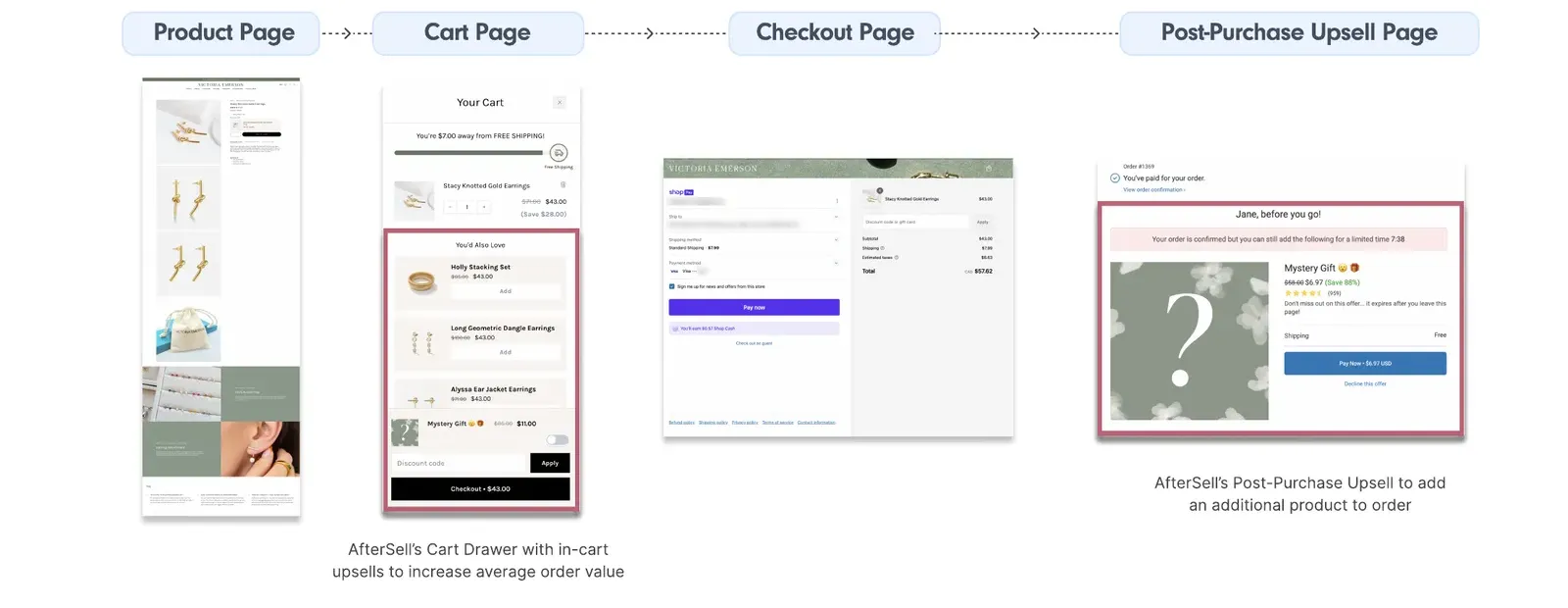
And the post-purchase page carries no checkout risk. The sale is done. Nothing you show here can lose it.
What AfterSell costs
Check the plan before you design. On the Shopify App Store listing in November 2026, the Post-Purchase plan is $34.99 a month, and the cart tools sit on the Pre-Purchase plan at $59.99. So if you want the cart drawer and the post-purchase page, that is the Complete plan at $79.99. Every paid plan has a 30-day free trial. Merchants in the reviews complain the bill grows with total store orders, not upsell orders, so price it against your order volume.
Where AfterSell sits in the Recommendation Journey™
Every customer sees one offer that moves them one rung up. AfterSell covers two of the four moments for a one-time buyer. Here is the part that changes your settings.
So in AfterSell: a percentage in the cart drawer, gifts on the checkout page if you are on Plus, and a cash delta on the post-purchase page. Money at the cart, gifts at the checkout, cash delta after the sale. Set "save 20%" on every surface and you have one offer said three times. The day-30 side is email, in turning one-time buyers into subscribers.
Setting up the post-purchase funnel
This is the offer that pays for the app. Our setup, in order:
- Pick the segment. Customers who bought the hero product one-time.
- Pick the offer. One rung up. A one-time buyer gets the subscription, not the three-month plan. Two rungs in one ask converts worse than two asks.
- Price it as cash. "Pay an extra $24."
- Add a timer. The offer expires when they leave the page.
- Add a downsell for anyone who declines the first offer.
- Test three offers before you settle on one.
Four settings that break the subscription offer
These come from AfterSell's own subscription docs, and each one fails quietly.
- Tick "Apply discount to subscriptions". Without it the subscription bills at full price and your discount only touches the one-time line. Even with it, the discount covers the first billing cycle only.
- Set the subscription trigger to "do not include a subscription". Shopify allows one subscription per order. If no subscription app is connected, a subscription-only offer is dropped for a buyer who already has one, and a mixed offer falls back to one-time.
- Leave "Show this funnel for all customers" off. It overrides every other trigger, subscribers included.
- Test with a real, cheap order. Preview Mode creates no order, no subscription and no charge, so it cannot tell you the subscription landed in your app.
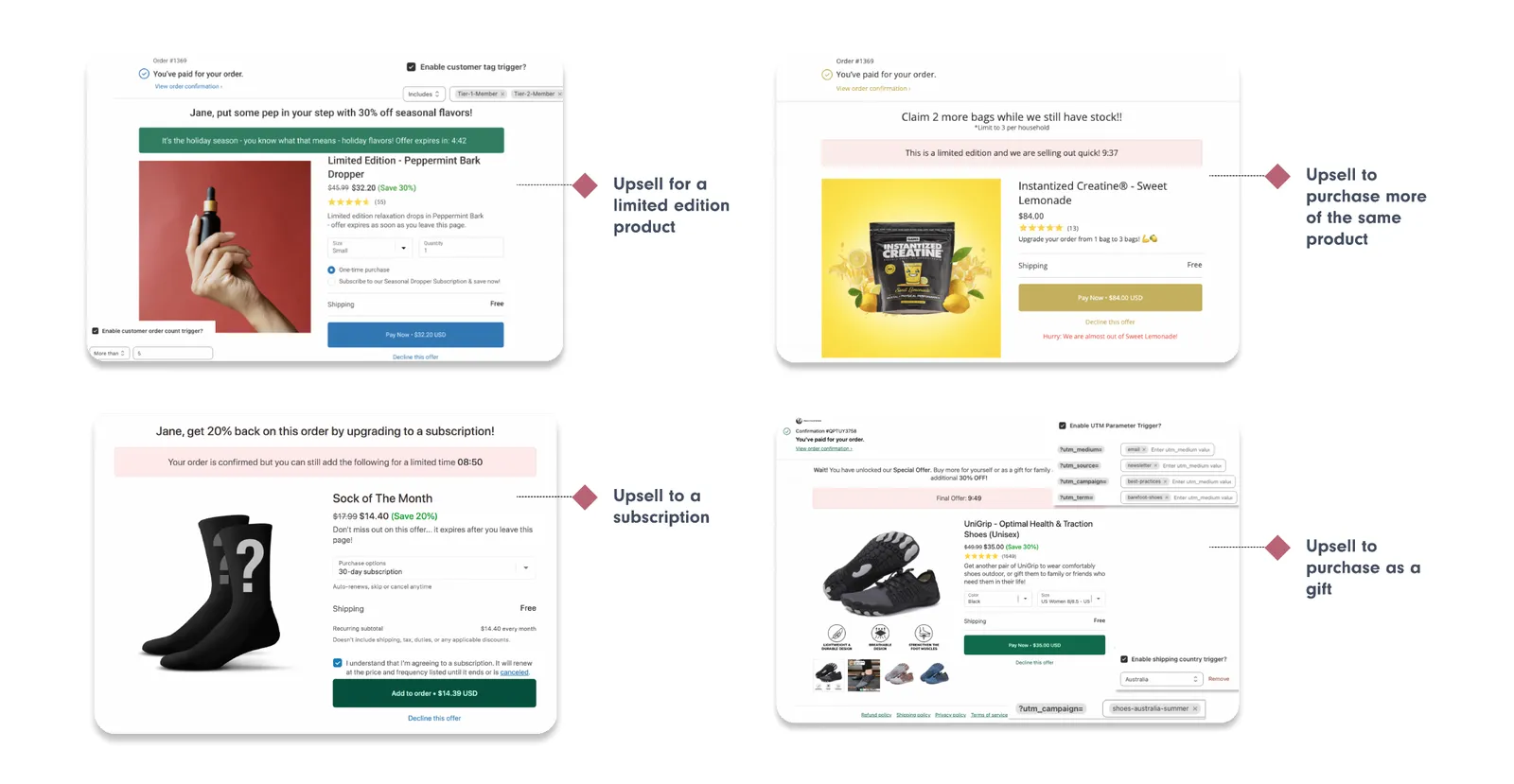
The bottom-left screen above is the one you want. One product, a 30-day subscription, the recurring subtotal shown, and a tick box that says it auto-renews until cancelled. That box matters. A subscription the buyer did not know they started comes back as a day-zero cancel or a chargeback.
Our older playbook said 20% off. We moved to cash.
Our first version was 20% off the first month or a free gift. It works. But after the sale the buyer is not comparing prices anymore. They are adding one small number to a payment they already made. "Pay an extra $24" is easy. A percentage on a thank-you page is maths.
Here is the row for one of our brands. A single product with a ladder of $49 one-time, $45 for one month on subscription, $79 for two months and $99 for three. On the success page, the $49 one-time buyer is offered: pay an extra $24, move to 2 months, plus 3 free gifts. AfterSell handles the one-click payment.
That one-time cell is the only one that costs margin. $49 plus $24 is $73, against a $79 two-month subscription, so 7.6% below the ladder. Defensible as the price of turning a one-time buyer into a subscriber. But it should be a decision, not an accident. The subscriber rows cost nothing, because $45 plus $34 is $79 and $79 plus $20 is $99.
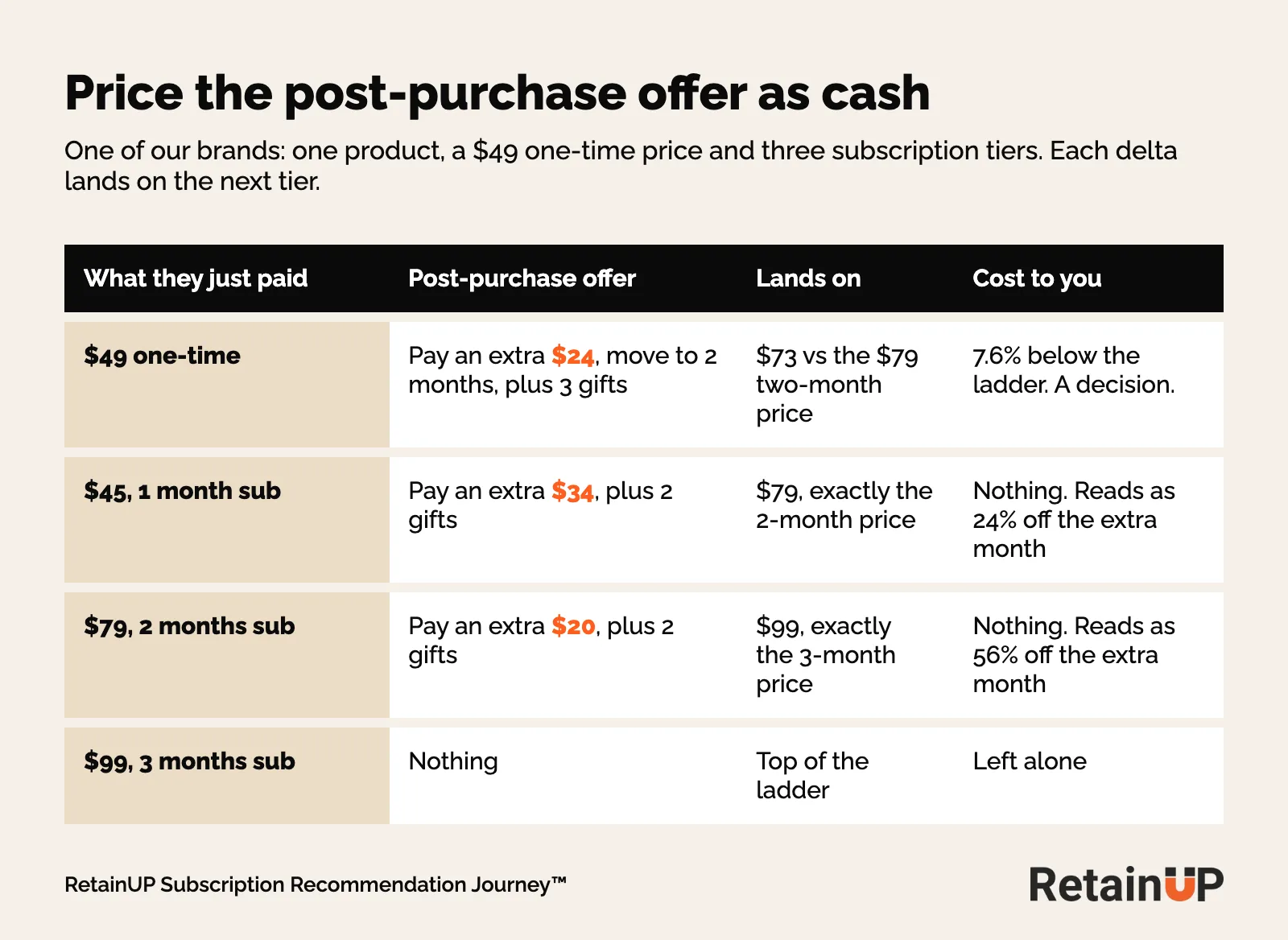
And check the percentage before it goes live. Our first draft for the same brand claimed 30% and 60% off the extra month. The sums gave 24.4% and 55.6%. Gift counts come from the gift ladder, never from a number someone typed into the app.
Targeting by product and order value
AfterSell can trigger on the products, the order value, a customer tag, order count, the UTM and the shipping country. You need three.
- Product. The hero product bought one-time.
- Order count or customer tag. Keep active subscribers out. Nobody at the top of the ladder sees a pop-up.
- Order value. A buyer who took the biggest pack one-time gets a different offer from one who took a single unit to try.
Grüns sells one frequency on the product page and upsells quarterly on the thank-you page. One named offer. That narrow.
One offer, not two in the same week
The post-purchase offer and your Klaviyo immediate upsell flow are the same offer on two channels. Send the email only to people who declined on the page. One message per person per week.
The limited-time offer and the timer
AfterSell shows a countdown bar above the offer. "Your order is confirmed but you can still add the following for a limited time." Keep it short. The offer is gone when they leave the page, and the timer just says so.
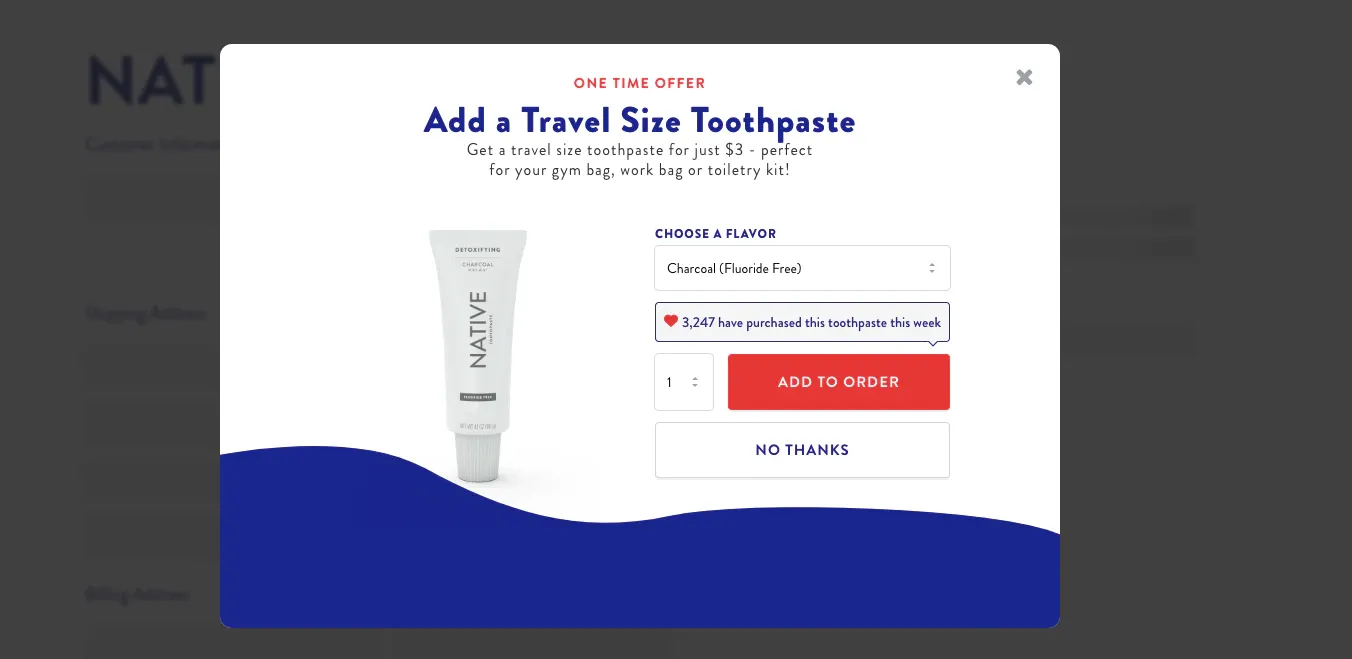
Native's version is the clean one. A $3 add-on, one flavour picker, one button to add and one to decline. No browsing. The same layout carries a subscription offer.
Keep the page to the same product they just bought. Pitching a different product or "buy more for faster results" right after the first order tells the customer you care more about the next sale than this one. Cross-sell waits.
And if your first-cycle discount is 100%, the button reads $0.00. AfterSell warns that buyers read that as free forever. So put the recurring price and the cancel terms in the copy, next to the button.
The cart drawer: a subscription switch on the line item
The cart drawer is the last place the buyer is still shopping. Set up an offer in AfterSell's cart drawer and target it by the products in the cart. A one-time item gets a dropdown to switch it to subscription, with the saving shown in money next to the line price.
The drawer runs on UpCart, AfterSell's cart app. Loop's setup guide spells out the steps: install UpCart, turn on its cart widget in your live theme, then switch on the "Subscription upgrade" option. One catch from the same guide: AfterSell does not apply Loop's availability rules, so a plan you hid on some pages can still show in the drawer.
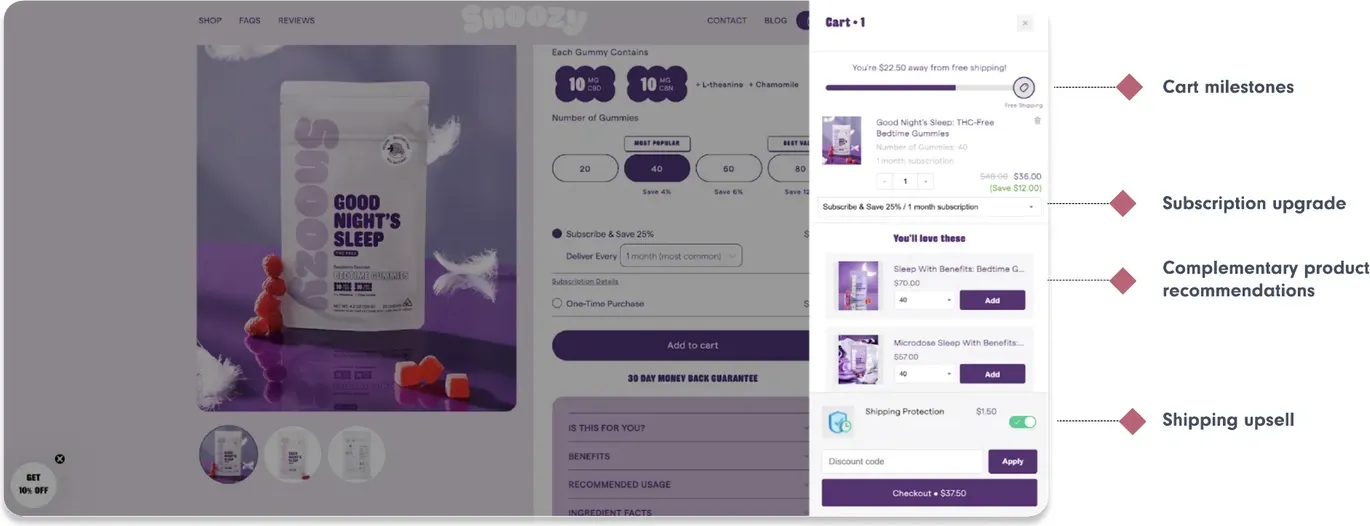
Same rate as the product page. If the cart says 25% and the widget said 15%, you have told the buyer the widget was lying, or that a better deal is somewhere else if they keep looking. One subscription discount everywhere.
And cut the drawer down. The screen above runs four upsells at once. For a subscription brand, the subscription switch and the free shipping bar are enough. A second SKU is more exciting to set up and converts worse.
AfterSell's own case study on Moonbrew, using its UpCart drawer, reports a 9.28% conversion rate across upsells and downsells and a $31 average upsell value. Their number, their store, all offers mixed. Treat it as a ceiling to check against, not a forecast.
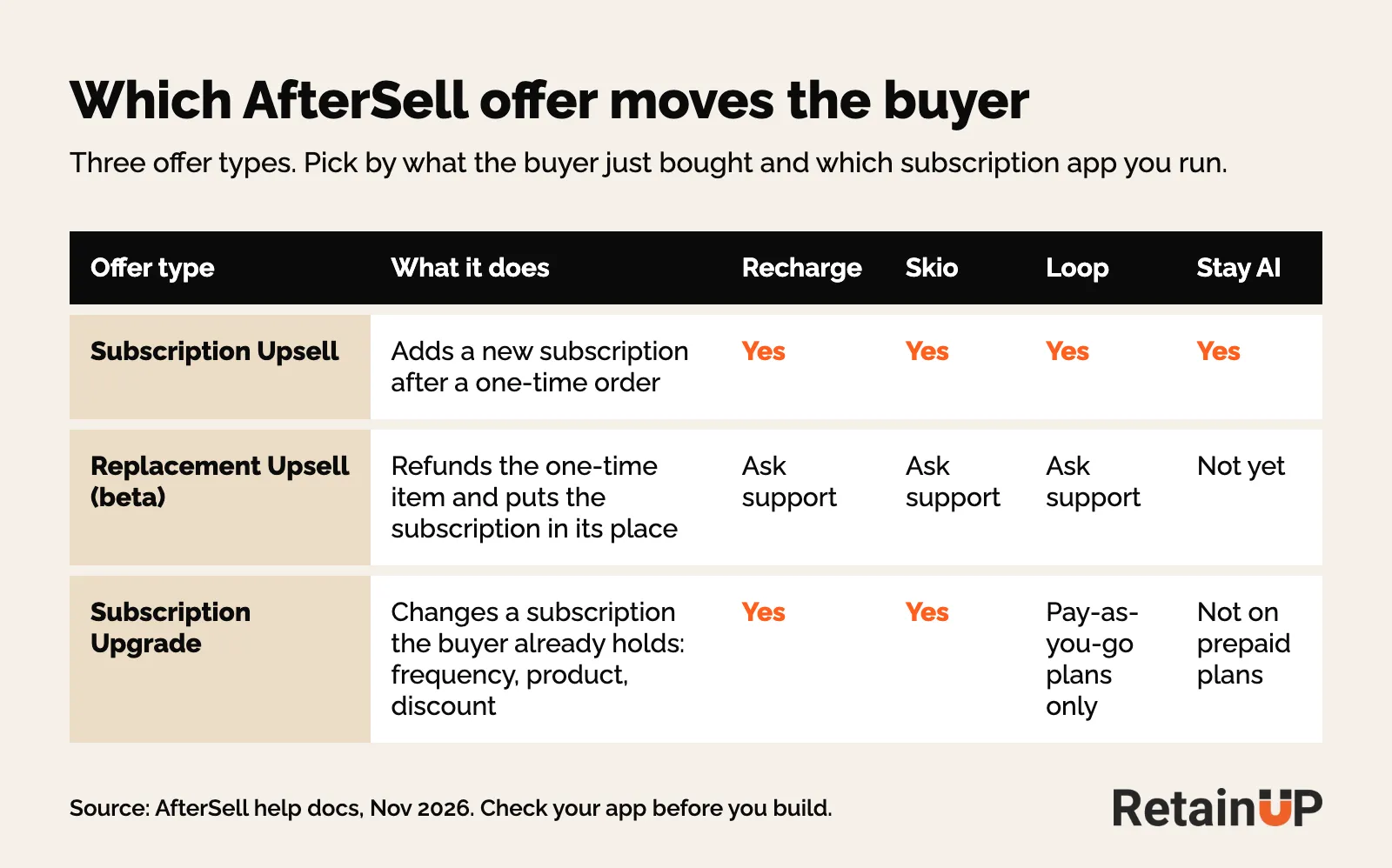
AfterSell with Recharge, Skio, Loop and Stay AI
The subscription offer only works if AfterSell can write to your subscription app. So check that first.
| App | What AfterSell can do after checkout |
|---|---|
| Recharge | Native subscription upsell on the post-purchase page. Subscription upgrades for existing subscribers, prepaid and pay-as-you-go |
| Skio | Native. Post-purchase upsell and downsell offers, one-click upgrade of a one-time purchase to a subscription. Monthly to quarterly upgrade applies to the next order |
| Loop | Native subscription upsell on the post-purchase page, on Loop's Starter and Pro plans. Upgrades on pay-as-you-go plans only |
| Stay AI | Adds a new subscription after checkout. It cannot switch the paid one-time order yet |
On Skio the monthly to quarterly upgrade is a workaround, and Skio's guide lays it out. The offer is a $0 quarterly variant. Shopify Flow tags the customer for 24 hours, and a Skio Journey swaps the subscription to quarterly. So the change lands on the next order, not the one they just paid for. The tag name has to match exactly in both tools.
Matthew Holman posted that AfterSell's quarterly subscription upsell is now native with Skio, Loop and Recharge, and that quarterly upsells convert at 20 to 30% on the post-purchase page. That is high. The question to ask yourself is how month-four retention looks for the quarterly ones.
On Stay AI the copy changes. The buyer keeps the one-time order and starts a subscription for the next one, so say what ships next and when. We added AfterSell to a Stay AI brand's plan on those terms. AfterSell's newer docs list Stay AI for upgrading an existing subscription, except prepaid plans. Check before you build. App settings are in the Recharge, Skio, Loop and Stay AI setup guides.
AfterSell also has a Replacement Upsell, in beta. It refunds the one-time item and puts the subscription in its place. Support has to turn it on. The buyer sees a refund and a new charge on the statement. And nothing retries if the subscription fails to start, so set a downsell as the fallback and check your app the next morning.
One of our brands on Recharge put its first AfterSell post-purchase upsell live this month. Take rate is good. It is early, so the retention of those subscribers is the number we are waiting on.
When AfterSell beats a native checkout upsell
Offers inside the checkout page need Shopify Plus. Recharge has its own checkout upsell, a bigger-pack swap with one button. So it comes down to who you are selling to.
- You are not on Plus. AfterSell wins by default. The cart drawer and the post-purchase page carry most of the work anyway.
- You want to move one-time buyers. AfterSell. The post-purchase page reaches the buyer who already said no to subscription on the product page, with no risk to the order.
- The buyer already picked subscription. A native checkout offer is enough.
Another of our brands runs the same thank-you page top-up on Zipify OCU instead. Zipify says OCU works with Recharge, Seal, Appstle, Loop, Skio and Stay AI after checkout, which is their own marketing, so test it. The app matters less than the offer. Pick the one that writes cleanly to your subscription app.
What to measure in AfterSell
The Longplay x AfterSell playbook lists six numbers, from upsell conversion rate to the effect on lifetime value. Read conversion and AOV weekly. Read lifetime value by cohort.
For a subscription offer, the AfterSell conversion rate is only step one. A subscriber who said yes on a timer and cancels before order 2 cost you a gift and a discount. So tag every subscription AfterSell creates. Then compare those subscribers on Order 3 retention against the ones who chose subscription on the product page. If they hold, raise the offer. If they drop, the timer is doing too much of the selling.
We set up AfterSell, the cart drawer and the post-purchase offer as part of the Subscription LTV Maximizer™, along with the offer, widget, cancel flow, portal, payment recovery, pause and skip in Recharge, Skio, Stay AI or Loop, plus email and SMS. It goes live in 30 days for $5,000. To see first where one-time buyers slip past you, the free subscription audit checks 48 points and sends your top 3 leaks in 24 hours.
FAQ
What is AfterSell on Shopify?
AfterSell is a Shopify app for post-purchase upsells, custom thank-you pages and cart drawer offers. It shows an offer after the card is charged and adds it to the order with one click, so the buyer does not enter payment details again. For a subscription brand, its main use is moving a one-time buyer onto a subscription right after the first order.
Does AfterSell work with Recharge?
Yes, AfterSell works natively with Recharge, and with Skio and Loop. On those three the post-purchase page can move a one-time buyer onto a subscription in one click. With Stay AI it can add a new subscription after checkout, but it cannot switch the paid order yet, so the offer copy has to explain what ships next and when.
Do I need Shopify Plus to use AfterSell?
No, the post-purchase page and the cart drawer work without Shopify Plus. Only offers inside the checkout page itself need Plus. For most subscription brands the cart drawer and the post-purchase page carry most of the work anyway, so a store on a standard plan can run the full one-time to subscription offer.
How much does AfterSell cost?
AfterSell starts at $34.99 a month for the post-purchase plan, as listed on the Shopify App Store in November 2026. The cart tools are on the $59.99 Pre-Purchase plan, and both together are $79.99 on the Complete plan. Every paid plan has a 30-day free trial. Some merchants say the price grows with total store orders, so check it against your volume before you install.
Is AfterSell better than a native checkout upsell?
It depends on who you are selling to. For one-time buyers, AfterSell is usually better, because the post-purchase page reaches them after they skipped subscription on the product page and cannot lose the sale. For buyers who already picked subscription, a native checkout offer from the subscription app is often enough on Shopify Plus.
One email a week on subscription retention: the numbers, the strategy, and what to fix first.

Rahi Jain
Rahi Jain is a subscription LTV specialist who helps $1M to $10M DTC brands reduce subscription churn and maximize LTV on Recharge, Skio, Stay AI and Loop.
More about Rahi