Key takeaways
- In Loop's own data from 441,000+ cancel attempts, a generic discount saves about 6% and a three-stage cancel flow about 15%.
- A new Loop frequency defaults to deliver every 1 month, so a plan named 3 months supply can bill monthly until you read the interval at checkout.
- On one Loop store, recovery read 41.2% by revenue in Loop and 17.3% by order in the activity log, because Loop counts a skipped order as left the cycle, not lost.
Loop ships more retention tools than most brands switch on. Cancel flows with a benefits page. Quick Actions. Streaks. Payment recovery with a backup card. On the Loop stores I audit, half of it is off and the other half runs on defaults.
We have worked with 80+ subscription brands on Recharge, Skio, Stay AI and Loop. This is the Loop setup we run, and where Loop leaves the work to you. It sits in our guide to subscription apps for Shopify.
What a Loop retention setup covers
A Loop retention setup is seven pieces: the offer and selling plans, the cancel flow, pause and skip, payment recovery, the customer portal, bundles, and the Klaviyo flows that run off Loop events. Loop has a setting for each.
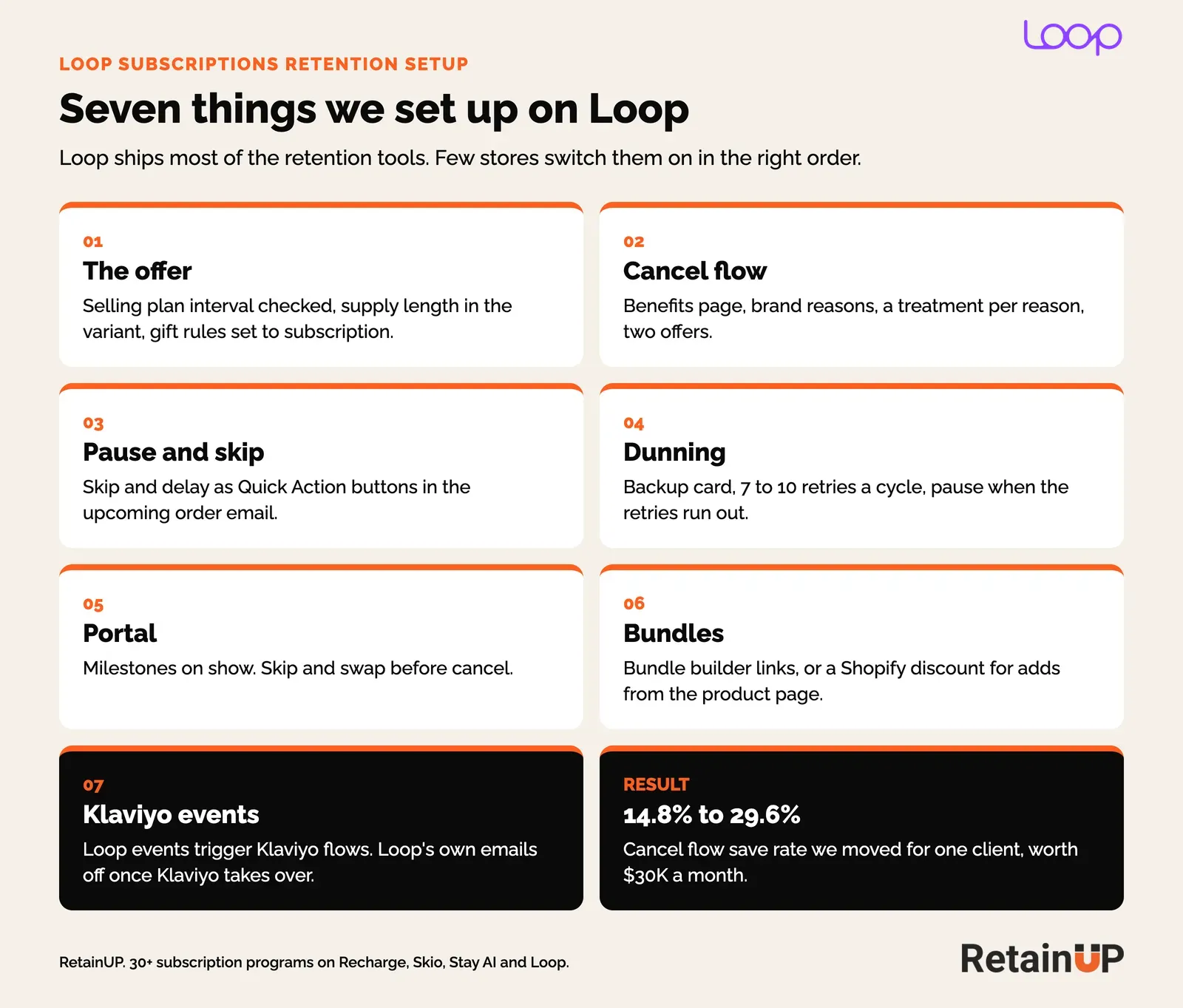
Loop's retention tools sit under Retain in the admin: Cancellation flows, Streaks, Product swaps, Payment recovery and Quick Actions. Flows sits on its own menu.
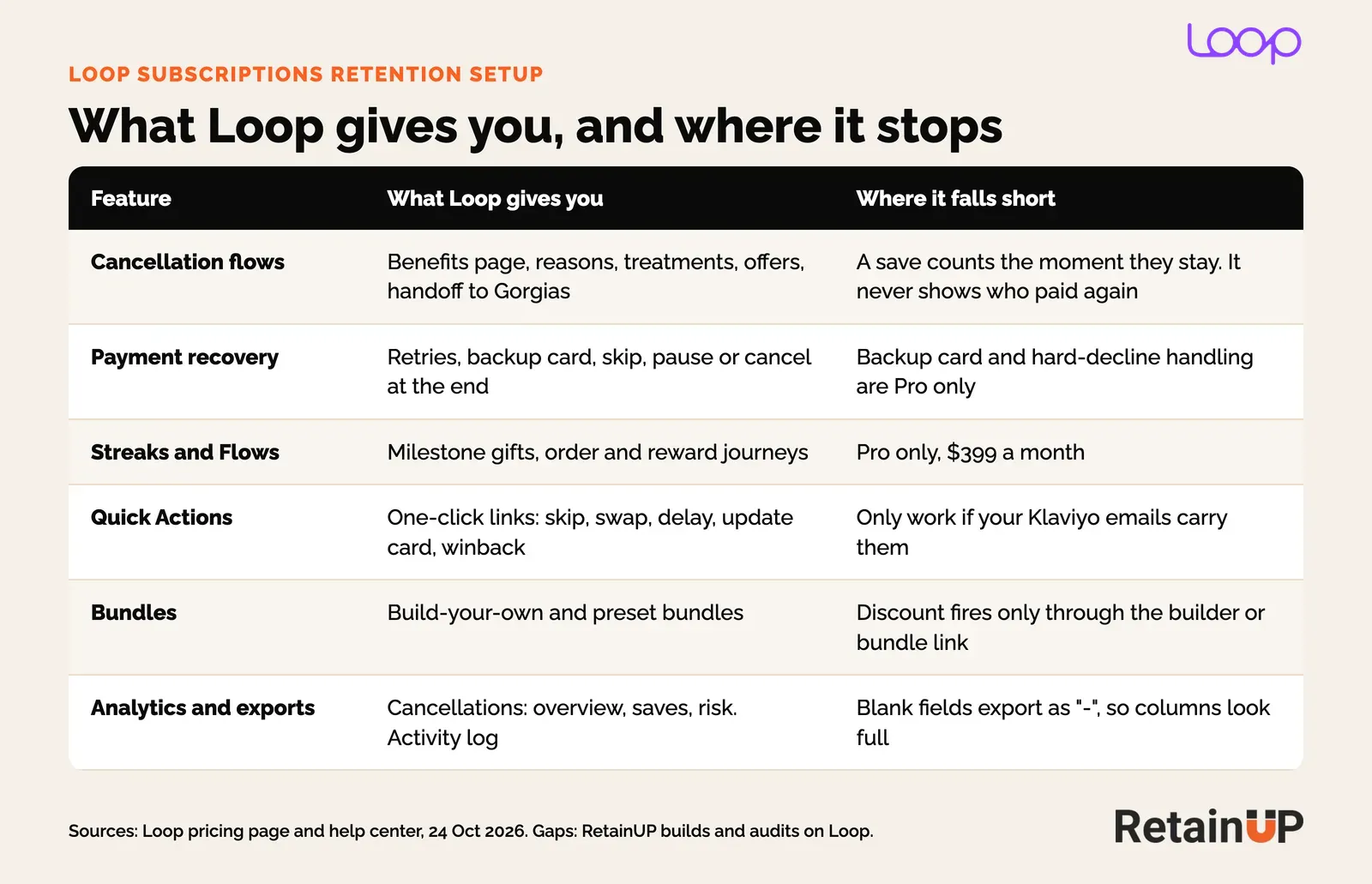
Which Loop plan you need for retention
Plan decides a lot. On Loop's pricing page, checked 13 November 2026, a free plan covers up to 50 active subscriptions. Starter is $99 a month plus 1.0% a transaction. Pro is $399 a month plus 0.75%.
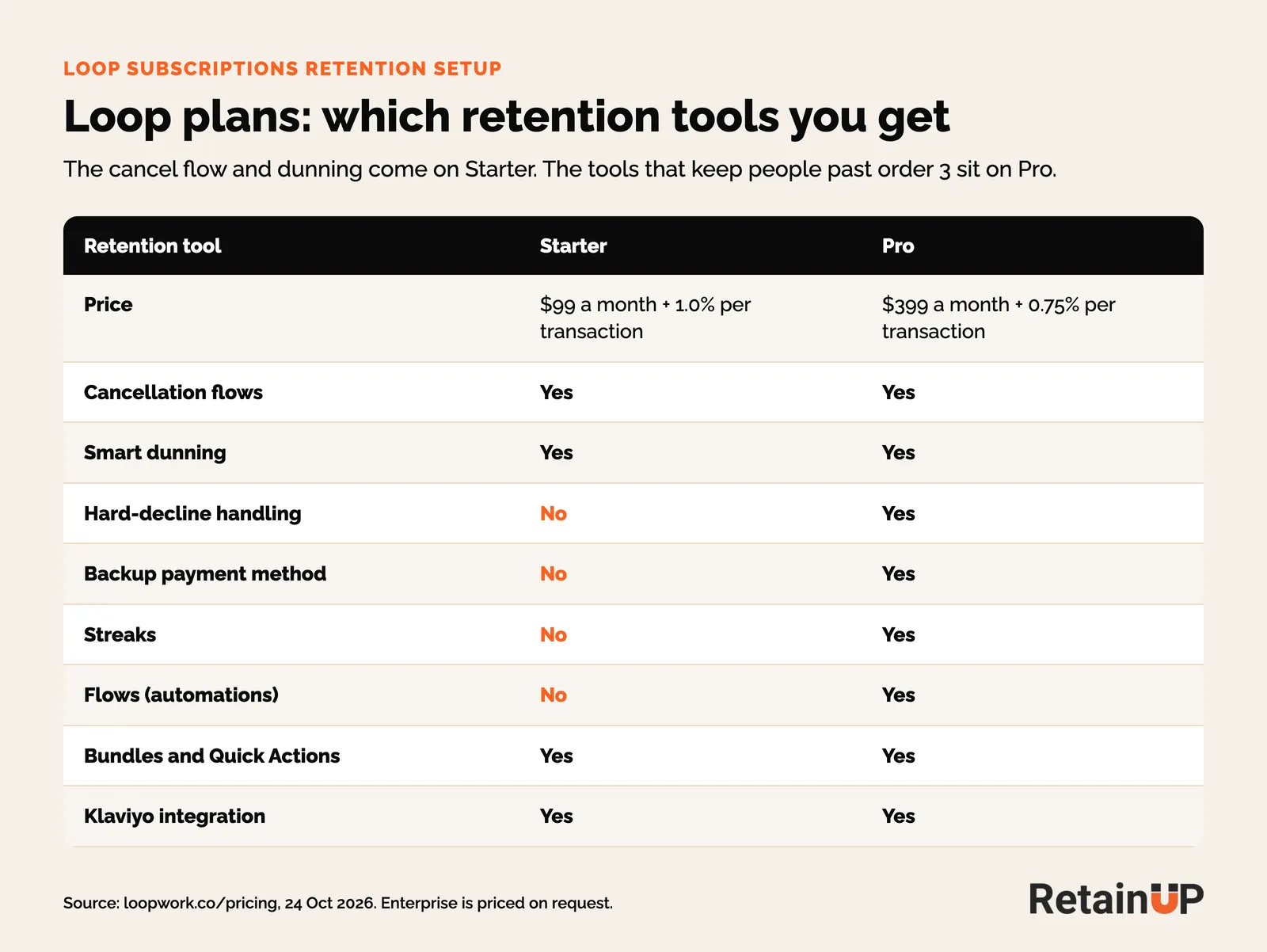
Cancellation flows, smart dunning, bundles, Quick Actions and the Klaviyo integration come on both, while Streaks, Flows, the backup payment method, hard-decline handling and A/B tests on cancel flows are Pro only.
For a brand under a few thousand subscribers, Starter plus Klaviyo covers most of it. The order 2 and order 3 gifts move into Klaviyo and Shopify discounts instead of Streaks. So how does Loop compare to Recharge? Loop costs less at every store size we model. And after the last failed retry it lets you pick skip, pause or cancel, where Recharge cancels. The fees at four store sizes are in Loop vs Recharge.
Selling plans: test what Loop actually charges
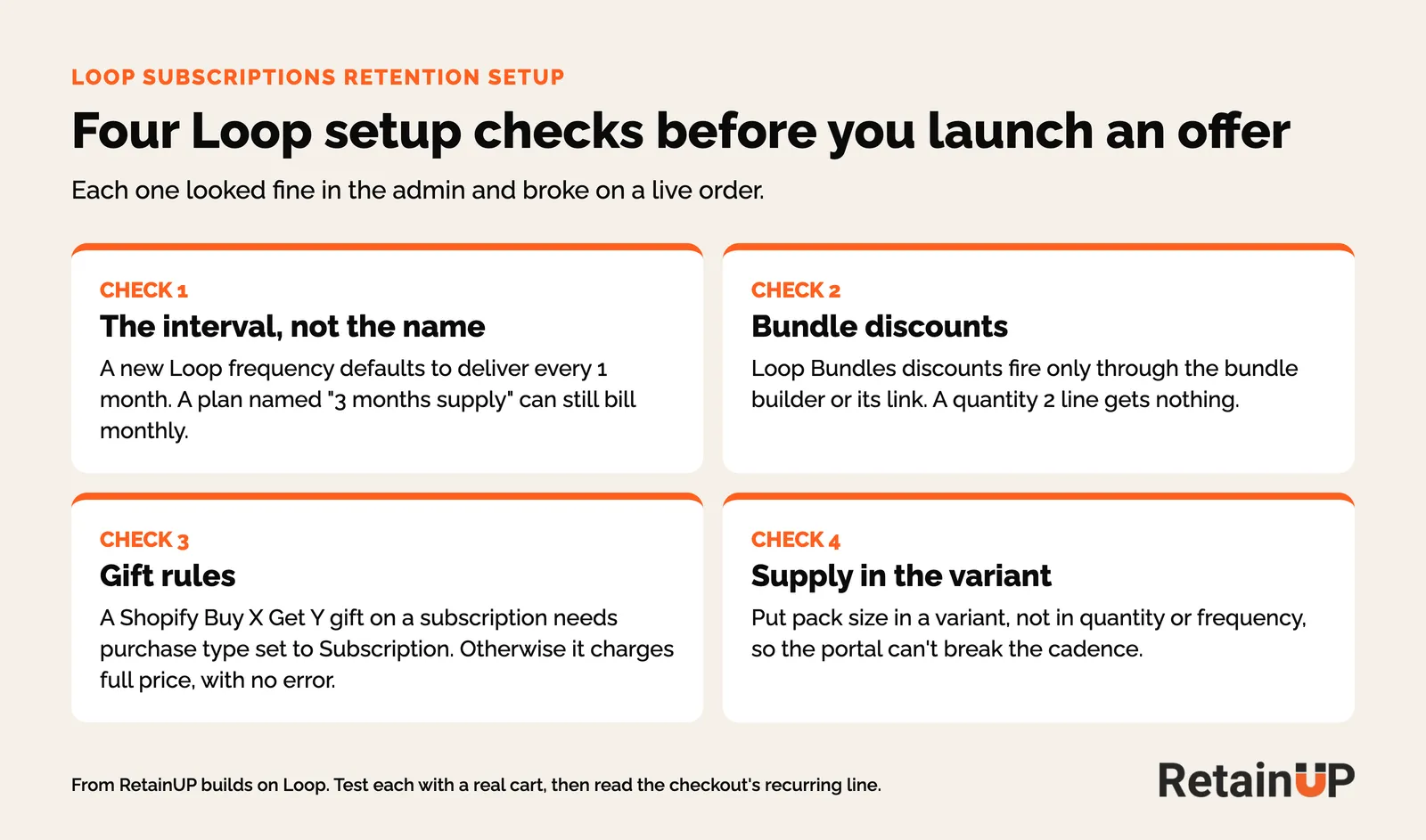
Before any cancel flow, check that the offer bills the way you think it does. Four things I check on every Loop store, each found the hard way.
Supply length goes in a variant
Loop's portal lets a customer change frequency and quantity separately, so a "3 packs" plan built on quantity breaks the first time someone edits it. Put the supply in a variant at quantity 1, with one selling plan group per variant and one frequency per group. Prepaid can't be unticked once saved. Build a new group. The full build, step by step, is in the subscription launch checklist.
Read the interval, never the name
A new Loop frequency defaults to deliver every 1 month. On a supplement brand on Loop, a plan named 3 months supply was billing monthly until we read the interval at checkout. Check the interval, never the name. The checkout's last line shows it: "Recurring subtotal ... every 84 days".
Test with links that keep the plan. /cart/add?id={variant}&quantity={n}&selling_plan={plan} keeps it and lands on the cart. A /cart/{variant}:{qty} permalink goes straight to checkout and drops the plan, so the line prices as one-time. Then try the 3-pack on the monthly plan. Shopify should refuse it. If it doesn't, the portal will let someone build that order later.
Bundle discounts and gift rules
Bundles come on every plan. The discounts break.
- Bundle discounts. Loop Bundles discounts fire only on items added through the bundle builder or its link. A product page widget that adds two units gets nothing, so it needs a Shopify automatic discount instead: minimum quantity 2, purchase type subscription, all recurring payments. Turn the Loop bundle off or the two stack.
- Gift rules. A Shopify Buy X Get Y gift on a subscription line needs purchase type set to Subscription. Left on one-time, the gift charges full price. Nothing flags it.
- Price gifts at retail. A $0 gift can be added alone. We saw five free on one subscription.
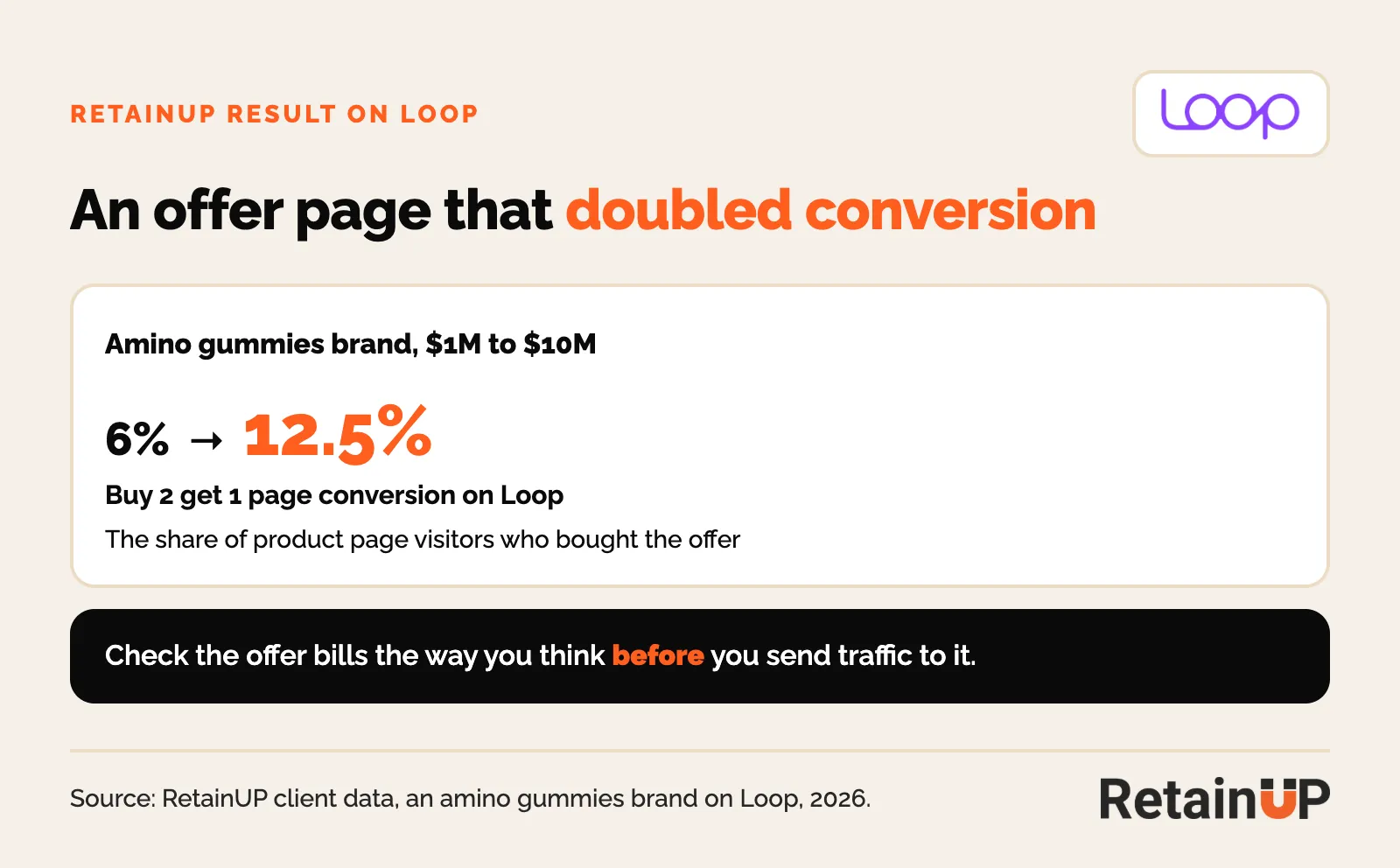
Get this right and the offer does its job. An amino gummies brand's buy 2 get 1 offer page on Loop went from 6% to 12.5% conversion.
Cancellation flows and cancellation profiles
Loop has published the best cancel flow data of any app. Read it first. In an analysis of 441,000+ cancel attempts across 87 brands, a generic discount saved about 6%. A three-stage flow saved about 15%, and the best brands passed 20%.
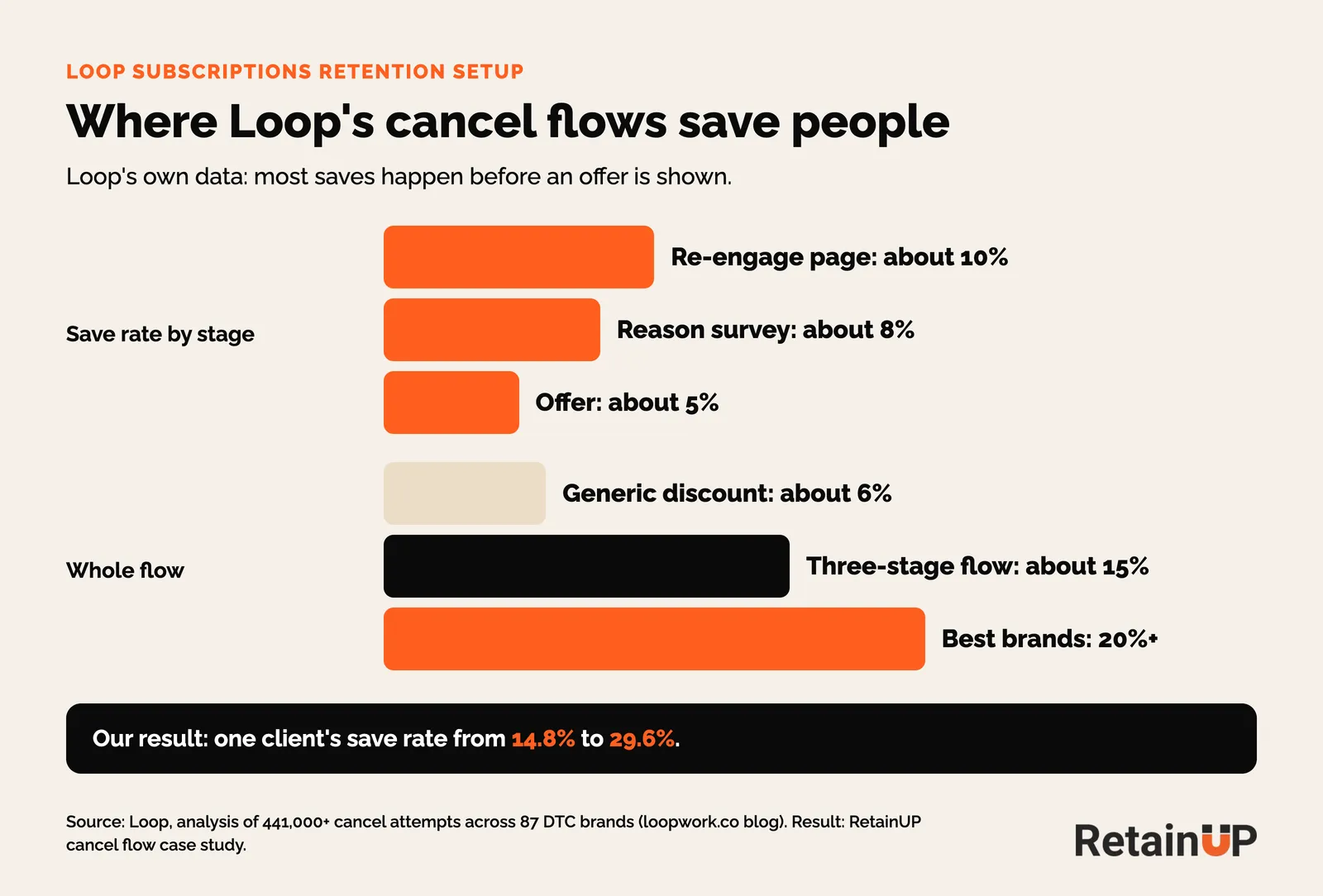
Most of those saves happen before an offer shows up. The re-engage page saves about 10% on its own. So we build it in this order, under Retain, Cancellation flows. The reasoning behind each screen lives in the subscription cancel flow; this is the Loop build.
- Benefits page. What they lose, in the brand's words. A short founder or product video if the brand has one.
- Reasons. Five brand-specific reasons, two or three sub-reasons each.
- Treatment per reason. The alternative that fits the reason.
- Two offers. A discount and a gift, so the subscriber picks one.
- Cancel. Easy to reach from there. Loop adds an instant winback offer after the cancel is confirmed.
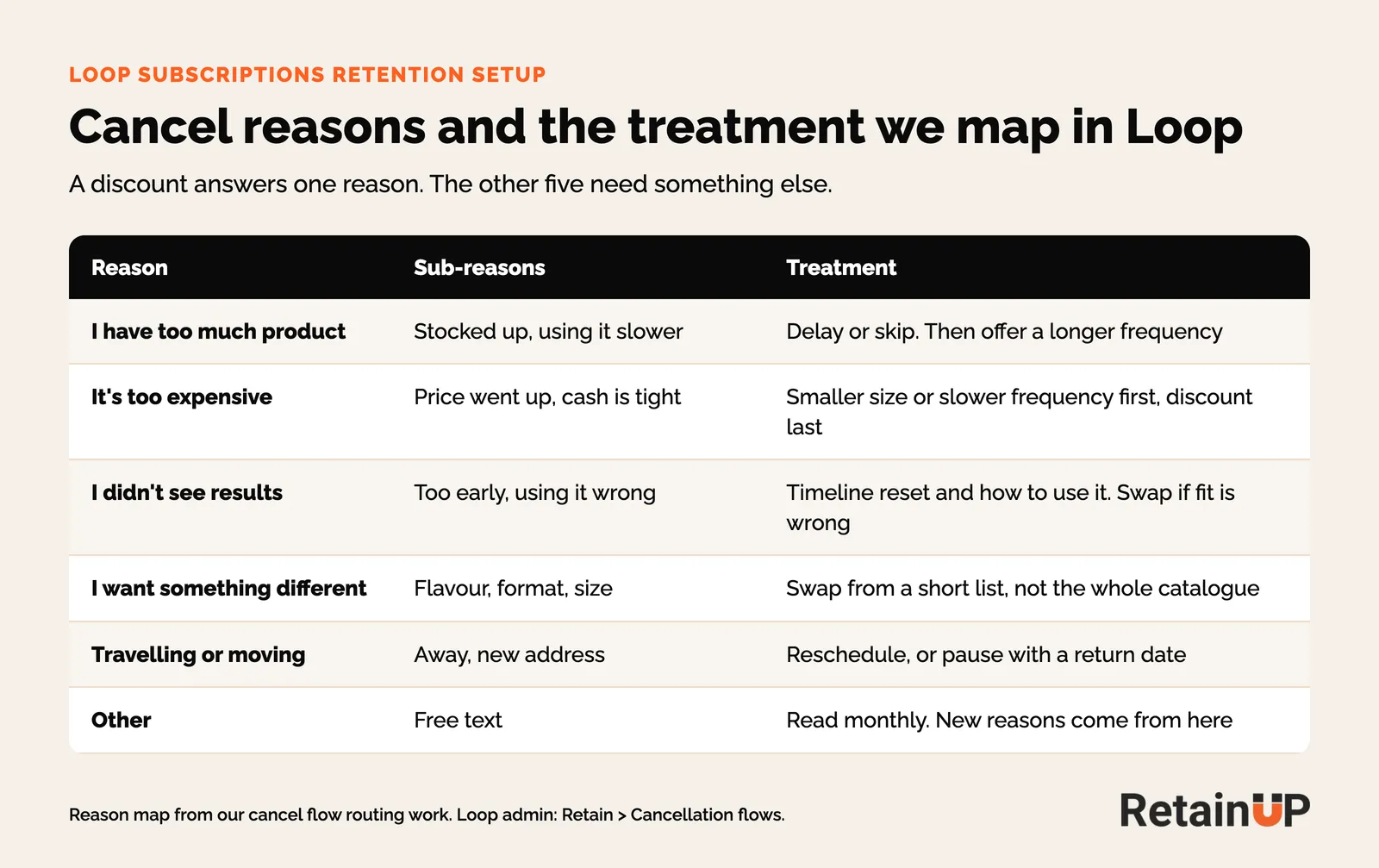
The map matters more than the offer. Too much product needs a delay. Too expensive needs a smaller size before it needs a discount. That is the reason-to-treatment map, and it is how we took one Skio client's save rate from 14.8% to 24.8%.
Cancellation profiles
Cancellation profiles show each segment its own flow. Use them. We start with three, by tenure: day zero, under a month, and loyal. A day zero cancel is a checkout problem. So that profile reminds them what they ordered and when it ships. A/B tests are on Pro.
Two rules to know. Loop's ARL setting lets subscribers in California and Colorado always cancel without the survey, and New York subscribers can skip the reasons. Add states, never remove them. And Loop counts several attempts in the same clock hour as one. The video below builds a day zero cancellation profile in Loop, plus the Recharge and Skio versions. Written version: day zero cancellations.
The Preferences tab holds the rest: a minimum orders lock, an installment lock, and whether a prepaid cancel waits for the cycle's last order. Leave the minimum orders lock on no restrictions. Loop's own help article says the same. Why we never build one is in cancellation rules.
Count the saves that paid
One thing I watch on Loop. A save counts the moment someone stays on the cancel screen. Loop's analytics show saves by treatment, which is useful. What they can't tell you is whether that person paid for the next order. On one store the flow saved 5.2% by Loop's count, and most of those saves cancelled again soon after. A save that cancels next month only moves the cancel.
Payment recovery: backup card first, pause at the end
Loop's payment recovery lives under Retain, Payment recovery. Its help center suggests 7 to 10 retries per billing cycle and a target of about 20% of failed payments recovered each month. A backup card, on Pro, gets tried before the retry schedule starts.
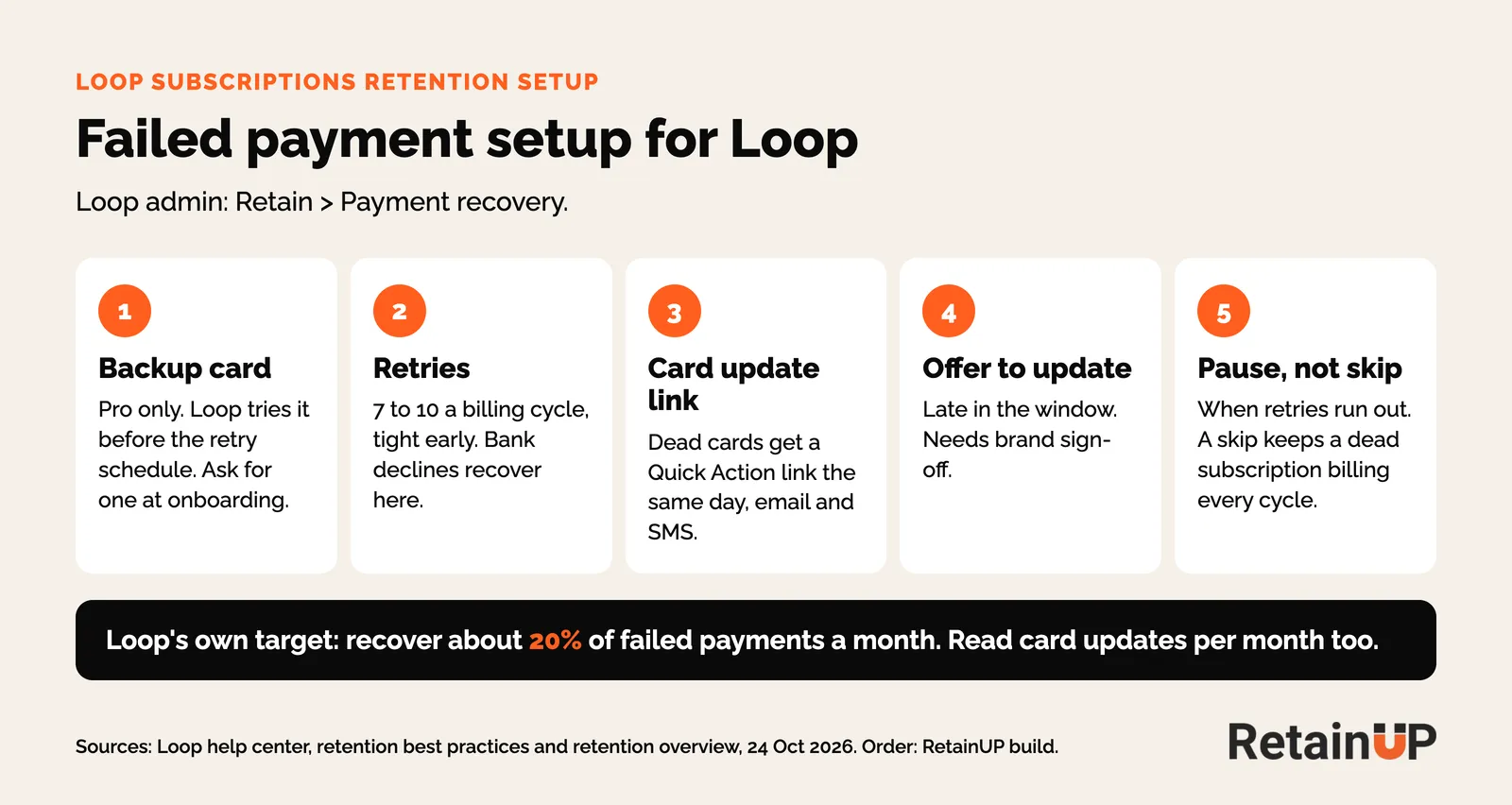
- Ask for a backup card once, in onboarding.
- Retries tight early. Bank declines recover here, and insufficient funds recovered best on one store: 73% on Loop's count, mostly by retry.
- Dead cards (expired, invalid, revoked) get a card update Quick Action link the same day, by email and SMS. No retry reaches them.
- Late in the window, an offer for updating, if the brand signs off.
- When retries run out, Loop lets you skip, pause or cancel. We pick pause. So does Loop's help center now.
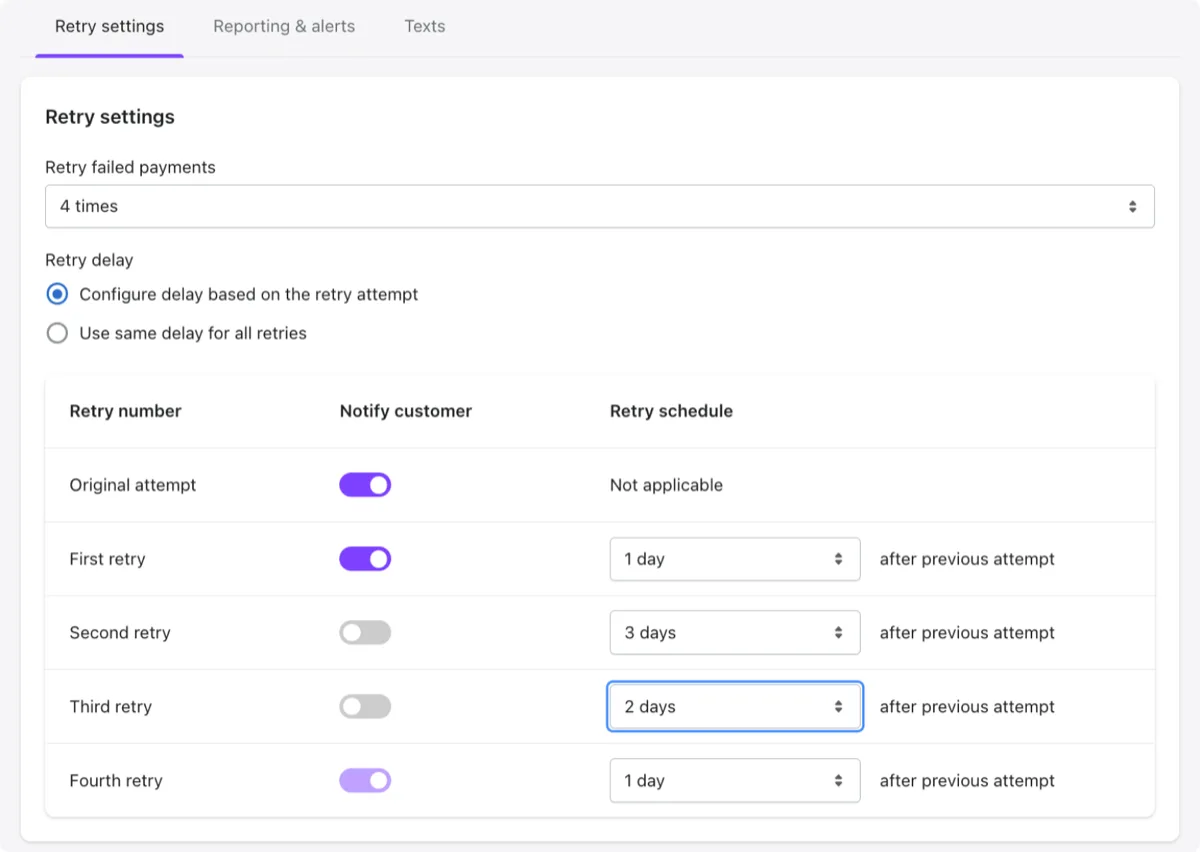
Here is what defaults did on one supplement brand. Nobody chose them. Loop retried up to 19 times, and retries 4, 7, 11, 12 and 14 to 19 recovered nothing. After the last retry, it skipped. That keeps a dead card billing every cycle: 44% of the failed subscriptions failed a second order. We moved it to 6 attempts over 14 days, on day 1, 3, 5, 7, 10 and 14. The reasoning is in payment retry schedules.
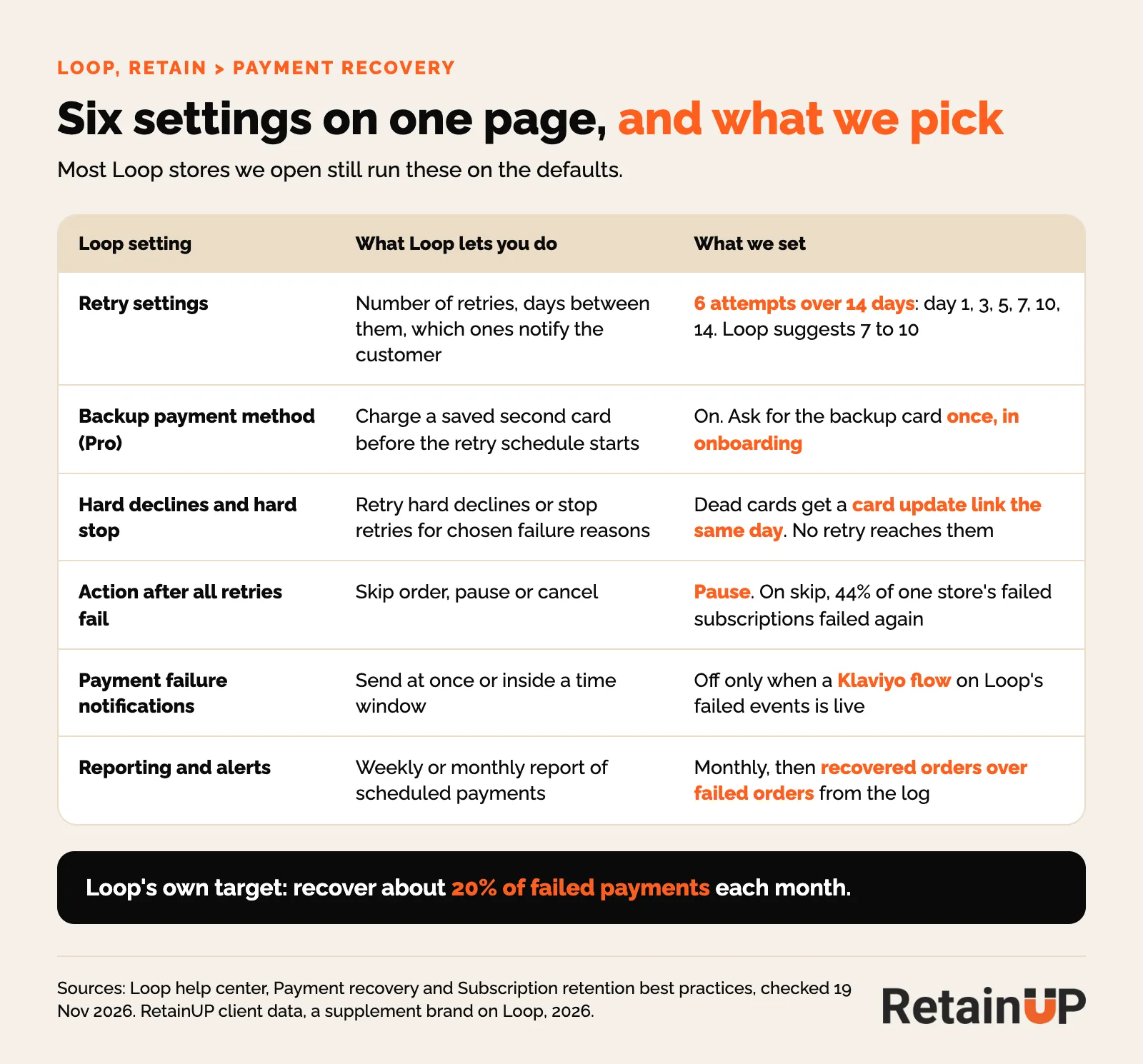
Two settings get missed. Hard declines behavior decides whether Loop keeps retrying a card that can't pay, and a hard stop ends retries for the failure reasons you pick. Use them for expired, invalid and revoked cards. Then send the card link.
And read the recovery rate yourself. Loop's first-cycle recovery on that store read 41.2% by revenue. The activity log read 17.3% by order. Same failures, two numbers. Loop counts a skipped order as left the cycle, not lost. So report recovered orders over failed orders, monthly, from the log.
Then switch off Loop's own payment emails once the Klaviyo flow is live, or subscribers get both, and check they didn't go off with nothing replacing them. On that store Loop's payment emails had stopped for a full month and no Klaviyo flow had taken over. Nothing flagged it. That is passive churn, and it never shows up in the cancel reasons. The emails themselves are in the card update flow. The video covers the retry rules and the no-login card link. Both work the same on Loop.
The Loop customer portal
Loop's portal is drag-and-drop. The theme lives under Customer portal, Theme settings, Customize. Most stores I open have never been there, so they still run the stock theme with every action at the same weight.
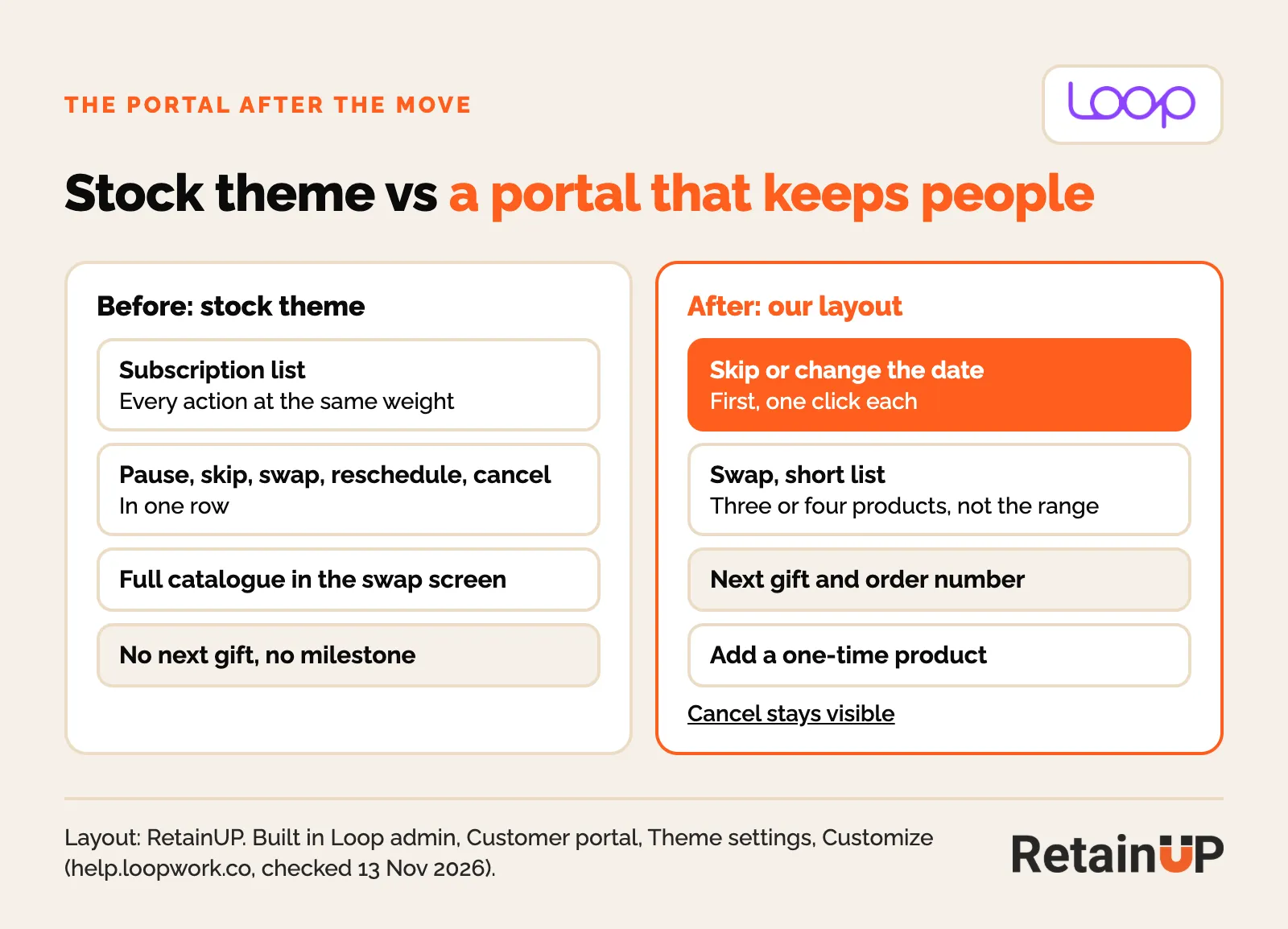
On one gummies brand the stock portal had four delivery buttons of the same size. Skip was as loud as Order Now. A "Payment failed" tag sat on a card that still said Active, with no update button. And a discount code field sent people hunting for codes.
What we set instead. A payment banner only when a charge failed. Progress, savings and the next gift near the top. Get it now as the main button, with skip, a new date and cancel under More. A short swap list, because a full catalogue sends people browsing. Cancel stays easy to find. What a portal should hold on any app is in the subscription customer portal.
Quick Actions and Klaviyo events
Skip, delay and swap should be one click from the email that lands before the charge. Loop's Quick Actions make that easy: magic links that skip, delay or swap without a login. But only if your Klaviyo emails carry them. We put them as buttons in the upcoming billing reminder. Pause goes in the cancel flow with a return date, last on the flexibility ladder.
Loop's list goes further: recover a failed payment, order now, upgrade, resume and winback, in Klaviyo, Omnisend, Recart or Attentive. In Loop's dunning guide, 30% of Mammaly's subscribers updated their card through one. Loop's numbers, not ours. Winback timing is in subscription winback.
Loop sends subscription events to Klaviyo. Each one needs a flow. For failed payments there are three: loop_billing_attempt_failed, loop_billing_attempt_failed_and_will_be_retried and loop_billing_attempt_failed_and_last_retry_left. Exact names vary. Check the list in Loop's Klaviyo guide.
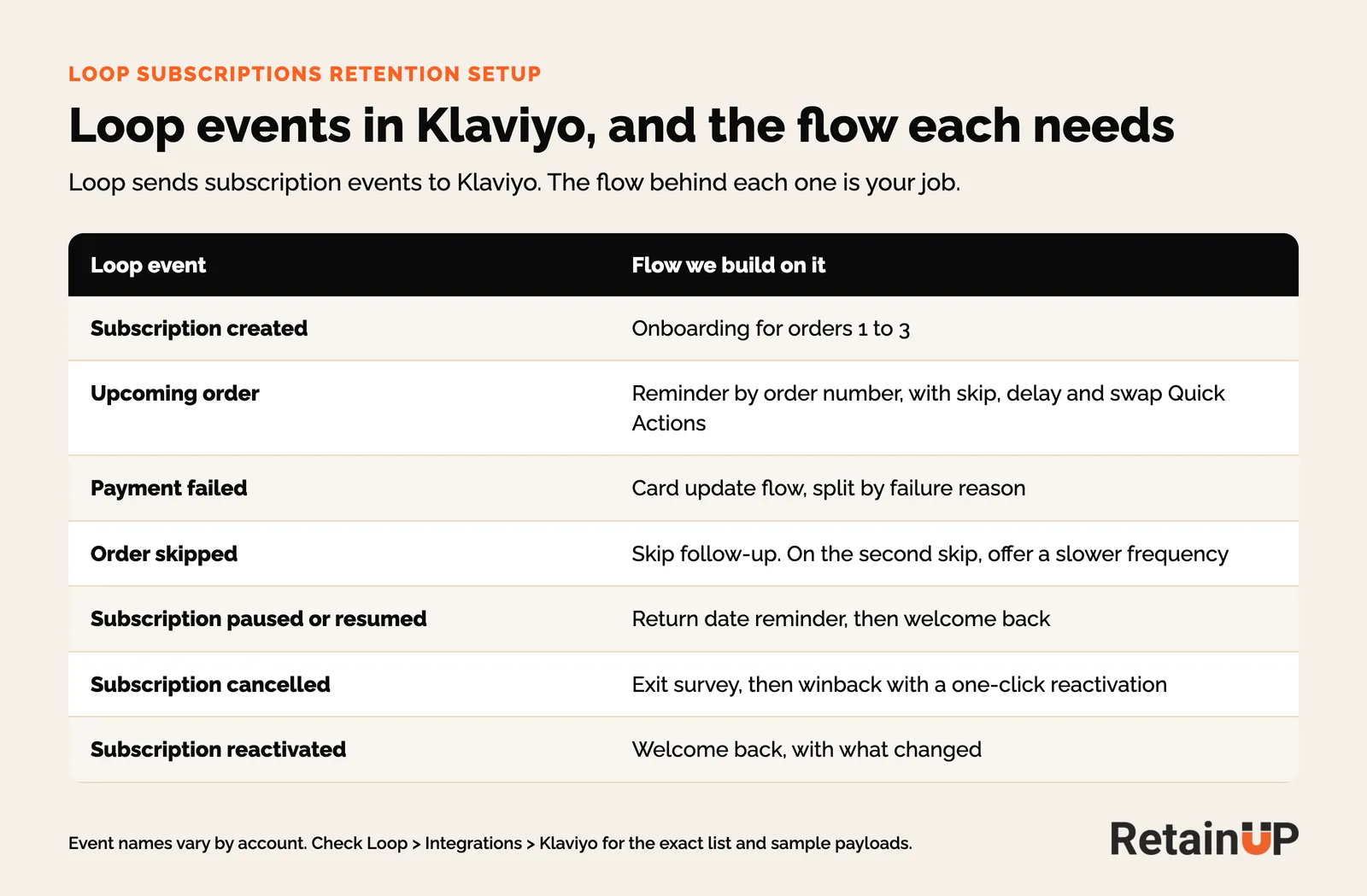
Two checks before building. First, look at both Klaviyo and Loop for live flows, because Loop runs its own milestone and notification emails and either can be the one a subscriber gets. And when you export Loop's activity log, blank fields come through as a dash. Count those as filled and every column looks complete. On one export, the first read counted almost every skip as a payment failure for that reason. The names on the other apps are in our Klaviyo event map.
Just moved onto Loop
Loop's migration FAQs say order history, past skips and discounts, and historical revenue and cohorts do not move, so every Loop report starts on go-live day.
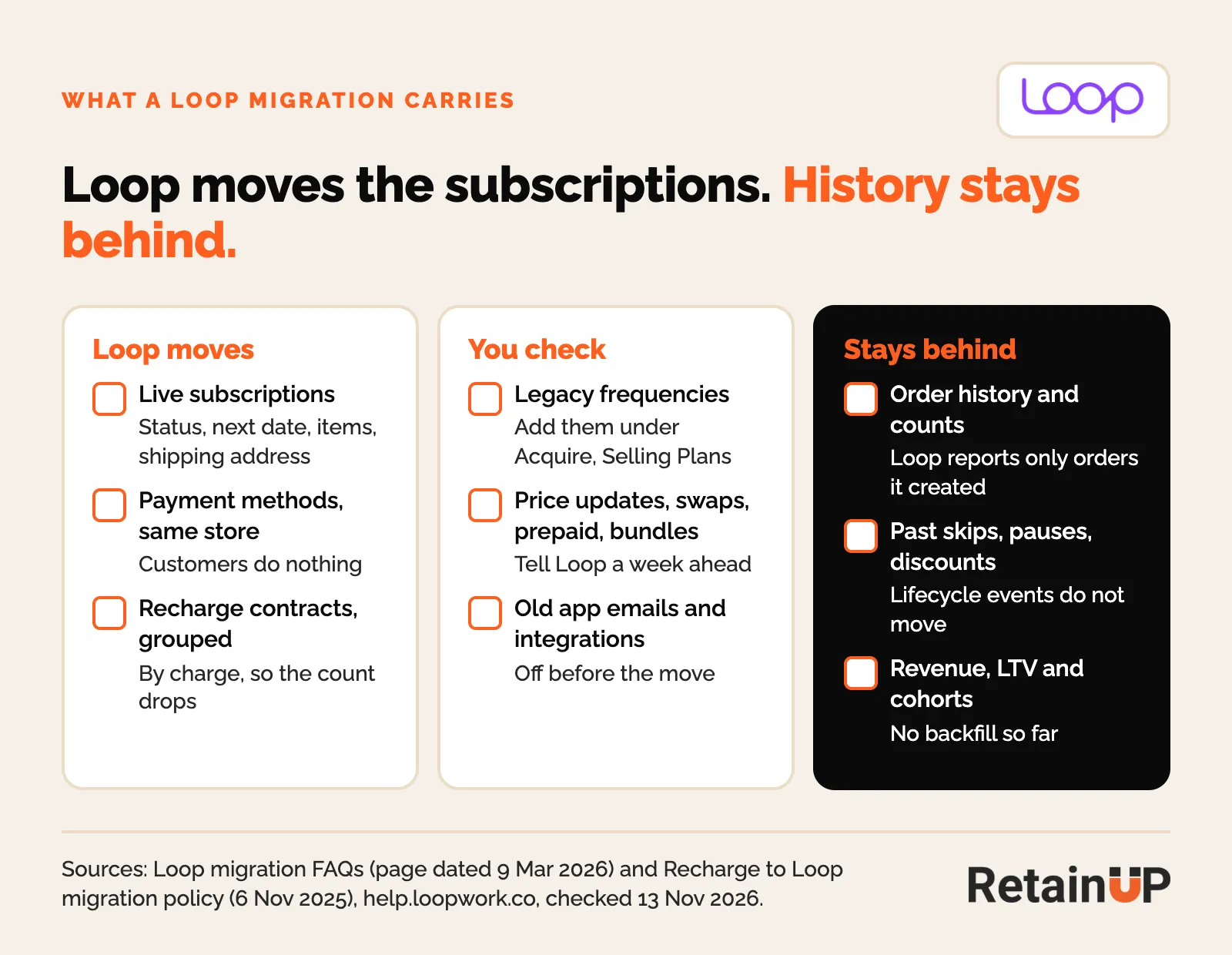
The old records get cancelled on migration day too. On one Appstle to Loop move, just over half the cancels in the first three months were migration records. Filter them out. The move itself is in our subscription migration checklist.
Loop retention setup checklist
The order we run in a 30-day build.
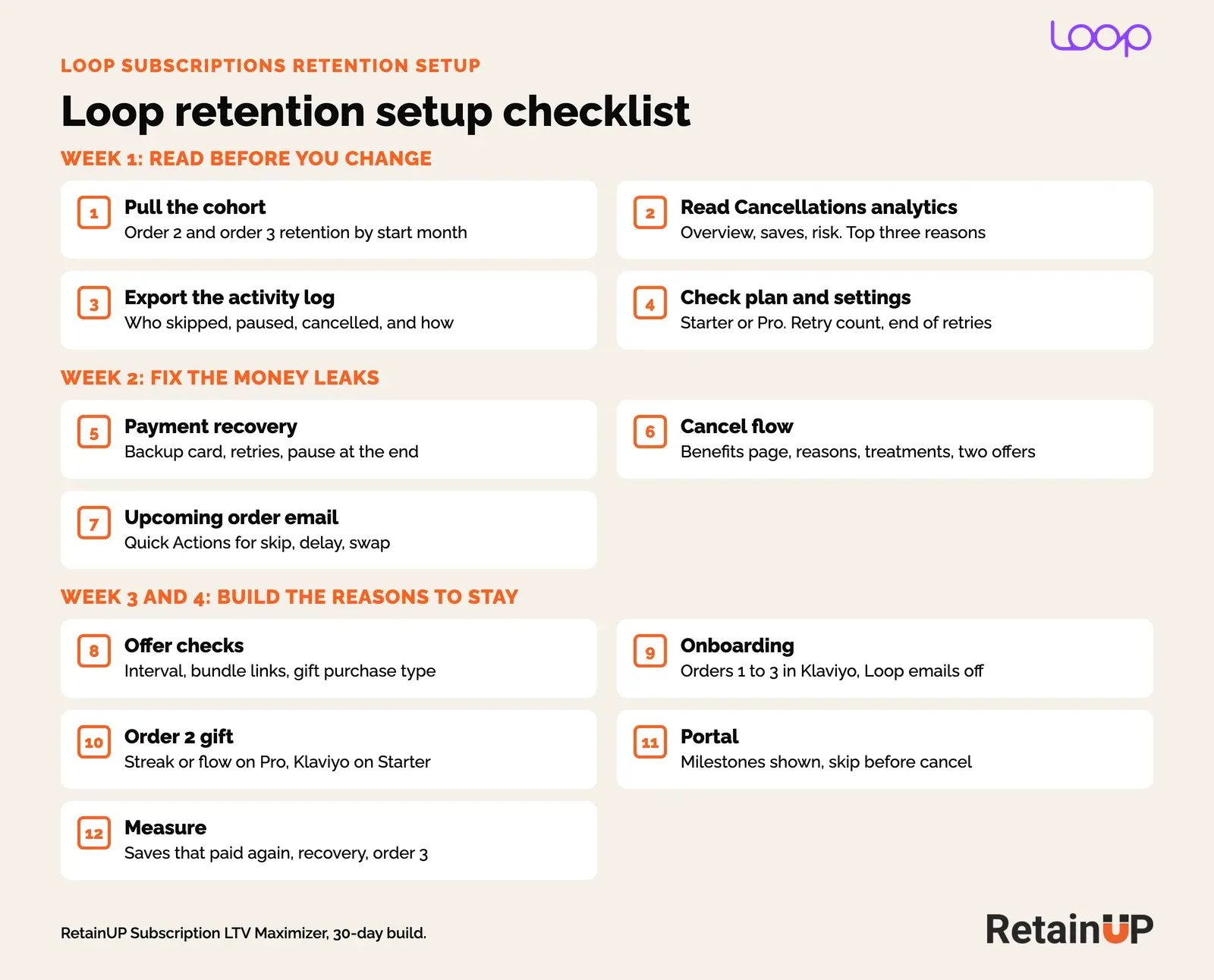
- Pull order 2 and order 3 retention by start month.
- Read Analytics, Cancellations for the top three reasons, and export the activity log.
- Check the plan, the retry count and what happens when retries run out.
- Set payment recovery: backup card on Pro, retries, pause at the end.
- Rebuild the cancel flow: benefits page, reasons, treatments, two offers, one profile per tenure.
- Add skip, delay and swap Quick Actions to the upcoming order email.
- Check every offer at checkout: plan interval, bundle links, gift purchase type.
- Build onboarding for orders 1 to 3 in Klaviyo and turn off the Loop emails it replaces.
- Promise an order 2 gift, through Streaks or Flows on Pro or Klaviyo on Starter.
- Set the portal: milestones shown, skip and swap before cancel.
- Track saves that paid again, recovery rate and order 3 retention monthly.
Still choosing? The best Shopify subscription app comparison puts Loop next to the other three. Not sure what your store is missing? The free subscription audit names the top 3 leaks in 24 hours.
Most of these settings get chosen once, in week one, and never checked again. The Subscription LTV Maximizer™ builds the offer, cancel flow, portal, payment recovery, pause and skip in Loop, plus the email and SMS around them, live in 30 days for $5,000.
FAQ
Do I need Loop Pro for retention?
No. Starter at $99 a month has cancel flows, smart dunning, bundles, Quick Actions and the Klaviyo integration. Pro at $399 a month adds Streaks, Flows, a backup payment method and A/B tests on cancel flows. Below a few thousand subscribers, Starter plus Klaviyo covers most of it. Milestone gifts run through Klaviyo and Shopify discounts.
What is a good cancel flow save rate on Loop?
Loop's own data puts a generic discount at about 6%, a three-stage flow at about 15%, and the best brands above 20%. Loop counts a save the moment someone stays on the cancel screen, so also check how many saved subscribers paid for their next order.
How many payment retries should I set in Loop?
Loop suggests 7 to 10 per billing cycle. We front-load them and often run fewer, 6 attempts over 14 days, because late retries rarely recover anything. Send dead cards a card update link the same day, since no retry reaches them. When retries run out, set Loop to pause the subscription instead of skipping the order.
Why is my Loop subscription billing monthly instead of every 3 months?
A new Loop frequency defaults to deliver every 1 month, whatever the plan is named. Set the interval itself, for example every 84 days for 28-day packs. Then prove it at checkout, where the last line should read "Recurring subtotal ... every 84 days".
Does Loop work with Klaviyo?
Yes, on every plan. Loop sends subscription events such as created, upcoming order, payment failed, skipped, paused and cancelled. Quick Action links can go into Klaviyo emails so subscribers skip, delay or update a card in one click, and once each Klaviyo flow is live you turn off the matching Loop email so nobody gets two.
One email a week on subscription retention: the numbers, the strategy, and what to fix first.

Rahi Jain
Rahi Jain is a subscription LTV specialist who helps $1M to $10M DTC brands reduce subscription churn and maximize LTV on Recharge, Skio, Stay AI and Loop.
More about Rahi