Key takeaways
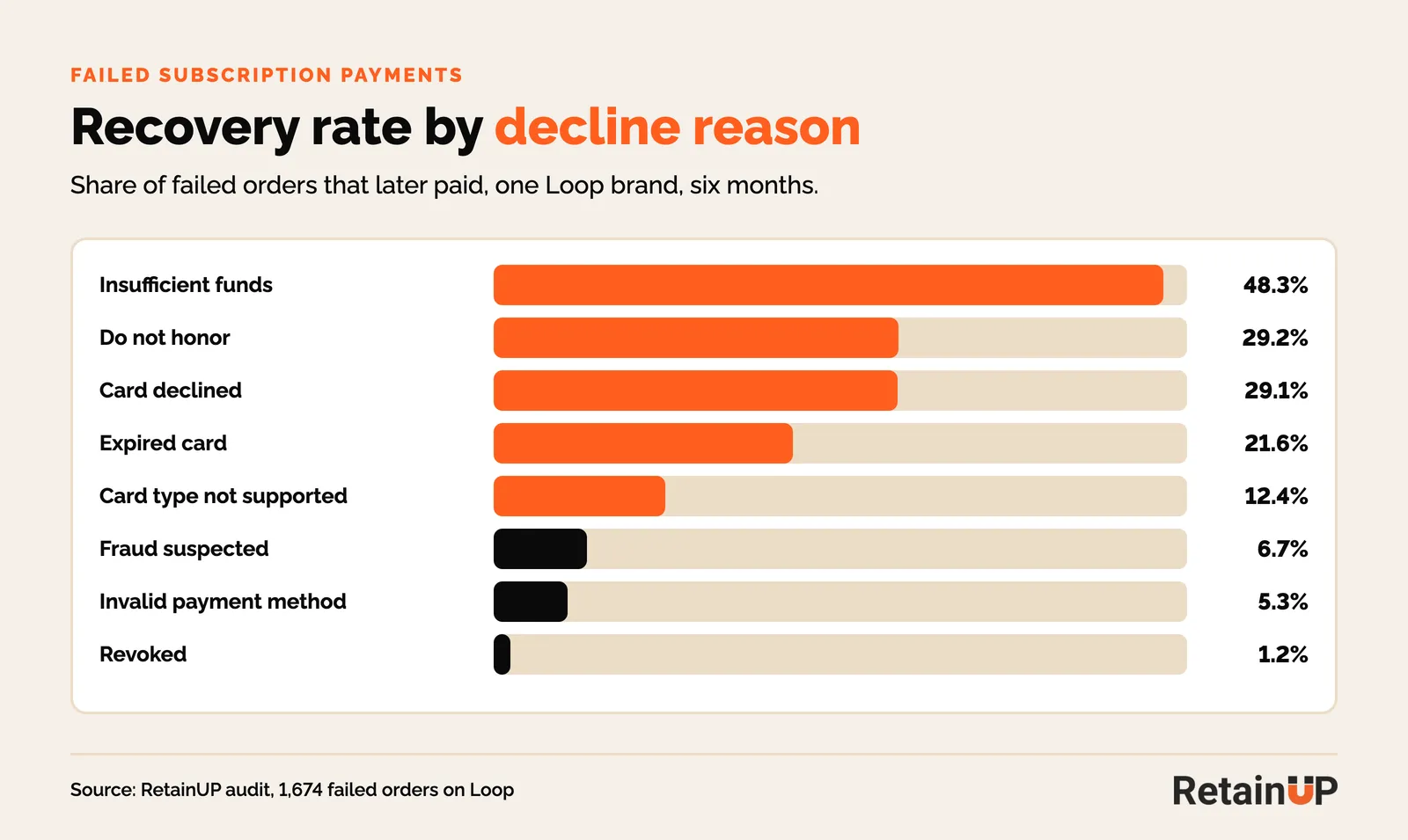
- On one Loop brand, insufficient funds recovered 48.3% of the time on retries, while revoked payment methods recovered 1.2%.
- Changing the default card in a Shop Pay wallet does not update existing subscriptions, so each renewal keeps charging the old card.
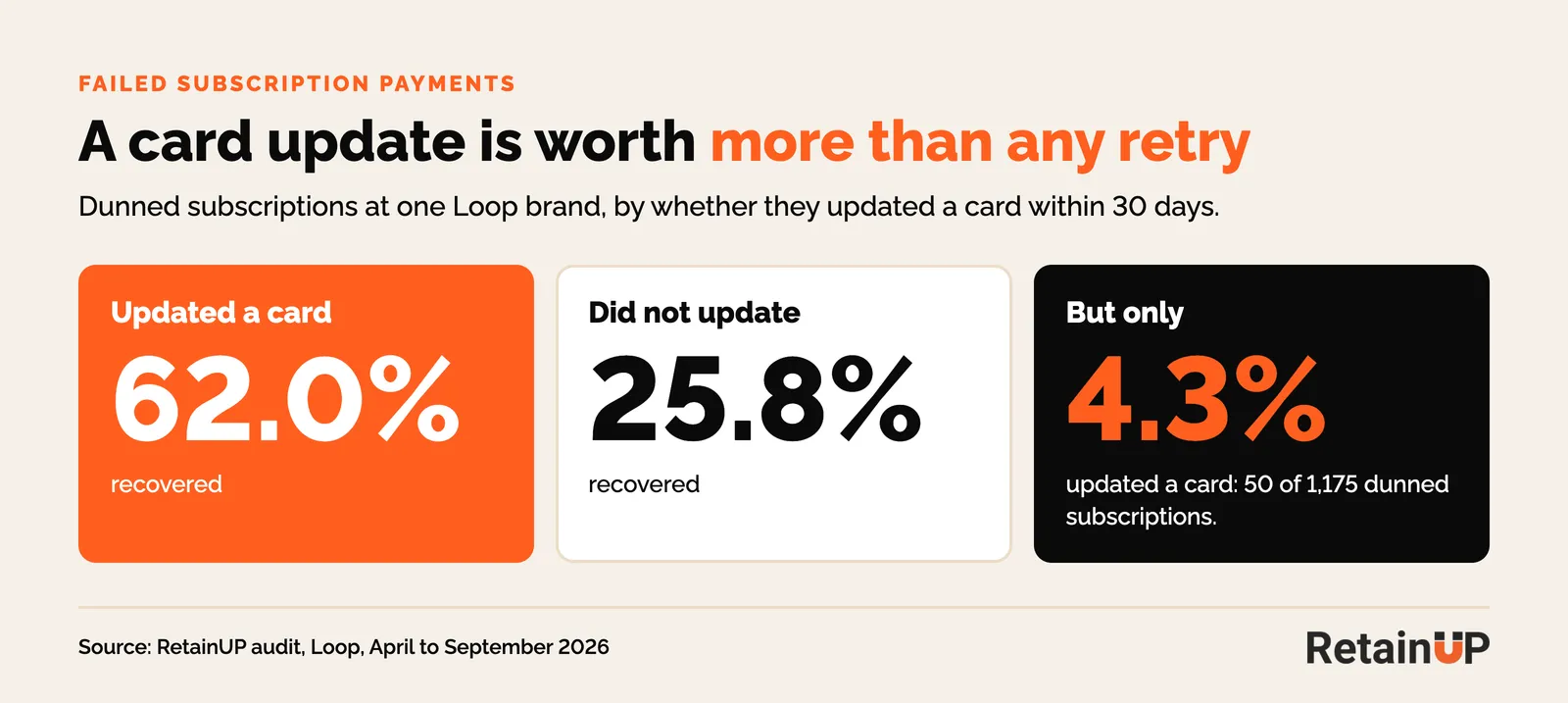
- Subscribers who updated their card inside 30 days recovered 62.0% of failed orders, against 25.8% for those who did not.
A subscriber's renewal fails. The app retries it nine times over three weeks. Nothing comes back, the order is skipped, and next month it fails again.
I've seen that exact loop in two Loop audits this year. The retry count was never the problem. Most of those cards were dead, and no retry reaches a dead card.
This post covers the two questions merchants ask most on the Shopify Community: why Shop Pay customers can't update their card, and what retry schedule to run. Then the settings on Recharge, Skio, Loop and Stay AI, and the emails and SMS to send.
Why Shop Pay subscribers can't update their card
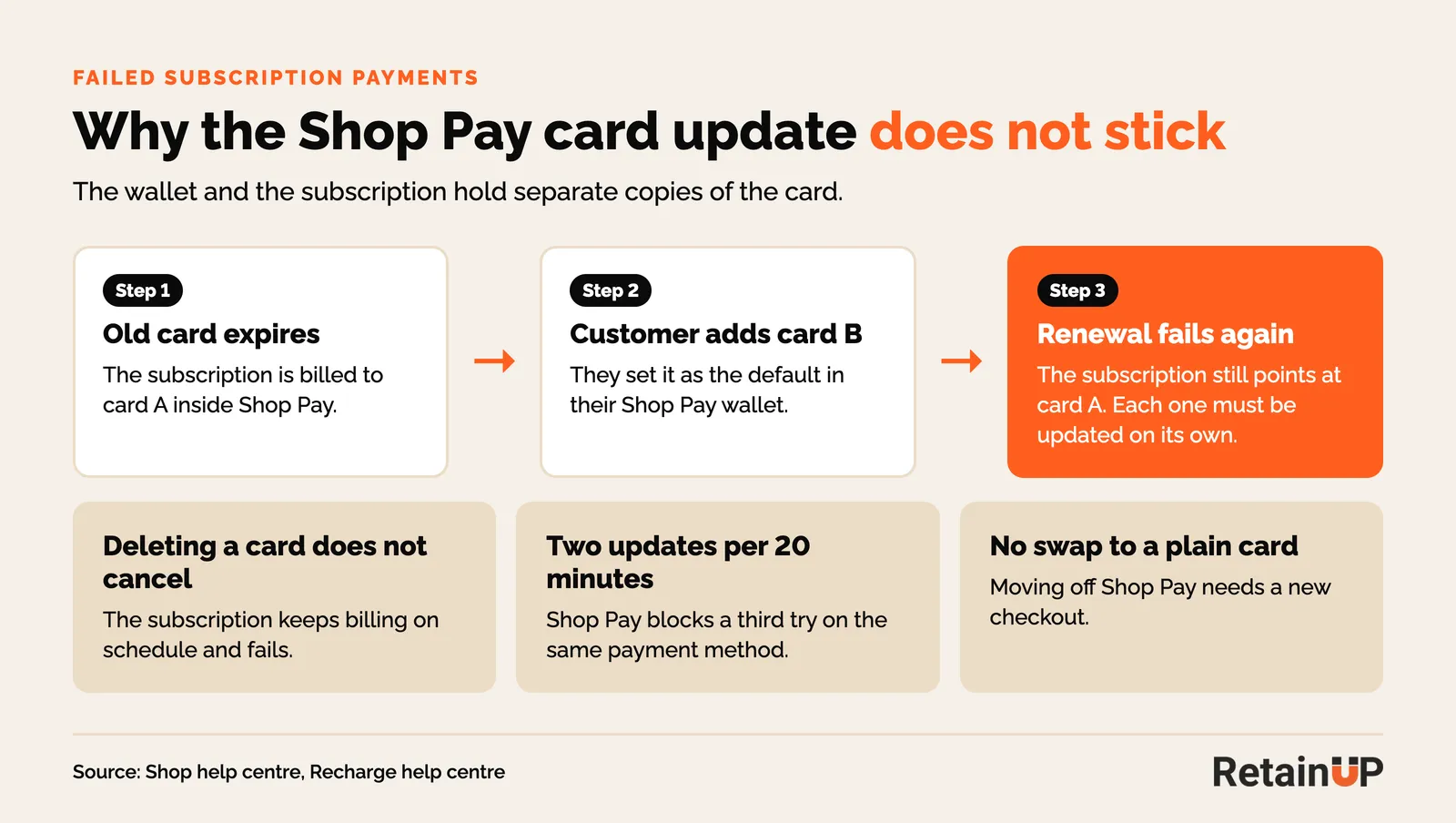
Shop Pay holds the card, so your subscription app can't edit it. The app can only ask Shopify to send the customer an update link, or open Shopify's own screen. When a customer changes their default card in the Shop Pay wallet, existing subscriptions stay on the old card.
Shop's own help page says it plainly: changing your default payment method does not update existing subscriptions. Each subscription has to be updated on its own. Deleting a card from the wallet does not cancel the subscription either. It keeps billing on schedule and fails.
So the customer thinks they fixed it. The next charge fails anyway. They get another failed payment email and decide the brand is broken.
The busiest thread on this, "ShopPay payment method is not updating for subscription customers", has 1,109 views and 26 replies. The merchant who opened it said every card update problem she had came from Shop Pay customers. The app blamed Shopify and Shopify blamed the app. Nobody posted a fix.
Two more limits catch people out. Recharge notes that Shop Pay allows two updates per payment method every 20 minutes, so a customer who tries three times gets blocked. And a Shop Pay method can't be swapped for a plain card without a new checkout.
What "payment method revoked" means
Revoked means Shopify has withdrawn the saved payment method, so there is nothing left to charge or retry. The customer has to add a new one. A retry schedule does nothing here.
Shopify's API lists the reasons a method gets revoked. They include the customer removing it, a manual revoke, and too many consecutive failures. Loop's docs call it customer initiated, not a bank decline. Skio says it often follows a customer removing the card from Shop Pay, which breaks the billing agreement.
In the "Payment Method Revoked" thread (749 views), a merchant saw a wave of these on Shop Pay renewals from June 2025. About a third of their subscribers paid with Shop Pay. The only fix they found was a new subscription. Recharge says the same: if the original method no longer exists, the customer checks out again.
In our audit data, revoked is the worst reason on the list. At one Loop brand with 9,961 recurring orders over six months, revoked cards recovered 1.2% of the time.
How to get a Shop Pay subscriber to update their card
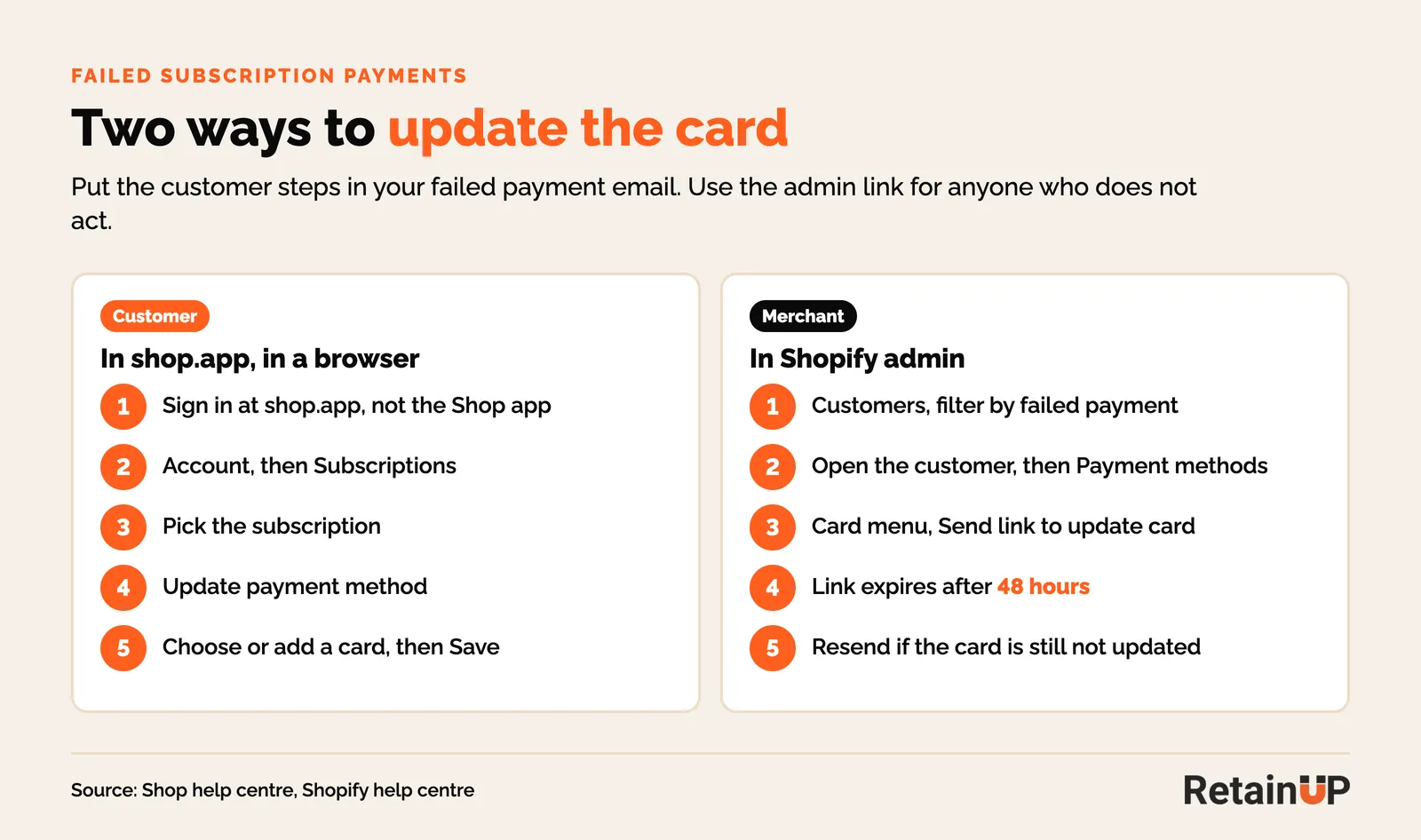
Send the update link from Shopify, not just your app's generic email, and tell the customer exactly where to click. The customer fixes it in the Shop account in a web browser. You can trigger it from the Shopify admin.
What the customer does
Sign in at shop.app in a browser, not the Shop app. Then Account, Subscriptions, pick the subscription, Update payment method, Save. Put those five steps in the failed payment email. Most customers have never seen that screen.
What you can send
In the Shopify admin, open the customer, go to Payment methods, open the card menu and choose Send link to update card. The link expires after 48 hours, so send it when the customer is likely to act, and send it again if they miss it. You can filter customers by failed payment to work through a list.
Each app wraps the same Shopify email:
- Recharge: customer profile, Manage payment methods, Request an update via email.
- Skio: Manage, Update payment method, send the secure link.
- Loop: subscription, Payment details, Send link to update payment details. Loop's quick action URL also works for revoked methods.
- Stay AI: the portal button triggers Shopify's email, and only active or paused subscriptions can be updated in Shop Pay. A cancelled one can't.
That last Stay AI line matters more than it looks. If your app cancels a subscription when retries run out, the Shop Pay customer can't update the card on it any more. They have to buy again. Most won't.
Why subscription payments fail: three buckets
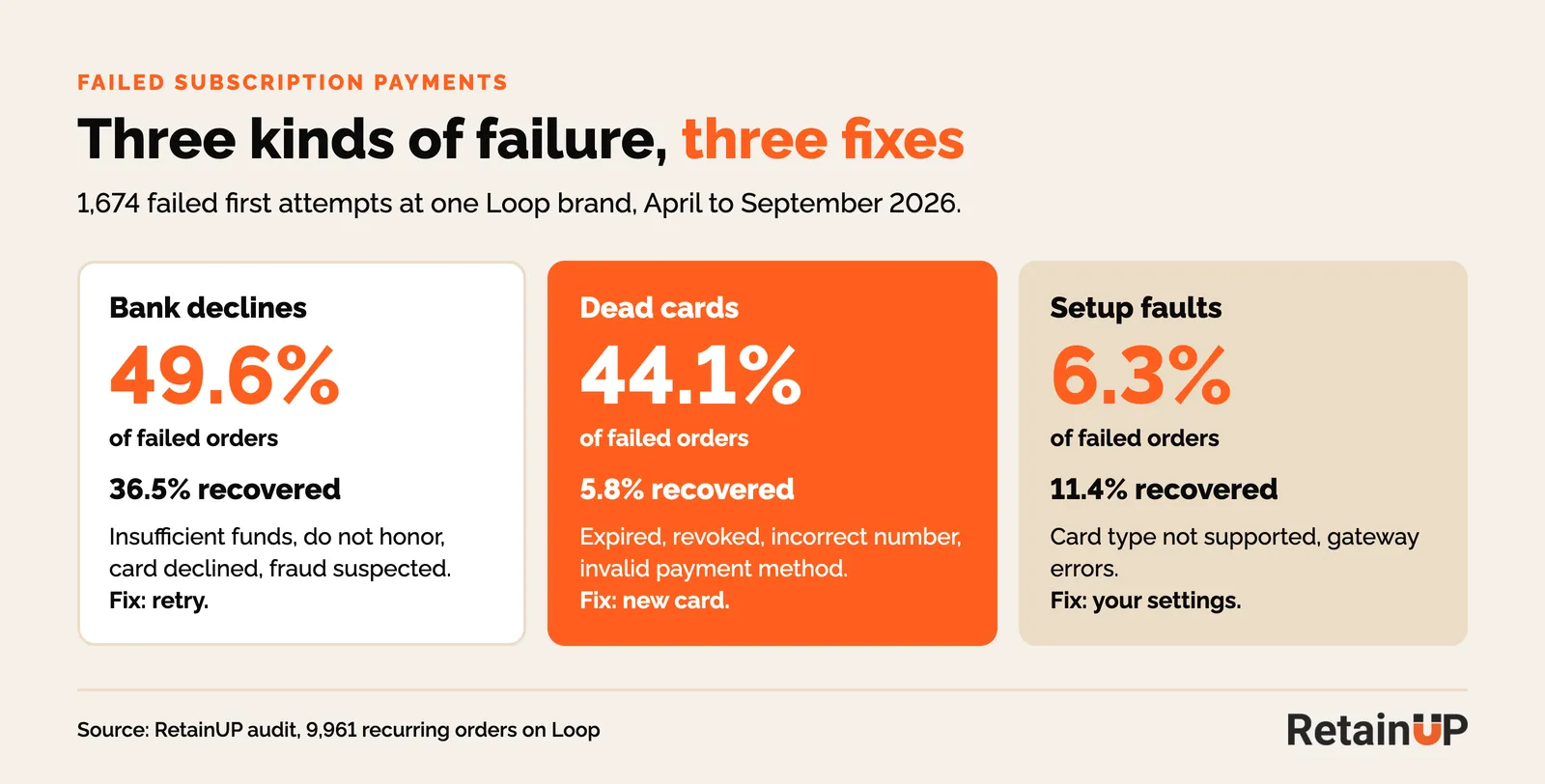
Every failed payment falls into one of three buckets: bank declines, dead cards and setup faults. Each needs a different fix. Read the failure reason before you touch the retry schedule.
- Bank declines: insufficient funds, do not honor, card declined, fraud suspected. The card works, the bank said no this time. Retries have a real chance.
- Dead cards: expired, revoked, incorrect number, invalid payment method. Only a new card fixes these.
- Setup faults: card type not supported, gateway errors. These are yours to fix in Shopify Payments.
At the Loop brand above, 1,674 of 9,961 orders failed on the first attempt. Bank declines were 49.6% of those and recovered 36.5%. Dead cards were 44.1% and recovered 5.8%. Setup faults were 6.3% and recovered 11.4%.
A supplement brand on Loop with about 300 subscribers showed the same split. 35% of failures were dead cards. Over three months, customers updated a card through the portal five times.
So close to half of failed payments can't be retried back. That's why adding more retries rarely moves the number. It needs the customer to act.
The retry schedule we set, by decline reason
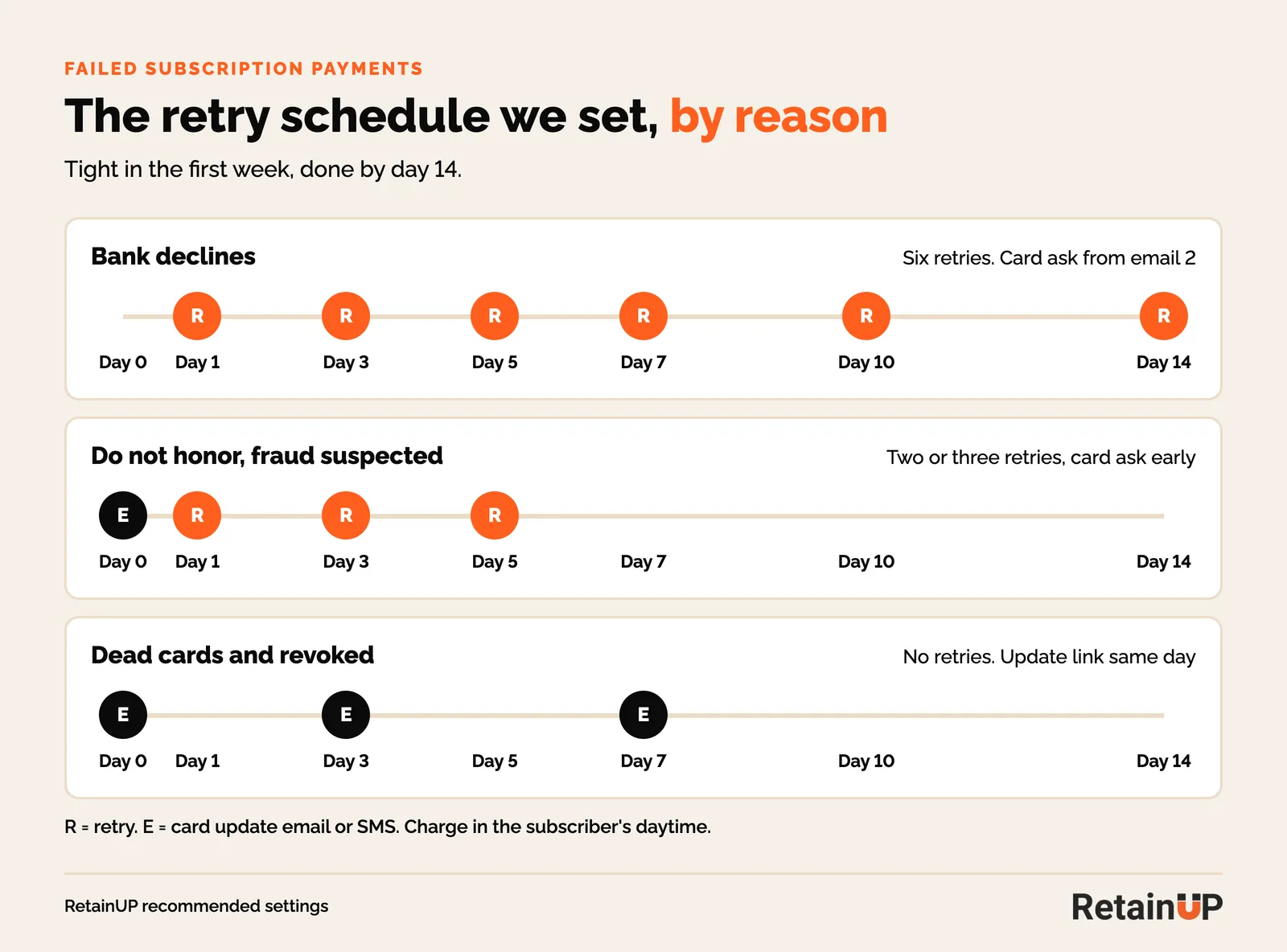
Front-load the first week, then stop by day 14. For bank declines we run six attempts: day 1, 3, 5, 7, 10 and 14. For dead cards, skip the retries and send the update link the same day.
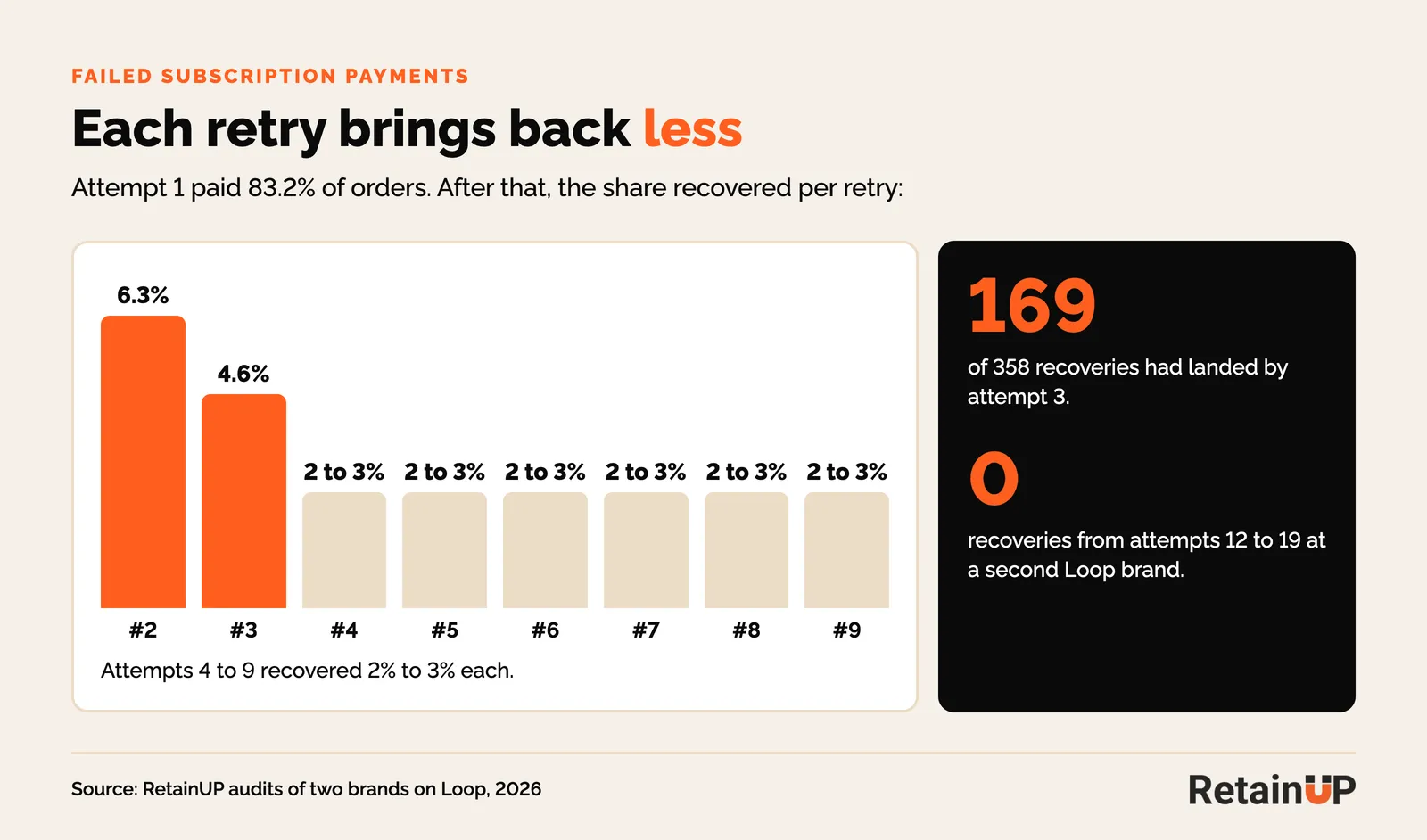
The data behind it. At the Loop brand, attempt one succeeded 83.2% of the time. Attempt two recovered 6.3%, attempt three 4.6%, then 2% to 3% each up to attempt nine. 169 of the 358 recoveries had landed by attempt three. The other supplement brand ran up to 19 retries, and attempts 12 to 19 brought back nothing.
Outside benchmarks point the same way. Stripe recommends 8 tries within 2 weeks and never retries codes like incorrect number, lost or stolen card, or revoked authorization without a new card. Recurly found most recovery lands 2 to 12 days after the decline.
| Decline reason | Bucket | Retries | What else to do |
|---|---|---|---|
| Insufficient funds | Bank decline | Day 1, 3, 5, 7, 10, 14. Land some near paydays | Card or backup card ask from email 2 |
| Card declined, temporary hold | Bank decline | Day 1, 3, 5, 7, 10, 14 | Card ask from email 2 |
| Do not honor, fraud suspected | Bank decline | 2 or 3 retries | Ask for a new card early. The bank may never clear it |
| Expired, incorrect number, invalid | Dead card | None, or one after the update | Update link same day, email plus SMS |
| Revoked (Shop Pay) | Dead card | None | Shopify update link, step-by-step shop.app instructions |
| Card type not supported | Setup fault | None | Fix accepted card types in Shopify Payments |
Two smaller things. Charge in the subscriber's daytime. A 5am Eastern billing run is 2am in California, and banks flag odd hours. And ask for a backup card once, in onboarding. Recharge and Loop will both try other saved methods.
Settings on Recharge, Skio, Loop and Stay AI
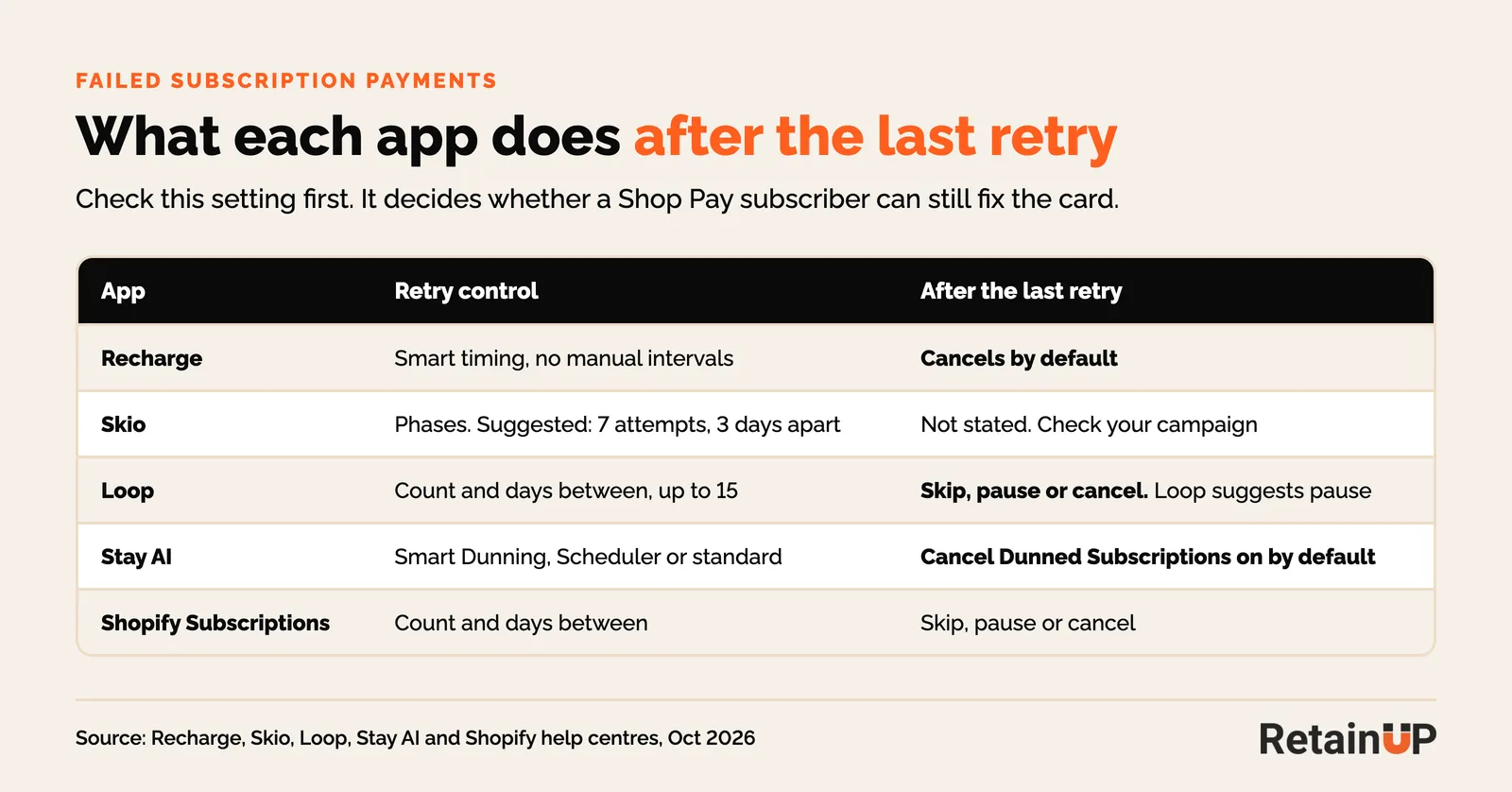
All four let you control retries, but they differ on what happens after the last one. Recharge and Stay AI cancel by default. Loop lets you pick skip, pause or cancel. Check yours today, because the default decides whether a Shop Pay subscriber can still update the card.
| App | Where | Retry control | After the last retry |
|---|---|---|---|
| Recharge | Churn tools, Failed Payment Recovery | Smart retry timing, no manual intervals. Hard declines skip the strategy | Cancels by default. Card Declined email for hard declines is off until you turn it on |
| Skio | Payment Recovery campaigns | Phases with their own count and interval. Suggested first phase: 7 attempts, 3 days apart. Smart Retries moves timing | Not stated on the help page. Check your campaign |
| Loop | Retain, Payment recovery | Retry count and days between. Up to 15 retries | Skip, pause or cancel. Loop calls pause the best default |
| Stay AI | Subscription Setup, Customer Billing | Smart Dunning, Dunning Scheduler, or standard retries | Cancel Dunned Subscriptions is on by default |
Two checks on every audit:
- Are the payment emails still going out? At both Loop brands, the app's payment emails stopped on their own. One sent none after June. The other sent none in September, against 184 retries. Nobody noticed, because the flows still existed.
- Is Klaviyo sending a second copy? If Klaviyo takes over the messages, turn the app's emails off. If you don't, people get both.
Pause instead of auto-cancel
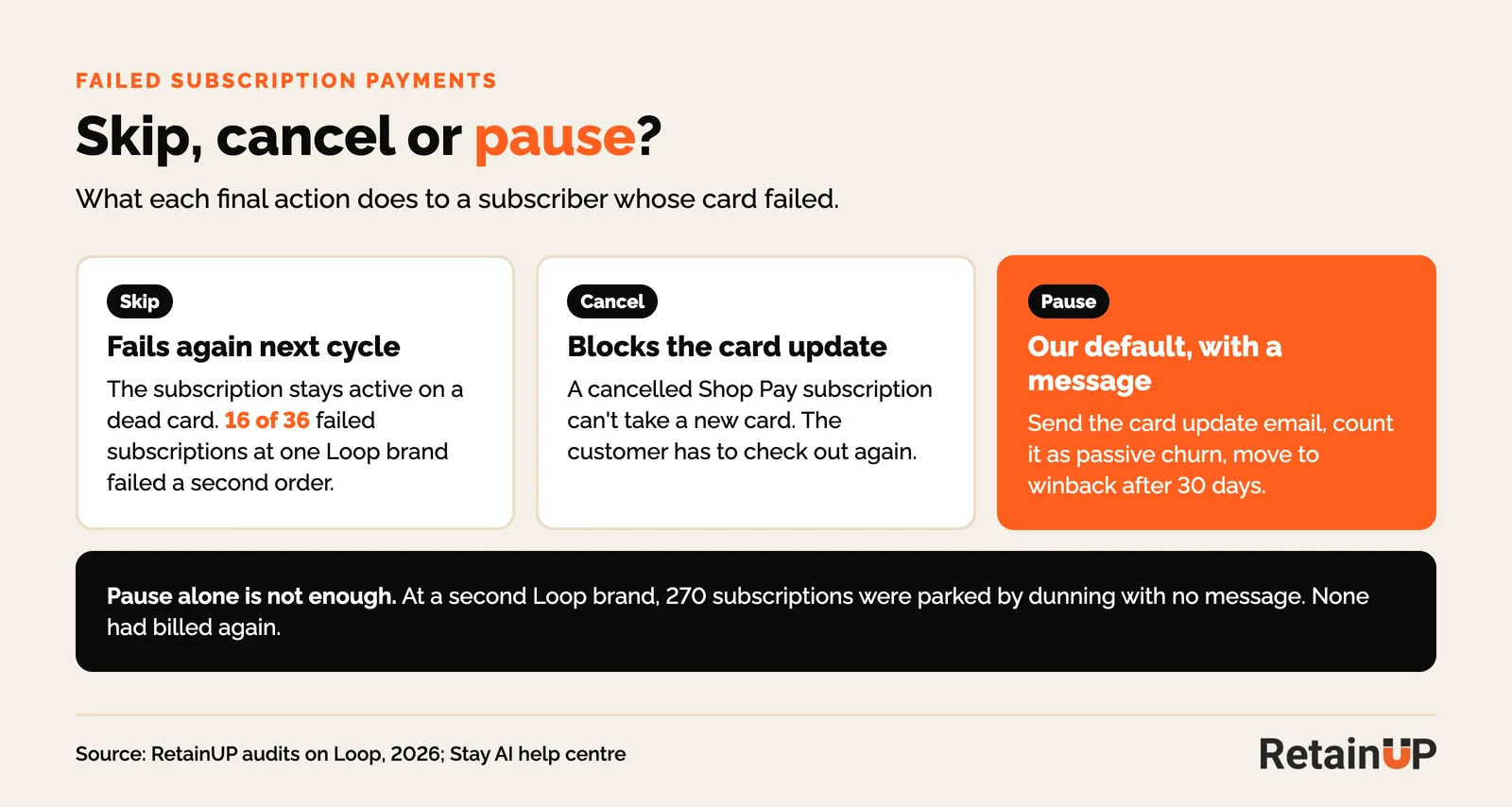
When retries run out, pause the subscription and send the card update email. Don't cancel and don't skip. A cancel blocks the Shop Pay update. A skip keeps a dead card billing every cycle.
The skip trap is easy to miss. Loop can end dunning with a skip, so the order is skipped and the subscription stays active. At the smaller Loop brand, 16 of 36 subscriptions that failed went on to fail a second order. They sat in the active count the whole time.
Pause has its own trap. At the bigger Loop brand, 270 subscriptions were parked by dunning and none had billed again. A pause with no message is a cancel that still looks active. So pair it with the card update email, count it as passive churn in your reports, and move it into your winback flow after 30 days.
Card update emails and SMS to send
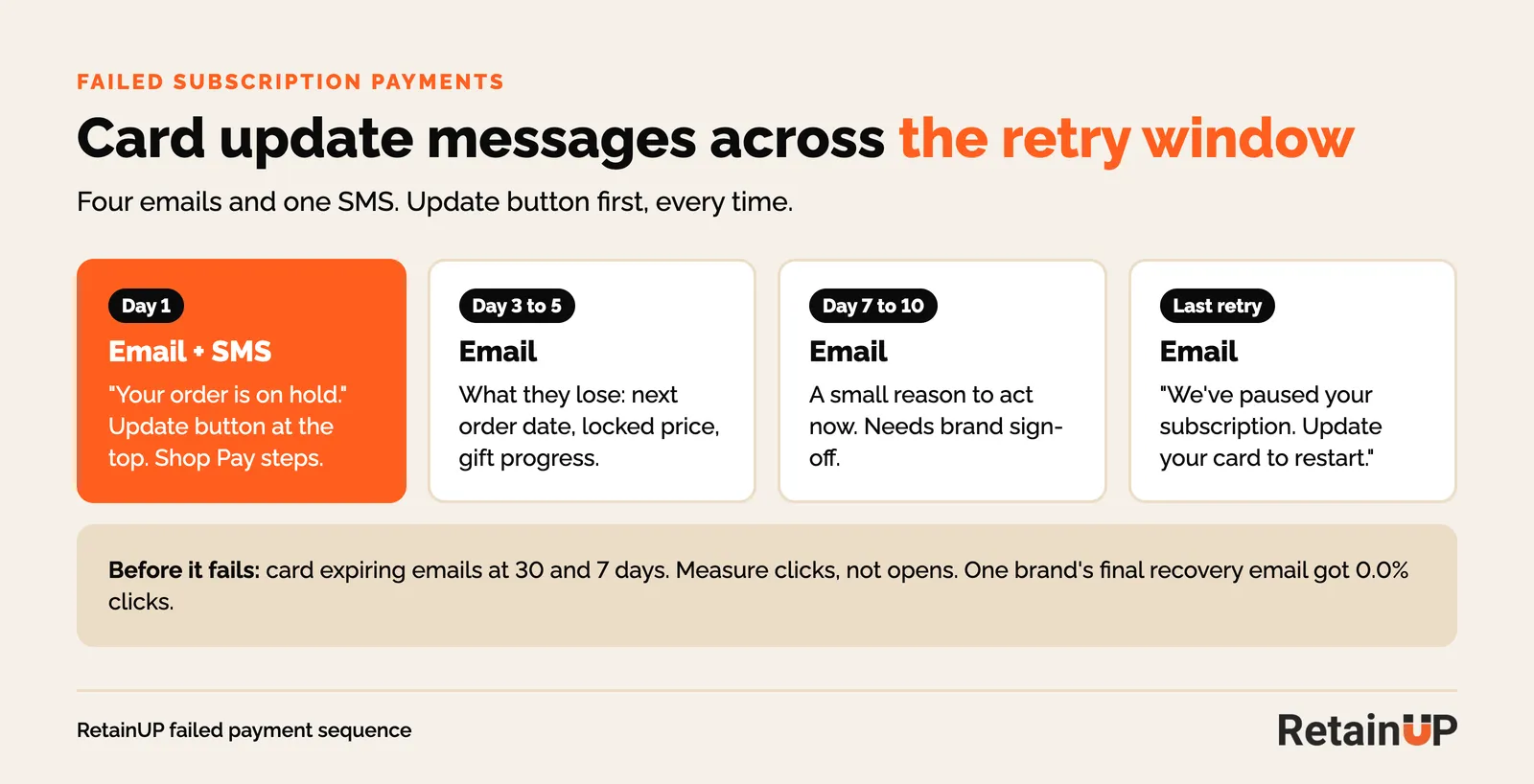
Send four emails and one SMS across the retry window, with the update button at the top of every one. Lead with the path to stay, never with cancellation. Split the copy by bucket when your app passes the failure reason to Klaviyo.
| When | Channel | Message |
|---|---|---|
| Day 1 | Email and SMS | "Your order is on hold." Update card button at the top. One line. For Shop Pay, the five shop.app steps |
| Day 3 to 5 | What they lose: next order date, locked price, progress to the next gift | |
| Day 7 to 10 | A small reason to act now, such as money off the next order for updating in 48 hours. Needs brand sign-off | |
| Last retry | "We've paused your subscription. Update your card to restart." | |
| Before it fails | Card expiring at 30 and 7 days, with the update link. Loop sends one at 30, 15 and 3 days. Check it is on |
Keep the copy short. A heading, one line, a button. The button should open the payment page already logged in. A login wall loses most people.
Measure clicks, not opens. At the bigger Loop brand, the Klaviyo failed payment flow reached 748 to 1,806 people a month and got clicks from 0.5% to 1.6%. The final recovery email got 0.0%. Those emails had broken or buried links.
Getting the card update right is worth the effort. 50 of 1,175 dunned subscriptions at that brand updated a card inside 30 days, 4.3%. They recovered 62.0% of the time. Everyone else recovered 25.8%.
How to measure failed payment recovery
Count orders, not attempts. Your dunning rate is orders that failed on the first attempt over orders due. Recovery is orders that later succeeded over orders that failed, monthly.
Don't quote the app's blended success rate. On one day, Loop's transaction summary showed 247 orders at 37.7% success, because every retry sat in the count. The same day held 106 first attempts at 85.9%. Loop's own first-cycle recovery figure also counts a skipped order as resolved. At the smaller brand it read 41.2% by revenue, against 17.3% by order on the log.
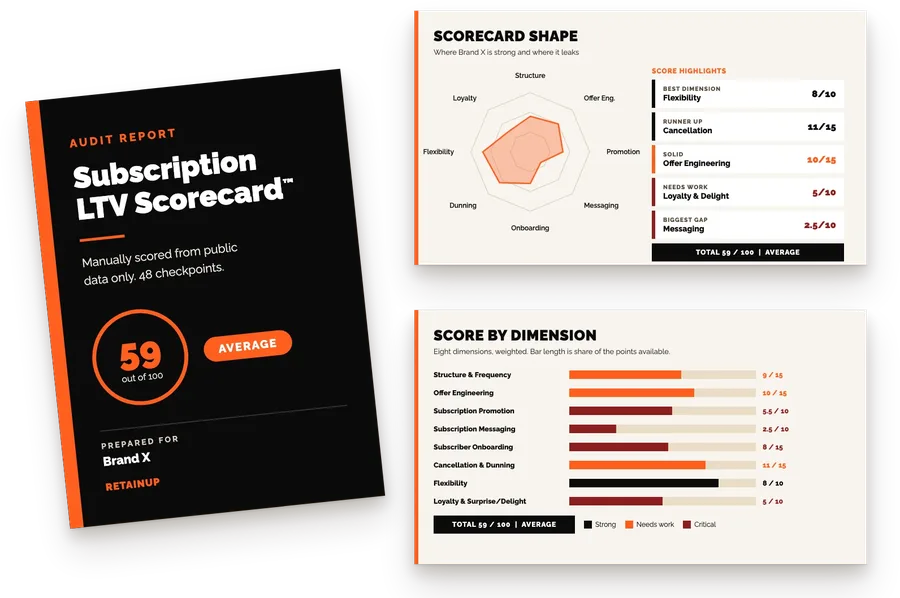
This is the passive half of active vs passive churn, and the part most brands never split out. If you want your own numbers read, the free subscription audit scores dunning and card update coverage among its 48 checkpoints. Then compare where failures land against your cancellation days. Failed payments that resolve near the charge date can look like cancels.
FAQ
Why can't my customers update their card in Shop Pay for their subscription?
Changing the default card in the Shop Pay wallet doesn't change existing subscriptions. Each subscription is updated on its own in the Shop account, in a browser. Send them Shopify's update link from the admin, which expires after 48 hours.
What does "payment method revoked" mean on a Shopify subscription?
Shopify has withdrawn the saved payment method, often because the customer removed it from Shop Pay. There is nothing left to retry. The customer needs to add a new method, and if the subscription was cancelled, they usually need to check out again.
How many times should I retry a failed subscription payment?
For bank declines, about six times over 14 days, front-loaded: day 1, 3, 5, 7, 10 and 14. In our audit data, attempts past nine brought back almost nothing. For expired, invalid or revoked cards, don't retry. Send the update link.
Should a subscription cancel after the last failed payment?
No. Pause it and send the card update email. A cancelled Shop Pay subscription can't take a new card, and a skipped order fails again next cycle.
What's a good failed payment recovery rate?
Measure it by order. The two Loop brands in this post recovered 21.4% and 17.3% of failed orders before changes. Stripe and Recurly publish higher figures across all subscription businesses, so compare against your own month-on-month trend first.
Do I need a dunning tool like Churn Buster?
Start with your app's own settings, the reason split and the card update emails. Most of the gaps we find are settings and broken emails, not missing tools. A dedicated tool is worth testing once you have a few thousand active subscribers.
One email a week on subscription retention: the numbers, the strategy, and what to fix first.

Rahi Jain
Rahi Jain is a subscription LTV specialist who helps DTC brands maximize their LTV from subscriptions.
More about Rahi