Key takeaways
- A Recharge cancel flow can say Active and deliver zero experiences in 30 days. We found one in November 2026.
- Recharge sends Order upcoming to Klaviyo 3 days before a charge by default. We move the reminder to 5 to 7 days out.
- On a $5M brand running Recharge and Klaviyo, RetainUP cut monthly churn from 22% to 9% in 30 days.
Most Recharge stores I open still run the settings they launched with. Cancel flow on the default reasons. One failed payment email. A billing notice that reads like a receipt. And a Klaviyo account full of Recharge events with no flow on them.
Nothing looks broken. But the defaults were built to run billing, and billing is not retention. This page is the Recharge part of our subscription apps guide: the settings we change after install, in the order we change them, and how to check each one still works a month later. We have worked with 80+ subscription brands on Recharge, Skio, Stay AI and Loop. Recharge is the one we see most.
How Recharge handles retention tools, and where it stops
On its own, Recharge gives you Cancellation Prevention, Failed Payment Recovery, a customer portal with skip, swap and reschedule, Win Back, and a Klaviyo integration that sends nearly every subscription event. Win Back comes with reactivation pages that need no password. Most brands use a fraction of it.
The gaps are in how each one is set up. Recharge gives you the tools. It does not decide how any of them should work for your product. Billing works on day one. Retention takes someone sitting with your cohorts, your cancel reasons and your failed charges, and making calls the app can't make for you.
Pricing decides part of the build. On Recharge's pricing page, checked 8 November 2026, Starter is $149 a month plus 1.50% and 20 cents a transaction. Scale, the plan that used to be called Plus, is $499 a month plus 1.25% and 20 cents. Both get Smart Cancellation Prevention, Failed Payment Recovery, Win Back and automated workflows. Bundles, gifting and journey A/B tests are Scale only. At a $50 order, Starter stays the cheaper plan below about $1.7M a year.
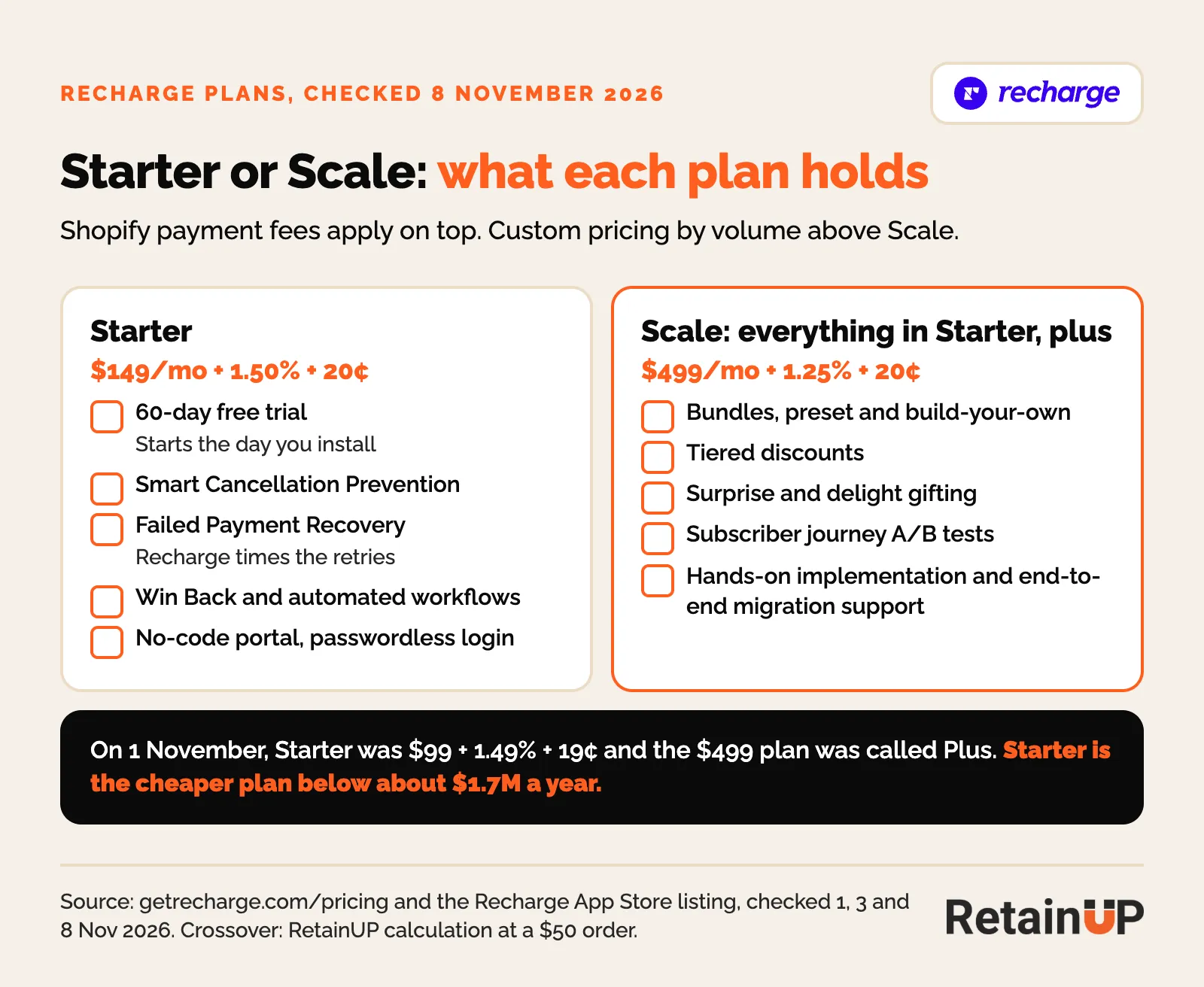
So a Starter brand that wants an order 3 gift builds it in Klaviyo and Shopify instead. That is fine. It just has to be planned, not discovered in week three.
Three settings to fix in the first week
Recharge's own onboarding checklist gets you live: payment processor, install, products and rules, theme and widget, shipping, tax, inventory, portal, staff, legal, notifications, discounts, a test order, then launch. It stops there. None of it decides who stays past order 2.
A few settings take minutes now and a rebuild later. Do these before the first subscriber renews.
- Install close to launch. The 60-day Starter trial starts the day you install the app, not the day you launch.
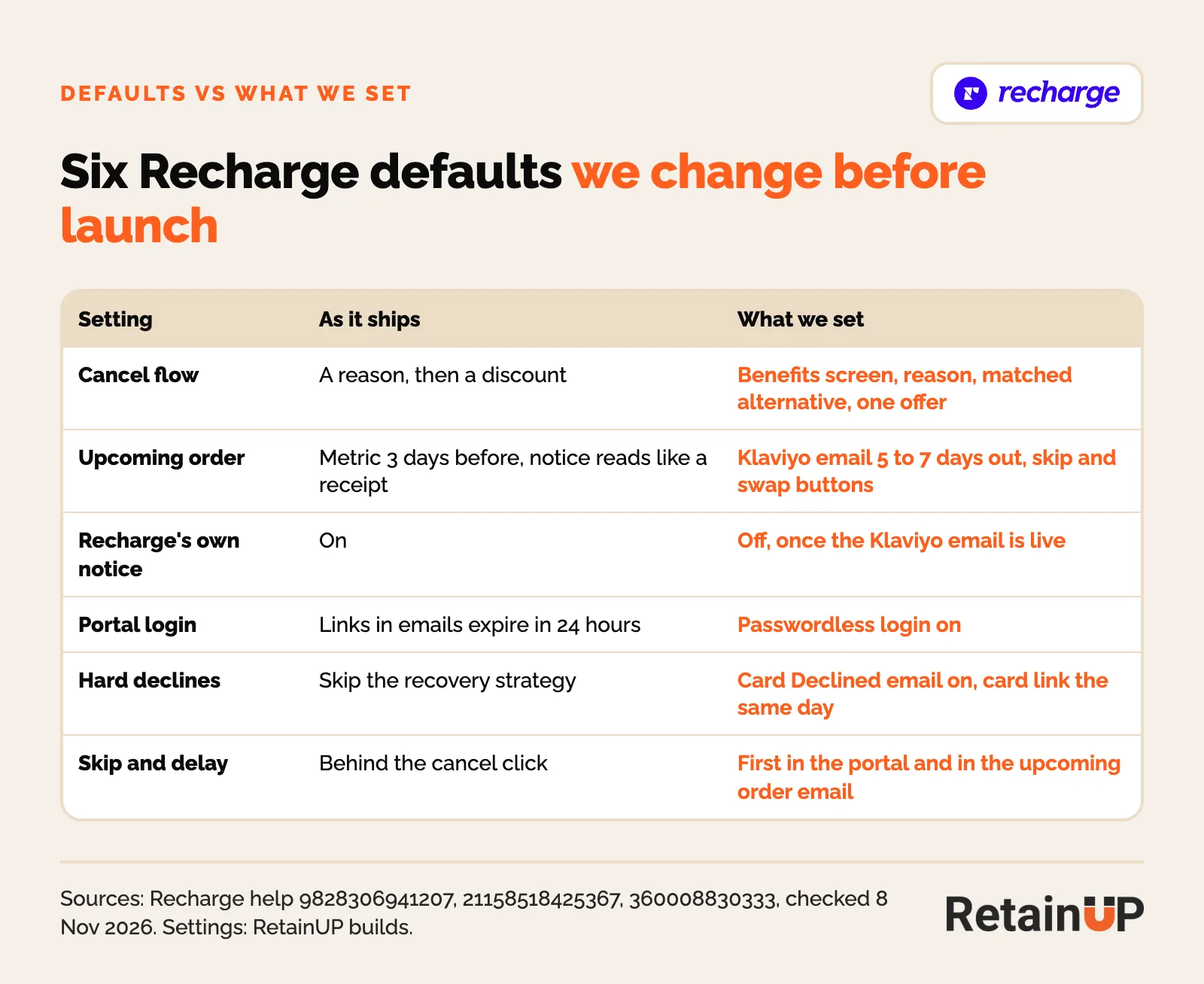
- Passwordless login on. Portal links Recharge sends to Klaviyo skip the login for 24 hours. After that they fall back to passwordless login, or to a password if it is off. Leave it off and the skip button ends at a password screen.
- Order merging on. Out of the box Recharge makes one subscription per product. So two products a few days apart bill and ship as two orders. We set about 7 days. One box, one charge, one decision.
Then place a test order. A Recharge metric only shows up as a flow trigger in Klaviyo once it has fired, per Recharge's help center. So check each one is there before you build a flow on it. Starting from scratch? The order of work is in the subscription launch checklist.
Cancellation Prevention: build it, then check it is firing
Recharge's cancel flow is called Cancellation Prevention. It lives under Churn tools. Stores set up after 23 October 2023 only get this builder. On older stores, turning it on removes the old cancellation and retention settings. Recharge's help center says you cannot go back.
How we build it
The default template suggests a discount on most reasons. We rebuild it:
- A Deflection Page node before the survey, with one offer, skip or delay. It catches people who would leave before picking a reason.
- Reasons answered with time and product first. Too much product gets skip or delay. Didn't like it gets a swap. Price gets value, then a small discount last.
- A Conditional Branch on number of subscription orders processed, so a first-order cancel sees its own screens.
- Gaming prevention left on. The 365-day default on money offers is fine.
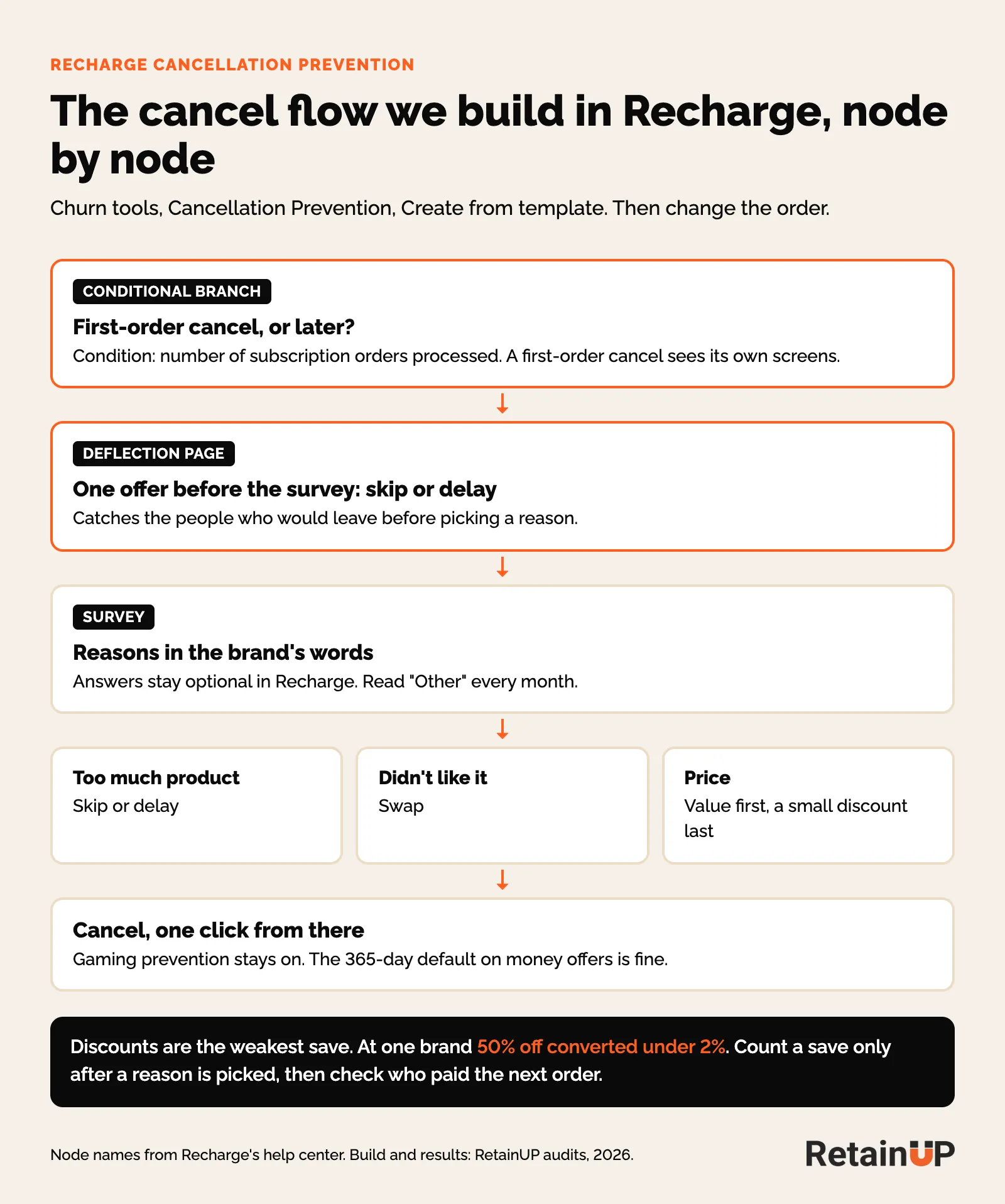
Discounts are the weakest save. At one brand 50% off converted under 2%. Recharge also lets you put a video in the flow without code. One limit to plan around: survey answers in Recharge stay optional, so you can't force a written answer on "Other". Read the custom answers that do come in each month and turn the common ones into reasons. The full structure is in the subscription cancel flow. The treatment for each reason is in cancel reasons.
The video below builds the day zero branch, step by step.

Check Experiences delivered every month
Go to Churn tools, then Cancellation Prevention, and read Experiences delivered for the last 30 days. Zero next to hundreds of cancels means cancels bypass the flow or it stopped firing, whatever the status says.
In November 2026 we found a Recharge flow marked Active. Thousands of runs over its lifetime. Zero delivered in the last 30 days. Nobody had noticed. Not the brand, not Recharge. Admin and helpdesk cancels never touch the flow either. That is why cancel flow coverage gets checked before any copy or offer change.
And read Recharge's own save rate with care. It counts a closed tab, or Keep subscription with no reason picked, as a save. We report saves only after a reason is picked, and then check who paid the next order.
The upcoming charge email: earlier, and one sender
By default Recharge sends the Order upcoming metric to Klaviyo 3 days before the charge. Its own notice goes out between 7 and 11 PM ET. You set the days under Email, Upcoming order email, Settings. On newer accounts it runs from Churn tools, Upcoming Order Email flows, and nothing sends unless a flow there is Active. That email gets opened more than anything else you send in month one. Most brands use it to say a card is about to be charged.
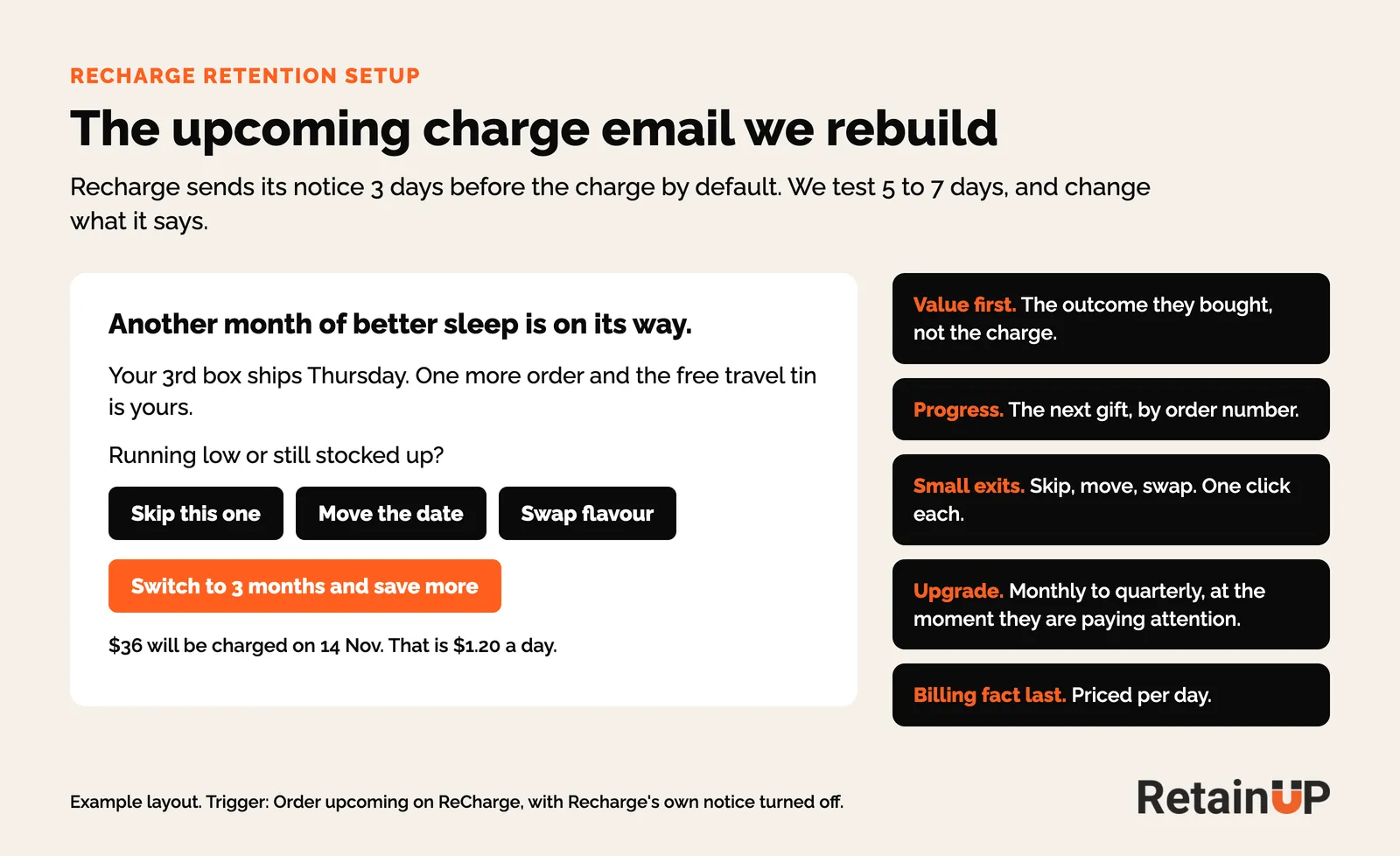
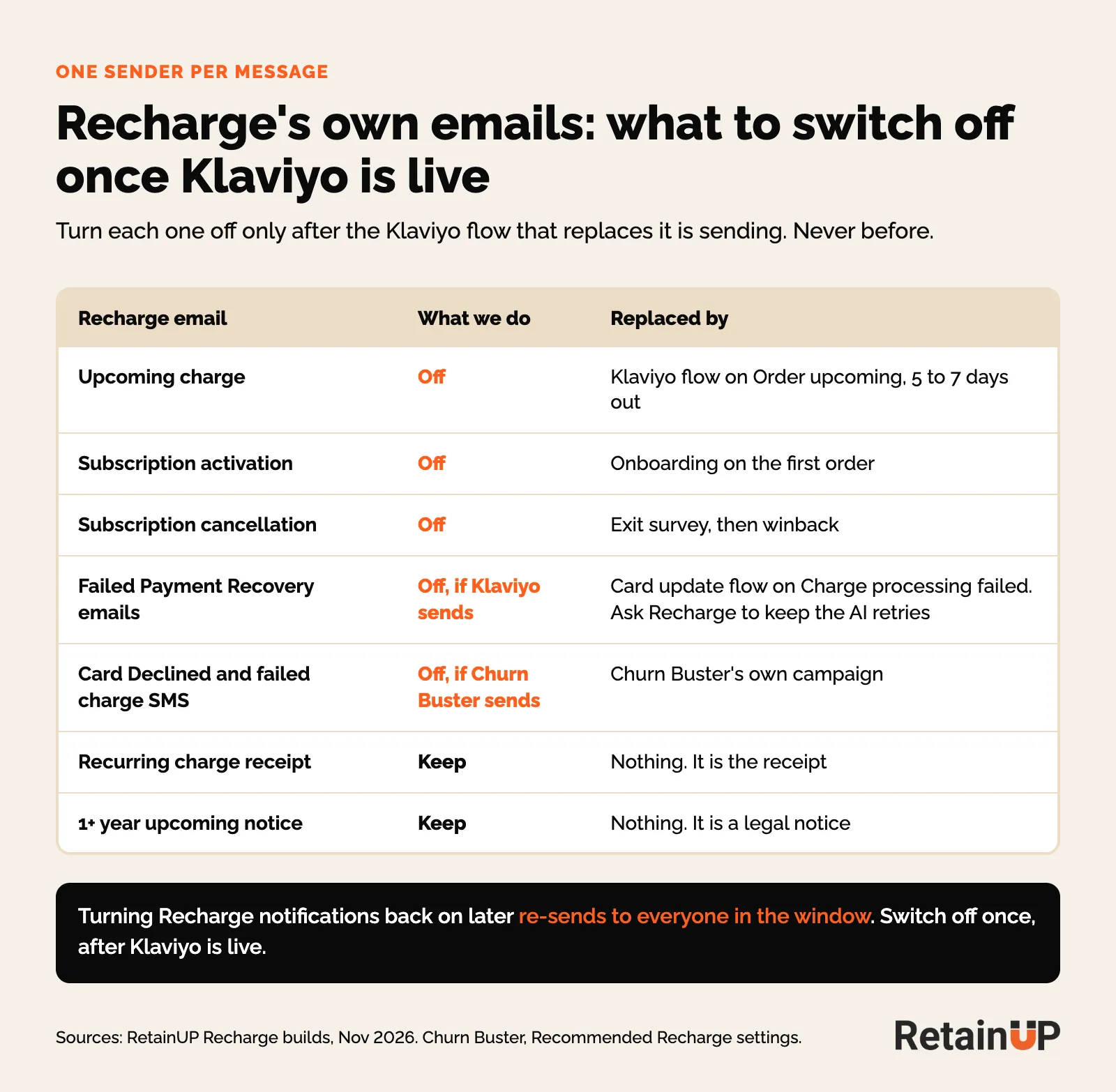
So we build the Klaviyo version on Order upcoming on ReCharge, with versions for order 2, order 3 and later, and test 5 to 7 days out. The skip and swap buttons use Recharge Quick Actions links (Tools & apps, Quick actions), built on the store's own domain. Then deactivate Recharge's notice, only once Klaviyo is live, so nobody gets two. Turning Recharge notifications back on later re-sends to everyone in the window.
The reminder is where people decide. Treat it that way. At one brand, 45.6% of skips landed the day the reminder went. What goes in it is in the upcoming billing reminder.
Skip, swap and pause in the portal
Swap is off by default. Turn it on beside skip, and limit frequency to the plans you sell. Recharge says subscribers who manage their own plan have up to 32% higher LTV. It doesn't say how it measured that. At one brand 74.4% of swappers paid again, against 38.6% after a skip. Pause we leave off. It is a slow cancel. At two brands only 14% of pausers came back. The order we offer each option is in the flexibility ladder.
Failed Payment Recovery: what to set and what to leave
Failed Payment Recovery sits under Churn tools. Recharge's AI strategy picks the retry timing and keeps trying for up to 120 days. Those are locked. Good. For the cards that still work, we leave Recharge to it. Smart retries beat a schedule you guess.
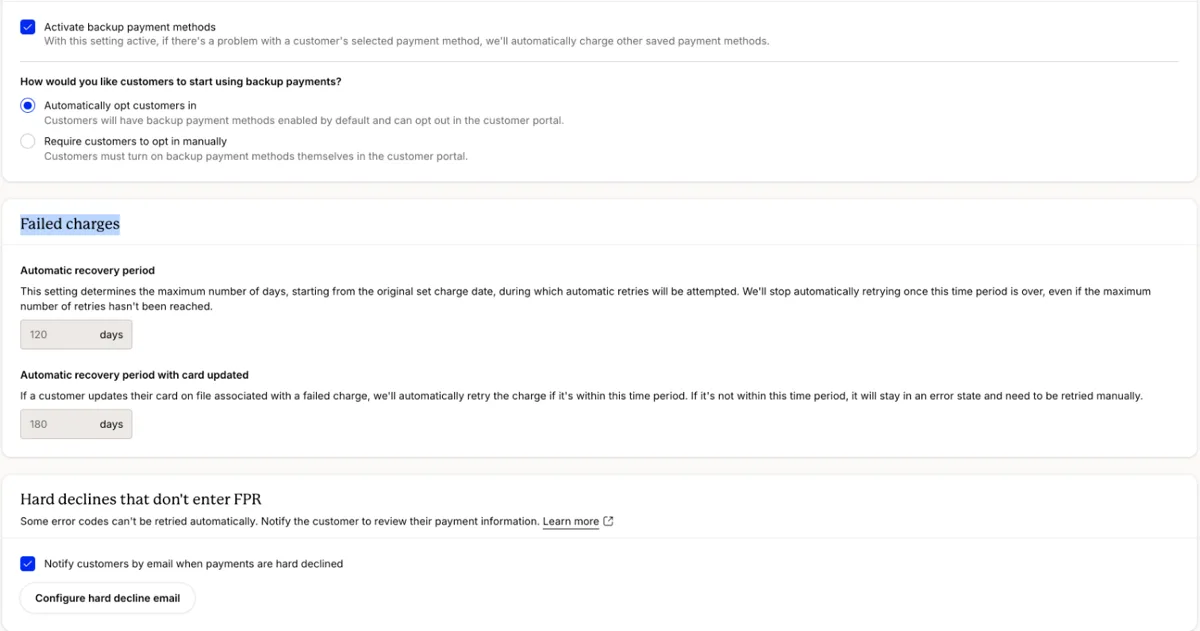
What we do set, in Settings:
- Backup payment methods on, with customers opted in automatically. If the main card fails, Recharge charges another card on file.
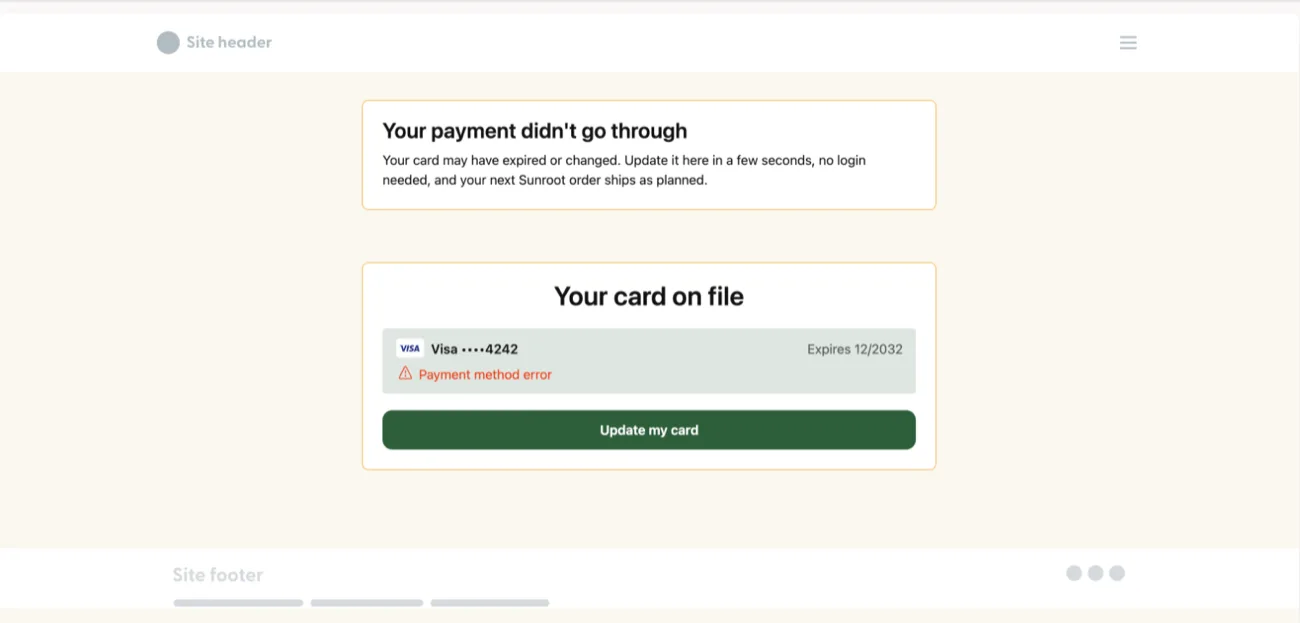
- The hard decline email on. Hard declines skip the strategy and get no email unless you turn it on, so point its button at the payment methods landing page, where the customer fixes the card without logging in.
- One sender. The AI strategy sends its own five emails. We run ours in Klaviyo on Charge processing failed on ReCharge. So check with Recharge how to keep the AI retries and switch its emails off. That metric fires on every retry, so trigger on the first attempt only.
- Or Churn Buster. If it sends your dunning, Churn Buster's setup guide has you turn off Recharge's Card Declined email and failed charge SMS. The rest is in Churn Buster for subscription brands.
Four rules from Recharge's help center to know before day one. Turn off any other dunning tool first, because once active Recharge takes over every charge already in a retry cycle. You cannot edit a strategy after you activate it, even if you turn it off. So write and preview every notice first. The notices count as transactional. No marketing content. And when every retry fails, Recharge cancels the subscription, with the reason "Failed Payment flow max retries".
So the card update has to land before the last retry. A login link kills it. At one brand the failed payment email asked people to log in, and it got zero clicks. The emails and timing are in the card update flow. Why dead cards and bank declines need opposite handling is in failed payment recovery.

The Recharge Klaviyo integration: winback and the other events
Recharge has Win Back on both plans, and it sends Subscription cancelled on ReCharge to Klaviyo. We run winback from Klaviyo. One sender. Most brands have flows on two metrics. Started and cancelled. That's it. The rest fire into nothing.
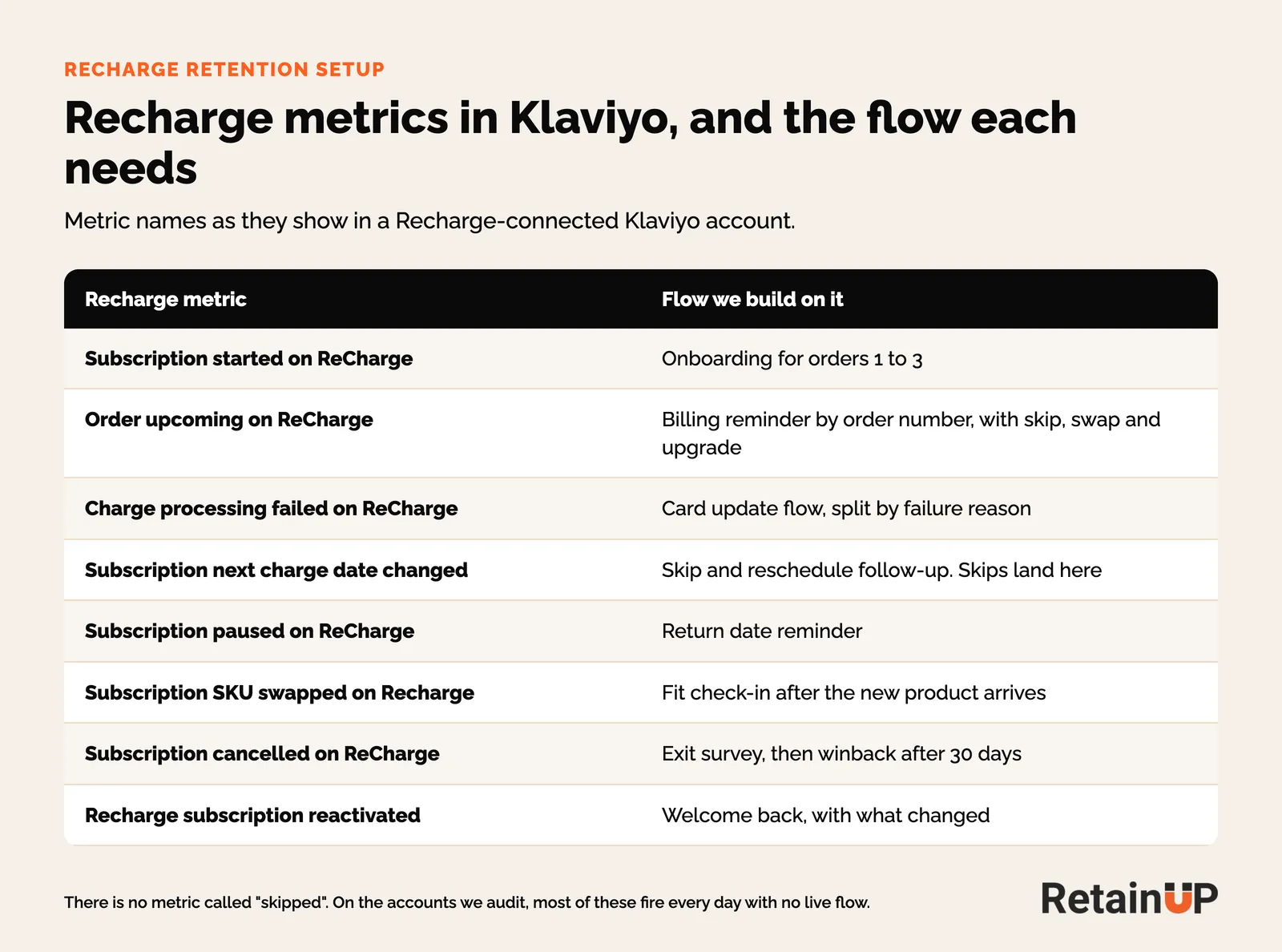
- Subscription cancelled runs the exit survey, then winback.
- Anyone cancelled by a failed card goes into a winback flow of their own. They never chose to leave.
- Recharge subscription reactivated gets a welcome back, with what changed.
Subscription started fires once per line, so a box with five products fires five times. Don't hang an order-level flow on it. And there is no metric called skipped. A skip arrives as Subscription next charge date changed, the same metric as a reschedule. So filter by how far the date moved. Search both spellings. Recharge writes "ReCharge" in some metric names and "Recharge" in others. The same events on the other apps are in subscription app events in Klaviyo. Offers and timing are in subscription winback.
Recharge benchmarks and the lifetime revenue dashboard
Two Recharge screens are worth a screenshot every quarter. The Benchmarks page, under Home, shows your take rate and active churn percentile against your vertical, and the Lifetime revenue dashboard, under Analytics, Dashboards, puts subscriber and non-subscriber value and orders side by side.
Read them. Don't report them.
- Recharge's lifecycle "subscriber" means subscribed at any point. A one-time buyer who subscribes on order 4 sits in the subscriber line with all four orders. At one brand nearly every lifecycle subscriber reached a second order. Its subscriber retention report said 80%.
- One dashboard implied 1.5x subscriber LTV where the cohort showed 1.10x. Under a few hundred subscribers, it is direction only.
For the market, Recharge's 2026 Trend Report says subscribers place 59% more orders than one-time buyers, and wellness churns 8.8% a month, the highest of any category and still rising. Its supplement data, from about 1,750 brands, has 75.2% of subscribers placing a second order and 49.1% a third. Every other number we compare against is on subscription benchmarks. The clean way to count value is in the 12-month LTV formula.
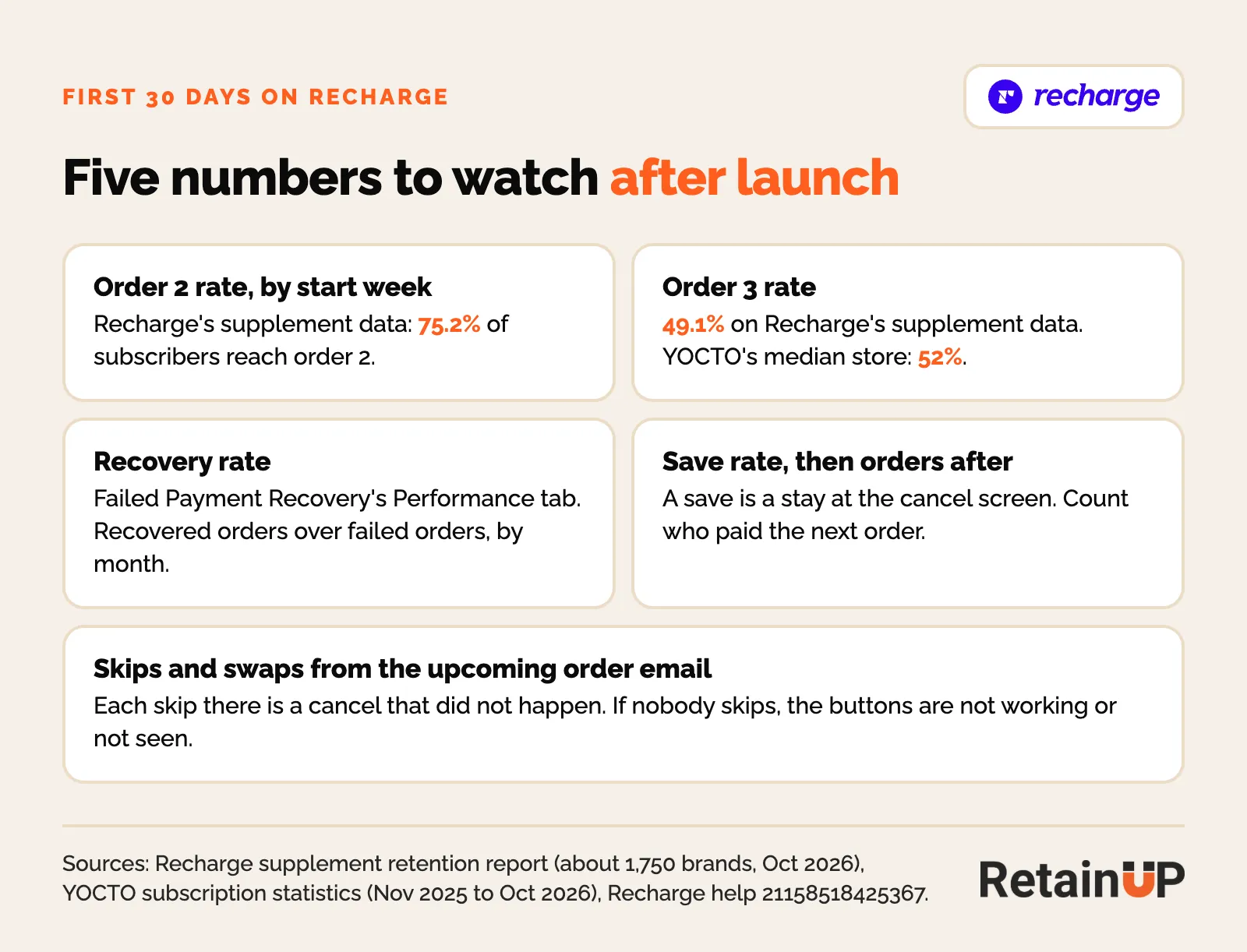
In the first 30 days, watch four things. Order 2, by start week. Recovery rate, on the Performance tab of Failed Payment Recovery. Save rate, with orders after the save. And skips from the reminder. Each one is a cancel that did not happen.
What we leave on default
- Allow cancellation after X charges: leave no restrictions. A minimum is unlawful in California and feeds the fear of being stuck.
- One-click cancellation regions: leave Recharge's legal defaults.
- Existing subscriber prices: by default they keep the old price when you change it in Shopify. Leave it.
- Widget styling: minutes, not hours.
The tool is rarely the problem. The defaults are.
Want these settings built for you? The Subscription LTV Maximizer™ sets up the offer, widget, cancel flow, portal, payment recovery, pause and skip inside Recharge, plus the Klaviyo email and SMS, live in 30 days for $5,000. To see where your store leaks first, the free subscription audit checks 48 points and gives your top 3 leaks in 24 hours.
FAQ
How does Recharge handle retention tools?
Recharge handles retention with five tools: Cancellation Prevention, Failed Payment Recovery, Win Back, a customer portal and a Klaviyo integration. Starter has the first three. Bundles, gifting and journey A/B tests need Scale. The tools work. The defaults lead with a discount, send one billing notice three days out and leave most Klaviyo events with no flow on them.
How do I know if my Recharge cancel flow is working?
Check Experiences delivered for the last 30 days under Churn tools, Cancellation Prevention. If it reads zero while you had cancels, the flow is not firing, whatever its status says. Then compare cancels through the flow against all cancels, because admin and helpdesk cancels never reach it, and do this every month, since a flow can stop after an app change without anyone noticing.
When does Recharge send the upcoming charge email?
Recharge sends the Order upcoming metric to Klaviyo 3 days before the charge by default, and you can change the days in the Upcoming order email settings. We move it to 5 to 7 days and build the email in Klaviyo with skip and swap buttons. Then turn Recharge's own notice off once the Klaviyo version is live, so nobody gets two.
Can I change Recharge's failed payment retry schedule?
Usually not. Recharge's AI strategy picks the retry timing and keeps trying for up to 120 days. Under that strategy both are locked. What you control is backup payment methods, the hard decline email, the payment methods landing page and who sends the notices. You also cannot edit a strategy after you activate it, so write every notice first.
Is the Recharge lifetime revenue dashboard accurate?
It is a fair direction check, but its subscriber line counts anyone who subscribed at any point, with all their orders. That flatters subscriber value. Read it next to a cohort table by order number before you quote a multiple. Under a few hundred subscribers, treat it as direction only.
One email a week on subscription retention: the numbers, the strategy, and what to fix first.

Rahi Jain
Rahi Jain is a subscription LTV specialist who helps $1M to $10M DTC brands reduce subscription churn and maximize LTV on Recharge, Skio, Stay AI and Loop.
More about Rahi