Key takeaways
- At one subscription brand, 588 monthly subscribers cancelled on day 27, the day the reminder went out, against 160 the day before and 247 after.
- A subscription reminder email has three jobs: a reason to stay, value, and a cross-sell, with the amount and date at the bottom.
- Boka's reminder, with skip and swap options and four add-ons, cut churn 18% in 90 days and added $12 AOV per renewal cycle.
In a hurry? Watch the tutorial.

The subscription reminder email is the one your subscriber gets a few days before every charge. It is one of the most opened emails in your whole program. In month one it is usually the most opened.
It is also the most debated email in subscriptions. Most brands treat it like a legal obligation. Many don't even want to send it, because they feel it reminds people to cancel.
They are partly right. For a lot of brands, the day this email goes out is one of the biggest cancellation days of the month. I have rebuilt it across 30+ subscription programs, and the fix is the same every time: change what it says, and what it asks people to do.
This guide covers why the reminder causes cancellations, what goes in it, the skip and swap buttons, a different version for order 2, order 3 and order 6, the full build in Klaviyo, the events for Recharge, Skio, Loop and Stay AI, and how to measure it.
Why the subscription reminder email causes cancellations
The reminder causes cancellations because most versions read like a bill with a cancel button. You send it so nobody gets surprised, and it does that job. But it also moves a chunk of cancellations three days earlier.
Here is the data. These are monthly cancellations at one brand, by day since signup. On day 26, 160 cancellations. On day 27, 588. On day 28, back down to 247.
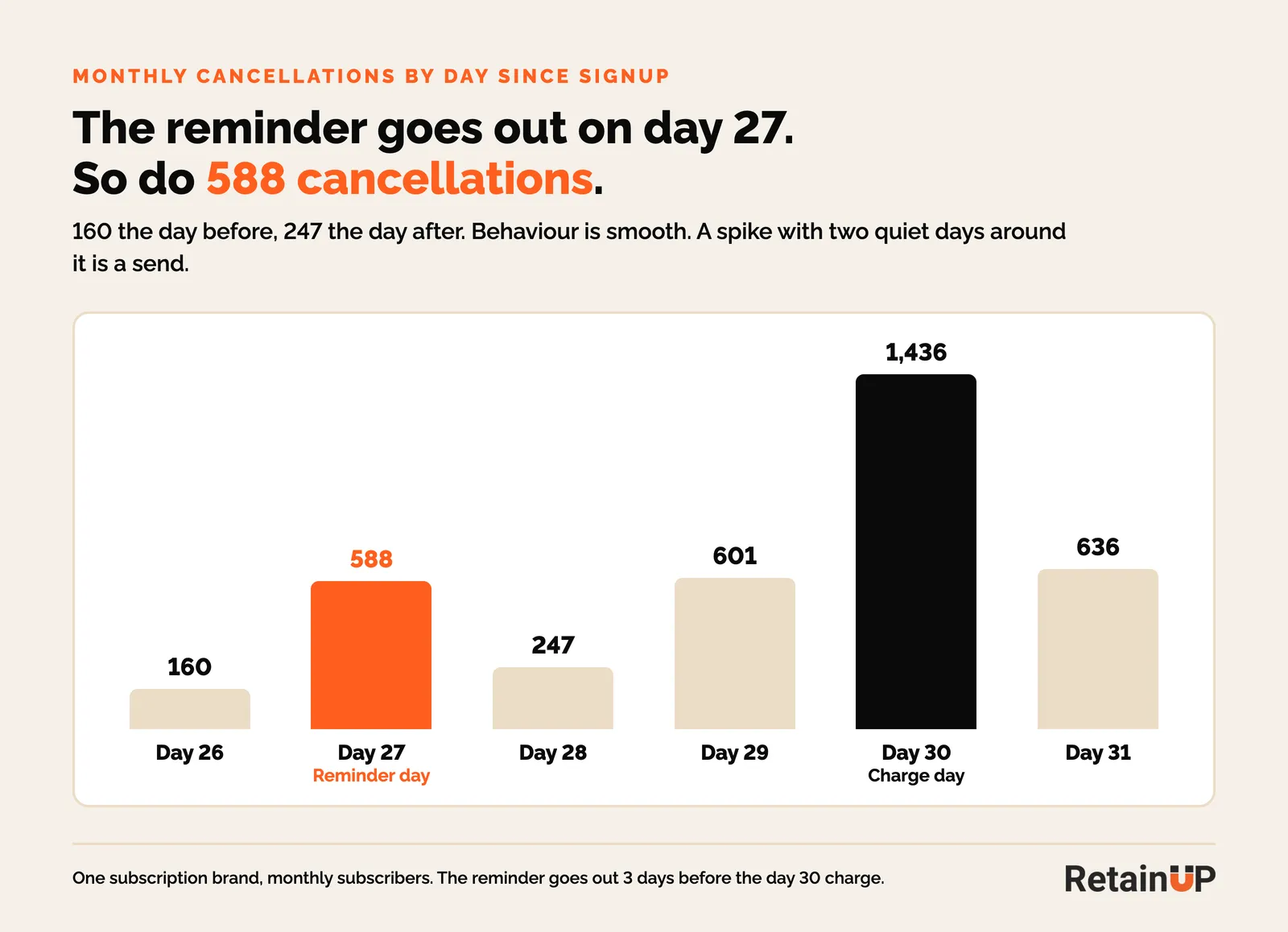
Behaviour doesn't do that. Behaviour is smooth. A spike with two quiet days around it is a send. And day 27 is exactly when this brand's reminder goes out, three days before the charge on day 30.
So the answer is not to delete it. Day 30 is still the biggest day, with 1,436 cancellations, and that is the day of surprise charges. I covered all three spikes in when subscribers cancel. You keep the email. You change what it says.
Find where your reminder comes from, and read it
Before you write anything, find out which tool sends the reminder. Most brands assume it is in Klaviyo. Very often it is sent by Recharge, Skio or Stay AI, and nobody has looked at it since the app was installed.
So go and read it, the way a subscriber would. Most of these emails open with a charge amount and a date. And the most obvious link on the page is cancel.
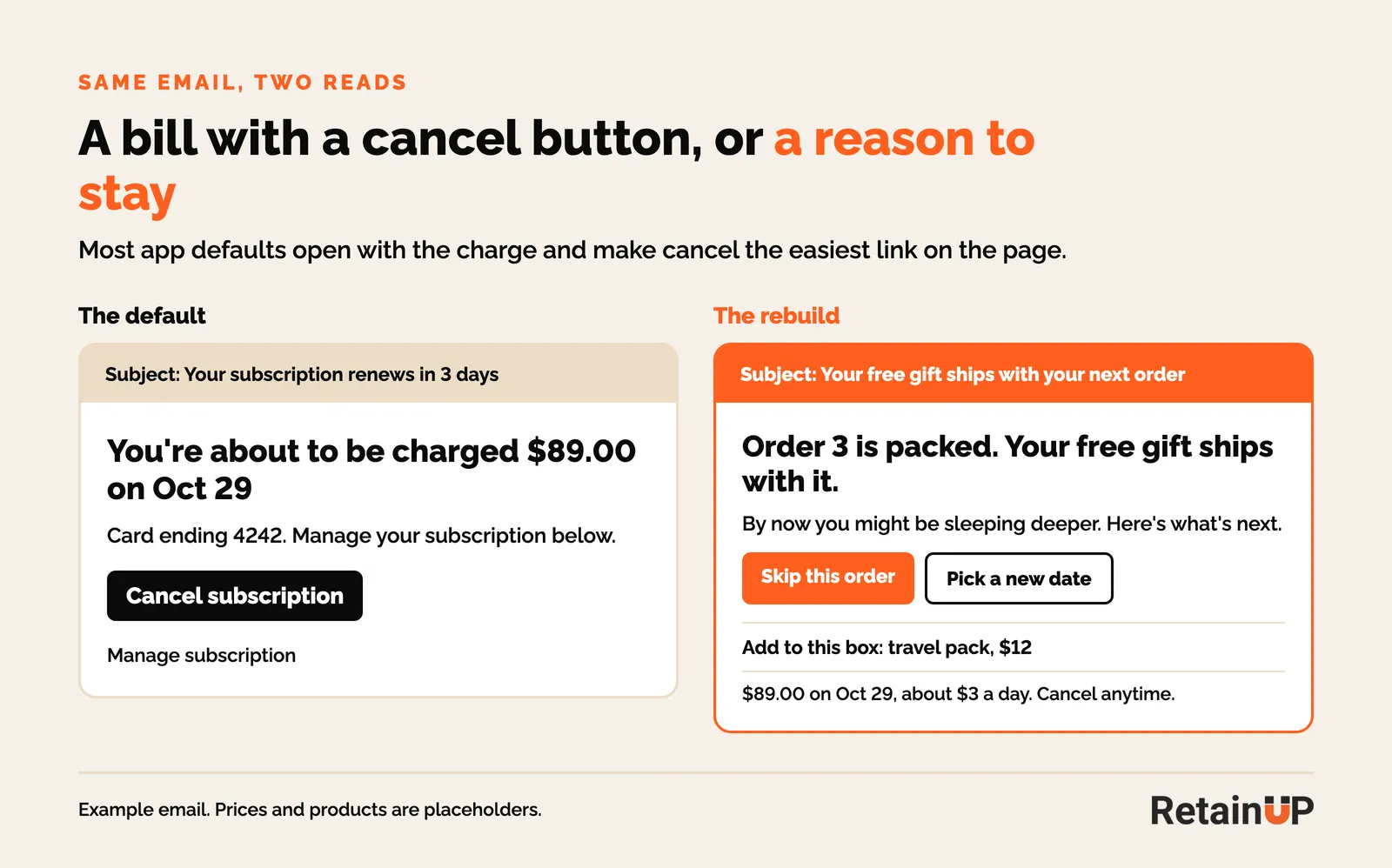
If you say "You're about to be charged", don't be surprised when people cancel. You have written a bill and attached a cancel button.
What to put in a subscription reminder email
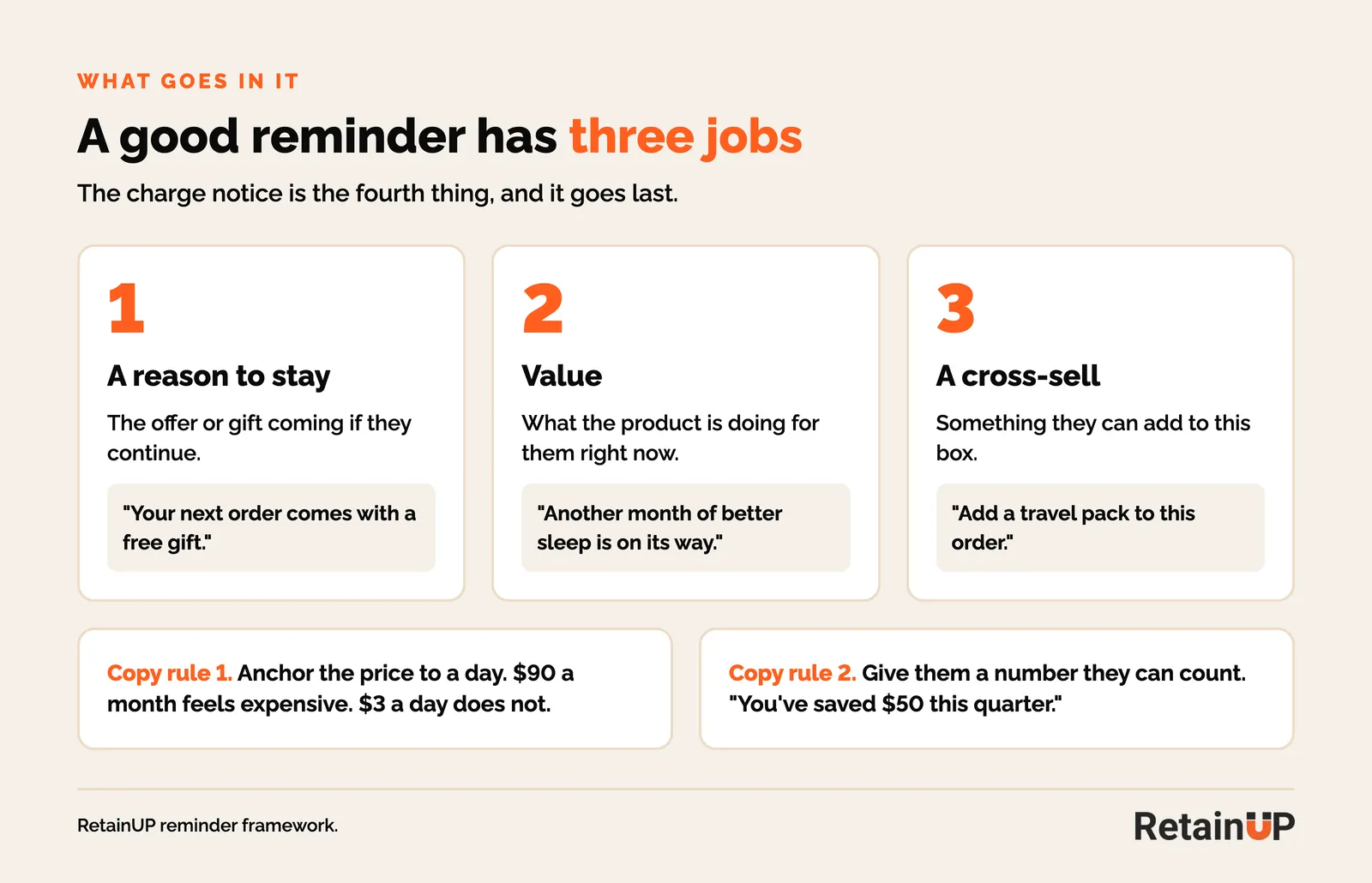
A good reminder has three jobs. A reason to stay, so the offer or gift coming if they continue. Value, so what the product is doing for them. And a cross-sell, so something they can add. The amount and the date go at the bottom.
Reframe the whole email
It works better when you reframe it. Instead of "Your order renews in 3 days", say "Your next freebie is on its way", or "Your order is ready, here's what's inside."
Tie it to the outcome they bought it for. "Another month of better sleep is on its way" lands very differently from a renewal notice.
Mars Men does this really well. Their subject line is "You're in your activation phase." The email reminds you what you might be noticing right now, like feeling stronger and recovering faster. It tells you when the effects build up. And at the bottom there is an option to move from monthly to a 90-day plan.
Two copy rules I use on every client
- Anchor the price to a day, not a month. $90 a month feels expensive. $3 a day does not.
- Give them a number they can count. "You've saved $50 this quarter with your subscription." How much they saved, how many orders they've had.
The billing fact, the amount and the date, goes at the bottom. That is where it belongs legally, and nowhere else.
Skip and swap links: make them the main buttons
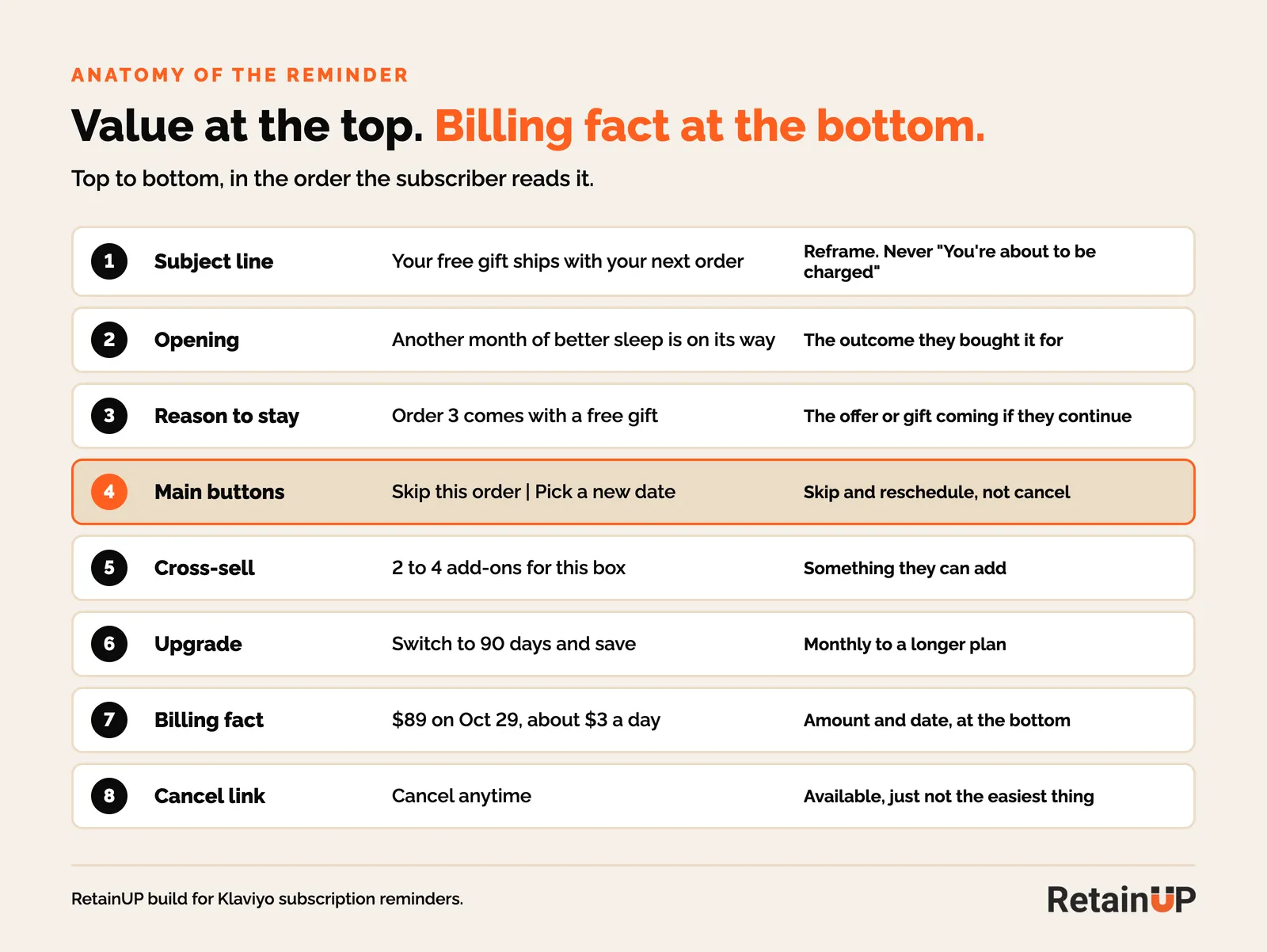
Skip and reschedule should be the main buttons on the page. Cancel stays available. Hiding it is unlawful in some places, and it doesn't work anyway. It just stops being the easiest thing on the page.
Every app gives you one-click links for this. Recharge has Quick Actions for Klaviyo emails. Loop has Quick Actions too, magic links that skip, delay or swap without a login. Skio has its own quick action links. A subscriber who only wants to push one box back should never have to log in, find the portal and walk past a cancel button. More on the order of these options in pause and skip.
Put the actions inside the email
If you can, put the actions inside the email itself, with a tool like Zaymo. The subscriber can skip, delay, add a product or upgrade without opening the portal.
The numbers here are strong. On its own site, Zaymo reports that a subscriber who delayed their upcoming order was 60% less likely to cancel, and 20% fewer cancellations with its portal block in the email. Zaymo figures in the Subscription Tech Playbook 2025 (Lunar Solar Group) go further: when subscribers delay by one to four weeks inside the email, about 80% renew again after the delay. And forms inside the email get twice the response of a link to a form.
What we built for Boka
For Boka, the reminder goes out three days before renewal with a simple "your subscription is due" line. Right under it sit the options to skip, pause or swap products. We didn't call them that. We called it "Need to make an adjustment?" Below that, four cross-sell blocks: mouthwash, tongue cleaner, toothpaste packs and bundles.
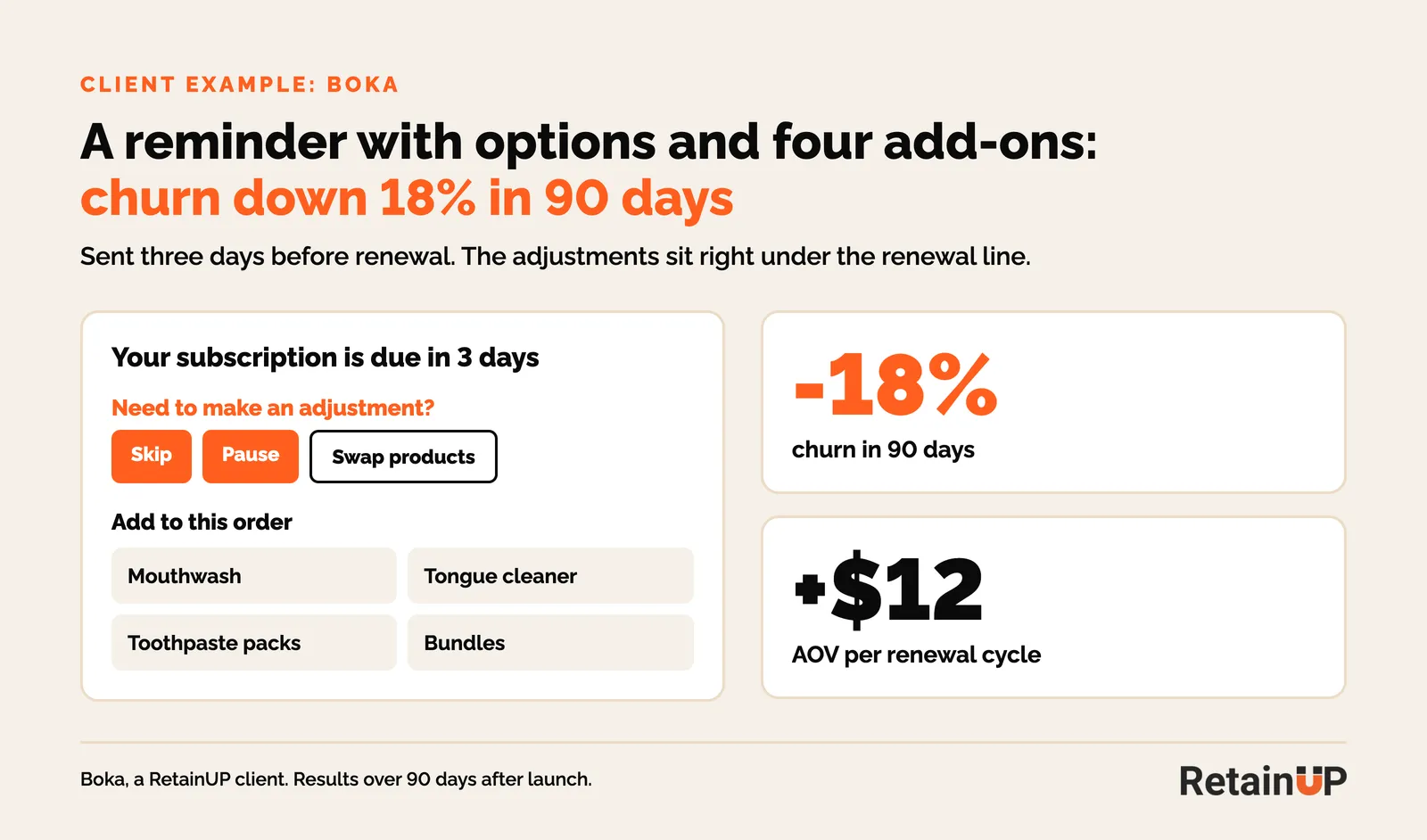
Churn went down 18% in 90 days, and AOV went up $12 per renewal cycle. Today I would leave pause out of the email. Skip and delay do the same job with less risk.
When to send the renewal reminder email
Send it 3 to 5 days before the charge, then test the lead time. Earlier than 7 days and it slips their mind. Under 48 hours and a reschedule can collide with the charge batch.
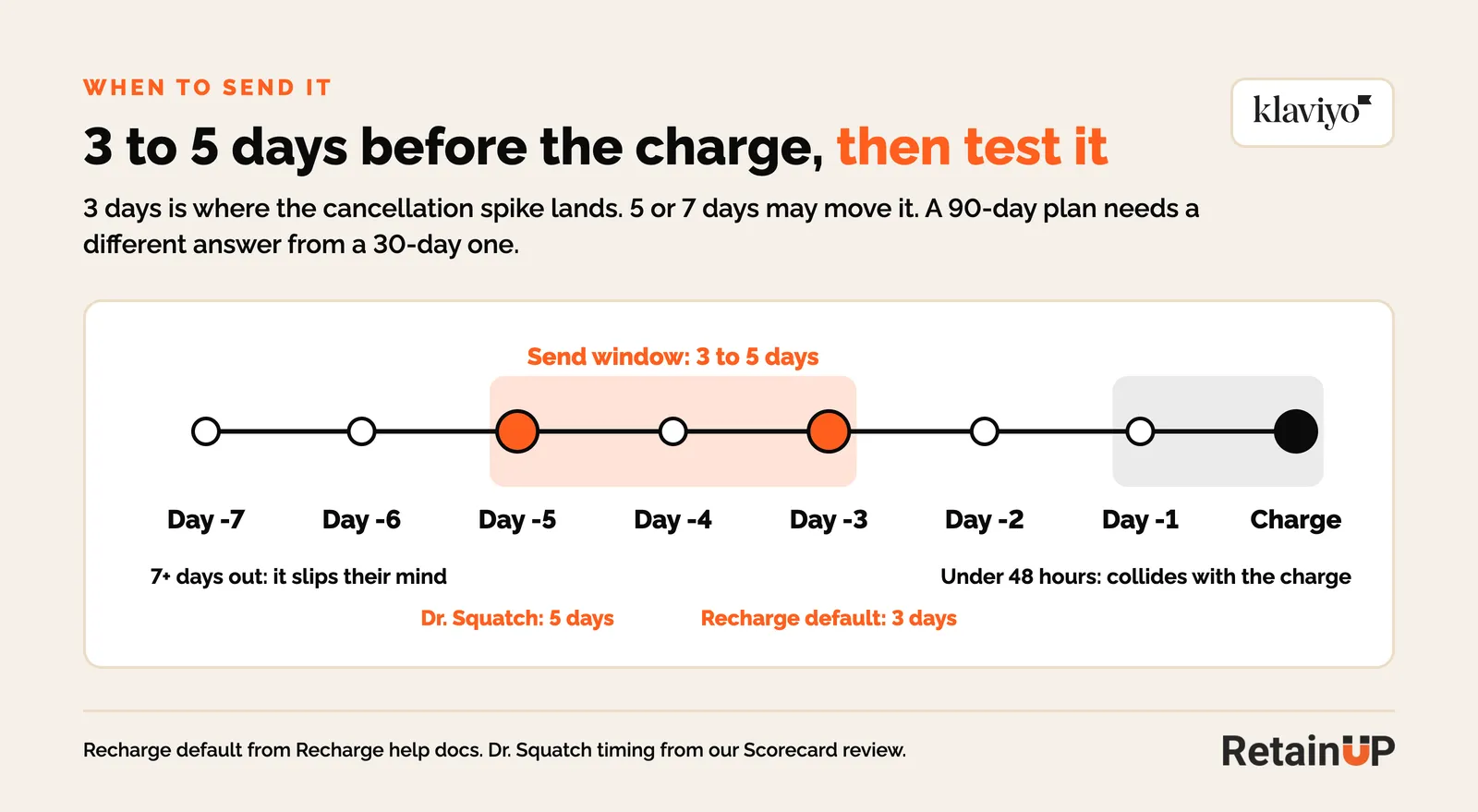
Recharge sends its upcoming charge event 3 days before by default, and you can change it in Recharge. Dr. Squatch sends its reminder 5 days before every charge. Three days is where the cancellation spike lands, so 5 or 7 days may move it. The answer for a 30-day plan will differ from a 90-day one, so test each cadence on its own.
A different reminder for order 2, order 3 and order 6
Write a different reminder for each stage, because order 2 is the most vulnerable point and by order 4 most people are settled in. Most brands send the same reminder before every order. Someone on their second order needs reassurance. Someone on their sixth needs a reward.
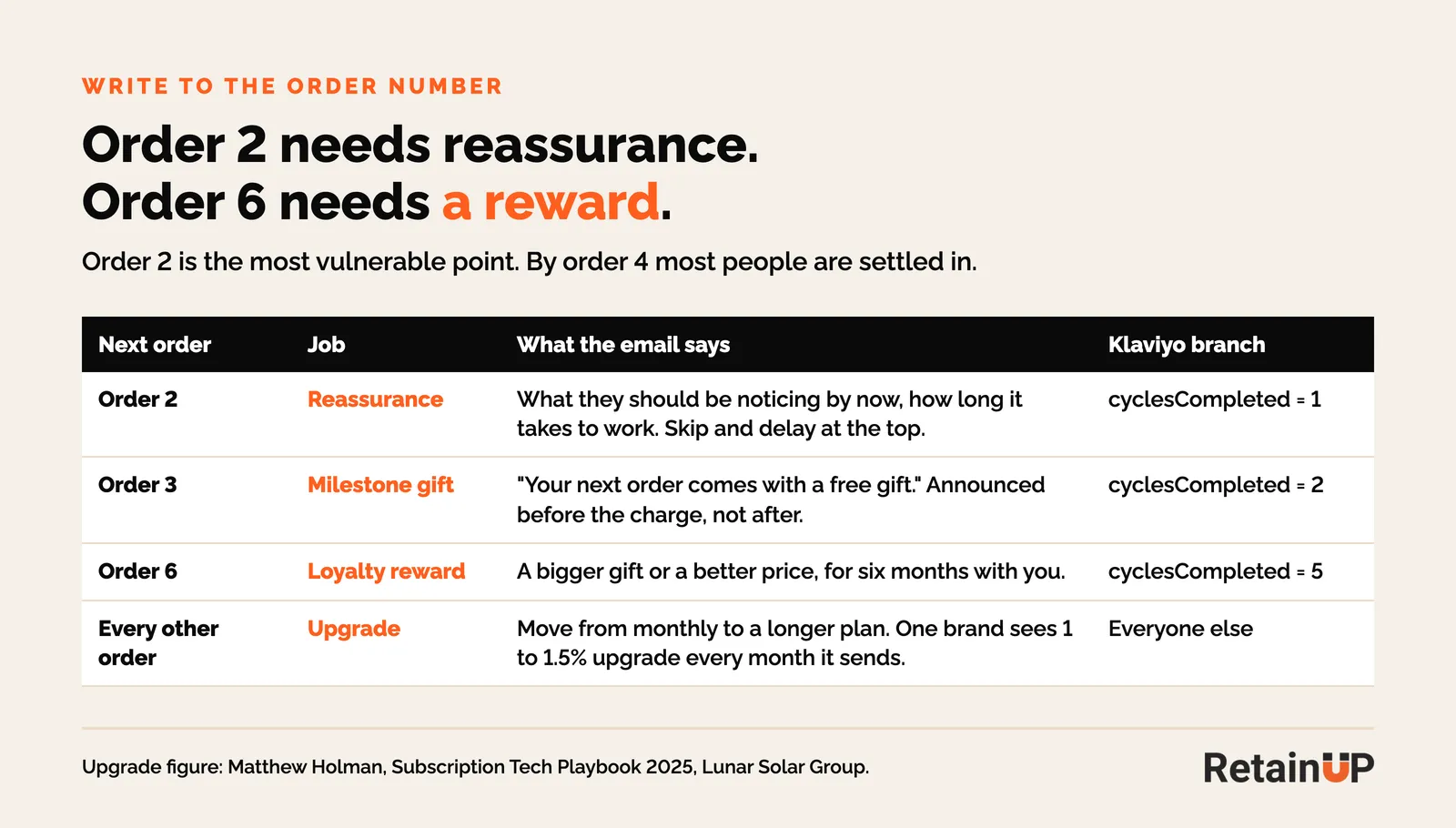
- Order 2: reassurance. What they should be noticing by now, how long it takes to work, and the skip and delay options right at the top.
- Order 3: the milestone gift. "Your next order comes with a free gift." So they have a reason to stay for order 3, and it is announced before the charge, not after.
- Order 6: the loyalty reward. A bigger gift, or a better price, for six months with you.
- Every other order: the upgrade. One recurring reminder with the move to a longer plan. One brand offers every monthly subscriber a quarterly upgrade in this email, and 1 to 1.5% upgrade every month it sends (Matthew Holman, Subscription Tech Playbook 2025).
The gift in the order 3 email is the same one in the gifting and milestone automations. Promote it in the reminder before that order, then confirm it after the renewal.
How to build the subscription reminder flow in Klaviyo
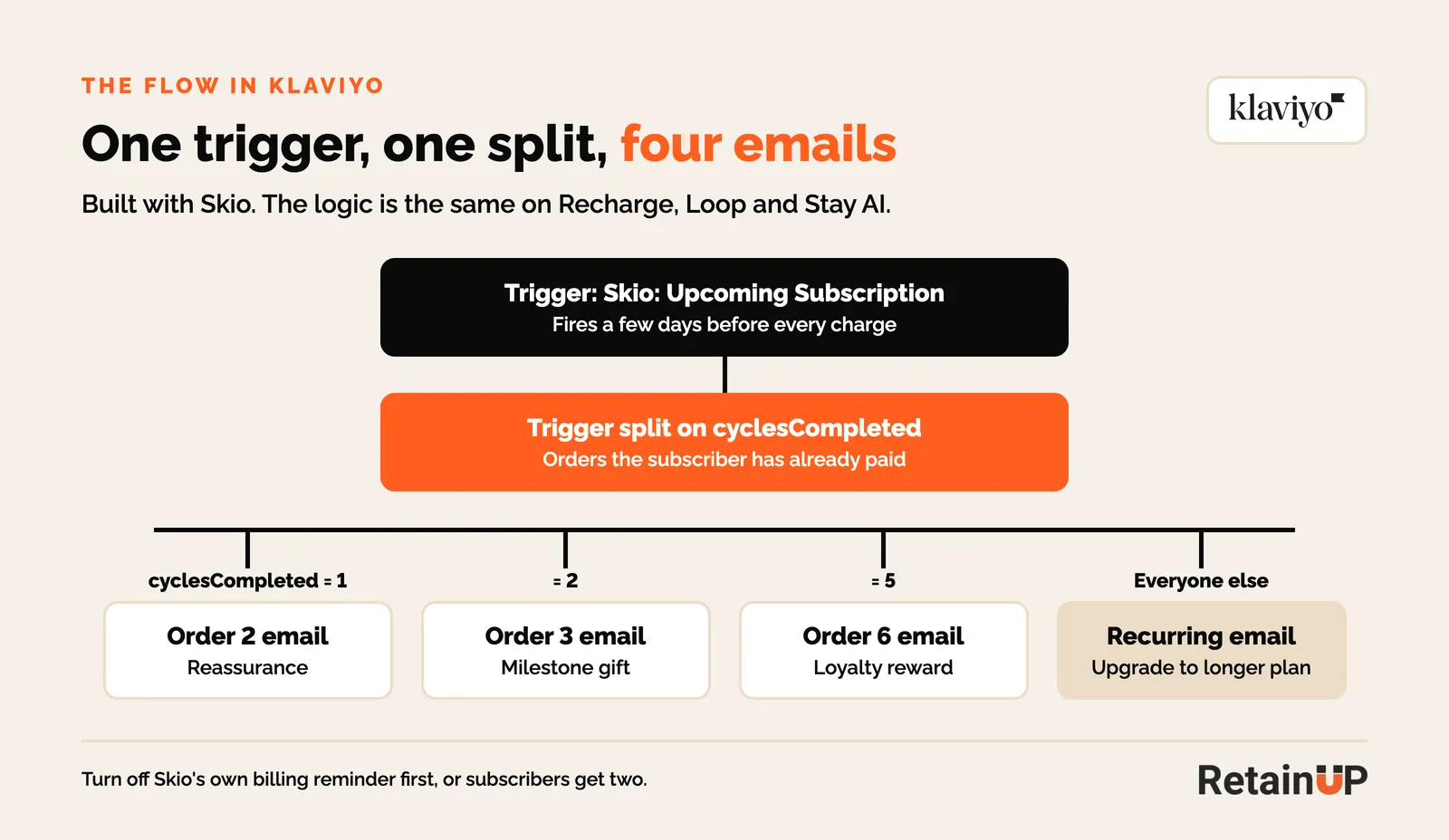
The build is one flow: the app's upcoming order event as the trigger, one split on the number of orders paid, and four emails. I am using Skio here. The logic is the same for Recharge, Loop and Stay AI.
- Turn off the app's own reminder. In Skio, switch off the billing reminder notification. In Recharge, open the upcoming charge notification under Email and deactivate it. Otherwise your subscriber gets two.
- Create the flow. In Klaviyo, go to Flows, Create flow, Build your own. For the trigger, pick the Skio event, "Skio: Upcoming Subscription". It fires a few days before every charge.
- Set the timing. The lead time is set in the app, not in Klaviyo. Leave the flow with no time delay before the split, so the email lands when the event fires.
- Keep filters light. The event only fires for active subscriptions, so you rarely need flow filters. Turn Smart Sending off for every email in the flow. If the subscriber got a campaign that morning, Smart Sending would skip the one email that tells them about the charge.
- Add a trigger split on cyclesCompleted. That is the number of orders the subscriber has already paid. If it is 1, the next order is order 2, so that branch gets the order 2 email. If it is 2, the next order is order 3, the milestone gift email. If it is 5, the next order is order 6, the loyalty email. Everyone else goes to the recurring email.
- Build each email with the same blocks. Value at the top, the gift or the reason to stay, skip and reschedule as the main buttons, a product block with 2 to 4 add-ons, and the amount and the date at the bottom.
- Use the order count in the copy.
{{ event.cyclesCompleted|default:'' }}shows the subscriber how many orders they have had. - Test every branch. Before you turn it on, send a test for each branch, and check the right email lands for the right order number.
One thing to check with your own counsel. Klaviyo keeps transactional status for emails with no promotional content, and a reminder with cross-sells is promotional. So it goes out as a marketing email, and profiles who unsubscribed from marketing won't get it. Decide how those subscribers get their charge notice before you switch the app's version off.
Upcoming charge events for Recharge, Skio, Loop and Stay AI
Every subscription app sends Klaviyo an upcoming order event, and that event is your trigger. The name and the order count property change by app. Exact metric names can differ by account, so check Analytics, Metrics in Klaviyo before you build.
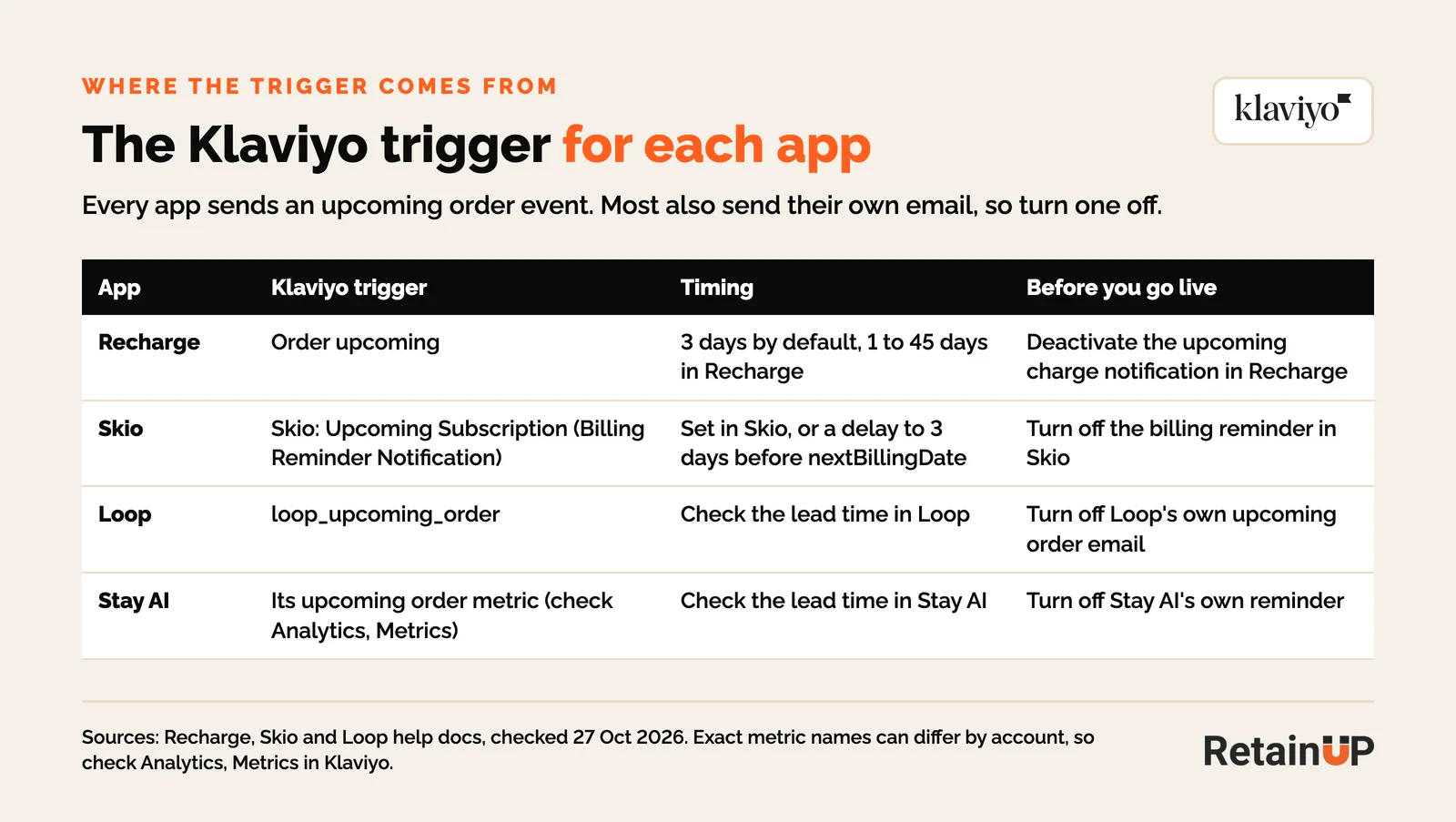
| App | Klaviyo trigger | Order count to split on | Timing |
|---|---|---|---|
| Recharge | Order upcoming on ReCharge | Check the sample event in Klaviyo for an order or charge count | 3 days by default, 1 to 45 days, set in Recharge |
| Skio | Skio: Upcoming Subscription (shows as Billing Reminder Notification in some accounts) | cyclesCompleted, billing cycles completed at event time | Set in Skio |
| Loop | loop_upcoming_order | $loop_processed_order_count, a profile property | Check the lead time in Loop |
| Stay AI | Stay AI's upcoming order metric | Check the sample event in Klaviyo | Check the lead time in Stay AI |
Recharge upcoming charge email in Klaviyo
Use the Order upcoming metric as the trigger, and deactivate the Recharge notification first. Recharge's guide notes it sends upcoming charge events to Klaviyo between 1 and 4 PM ET, so the send time can differ from the Recharge email it replaces. The full Recharge list is in our Recharge retention setup.
Skio
Skio passes cyclesCompleted on its events, which is what makes the four-branch split easy (Skio's property list). Out of the box, the billing reminder reads like a bank. More in our Skio retention setup.
Loop
Loop sends loop_upcoming_order, and $loop_processed_order_count sits on the profile, so split on that profile property (Loop's Klaviyo events). Put the Quick Action links in every branch. Details in our Loop retention setup.
Stay AI
Stay AI passes its subscription metrics to Klaviyo. Find the upcoming order metric in your account, open a sample event, and pick the property that counts paid orders. The rest of the build is the same. Our Stay AI retention setup covers the other events.
How to measure the subscription reminder email
Measure the whole seven-day window around the renewal, with the new email and with the old one. Never judge it by the day it goes out. You will always see a spike there, because the email creates a cancellation day. But it also prevents a different one, on the charge day.
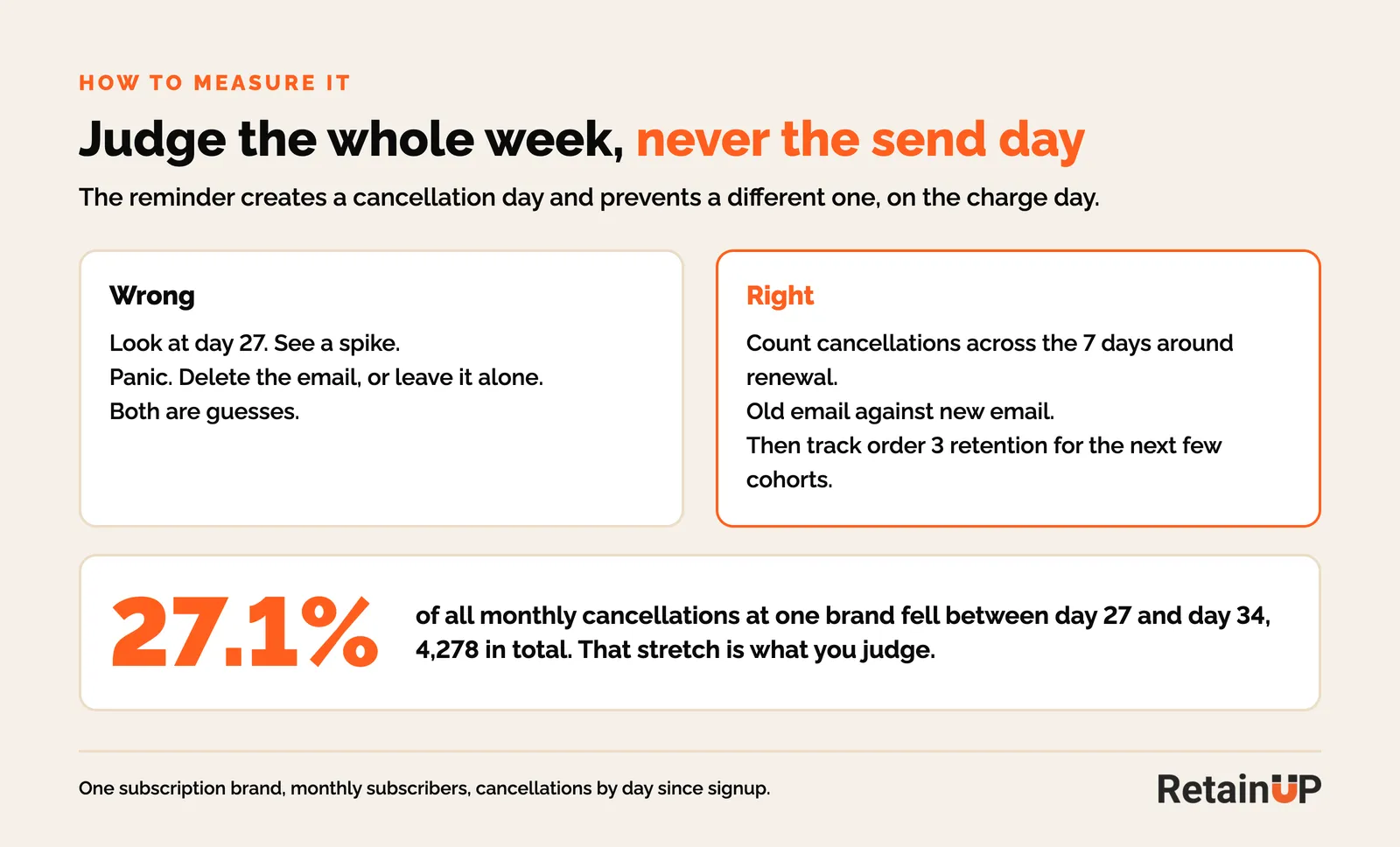
At the brand above, days 27 to 34 held 4,278 cancellations, 27.1% of every monthly cancellation. That week is the number to move.
Most brands look at the spike their own send created and panic. Then they either delete the email or leave it alone, and both are guesses. To see if the new version worked, track order 3 retention for the next few cohorts.
Mistakes that make the reminder cost you subscribers
- Leaving the app default on. Nobody has read it since install, and it opens with the charge.
- Two reminders. The Klaviyo flow goes live and the app's own email stays on.
- Cancel as the biggest button. Skip and reschedule should be the first things they see.
- One email for every order. Order 2 and order 6 need different words.
- Announcing the gift after the charge. The gift only keeps someone if they know about it before they decide.
- Smart Sending on. The reminder gets skipped for anyone who got a campaign that day.
- Judging it by the send day. Look at the week, or you will delete an email that was saving subscribers.
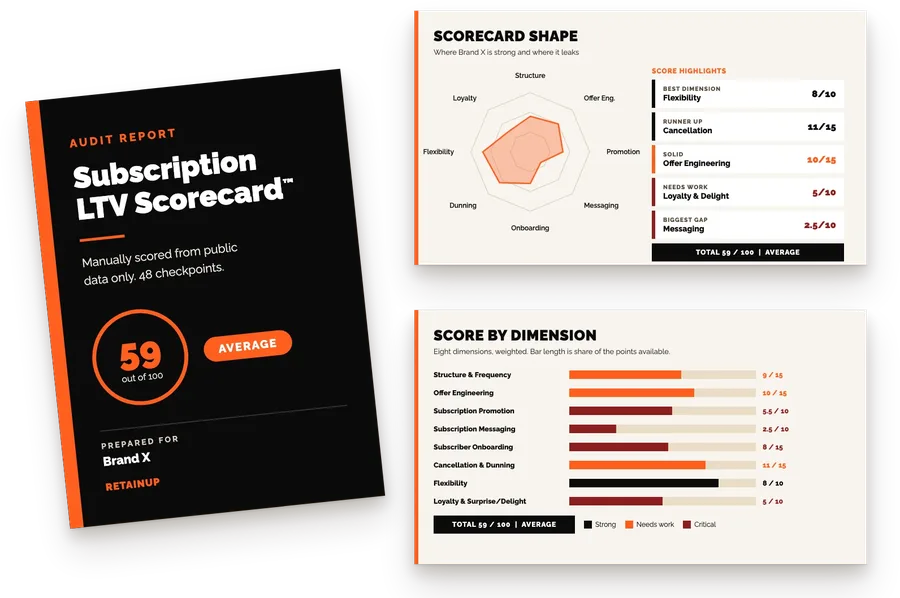
If you want to know how your own reminder, cancel flow and portal compare, our free subscription audit scores your program on 8 dimensions and 48 checkpoints.
Subscription reminder email FAQ
How many days before renewal should I send a subscription reminder email?
Three to five days before the charge. Recharge defaults to 3 days. Test 5 and 7 days against it, and test each plan length on its own, since a 90-day plan behaves differently from a monthly one.
Does a subscription reminder email increase cancellations?
It moves some cancellations earlier. At one brand, day 27, the reminder day, had 588 cancellations against 160 the day before. It also cuts surprise cancellations on the charge day, so judge the full week around renewal.
Should I send the reminder from Recharge or Skio, or from Klaviyo?
From Klaviyo, so you can split by order number, add products and match your brand. Turn off the app's own reminder first, or subscribers get two.
What should a renewal reminder email say?
Lead with value and a reason to stay, like the gift coming in the next order. Make skip and reschedule the main buttons, add 2 to 4 products they can add, and put the amount and date at the bottom.
Can I hide the cancel link in the reminder?
No. Hiding it is unlawful in some places, and it doesn't work anyway. Keep it available, just not the easiest thing on the page.
Is the subscription reminder email transactional in Klaviyo?
Only if it carries no promotional content. Once you add cross-sells or an upgrade offer, it goes out as marketing, so check how you notify subscribers who unsubscribed from marketing email.
One email a week on subscription retention: the numbers, the strategy, and what to fix first.

Rahi Jain
Rahi Jain is a subscription LTV specialist who helps DTC brands maximize their LTV from subscriptions.
More about Rahi