Key takeaways
- To see a 5-point lift on a 20% save rate, each arm needs about 1,090 cancel attempts. Loop's 100 per arm only catches 17-point swings.
- Judge a cancel flow test by post-save orders. One of our brands saved the most people with contact support and earned the least after the save.
- Run one test at a time for 4 weeks minimum, with a rollback number agreed before launch, such as revenue per visitor down 15% after three days.
Most subscription brands test subject lines. Some test pop-ups. Very few test the cancel flow, the product page widget or the billing reminder. Those three are where a subscription program wins or loses money.
And when they do test, they read the wrong number. The save rate went up. Fine. Did more people pay for order 3? This page, part of the subscription metrics hub, covers tests you can trust.
One test at a time, four weeks minimum
Change one thing. Wait. Read the result. Move on. That rule gets broken all the time.
At one of our brands the product, prices, cadence, options, gifts and page all changed on the same day. Take rate rose from 42% to 58% in three days. Revenue per day fell 42% in the same three days, because the base shrank. The offer was pulled. And nobody could say which of the six changes did the damage. So nothing was learned.
Run monthly. Not daily. Four weeks covers a full billing cycle for monthly subscribers, so every cohort hits the variant at least once around a charge. For offer tests that touch renewals, Skio's volume discount guide goes further: 2 to 4 billing cycles.
Agree the rollback number before you launch
Write down what would make you stop. Ours is revenue per visitor down 15% after three days. Keep the old offer on part of the traffic, split with Shoplift or Intelligems.
And do not edit a live test. Klaviyo says the same in its A/B testing guide: stop it, change it, start again.
How many cancels you need per arm
Loop's cancellation playbook, built on 441K cancel attempts across 87 brands, says to wait for 100+ attempts per variant. That is a floor. It is too low for most lifts.
Say your save rate is 20%. You want to know if a new screen gets you to 25%. At 95% confidence and 80% power, the standard sample size formula gives about 1,090 cancel attempts in each arm. So 2,180 people through the flow before you call it. That is a lot of cancels.
| Starting save rate | Lift you want to detect | Cancel attempts per arm |
|---|---|---|
| 20% | 5 points (to 25%) | About 1,090 |
| 20% | 10 points (to 30%) | About 290 |
| 20% | 17 points (to 37%) | About 110 |
Read that last row again. With 100 per arm, only a swing of around 17 points shows up as real. Anything smaller is a coin flip. Even when the dashboard paints a winner.
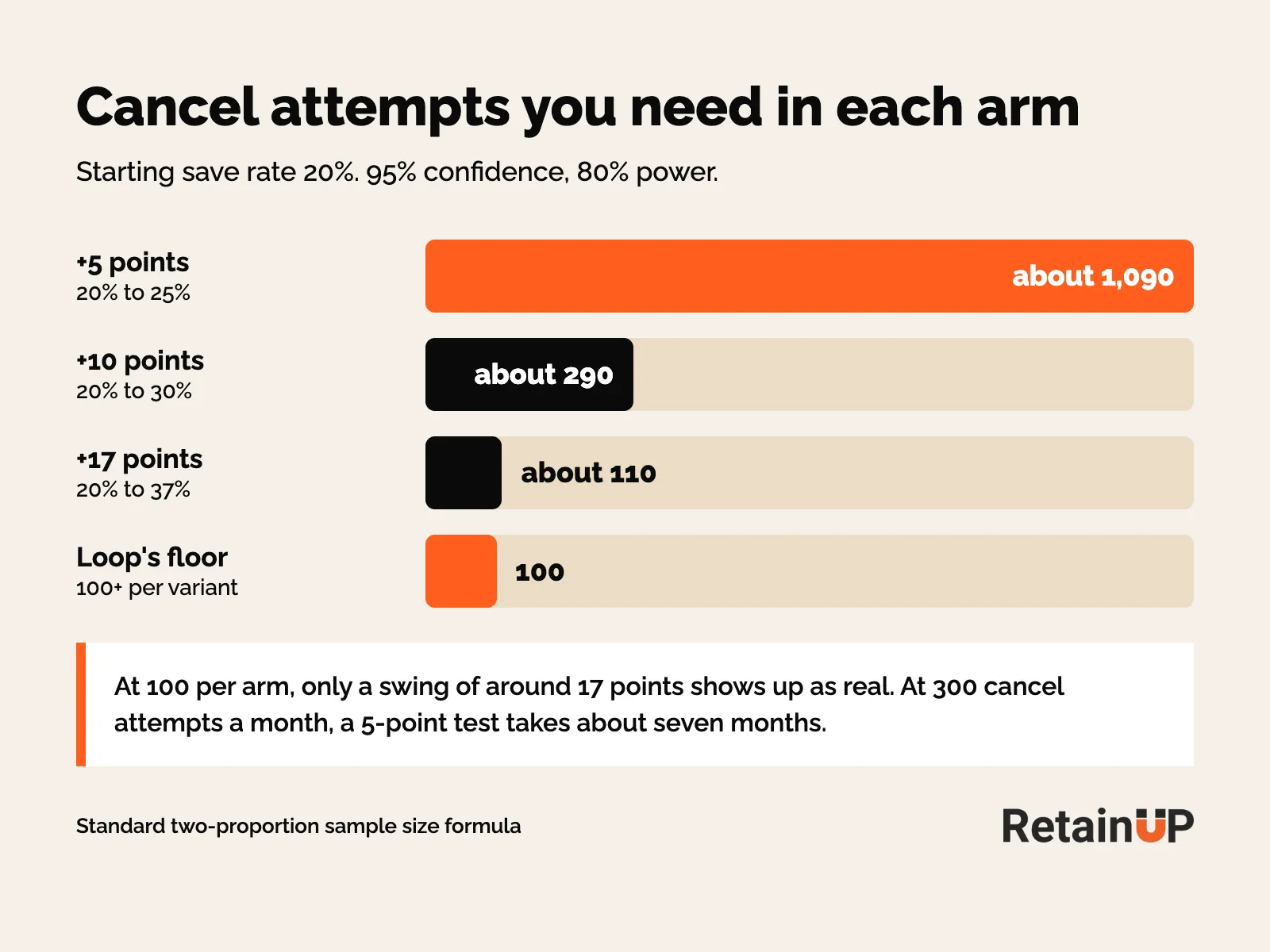
At 300 cancel attempts a month, a 5-point test takes about seven months. Too slow for button copy. So small programs test big swings only. Video vs no video. Gift vs discount.
What an underpowered test looks like
One of our brands ran five pop-ups against each other in Klaviyo: pain-based, social proof, USP, a quiz and one more. Submit rates ran from 5.65% to 12.44%. The tool still marked the test "Not statistically significant" and gave the top pop-up a 68.32% win probability. The winner was chosen by hand after 27 days.
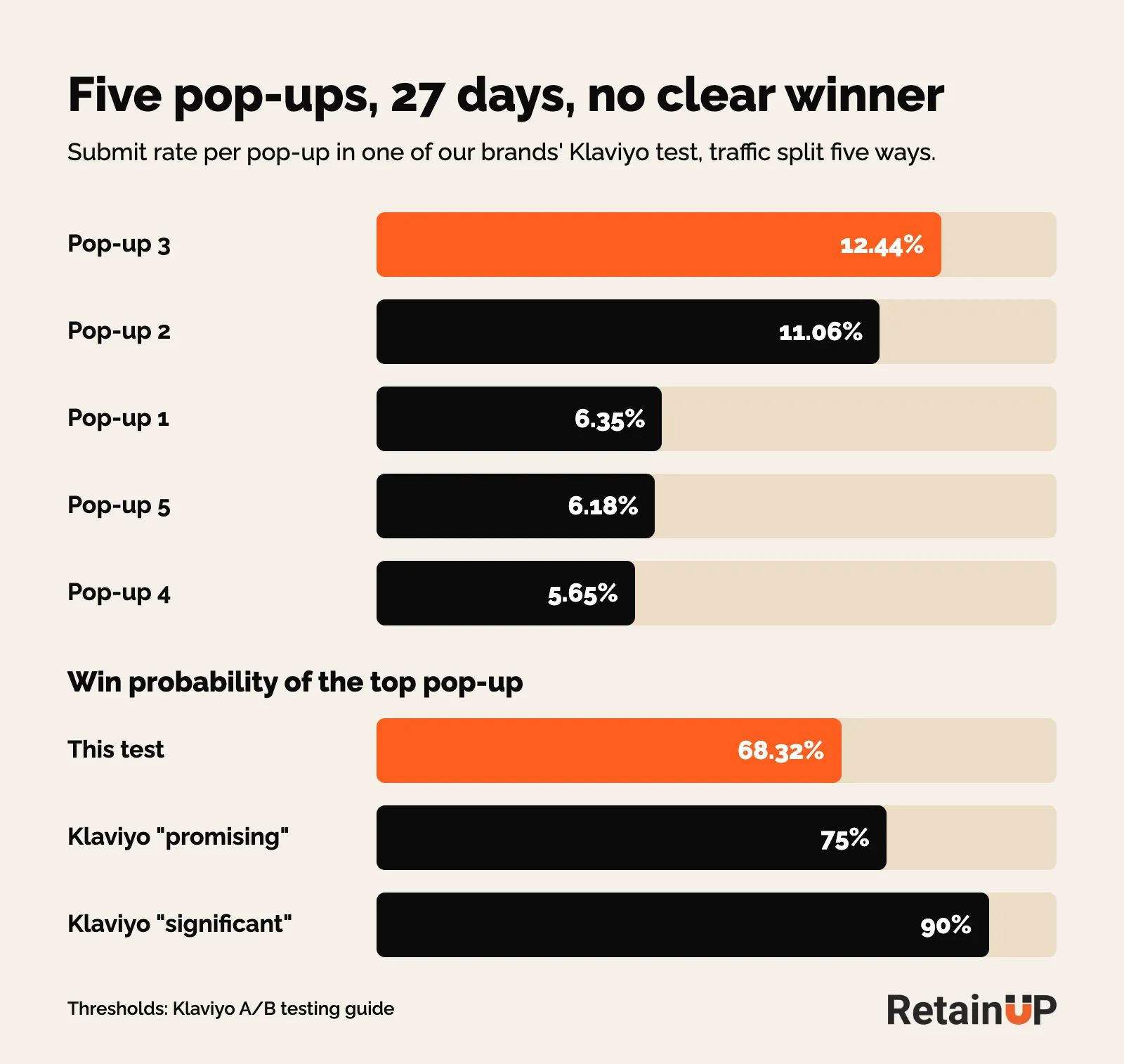
Klaviyo calls a result significant at 90% win probability and promising at 75%. This one reached neither. So five arms split the traffic five ways. Two would have answered sooner. Klaviyo's own advice is 2 or 3 variations when the sample is small.
Judge saves by what happens after the save
Most save rates are first-order saves. The customer did not cancel today. That is all. Did their next order process? If saves cancel anyway at the next charge, nothing was saved. You just delayed the inevitable. And a test that picks the variant with the higher save rate can pick the worse variant.
Loop's cancel flow guide says to check saved subscribers at 30, 60 and 90 days. If they cancel again inside 30, the offer only bought time. Read it by segment too. New subscribers and veterans answer the same offer differently.
Thomas Lalas said it on a podcast. Do not celebrate "we saved 28%" if those people never buy again.
The contact support trap
One of our brands had contact support as the main treatment for "too much product". It saved more people than any other treatment and earned the least per save afterward. Skip and frequency edit saved fewer and earned more. So the test swapped part of contact support for skip or frequency edit. Judged on post-save revenue.
Recurring vs one-time discounts
20% off the next 3 orders beats 30% off one order. The subscriber has to stay 3 deliveries to get it. Still, test both. Loop shows post-save orders per treatment. Run the comparison. The recurring offer almost always wins on LTV even when it loses slightly on save rate.
Always keep a control
Another of our brands tested a free gift against control in the cancel flow. Early on the gift won, 73.5% against 66.4%. As volume grew the gap closed and flipped: 51.0% for the gift, 52.5% for control. On the same flow a 20% discount was taken by 0.6% of people. Half of those who declined it still did not complete the cancel. The offer was not what saved them.
Those rates count everyone who entered the flow, so they look high next to the 25% to 33% on the subscription benchmarks page. Without the control arm, the gift and the discount would have taken credit for saves that were coming anyway. Same lesson at two other brands. At one, 50% off converted under 2%. At the other, 20% off saved no more than control, and 15% beat 20%.
| What you test | The number that decides it | Read it after |
|---|---|---|
| Cancel flow screen or offer | Orders placed after the save, per treatment | At least one more charge |
| Product page widget | Revenue per visitor, then subscribers per 100 sessions | 3 days for rollback, 90 days for renewals |
| Billing reminder | Cancels across the 7-day window around the charge | A full billing cycle |
A save rate over 35% should make you suspicious. It may be delayed churn.
Cancel flow tests worth running
Impact is conversion rate times impressions. So test where the most people are. The benefits page first, because every cancel passes through it. The highest-volume cancel reason second. Niche reasons last.
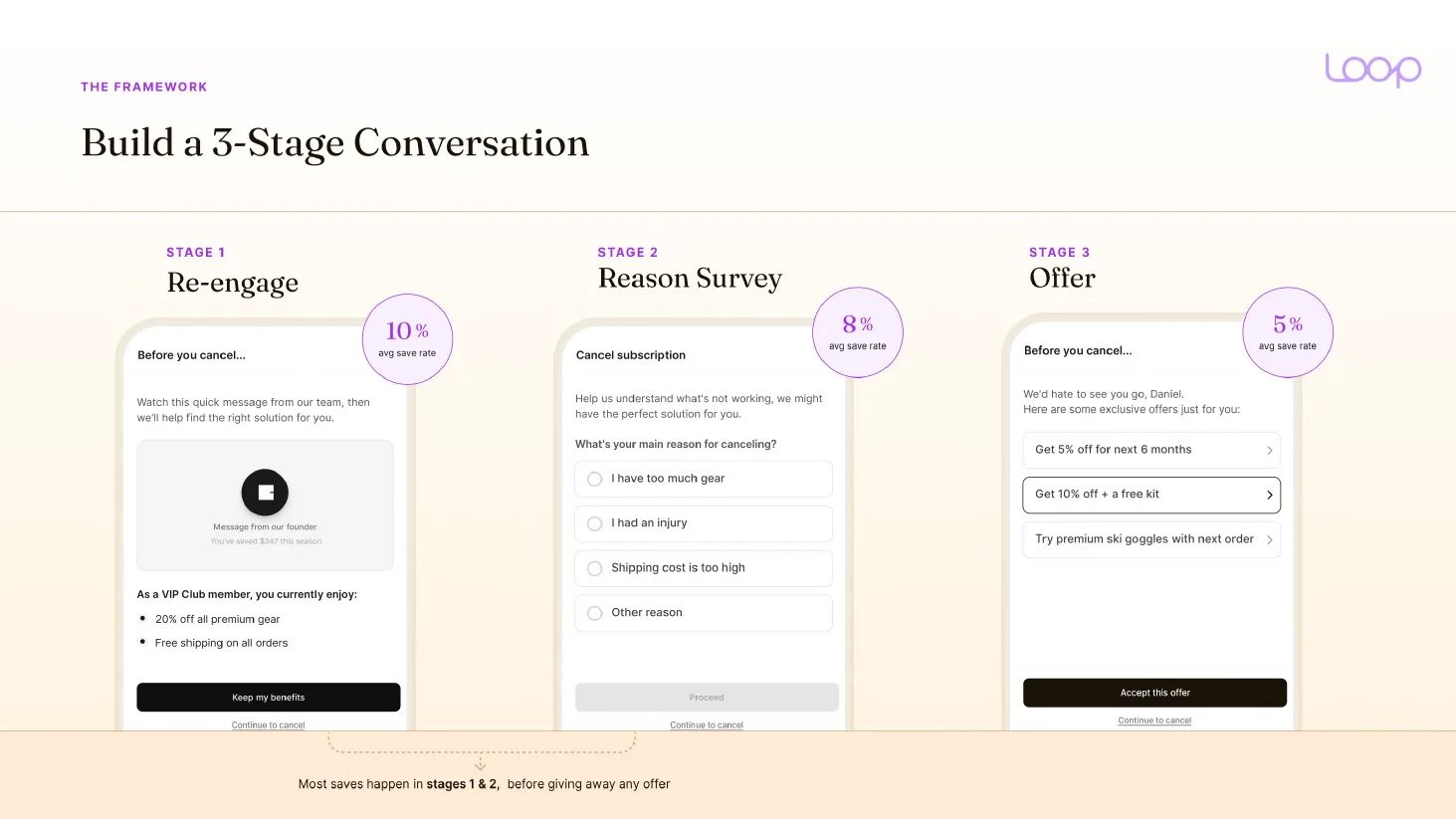
Loop's numbers show why. Re-engage averages a 10% save rate, the reason survey 8%, the offer 5%. So most saves happen before any offer is shown. A generic "here's 10% off" screen saves about 6%, a 3-stage conversation about 15%.
Benefits page (test first)
- Video vs no video. Loop measured a 35% lift for video over static content
- Founder solo vs founder with partner
- Short video (60 seconds) vs longer (2 to 3 minutes)
- Financial value copy vs emotional value copy
- A perk list vs a single emotional hook
- Personalised by order count and spend vs generic
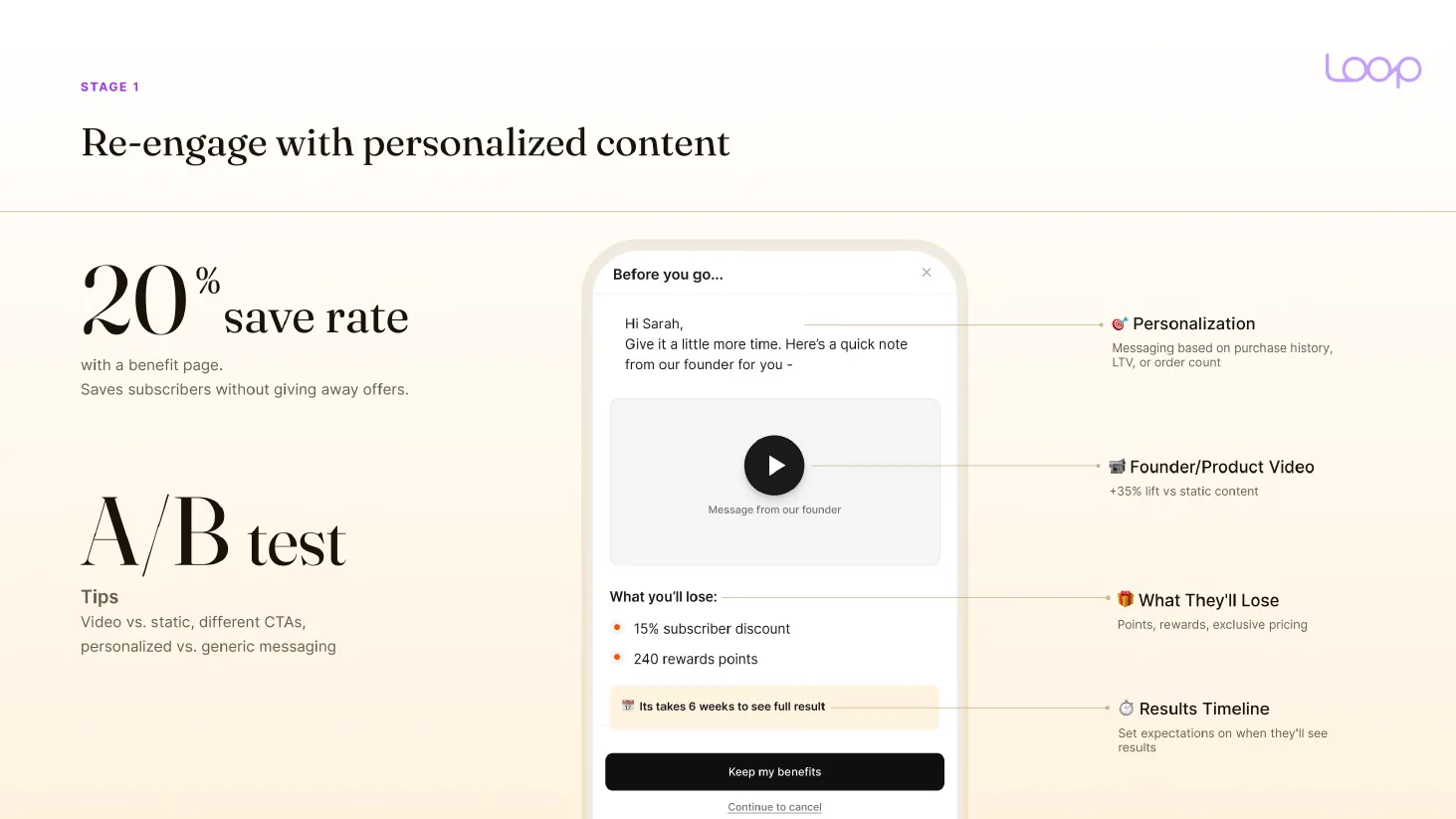
Cornbread Hemp went from 9.5% to 25.6% after adding the splash screen alone. A small program can detect that.
Reason screen
- 5 reasons vs 7
- Generic "too expensive" vs two sub-reasons (no budget, no value)
- "No longer use" with a flat swap vs sub-reason branching
- Contact support as primary vs skip or frequency edit, compared on post-save revenue
- With or without a skip prompt before the reason screen
That last one is worth running early. A 9-figure brand added only a skip prompt before the reason screen and saw a double-digit retention improvement. No video, no discount.
Offers
- Discount vs physical gift
- Steep one-time (50% off 1 order) vs lighter recurring (25% off 3 orders)
- One forced treatment vs two options the subscriber chooses
- Same offer for all vs a bigger offer for month 4+ or high-value subscribers
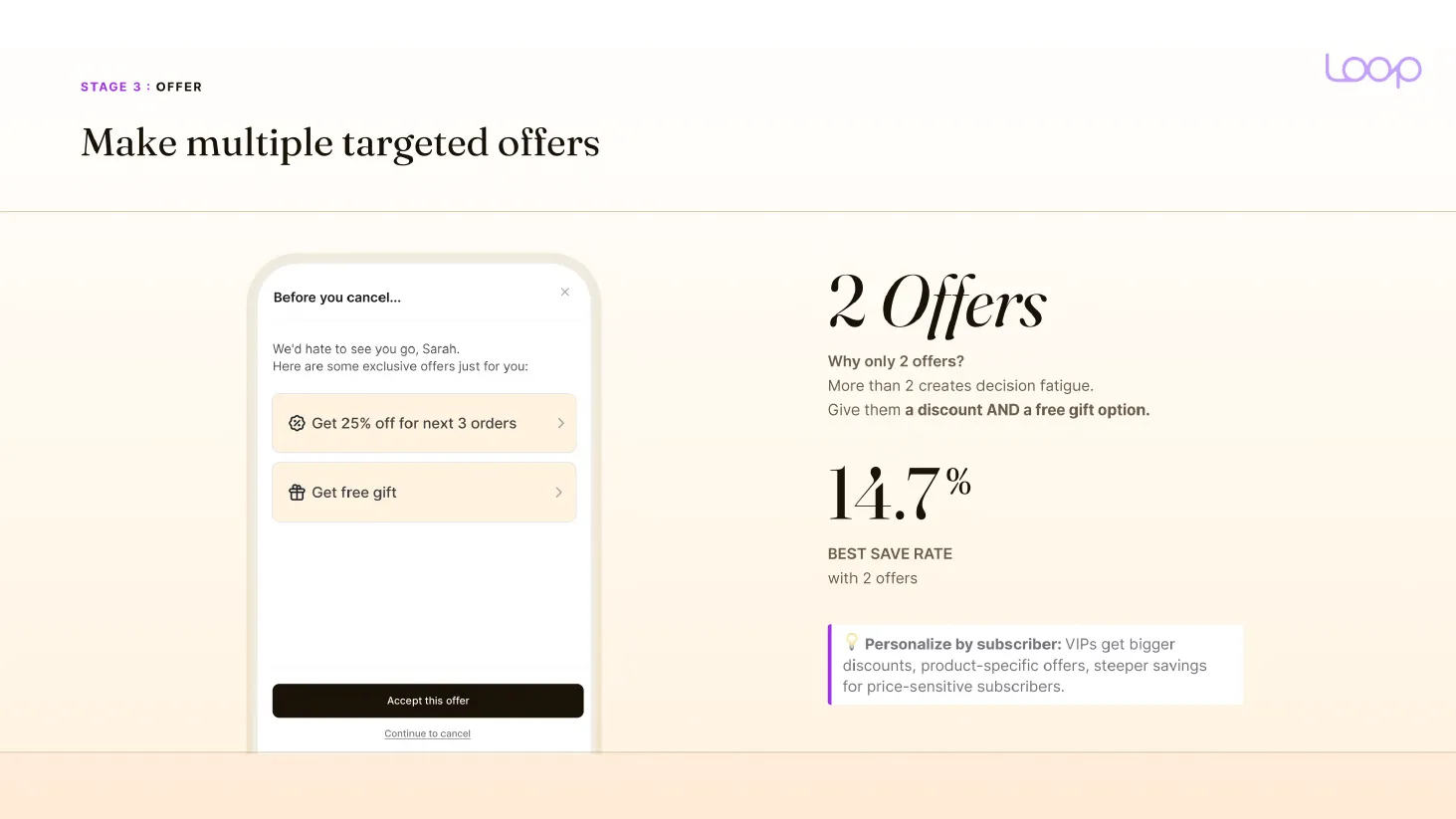
Loop found the best save rate with two offers, a discount and a free gift, at 14.7%. More than two creates decision fatigue. For what goes into each offer, see cancel offers that work, and for the screen order see the cancel flow structure.
What your app lets you test
Recharge runs A/B tests at flow level. Its cancellation page lists discounts, gifts, skips and delays as testable. Stay AI tests several treatments per reason on its own and surfaces the winner. But it cannot show a subscriber two options at once. Loop shows average orders after each treatment, the best read on post-save results. Skio supports sub-reasons, a skip or pause prompt before the reason screen, and several treatments per reason that the subscriber chooses from.
Skio added native cancel flow A/B testing in August 2026. You duplicate a live flow and edit the copy. Skio splits the traffic and emails you at significance. Tests stay inside each flow's entry conditions, so new and high-value subscribers do not mix. The readout is save rate. So pull post-save orders per arm yourself.
Widget and offer tests on the product page
The widget test is the riskiest. It touches every buyer, not just the ones leaving.
Judge it on revenue per visitor and subscribers per 100 sessions. Take rate and AOV are supporting numbers. Then look again at 90-day revenue per visitor once renewals arrive, since a widget that sells more first orders at a deep discount can lose at order 3.
Change prices last. One option at a time. The layout rules are on the subscription widget page.
Testing the subscription discount
Your subscription app reads the price from the product. So a price test needs a tool that talks to it. Intelligems makes a duplicate product per test group and works with Recharge, Stay AI, Skio, Loop and Ordergroove. Hold the one-time price. Test the discount, 10% against 15%. Shoplift tests prices through Recharge and keeps existing subscribers on their price. Both read the first order. The 90-day check is still yours.
Testing the billing reminder
Most brands never test whether the reminder is net positive. They treat it as compliance. Some delete it after a spike. Some leave it alone. Both are guesses.
So do not measure this email by the day it lands, because it creates a cancellation day and prevents a different one. Hold out a share of subscribers from the send. Then compare the whole 7-day window around renewal, with the email and without it.
- Lead time: 3 days vs 5 vs 7. 3 days is where the spike lands. The answer for a 30-day cadence will differ from a 90-day one
- Value first vs billing fact first
- Skip and reschedule as the main buttons vs a single "manage" link
- Versions by order number vs one email for all
The one number to chart is the pre-rebill cancel rate: cancels in the 3 days before the rebill, divided by rebills due that day. Max Sturtevant reported a client going from 10 to 12% down to about 3% after reframing the reminder. Pair it with the 7-day window, so a lower rate does not just mean cancels moved to billing day. More on reading those days in cancellation day spikes, and on the email itself in the upcoming billing reminder.
Testing failed payment recovery
Recovery tests are slow. A failed charge can take weeks to recover or die. Churn Buster says its tests take 8 to 12 weeks, some up to 6 months. Its likely winners: a 60-day recovery window instead of 30, a better landing page, a last chance offer. Sender name and subject line are hit and miss. One variable per test. Retry settings live on failed payment recovery.
Email and pop-up tests in Klaviyo
Test offer, then timing, then copy. In that order, because that is the order of impact. Start with sign-up forms, the welcome flow and abandoned cart.
In a campaign, send each version to part of a 20% test group. Wait 6 hours. Then the winner goes to the other 80%. Judge subject lines by opens, content by clicks. Orders take longer than 6 hours to show. Klaviyo suggests 3 to 5 days for abandoned cart.
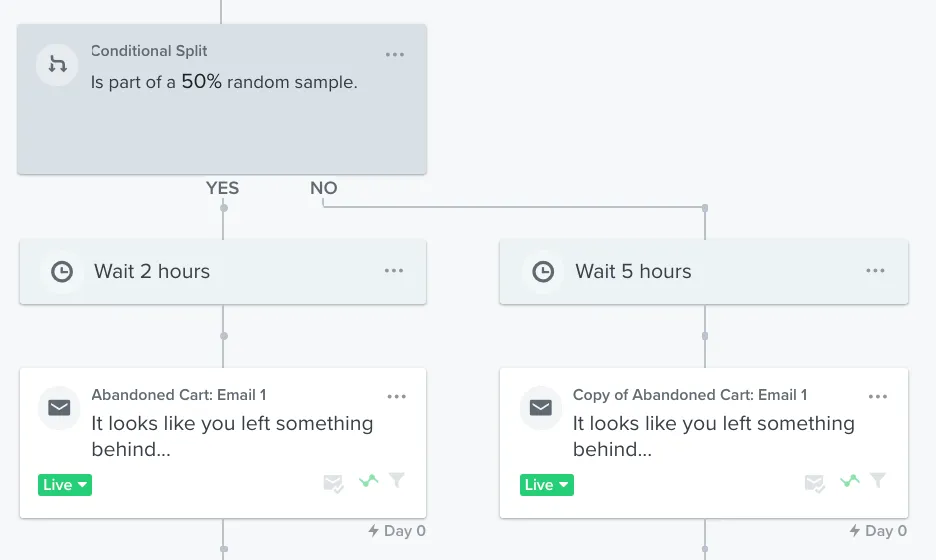
In flows, use a conditional split on a 50% random sample. It can test timing, content or an entire path. One catch: Klaviyo does not move traffic to the winner by itself in flows. You look at the result, then delete the losing path by hand.
One email test worth running: no price, the price shown, or a special price next to the best seller. Hiding prices can get more clicks. Orders are what you check.
The order to test in
If you can only run one test a month, run them in this order.
| Order | Test | Why here |
|---|---|---|
| 1 | Benefits page: video vs no video | Every cancel sees it |
| 2 | Skip prompt before the reason screen | Catches "too much product" before they pick a reason |
| 3 | Top cancel reason: treatment A vs B on post-save orders | Highest-volume reason |
| 4 | Billing reminder: with vs without, 7-day window | Decides if the email helps at all |
| 5 | Widget default and price gap | Touches every buyer, so split traffic |
| 6 | Offer: gift vs discount, with a control | Smallest share of saves |
Each needs a hypothesis, one metric and one change. Read results by order number in a cohort table, and keep Order 3 retention as the number every test eventually answers to.
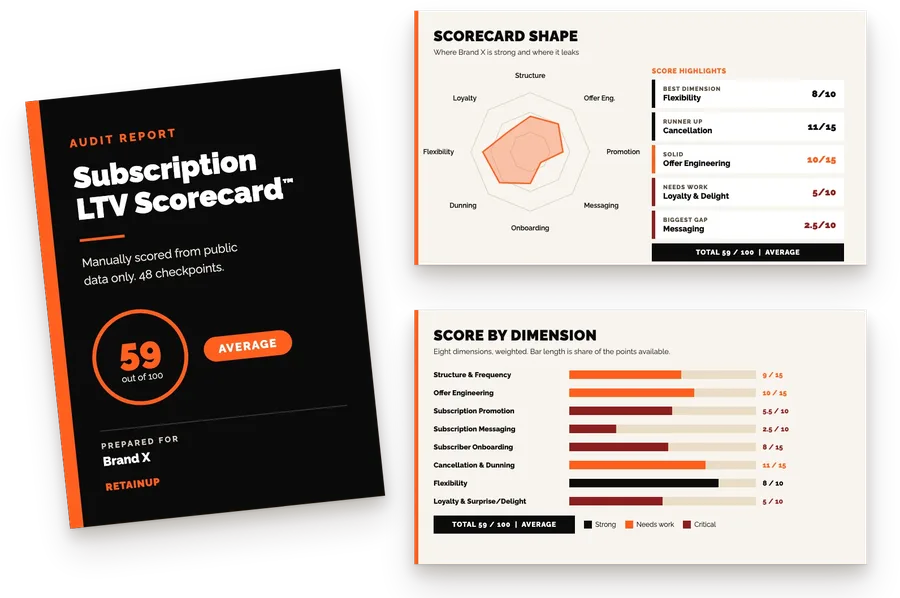
If you want a list of tests already ranked for your store, the Subscription LTV Roadmap™ reads your subscription data and gives you a 90-day plan of 30 to 50 changes in order, in 3 working days, for $1,000.
FAQ
How long should I run a subscription A/B test?
Four weeks minimum, and one test at a time. Four weeks covers a full billing cycle for monthly subscribers, so every cohort meets the variant around a charge. Cancel flow tests also wait for at least one more charge after the save. Agree a rollback number before launch.
How many people do I need in a cancel flow test?
About 1,090 cancel attempts per arm to detect a 5-point lift from a 20% save rate, at 95% confidence and 80% power. At 100 per arm only a swing of around 17 points is reliable. So small programs test big changes, like a video or a skip prompt.
Is a higher save rate always better?
No. A save only counts if the next order processes. Contact support can save the most people and earn the least afterward. So compare post-save orders per treatment, and check saved subscribers again at 30, 60 and 90 days. Keep a control arm so offers do not take credit for saves that would have happened anyway.
What should I A/B test first in a subscription program?
Start with the cancel flow benefits page, because every cancel passes through it. Video against no video is the usual first test. Next, a skip prompt before the reason screen, then the treatment for your top cancel reason. Then the billing reminder, then the widget.
Can I A/B test flows in Klaviyo?
Yes, with a conditional split on a 50% random sample, or a message variation on a flow email. Klaviyo does not send everyone to the winner automatically in flows. You read the result and delete the losing path yourself.
One email a week on subscription retention: the numbers, the strategy, and what to fix first.

Rahi Jain
Rahi Jain is a subscription LTV specialist who helps $1M to $10M DTC brands reduce subscription churn and maximize LTV on Recharge, Skio, Stay AI and Loop.
More about Rahi