Key takeaways
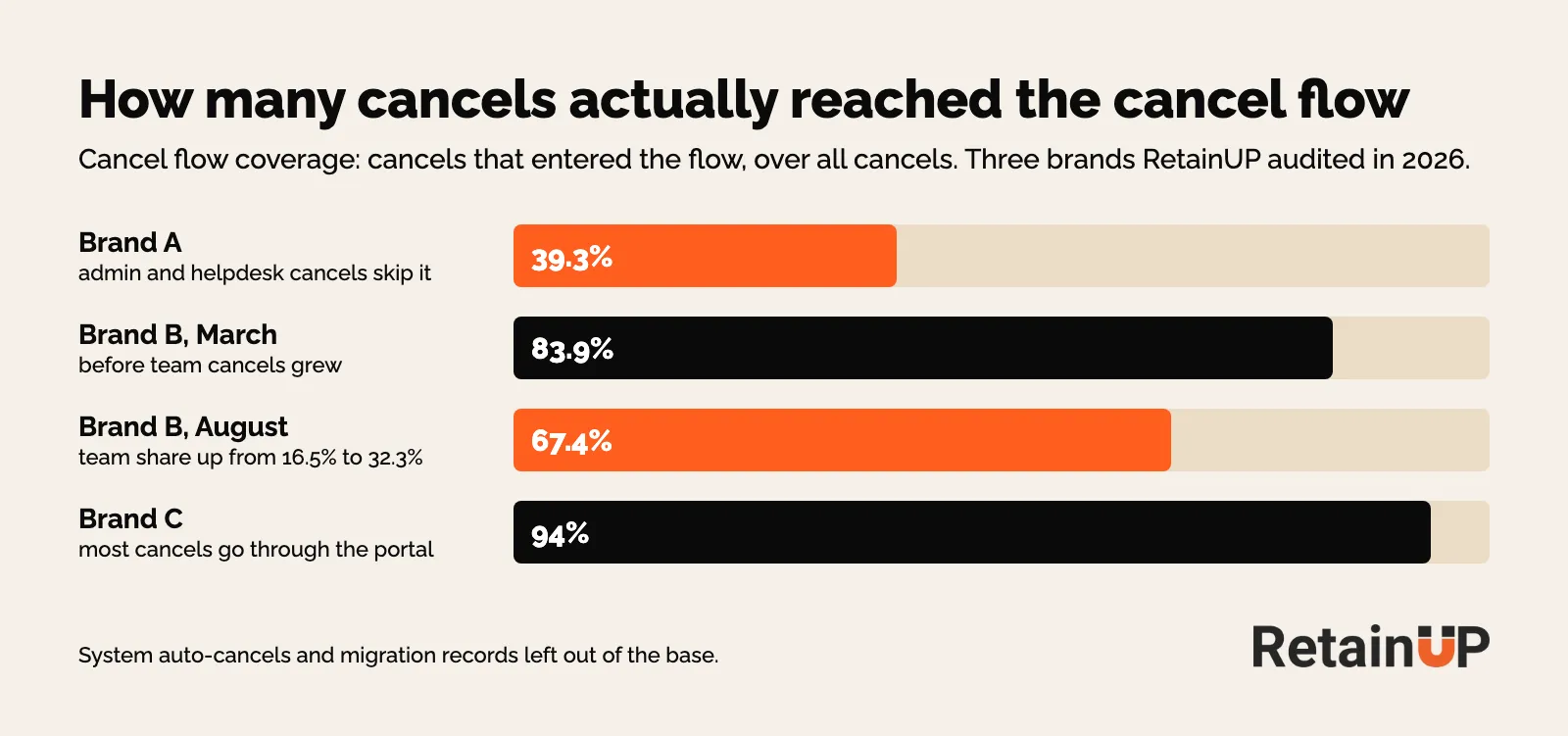
- At one of our brands, only 39.3% of cancellations reached the cancel flow. Admin portal and helpdesk cancels never saw it.
- Staff keyed in 17% of that brand's cancels in April and 82% in August. None of those saw a skip or an offer.
- One Recharge flow we audited in November 2026 showed Active and had delivered 0 experiences in the last 30 days.
A cancel flow works only on the people who reach it.
Sounds obvious. Most brands still never count them. They tune the copy, test a bigger offer, add a video, and the save rate barely moves. Then we open the cancel log and find that most cancellations came in through a door the flow doesn't sit behind.
This page is part of the subscription churn guide. It covers one number, cancel flow coverage: how to measure it, where the missing cancels go, how to check the flow is firing at all, and how to route the cancels that come through support. What goes inside the flow lives in the subscription cancel flow.
What cancel flow coverage measures
Coverage is the share of cancellations that actually reached the flow.
Cancels that entered the cancel flow, divided by all cancellations in the same month. That's it. And it has to be split by source, because a subscription can end in more places than the customer portal.
| Where the cancel comes from | Sees the flow? |
|---|---|
| Customer portal, cancel button | Yes |
| Admin portal, keyed in by staff | No |
| Helpdesk, a Gorgias ticket that staff act on | No |
| Custom portal or app built on the API | Only if someone wired it in |
| System auto-cancels and migration records | No, and they don't belong in the base |
So count cancellations by source before anything else. Customer portal, admin portal, support apps. Split every month. The cancel flow only ever sees the portal share.
Leave system cancels out of the base
Two kinds of cancel make coverage look worse than it is.
System auto-cancels first. At one Stay AI brand, counting them cut coverage by 8 points. Once they were left out, the flow caught 99 to 101% of portal cancels in every single month. So the flow was fine there, and the gap sat elsewhere.
That brand's cancels split three ways on a field nobody had looked at. The third channel turned out to be all payment-failure auto-cancels. So print the values of the source field before you group on it.
Then migration records. At one Loop brand, over half the cancellations in the first export were old subscriptions stamped "migrated" on go-live day. Nobody cancelled anything. Drop them, or your first month on the new app reads like a disaster. More on that in the migration checklist.
Coverage caps every save-rate gain
Here is the arithmetic that should decide where you start.
At Brand A, 39.3% of cancels reached the flow and 9.4% of those were saved. So the flow saved 3.7% of all cancellations. Now say you rewrite every screen and double the save rate to 18.8%. Hard work, and good work. You land at 7.4%.
Or leave the flow alone and route 94% of cancels into it, which is what Brand C runs. Same 9.4% save rate. 8.8% of all cancels saved.
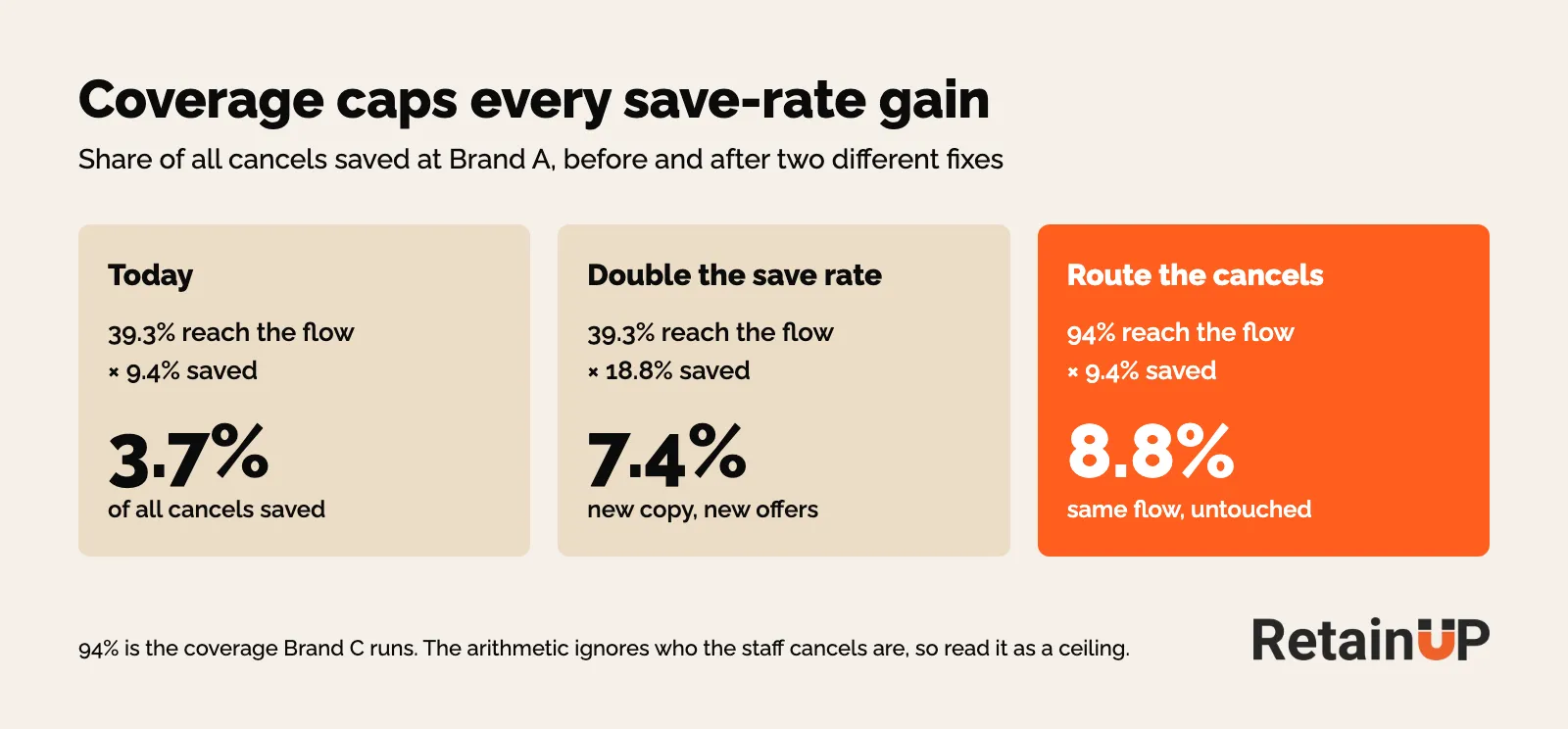
Treat that as a ceiling. Staff cancels are a different crowd, a lot of them asked by email because they didn't know they had subscribed, so they won't all save at the portal rate. But the direction holds. Routing is worth more than any copy or offer change inside the flow, as long as most cancels skip it.
And it changes what you read. A cancel offer test on 39% of your cancels tells you about the 39%. The rest never voted.
Where the missing cancels go
Three places, in the brands we audit.
The admin portal
The biggest one. A customer emails "please cancel", someone on the team opens the subscription app and clicks cancel for them. No benefit screen, no skip, no offer. Just gone.
A hidden cancel button feeds this door. People who can't find it email support instead, as Skio points out, so the button you buried to save subscribers sends them straight past the flow.
At Brand A, staff keyed in 17% of cancellations in April. By August it was 82%. Nobody decided that. Nobody was counting it either.
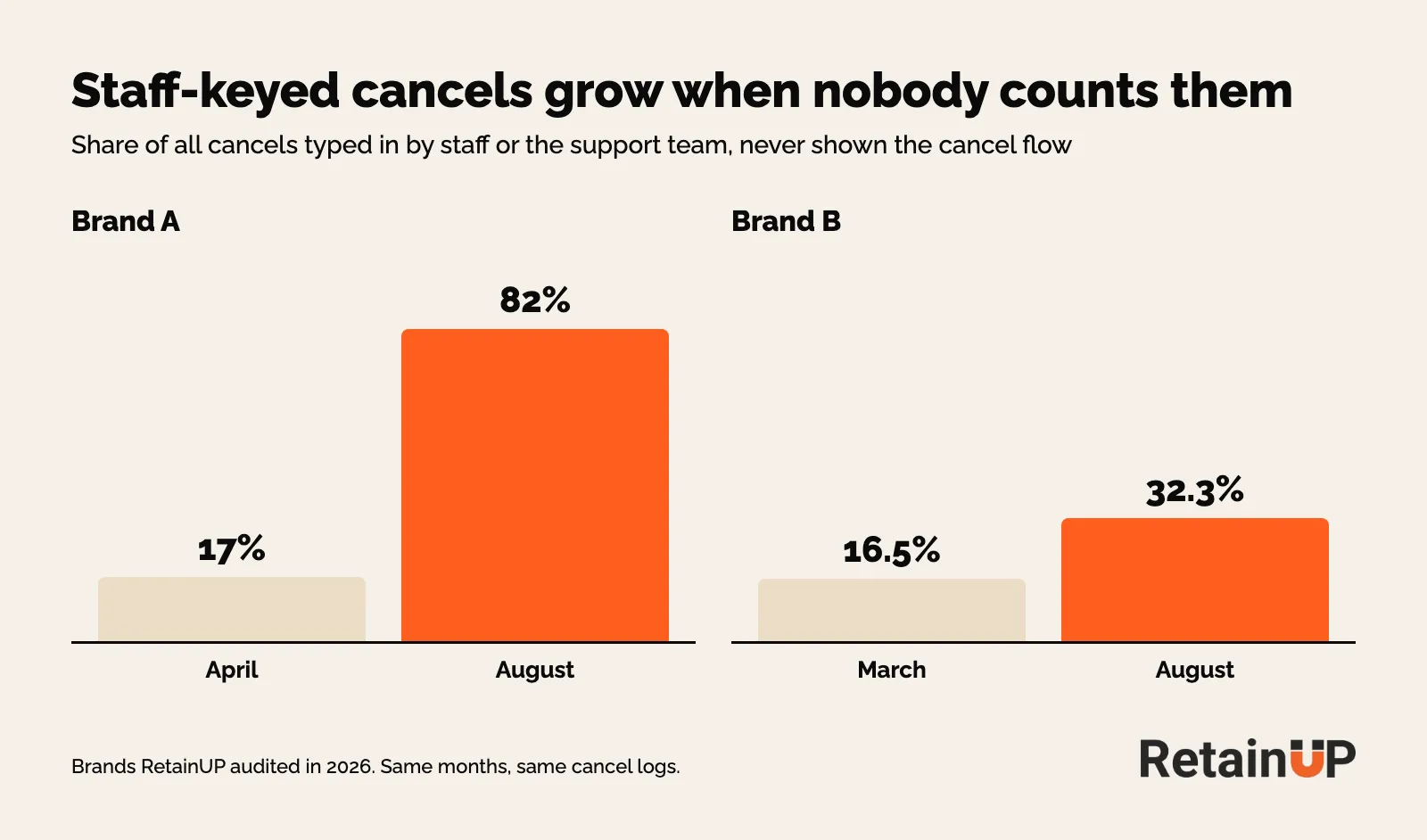
Brand B, on Stay AI, moved the same way, slower. Team cancels went from 16.5% in March to 32.3% in August, and coverage fell from 83.9% to 67.4% over the same months. The flow didn't change. The door did.
So name the number for its cause. "Cancel flow coverage fell" reads as the flow breaking. "Cancellations bypassing the flow rose to 32.3%" reads as the routing change it actually was. Same arithmetic, opposite instruction to the team.
Staff cancels also tell you when people leave. At Brand A, 45% of staff cancels came within a day of a repeat charge, and 53% came after two orders. A cancel within a day of a repeat charge points at a surprise charge. The fix for that sits in the reminder before the charge, covered in the upcoming billing reminder.
The helpdesk
Gorgias, chat, the contact form. Smaller in volume, same problem. The ticket becomes an admin cancel, and usually without a reason.
At one Recharge brand, 15.4% of cancels were keyed in by staff with no reason at all, and 54.2% of those landed within a week of the charge. At Brand A, 54% of staff cancels were logged as "Other reason". So you lose the save and the data in one click.
Custom portals and the API
The quiet one. In Recharge, a custom portal built on the API skips the cancel flow unless someone wires it in. The cancels still happen. They just come through the API, and the flow never opens.
At one brand we audited, fewer than 1 in 300 API cancels carried a reason.
Loop works the same way. A headless portal shows the cancellation flow only once it is set up through Loop's storefront APIs. And when Loop's auto-renewal law setting is on, customers in those US states get a cancel button that skips the standard flow. That one is on purpose, for state auto-renewal rules. Just know those cancels sit outside your coverage, and count them as their own source.
How to check the cancel flow is firing
A live flow is not a working flow.
In Recharge, go to Churn tools, then Cancellation Prevention, and read "Experiences delivered" for the last 30 days. Cancels done in the merchant portal never show in those analytics, per Recharge's own help centre, so the dashboard can look healthy while most of your cancels come from staff. Pull the cancelled-subscriptions export for the full count. Zero next to hundreds of churns means cancels bypass the flow or it stopped firing, whatever the status says. In November 2026 we found a Recharge flow marked Active with 0 delivered in the last 30 days.
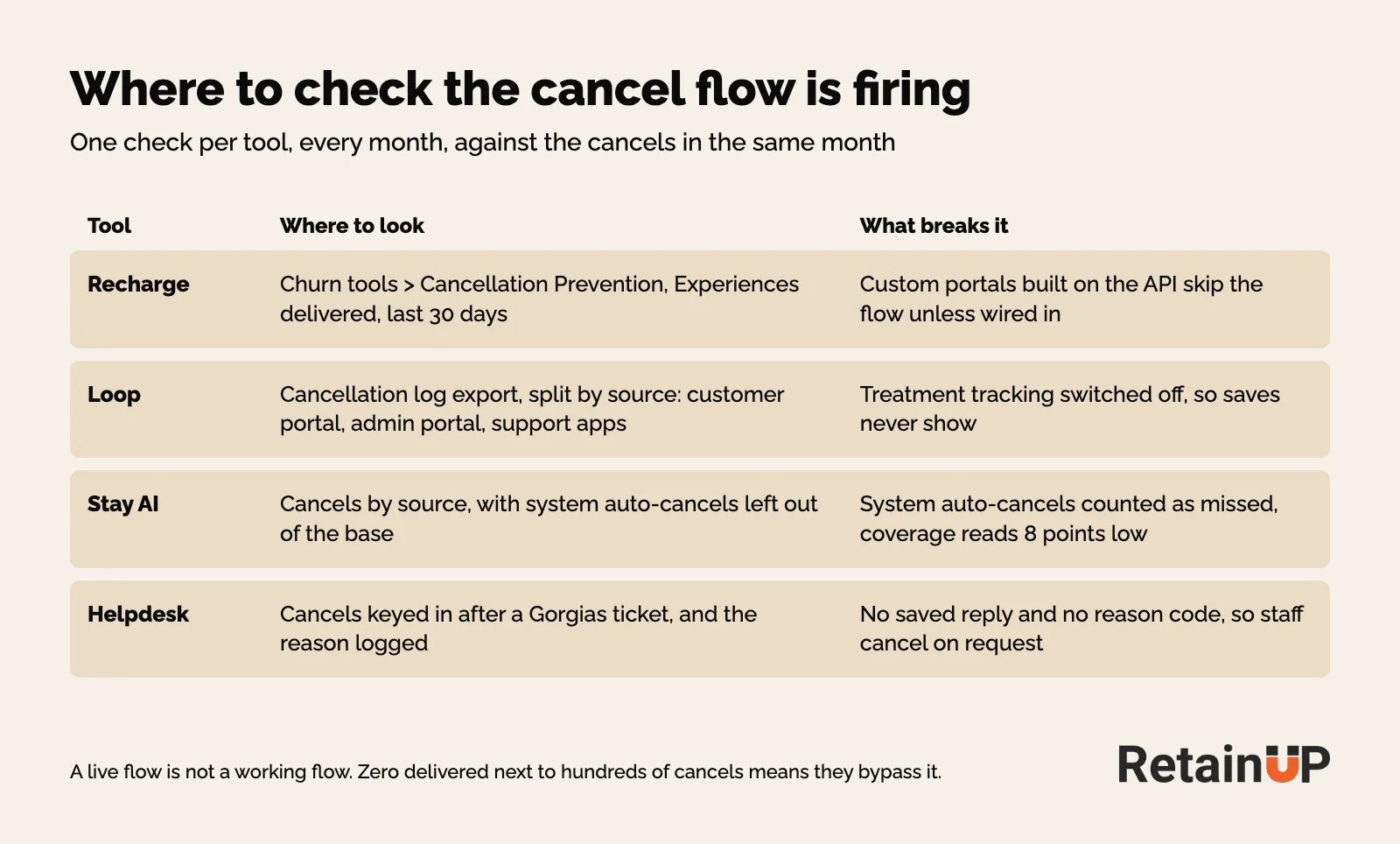
In Loop, export the cancellation log and split it by source. Check that treatment tracking is switched on, or the saves never show. Also read the reason editor for global switches: at Brand A, pause was off globally and still ticked on the "I don't need it anymore" reason, so the flow offered something nobody could see. The settings side is in the Loop retention setup.
In Stay AI, count cancels by source and leave system auto-cancels out before you judge the number. The Stay AI setup guide has where the cancellation survey sits.
Read it month by month
A six-month total hides a flow that stopped. Same with the reminder email: at Brand A, Loop's upcoming-payment email covered 99% of second charges in May and zero from July. Over the whole period it just looked patchy.
So keep one small table, one row per month:
| Month | All cancels | Through the flow | Admin | Helpdesk | API | Coverage |
|---|---|---|---|---|---|---|
| Each month | Count | Count | Count | Count | Count | Flow over all cancels |
Once a month is enough. If coverage drops five points, you see it in the month it drops.
Routing support cancels
You can't route every support cancel into the portal. Some customers will always email. And under cancellation rules like Colorado's, the way out has to stay as short as the way in, so a support team that stalls or argues is the wrong answer. The rules are in cancellation rules and dark patterns.
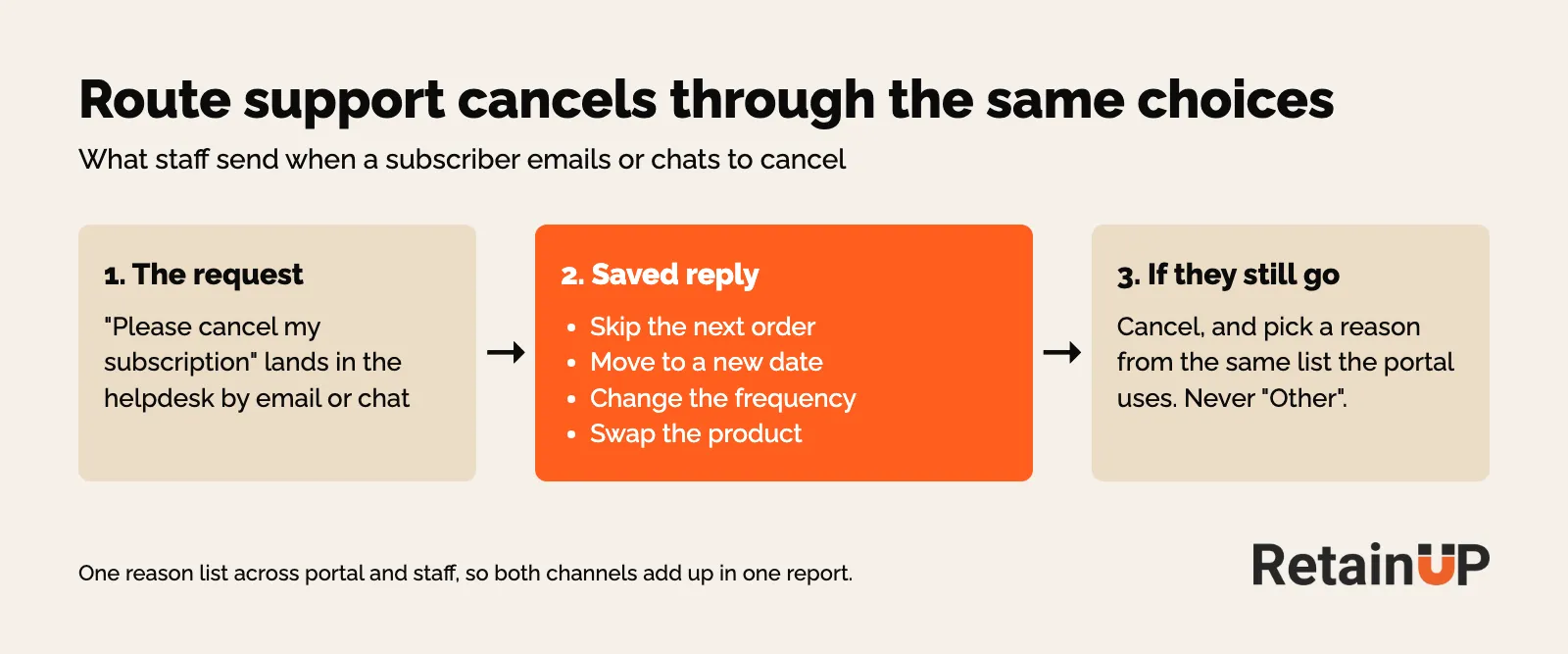
What you can do is give staff the same choices the flow gives.
A saved reply before every cancel
One Gorgias macro, with Loop or Recharge links. Skip the next order. Move to a new date. Change the frequency. Swap the product. If they still want to cancel, cancel. Same day, no second email.
Put a logged-in portal link in the reply too, so the customer can make the change without a password reset. Skio's macro guide also keeps macros away from anyone who has written in three or more times. Those get a person.
And the skip has to actually be on the table. At Brand A, skip and pause inside the flow caught under 1% of cancellations, because almost nobody reached them. The options existed. The routing didn't.
A reason code on every cancel
Make staff pick a reason from the portal list on every admin cancel. Then the two channels add up in one report. In Recharge, check the list first: the merchant portal reasons default to the old customer portal reasons and don't follow new ones you add to the Cancellation Prevention flow.
Free-text labels split one cause into five names. At Brand A, once we mapped the staff labels onto the portal reasons, "didn't know it was a subscription" became 44% of named reasons. Before the mapping it was spread across a pile of small staff labels and looked like nothing.
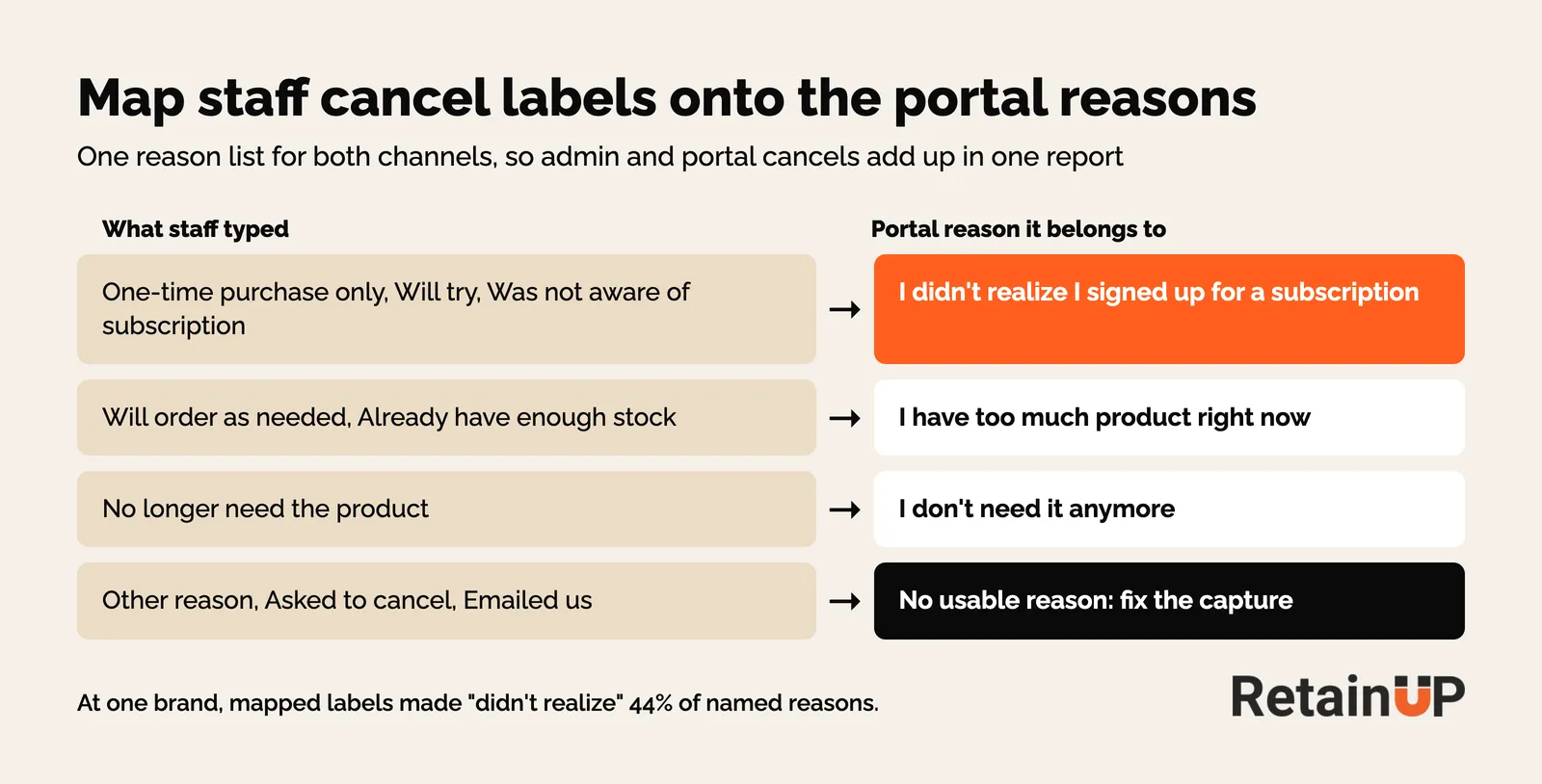
"Other reason" is missing data. Report it as a gap, never rank it. What to do with each reason once you have it is in cancel reasons and the fix for each. And when the top one is "didn't realise", the fix starts at checkout, covered in stopping day-zero cancellations.
What to fix first
Find the staff share first. When most cancellations are keyed in by staff, the support reply is the bigger lever and the cancel flow comes second.
- Count cancels by source for each of the last six months, with system and migration cancels left out
- Check the flow fired this month: Experiences delivered in Recharge, sessions against cancels in Loop or Stay AI
- Wire any custom portal or API cancel path into the flow
- Write the saved reply and the staff reason codes, and map the old labels
- Then work on the flow itself: screens, reasons, offers
Brand C shows what good looks like. 94% coverage, so its flow data was worth reading, and it showed delay offered again and again and saving nobody. You only learn that when the cancels are actually in the flow. Save rate benchmarks, with their sources, are on the subscription benchmarks page.
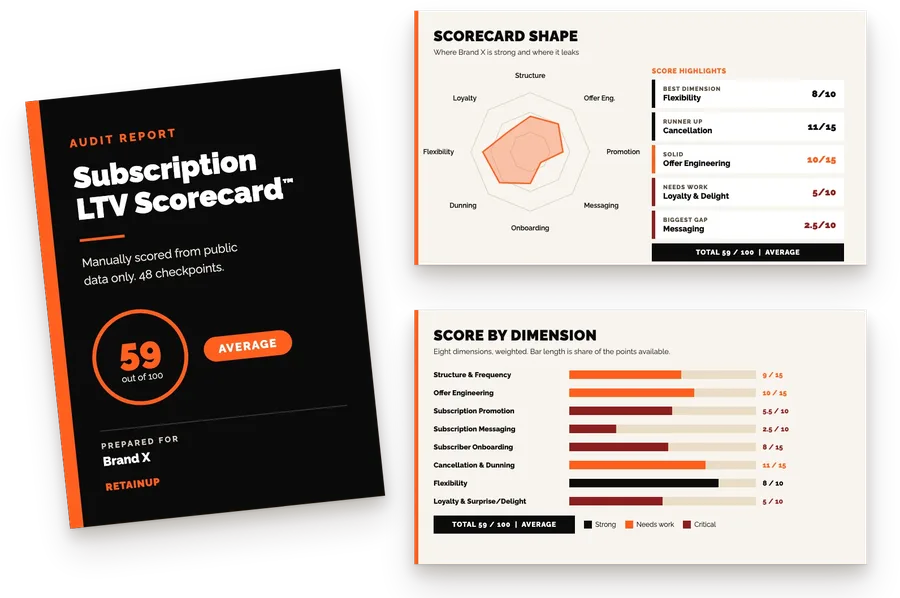
The Subscription LTV Optimizer™ checks your store, subscription app and Klaviyo every month and ships the fixes, for brands with 5,000+ active subscribers, at $3,000 a month. Cancel flow coverage by source is one of the rows we read every month, so a flow that stops firing gets caught in the month it stops. For a one-off read first, the free subscription audit checks 48 points and sends your top 3 leaks in 24 hours.
FAQ
Why is my cancel flow save rate so low?
Often because most cancellations never reach it. Count cancels by source: customer portal, admin portal, helpdesk and API. If staff key in a large share, those subscribers never saw a skip, a new date or an offer. At one brand we audited, only 39.3% of cancels reached the flow. Fix routing first, then judge the screens and offers on the cancels that actually saw them.
How do I know if my Recharge cancel flow is working?
Check Experiences delivered for the last 30 days under Churn tools, Cancellation Prevention. Compare it with your cancellations for the same 30 days. Zero delivered next to hundreds of cancels means the flow stopped firing or cancels bypass it, even when the status says Active. Custom portals built on the Recharge API also skip the flow unless someone wires them in.
Should customer support cancel subscriptions for customers?
Yes, when the customer asks, and quickly. But send one saved reply first that offers a skip, a new date, a frequency change and a swap, with links into the subscription app. If they still want to cancel, cancel the same day. Then log a reason from the same list the portal uses, so support cancels show up in your cancel reason report.
What is a good cancel flow coverage rate?
The best brand we audited in 2026 ran 94%, with almost every cancel going through the portal. Another fell from 83.9% to 67.4% in five months as team cancels grew. Leave system auto-cancels and migration records out before you judge the number, because they can pull coverage down by 8 points or more without anyone cancelling anything.
Do staff cancellations show in Recharge cancel flow analytics?
No. Cancels done in the Recharge merchant portal are left out of the Cancellation Prevention analytics, so the dashboard only describes the customers who cancelled themselves. Pull the cancelled-subscriptions export to see every cancel with its source. Then split it by portal, admin, helpdesk and API each month, and give staff the same reason list the portal uses, because the merchant portal reasons don't update when you change the flow's reasons.
One email a week on subscription retention: the numbers, the strategy, and what to fix first.

Rahi Jain
Rahi Jain is a subscription LTV specialist who helps $1M to $10M DTC brands reduce subscription churn and maximize LTV on Recharge, Skio, Stay AI and Loop.
More about Rahi