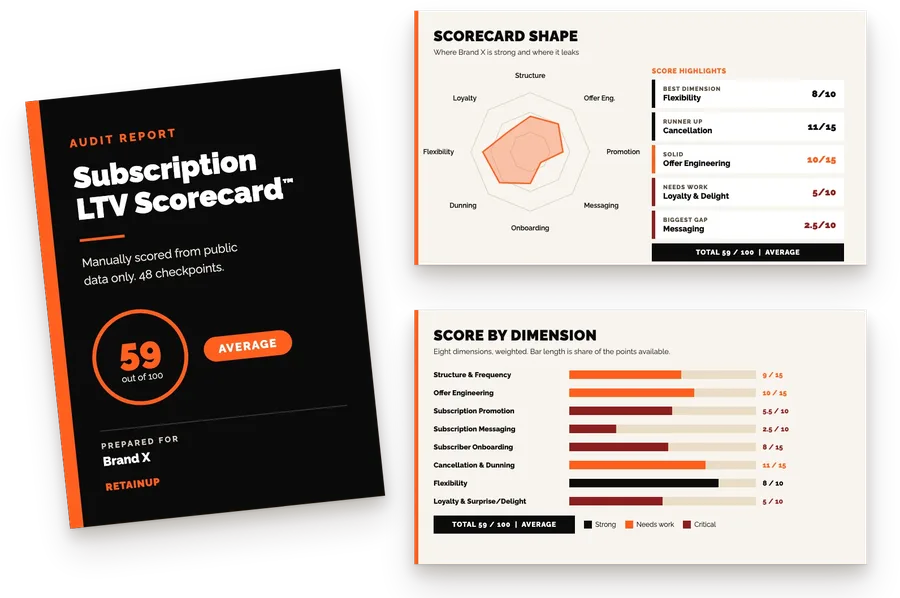
Key takeaways
- Subscribers last 135% longer when they can skip and 71% longer when they can swap, so both belong before the cancel button.
- 40 to 60% of paused subscribers are gone within 90 days. Our call: drop pause, or cap it at 90 days with a resume date.
- Two skips in 90 days means the cadence is wrong. Trigger a frequency-change offer then, not in the cancel flow.
Run this test on your own subscription program. It takes a minute.
Open your upcoming-order email.
Count the clicks from that email to skipping the order.
Now count them to cancelling.
If cancel is fewer clicks, you have your churn number explained.
Most brands come out at four or five clicks to skip and one to cancel, because cancel gets a link in the footer and skip is buried two screens into the portal.
This page sets the order of the small exits and when to offer each. It sits inside subscription retention.
More flexibility, in the wrong order
Most brands treat flexibility as a win. I thought the same for years. Then I tracked the accounts.
40 to 60% of the customers "saved" by a pause were gone within 90 days. The ones skipping every single month were quietly leaving too.
A pause is not a save. It is a slower goodbye. Flexibility in the wrong order just churned with extra steps.
When we start working with a brand, we go into the account and see people who can reschedule for the next two years, or skip five times in a row, or change frequency with no restriction. That creates a leaky funnel.
And Jeremy Horowitz has the other half: 60% of subscriber churn isn't real. The customer wanted to skip. You gave them a cancel button.
The flexibility ladder, ranked by the LTV each rung saves
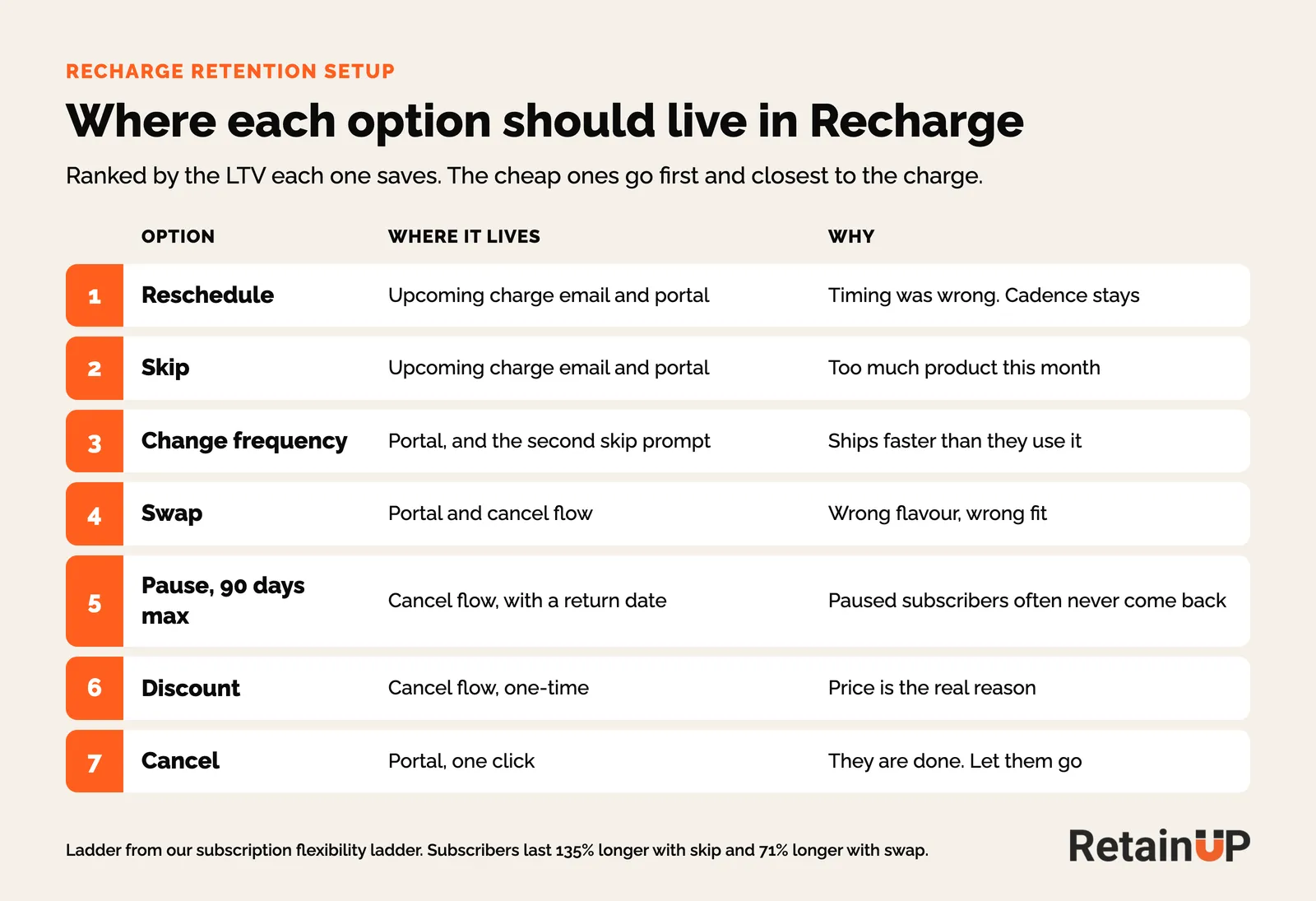
Retention gets built from the bottom of the ladder.
Discount, then cancel. The two rungs that cost the most, offered first.
The ladder runs the other way.
| Rung | Customer intent | Future churn risk | When to lead with it |
|---|---|---|---|
| 1. Reschedule | Timing is wrong: vacation, holiday, cash crunch | Lowest. Cadence kept, billing deferred. | First offer in the upcoming-order email, and when the cancel reason is timing |
| 2. Skip | Too much product, one-off life event | Low. One cycle given up, subscriber stays on the rails. | Stockpile. Pair with a frequency change if it repeats. |
| 3. Change frequency | Ships faster than they use it, every month | Low to medium. Lower monthly revenue, higher retention. | After two skips in a row, or "too much product" in the survey |
| 4. Swap product | Bored, wrong fit, wrong size | Low. Often a fit issue wearing cancel intent. | When the reason is "not what I expected" or "want variety" |
| 5. Pause (max 90 days, if at all) | Life event of known length: surgery, travel, financial reset | High. Pause is rehearsed churn. | Only after reschedule, skip and frequency are declined. Always with an end date. |
| 6. Discount | Price is the actual objection | Medium. Trains cancel-for-discount behaviour. | Last resort before cancel, with a cooldown |
| 7. Cancel | Genuine exit | None to manage. They are done. | Always available. One click, no maze. |
The numbers are not close.
Subscribers last 135% longer when they can skip an order. 71% longer when they can swap. Offer a pause and 25% of would-be cancellers take it instead of leaving, by Recurly's count.
Almost every brand already has these features. Recharge, Skio, Loop and Stay AI all ship skip, pause, reschedule, swap and change frequency.
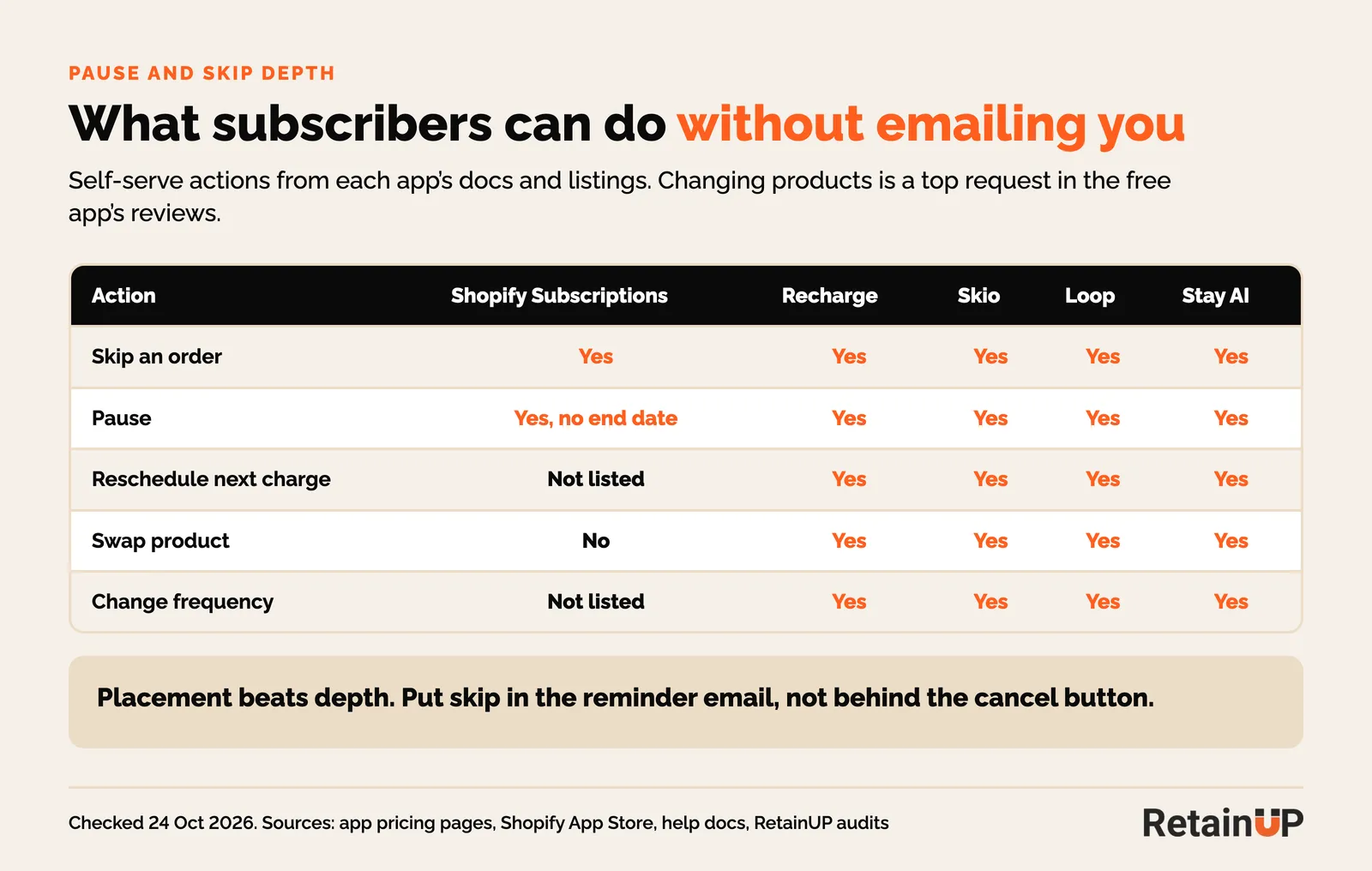
The problem is where they live. Skip and reschedule sit inside the cancel flow, offered as save attempts after the subscriber has already clicked cancel. So the customer who wanted to delay one order has to declare they are quitting before the system shows the smaller option.
Rung 1: Reschedule when the timing is wrong
Reschedule moves the next delivery date, and it should be the first option. Someone is going on vacation, or just needs seven or ten days. They haven't changed the frequency or the order. They've only asked to be billed on the seventh instead of the first. Small ask.
The guardrails
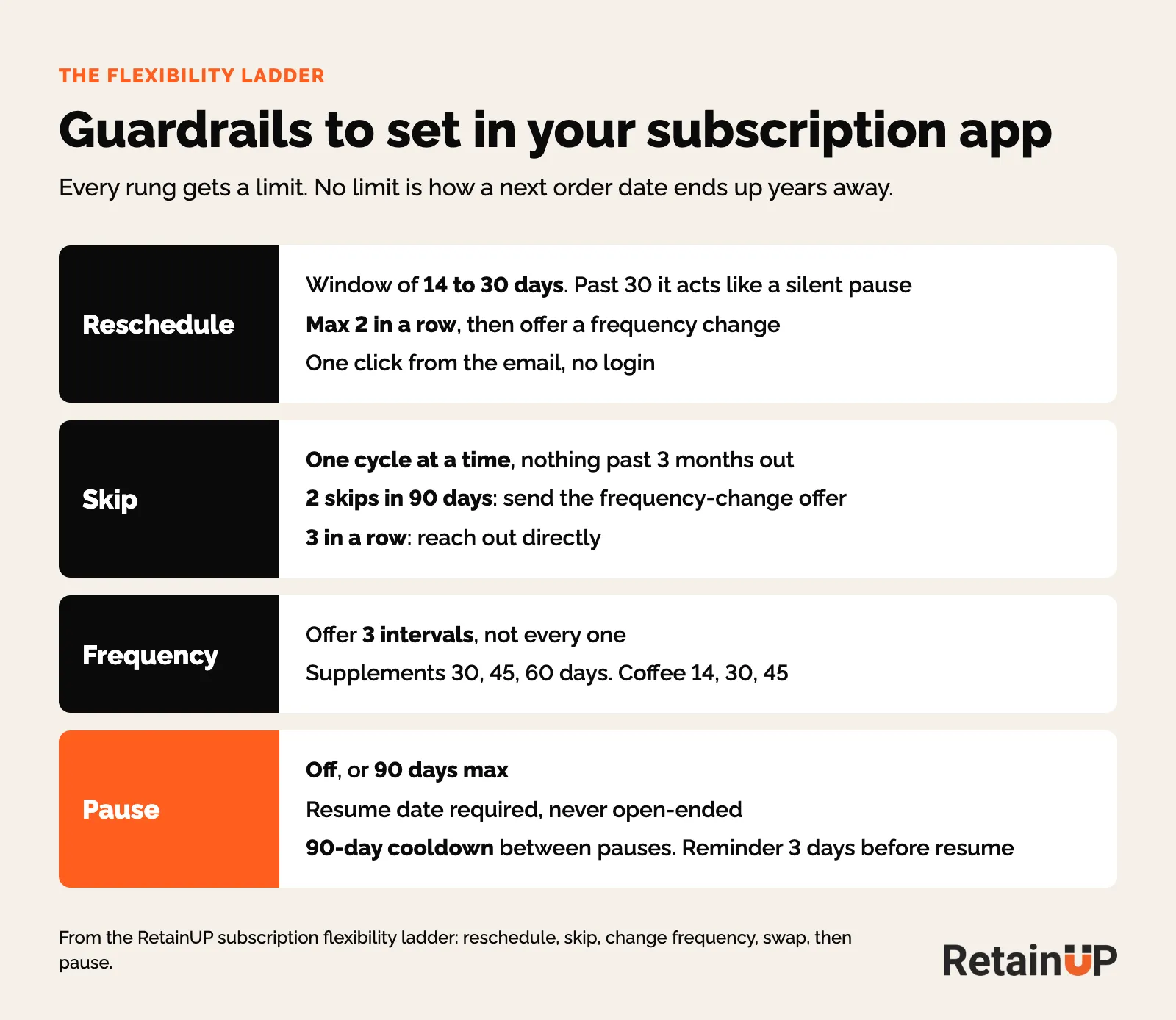
- A window of 14 to 30 days. Past 30 days it behaves like a silent pause.
- Max two reschedules in a row. Two in a row means the cadence is wrong, not the timing, so the next prompt is a frequency change.
- One click from the email, on a link that skips the login.
The in-email version works. Zaymo's data has about 80% of subscribers who delay by one to four weeks inside the email renewing again after the delay. Zaymo puts the button in the email itself.
Andriy Rudnyk goes one step further: turn skip off and turn change date on, because picking the date makes the subscriber decide instead of coast, and on one brand he manages the renewal rate went up 22%.
Rung 2: Skip when there is too much product
After 30 days it becomes a skip, because most brands run a one-month or three-month cycle. One cycle at a time. I prefer one or two months. Nothing more than three.
Skip and reschedule get mixed up all the time. Skip gives up one cycle, and the cadence carries on after it. Reschedule slides this order by a few days. Too much product? Skip. Wrong timing? Reschedule.
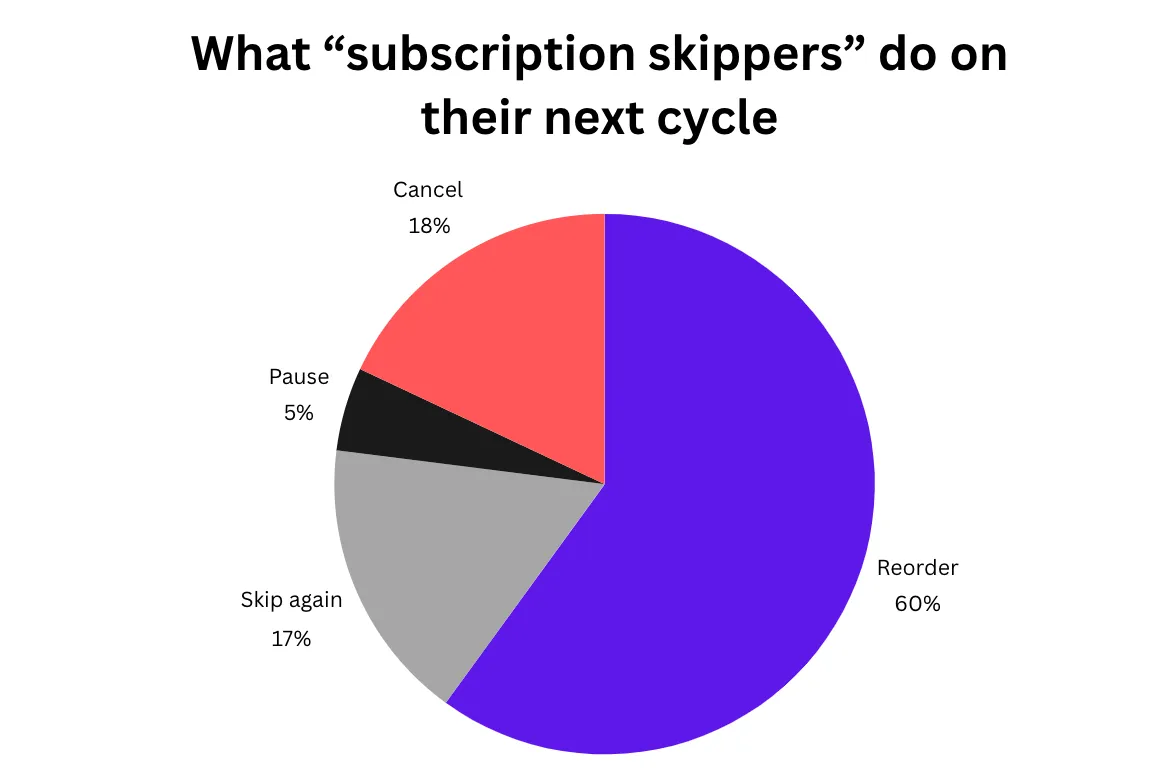
And a skip is a decent outcome. Across six subscription brands, No Limit Email tracked what skippers did on their next cycle: 60% reordered, 17% skipped again, 5% paused and 18% cancelled. If skipping had been hard, a good share of that 60% might have cancelled out of frustration.
Cap consecutive skips
Keep hard checks on consecutive skips. When we start an audit we usually find customers skipping every month with nothing to stop them.
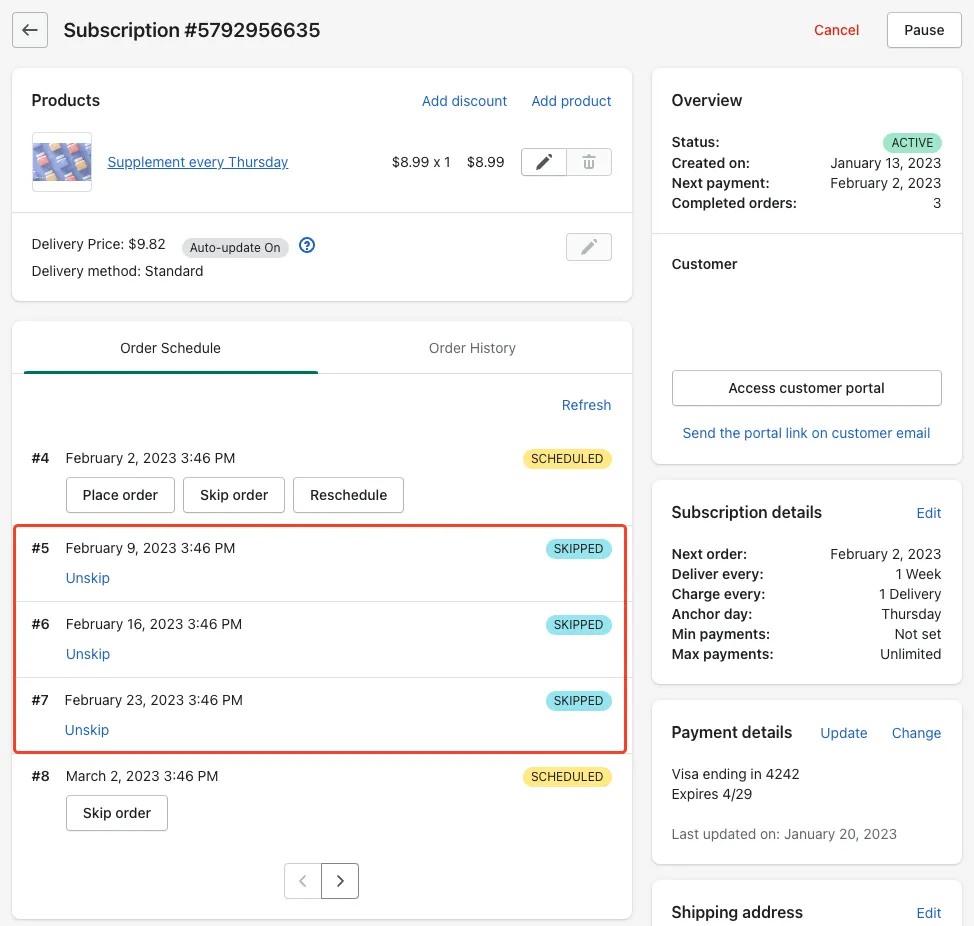
The worst version is skip-ahead. With no skip limit in the portal, a subscriber can skip years of orders in one sitting. On one of our brands the largest skipped every order out to May 2032. On another, a subscriber took nine orders off in 71 seconds and cancelled four minutes later. Both stayed active and never billed.
So set a hard limit in the app. Our usual fix is three skips and two pauses.
What to pair with a skip
- Skip plus frequency. "Skip this one, want us to ship every 6 weeks instead of 4?"
- Skip plus add-on. Try the new formula with next month's order.
Avoid skip plus discount. It trains discount-seeking. And follow every skip with emails that keep the line open: resume your plan, get it early, add something to the next box. The emails for active subscribers cover the skipped and paused messages.
The rung that goes up: get it now
Skip has a mirror. The subscriber who runs out early should bring the next order forward in one click. Loop puts Order Now on every subscription card next to skip, reschedule and swap.
Rung 3: Change frequency after two skips
Change frequency is the only rung that fixes the mismatch instead of papering over it. Most brands offer it least because it lowers monthly revenue. That hesitation is wrong. And the maths favours it, because a subscriber on a 60-day cadence who stays for 18 months is worth more than one on a 30-day cadence who churns at month 4.
It is not for everyone. If the concern is that the product didn't work, that's a different problem. But if someone keeps skipping because they have too much product, the next question is whether the cadence is wrong.
Two skips in 90 days triggers the offer
Build a segment for two or more skips in the last 90 days and trigger a flow offering a frequency change, with one-click acceptance. Do not wait for the cancel flow. Same offer when "too much product" shows up in the survey.
No Limit Email found 90% of subscribers who update their frequency stretch the gap between orders, which usually means they like the product but use less of it, so within a week of the change offer a second product on subscription.
Ordergroove found overstock caused 27% of subscription cancellations across its merchants from 2023 to 2024.
Do not expose every interval. For supplements that means 30, 45 and 60 days, and for coffee 14, 30 and 45. The maths for the default lives in matching frequency to how fast the product gets used.
Rung 4: Swap when the product is the wrong fit
Swap is for the subscriber who isn't happy with the product. Wrong flavour, wrong size, bored. If someone is set on cancelling and the reason is the product, offer a swap first.
In the email too, Zaymo puts the drop in churn from in-email swaps of flavour, size or colour at about 20%.
A subscriber who starts swapping is exploring. That is the moment to introduce a complementary product or bundle. Swaps forced by stock are a different job: out-of-stock and wrong-item swaps.
Rung 5: Pause, and why we would rather drop it
Our recommendation is no pause. Why? We already have skip and delay, so we don't need to give pause on top. It depends on the brand. If the brand is fine with removing it, we remove it totally. If not, 90 days is the max.
Skip is easy because the frequency stays. If someone skips February, March still ships. A pause left open can run forever.
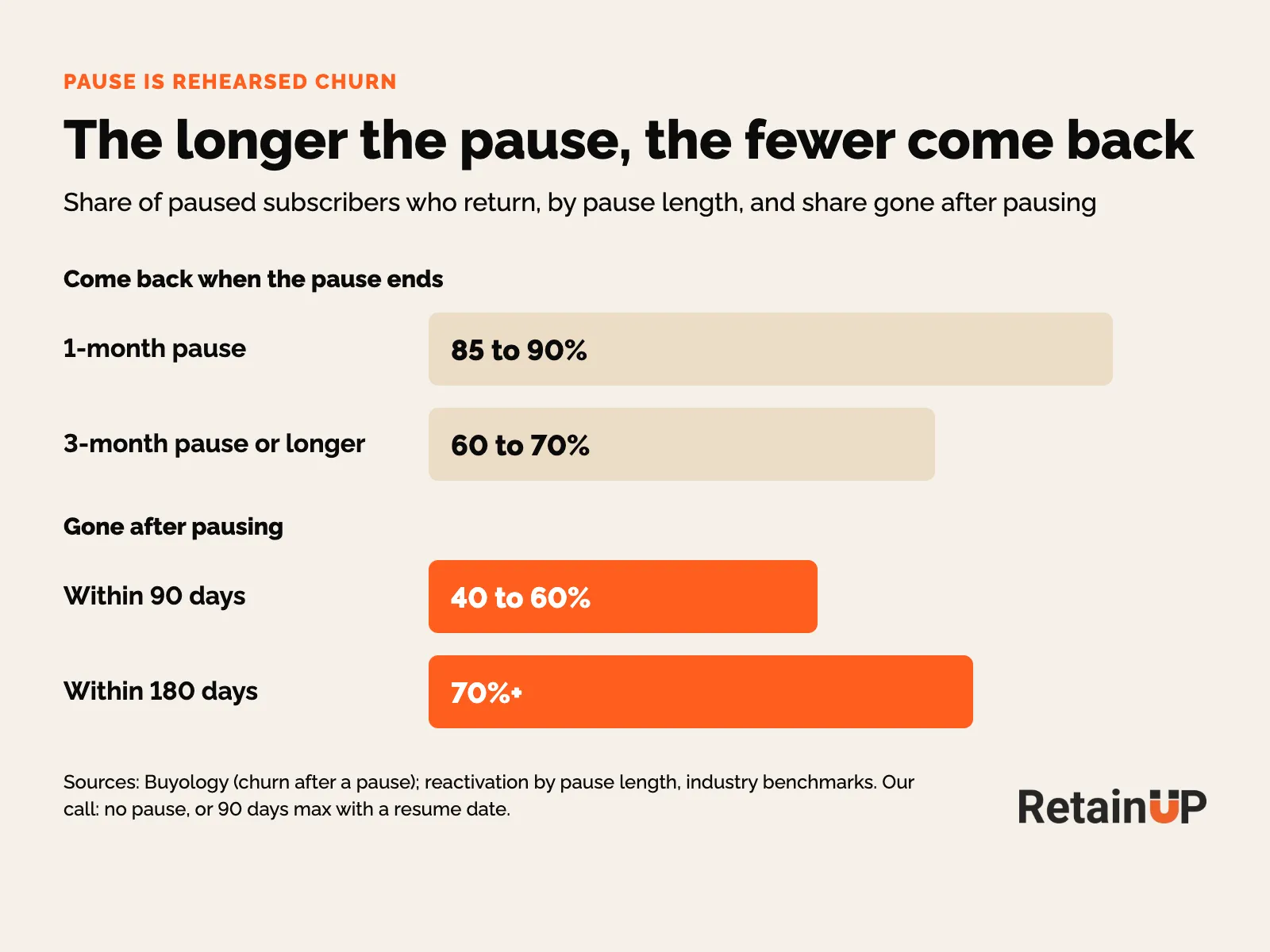
40 to 60% of paused subscribers are gone in 90 days.
70% in 180.
A one-month pause brings back 9 in 10.
A three-month pause brings back 6.
The longer the pause, the smaller the return.
We've audited 100 subscription dashboards. Every one filed pause next to wins. Put it next to churn.
The subscriber who paused already pictured life without you. They just found a softer word for leaving.
What we see in the accounts
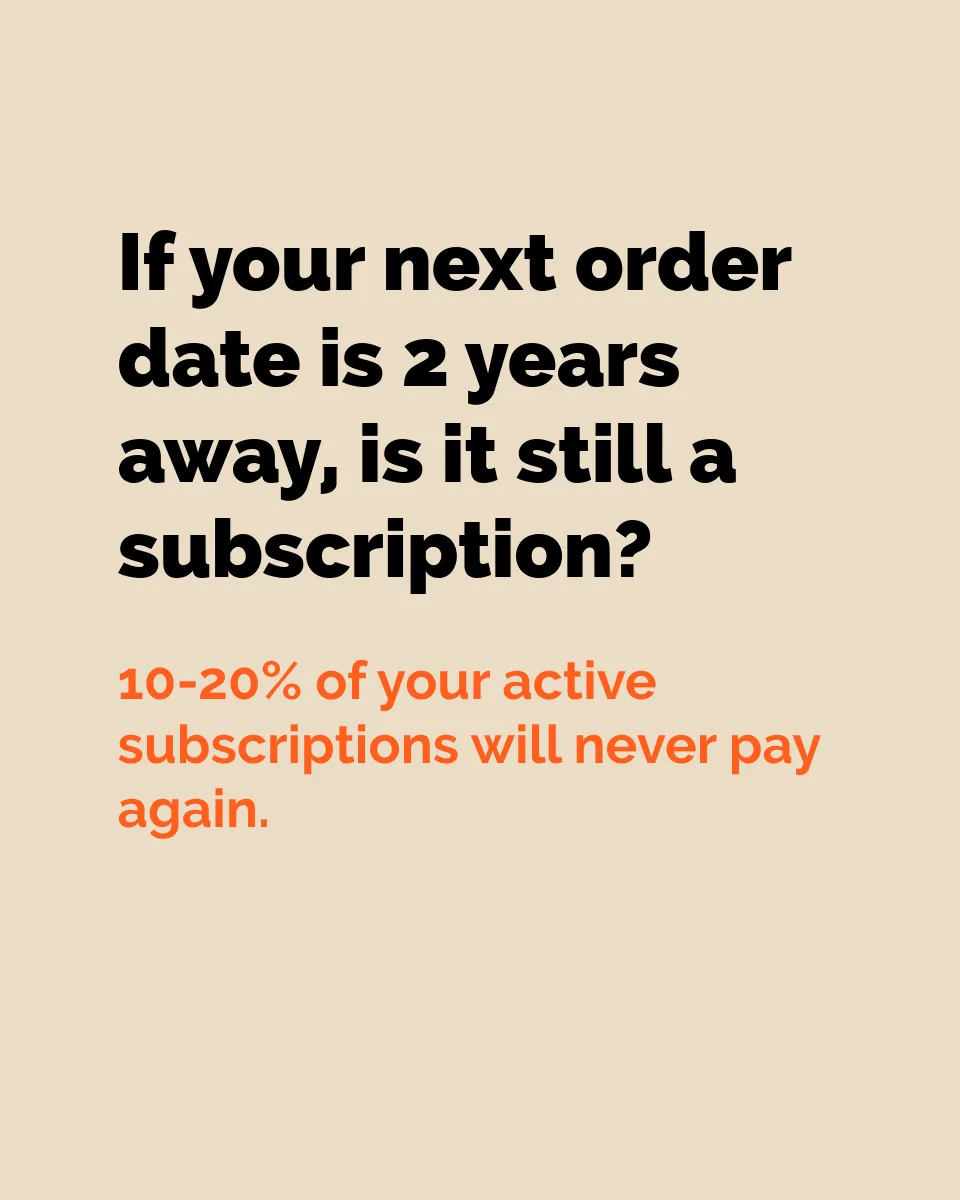
A paused subscriber shows as an active subscription while paying you nothing. In most accounts we see 10 to 20% of subscriptions paused with no end, some of them paused into 2028. A cancelled customer at least gets your winback emails. A paused one gets nothing.
On one of our brands, almost 9 in 10 pausers picked 3 months, the longest the portal offered. The setting decided. On the same brand, of the subscribers who paid their second order, 66.8% paid again within 120 days. Those who skipped it came in at 35.9%. Those who paused before it, 13.5%. A small group. But the gap is wide.
If you keep pause
- Always require a resume date. Never allow an open-ended pause.
- Hard cap at 90 days, and one month as the first option. People pick the longest pause on the menu, and a one-month pause brings back 9 in 10.
- A 90-day cooldown between pauses.
- Keep it for life events of known length: surgery, deployment, a semester abroad. Skip handles too much product.
- If it starts to look open-ended, email them that you'll either restart billing or cancel, and make a clean break.
Chewy does it well. Pause Autoship up to 12 weeks, keep the discount. And it ends.
Pauses rise from October through January and unpauses climb February to April, by Recurly's 2026 State of Subscriptions. So check your pause settings before Q4.
The auto-resume sequence
- Confirmation, resume date at the top.
- A check-in around day 30 of a 60-day pause.
- A reminder 3 days before the resume, edit or extend in one click. This one keeps the most.
- The charge, with a full receipt.
Pause does beat cancel. Recharge reports a 9.6% average save rate for merchants who offer it. It just loses to skip.

Discount and cancel sit at the bottom
Discount cuts margin and teaches subscribers to threaten to cancel. Use it last, with a cooldown.
Cancel stays one click. The offers inside it live in the subscription cancel flow.
Where each option lives: email, portal, then the cancel flow
In the upcoming-order email. Skip, reschedule and swap as buttons, before the charge, while the decision is still small. The rest of that email is in the upcoming billing reminder.
As primary portal actions. On the first screen the subscriber sees, at the same visual weight as their next delivery date. Skip gets the most weight and cancel comes last. More in the subscription customer portal.
Not as save offers. A skip offered after the cancel click is a rescue. A skip offered before it is a feature.
Get the order right and about 70% of your saves happen upstream. And it pays: Recharge puts it at roughly 7 extra months for subscribers who take portal actions.
Read the signals before the cancel
Nobody jumps straight to cancel. Some do. But most leave soft signals first: a skip, then another, or a skip followed by a pause. That is the good news. The worst case is the one who shows no signal and cancels.
So set rules. Someone who skipped twice, or skipped and then paused, or has been paused for three months is high risk. Reach out then with a product, an offer, a free gift or a manual note.
And check what happens after a save. Did they stay? If they paused, did they resume? A save rate under 15% means the cancel flow needs work. A save rate of 50 or 60% means something might be wrong with what is being saved. Healthy skip and pause rates are in skip and pause analysis.
If you want the ladder built for you, Subscription LTV Maximizer™ sets up the cancel flow, portal, payment recovery, pause and skip in Recharge, Skio, Stay AI or Loop, plus the email and SMS around them, live in 30 days for $5,000.
FAQ
Should I let subscribers pause their subscription?
Our recommendation is no pause, because skip and reschedule already cover most needs. If you keep it, cap it at 90 days and always require a resume date. 40 to 60% of paused subscribers are gone within 90 days, and an open-ended pause counts as active while it pays nothing.
How many times in a row should a subscriber be able to skip?
Allow one cycle per skip and keep hard checks on consecutive skips, with nothing past three months. A subscriber who skips every month is usually leaving slowly. Two skips in 90 days should trigger a frequency-change offer, and three in a row is the point to reach out directly.
Where should the skip button go in a subscription?
The skip button belongs in the upcoming-order email and at the top of the customer portal, before anyone opens the cancel flow. When skip takes four or five clicks and cancel takes one, customers who only wanted to skip will cancel instead.
Should a subscription brand offer a pause or a discount when customers cancel?
Offer neither first. Lead with reschedule or skip, then a frequency change or swap, and only then a capped pause. A discount comes last, with a cooldown, because it cuts margin on everyone you keep and teaches subscribers to threaten to cancel. Any pause gets a resume date and a 90-day cap.
Can Klaviyo pause a subscription instead of cancelling it?
No, Klaviyo sends the email, but the pause, skip or delay runs in your subscription app. The button in the email has to land on the portal, or use an in-email action from Zaymo or Loop. Put skip and delay in that email rather than pause.
One email a week on subscription retention: the numbers, the strategy, and what to fix first.

Rahi Jain
Rahi Jain is a subscription LTV specialist who helps $1M to $10M DTC brands reduce subscription churn and maximize LTV on Recharge, Skio, Stay AI and Loop.
More about Rahi